Lenovo IdeaCentre 24, Intel N100, 32GB, 1TB SSD, Dark Gray
The 32GB of RAM and 1TB NVMe SSD provide ample multitasking headroom and fast storage uncommon in this price tier, while the 23.8-inch FHD IPS display covers 99% sRGB for color-accurate work. Its space-saving Jet Black all-in-one design includes a comprehensive port selection with dual USB-C and HDMI output, reducing desk clutter immediately. This system is best for home office users and students who need a ready-to-use, wired desktop for document management, video conferencing, and light photo editing.

No current retailer price




Snapshot
The 30-Second Version
The IdeaCentre 24 pairs a genuinely generous 32GB of DDR4 and a 1TB NVMe SSD with an Intel N100 that ranks near the bottom of the all-in-one category for CPU. It's a tidy, complete home-office setup with a 99% sRGB IPS screen and a 4.2/5 owner rating from 125 reviews. But at $1,299 on Amazon, you're paying a premium for memory and storage wrapped around a modest processor. Great for browsing, documents and video calls, wrong for gaming or creative work.
Pros & Cons
Pros
- 32GB DDR4 gives real multitasking headroom, above the category midpoint 88th
- 1TB PCIe NVMe SSD, fast boots and plenty of room for photos and files 70th
- 23.8-inch FHD IPS panel with 99% sRGB coverage and anti-glare coating 69th
- Complete setup: wired keyboard, mouse, HD webcam and Windows 11 Home included
- 4.2/5 from 125 owners, one of the strongest buyer-satisfaction signals in our data
Cons
- Intel N100 ranks in the 12th percentile for CPU among all-in-ones
- Gaming score of 13.9/100 with integrated UHD graphics, effectively a non-starter
- $1,299 is steep for this class of processor
- HDMI 1.4b output limits external display options
- 250 nits brightness is dim for a sunlit room
The proof
Performance
Let's be straight about the processor. The N100 lands in the 12th percentile against other all-in-ones in our data, which means it lags behind most of what you'd cross-shop. Four cores, four threads, 6MB of cache, and integrated UHD graphics that ranks below average. In practice that's fine for the workload this machine is actually built for: documents, browsers, 4K video playback, Zoom calls. The 32GB of RAM helps a lot here, because memory pressure is usually what makes a cheap desktop feel slow, and this thing has headroom to spare. The 1TB NVMe drive keeps boots and app launches snappy. But the marketing copy talks about video editing and demanding applications, and we'd push back on that. Exporting timelines or working with large RAW batches is CPU-bound work, and this chip isn't the tool for it.
The display and I/O are more balanced than the internals. A 1920x1080 IPS panel at 23.8 inches with 99% sRGB is a solid, color-honest screen for photo sorting and general design work, though 250 nits is modest, so a bright room with a window behind you will wash it out a bit. Ports land right in the middle of the pack: two USB-C, four USB-A (two of them 10Gbps USB 3.2 Gen 2, two USB 2.0 for peripherals), Gigabit Ethernet, Wi-Fi 6, Bluetooth 5.2 and a 3.5mm jack. The catch is HDMI 1.4b for your second monitor, which is an older standard and limits what you can drive externally. And gaming scores 13.9/100, our weakest area by a mile. Integrated UHD graphics on an N100 is not a gaming platform, full stop.
Specifications
Full Specifications
Processor
| CPU | Intel Processor N100 |
| Cores | 4 |
| Frequency | 700 MHz |
| L3 Cache | 6 MB |
Graphics
| GPU | Intel UHD Graphics |
| Type | Integrated |
| VRAM Type | Shared |
Memory & Storage
| RAM | 32 GB |
| RAM Generation | DDR4 |
| Storage | 1 TB |
| Storage Type | NVMe SSD |
Build
| Form Factor | aio |
Connectivity
| USB-C Ports | 2 |
| USB Ports | 4 |
| HDMI | 1x HDMI 1.4b |
| Wi-Fi | Wi-Fi 6 |
| Bluetooth | Bluetooth 5.2 |
| Ethernet | Gigabit Ethernet |
System
| OS | Windows 11 Home |
vs Competition
The competitor set in our data is a rough mirror for this machine. The Apple Mac Studio M5 Max, HP OMEN GT16-0364, ASUS ROG GM700 and CLX SET TGMSETRTU5204BM are all performance-oriented desktops, and the IdeaCentre 24 gives up enormous ground to them on raw compute given its 12th-percentile CPU ranking and 13.9/100 gaming score. What it offers in exchange is a form factor none of those tower-and-box machines match: a 23.8-inch screen, speakers, webcam, keyboard and mouse in a single unit on your desk. If your priority is a clean workspace and light workloads, that trade is coherent. If you're rendering, compiling or gaming, it isn't a trade at all, it's a downgrade.
The Dell Desktop ECT1250 is the more natural cross-shop for an office buyer, and that's where we'd send anyone whose work involves heavier spreadsheets, big datasets or lots of simultaneous applications. The IdeaCentre's argument against it is the bundled display with 99% sRGB coverage, the 32GB of RAM and the 1TB NVMe drive already in the box, plus the all-in-one footprint. Our home office score of 64.9/100 says it's competent rather than class-leading. Cross-shop the Dell if speed matters more than tidiness, and look at the OMEN or ROG options if gaming is anywhere on your list.
| Spec | Lenovo IdeaCentre 24 | Apple Mac Studio M5 Max | Dell Desktop ECT1250 | HP OMEN GT16-0364 | ASUS ROG GM700 | MSI Aegis ZS2 A9NVP-1407US |
|---|---|---|---|---|---|---|
| CPU | Intel Processor N100 | Apple M5 Max | Intel Core Ultra 7 265 | AMD Ryzen 7 8700F | AMD Ryzen 7 9800X3D | AMD Ryzen 9 9900X |
| RAM (GB) | 32 | 36 | 32 | 32 | 32 | 32 |
| Storage (GB) | 1024 | 1024 | 2048 | 1024 | 2048 | 2048 |
| GPU | Intel UHD Graphics | Apple (32-Core) | Intel UHD Graphics | NVIDIA GeForce RTX 5070 | NVIDIA GeForce RTX 5070 Ti | NVIDIA GeForce RTX 5070 |
| Form Factor | aio | mini | sff | mid-tower | mid-tower | mid-tower |
| Psu W | - | 480 | 180 | 850 | 850 | 750 |
| OS | Windows 11 Home | macOS | Windows 11 Home | Windows 11 Home | Windows 11 Home | Windows 11 Home |
| Compare | Compare | Compare | Compare | Compare |
| Product | CPU | GPU | RAM | Ports | Storage | Reliability | Social Proof |
|---|---|---|---|---|---|---|---|
| Lenovo IdeaCentre 24 | 11.8 | 36.5 | 63.8 | 50.2 | 68.7 | 70.2 | 88 |
| Apple Mac Studio M5 Max Compare | 95.7 | 85 | 92.4 | 89.1 | 68.7 | 99.3 | 66.7 |
| Dell Desktop ECT1250 Compare | 88.1 | 60.1 | 81.6 | 75 | 82.6 | 70.2 | 98.2 |
| HP OMEN GT16-0364 Compare | 69.4 | 90.7 | 87 | 97.9 | 53.3 | 70.2 | 98.2 |
| ASUS ROG GM700 Compare | 80.4 | 94.6 | 81.6 | 96.1 | 90 | 37.5 | 99.2 |
| MSI Aegis ZS2 A9NVP-1407US Compare | 92.4 | 90.7 | 87 | 90.4 | 82.6 | 37.5 | 99.2 |
Price
Value & Pricing
Here's where we get uncomfortable. We track this at $1,299 on Amazon in the US, and MXN 26,563 in Mexico (different currencies, not comparable, so don't do the mental math). At that US price you're paying a premium for the 32GB/1TB configuration and the all-in-one convenience, not for compute. The RAM and storage rankings are above average, sure, but the CPU sits in the bottom stretch of the category, and processors are the part you can't upgrade later. Memory and storage are the cheap parts of this equation. The engine is the expensive part, and it's the weak link.
Our value read: this makes sense if you specifically want zero clutter, one power cable, a built-in webcam and a screen that's already color-accurate, and you never plan to push the machine hard. If any of that isn't a hard requirement, the same money buys far more processing power elsewhere in the desktop category. We'd wait for a meaningful drop before calling it a good deal.
Read more
Overview
The Lenovo IdeaCentre 24 is one of those machines where the spec sheet tells two different stories at once. On paper you get 32GB of DDR4 and a 1TB PCIe NVMe SSD, which is genuinely generous for an all-in-one. Underneath that sits an Intel N100, a four-core chip with a 1.1GHz base clock that turbos to 3.4GHz, paired with integrated Intel UHD Graphics. That's an efficiency-first processor doing duty in a machine dressed up for productivity work, and the gap between those two things is the whole review.
Who's it for? Someone who wants a tidy desk and a computer that just works: web browsing, spreadsheets, email, video calls on the built-in HD webcam, streaming, and a lot of browser tabs open at once. The 23.8-inch Full HD IPS panel with 99% sRGB coverage and an anti-glare coating is a nice fit for that kind of day, and the box includes a wired keyboard and mouse plus Windows 11 Home, so there's nothing else to buy before you're up and running.
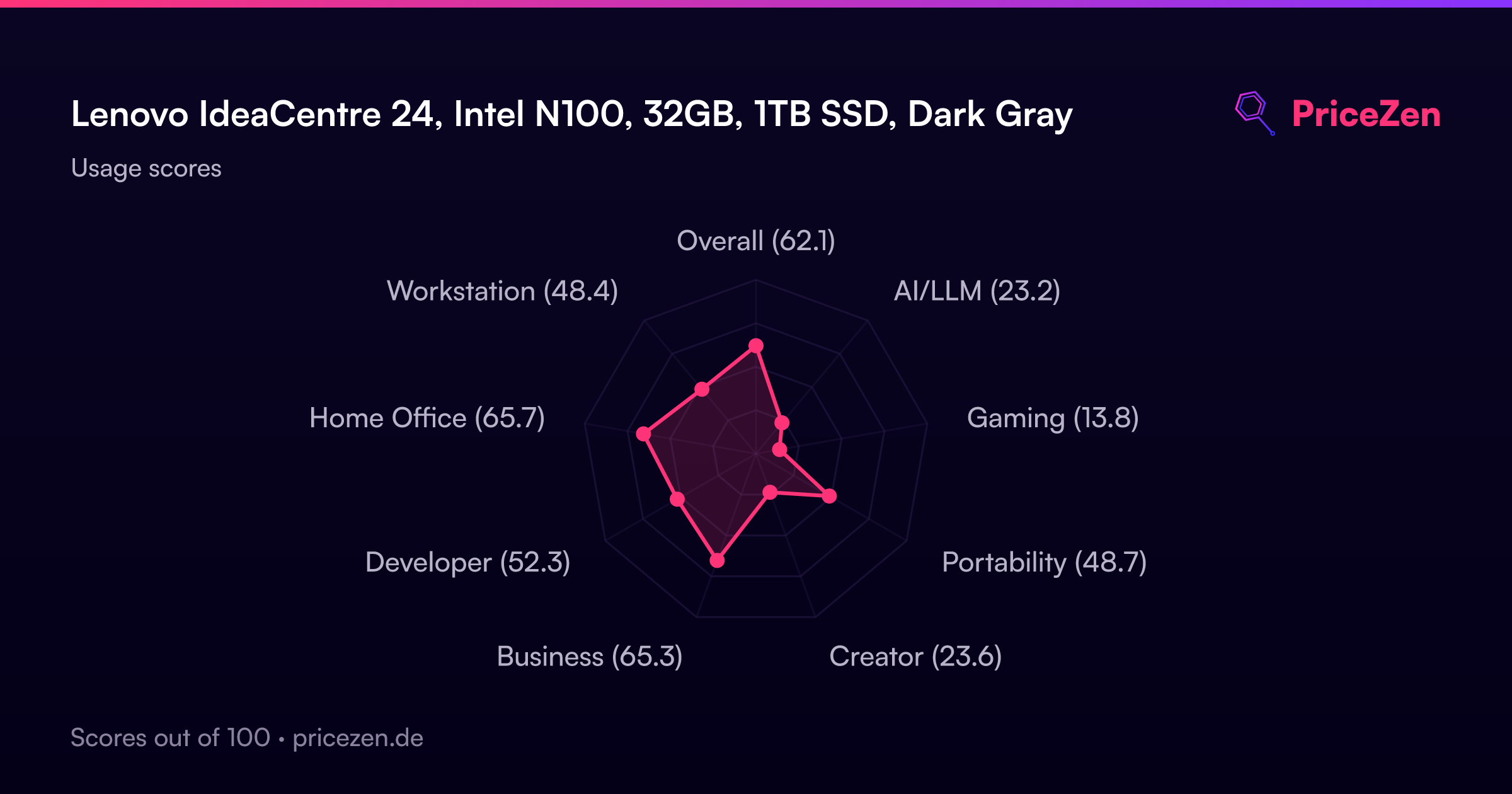
What makes it interesting is the mismatch. Our scoring model puts it at 64.9/100 for home office and 64.5/100 for business, with a 61.4 overall, which is respectable but not exciting. Meanwhile its CPU ranking sits near the bottom of the all-in-one category while its RAM and storage sit comfortably above the middle. Buyers clearly like it, though: 4.2/5 across 125 reviews puts its social proof among the strongest we track in this category. So people are happy with what it does. The question is whether $1,299 is the right price for it.
Common Questions
Q: Can it handle photo or video editing?
Light photo work, yes: the 23.8-inch IPS panel covers 99% sRGB, and 32GB of RAM plus a 1TB NVMe drive gives you room to sort and tweak libraries. Video editing is a different story, since the Intel N100 ranks in the 12th percentile for CPU among all-in-ones in our data and exports are heavily processor-bound. Treat the marketing claims about demanding creative applications with skepticism.
Q: Is 32GB of RAM overkill on a machine like this?
It's more than the N100 strictly needs, but it's the reason this machine feels smooth in daily use. With that much memory you can keep a large pile of browser tabs, documents and background apps open without the system swapping to disk. Our RAM ranking puts it above the category midpoint, so it's a genuine strength, just not one that makes the processor faster.
Q: Can I add a second monitor?
Yes, through the HDMI 1.4b output, alongside the built-in 23.8-inch Full HD panel. Keep in mind 1.4b is an older HDMI revision, so it won't drive high-resolution, high-refresh external displays the way newer standards do. For a second 1080p screen for spreadsheets and reference material, it's perfectly adequate.
Q: Could I game on it at all?
Our gaming score for this machine is 13.9/100, the weakest area by a wide margin, and that's with integrated Intel UHD Graphics rather than a discrete card. Older or very lightweight titles might run, but anything modern is off the table. If gaming matters even a little, the HP OMEN GT16-0364 or ASUS ROG GM700 in our comparison set are the direction to look.
Who Should Skip This
Gamers should walk away immediately. A 13.9/100 gaming score and integrated UHD graphics on an N100 means this isn't a compromise, it's the wrong category of machine. Same goes for anyone doing regular video exports, 3D work, code compilation or heavy data crunching: the CPU ranking in the bottom stretch of all-in-ones is the number that will define your experience, and 32GB of RAM can't rescue it. Look at the HP OMEN GT16-0364, ASUS ROG GM700 or CLX SET TGMSETRTU5204BM instead.
Also skip it if you work in a bright, sun-facing room, since 250 nits isn't much brightness, or if you need a high-resolution external display driven over HDMI, where the 1.4b port will hold you back. And if you simply want the most computing power per dollar, the Dell Desktop ECT1250 is the more sensible cross-shop at this budget. This machine's appeal is convenience and completeness, not performance.
Verdict
For a home office that lives in a browser, Office apps, email and video calls, this is a pleasant machine to own. The 32GB of RAM means you can leave twenty tabs and three documents open without the system choking, the NVMe drive keeps everything responsive, and the anti-glare IPS panel is easy on the eyes over a long day. Owners seem to agree, given the 4.2/5 across 125 reviews. For a student desk, a kitchen computer or a small business reception setup, it does the job with almost no fuss.
For anyone with ambitions beyond that, we'd steer you elsewhere. The N100's low ranking and the integrated graphics mean creative work, gaming and heavy multitasking under load will frustrate you, and $1,299 is a lot to spend on a machine with that ceiling. Our recommendation: buy it for simplicity and light productivity, ideally at a lower price than we're currently tracking. Skip it if you need horsepower, because no amount of RAM fixes a slow processor.
Usage Scores
- Overall62
- AI/LLM23.2
- Gaming13.8
- Portability48.6
- Creator23.6
- Business65.3
- Developer52.3
- Home Office65.7
- Workstation48.4