Dell UltraSharp U3421WE 34.1" Black / Silver 2021
The 34-inch WQHD IPS panel with a 21:9 aspect ratio and built-in 5W speakers creates an immersive, cable-free workspace. Its 150mm height adjustment and wide tilt range provide ergonomic flexibility, while Thunderbolt connectivity simplifies a single-cable docking setup. This monitor is best for office professionals and multitaskers who need expansive screen real estate for spreadsheets and data analysis, not color-critical creative work.

No current retailer price
Where we saw it before. Check the store for today's price.











Snapshot
The 30-Second Version
A brilliant office ultrawide trapped in a gamer's body. Buy it for the Thunderbolt hub, not the pixels per second.
Pros & Cons
Pros
- Connectivity is one of the best on the market: Thunderbolt, USB-C, HDMI, DisplayPort, and PIP/PBP 91st
- Ergonomics are top-shelf with height, tilt, swivel, pivot, and VESA 100x100 91st
- Color accuracy punches above its weight: 95% DCI-P3 and 10-bit on an office monitor 81st
- 2000:1 contrast ratio is unusually good for IPS 79th
Cons
- 60Hz and 5ms response time make this a non-starter for gaming
- 300 nits brightness is just okay, nothing special
- At 11.6kg, this thing is a desk anchor, not something you're moving around
- 210W power draw is hefty for a 60Hz panel
The proof
Performance
Here's what surprised us digging through the specs: the color coverage is legitimately strong for an office panel. 99% sRGB, 99% Rec 709, and 95% DCI-P3 with 10-bit color depth puts it in the 81st percentile for color, which means you could do casual photo editing on this thing without wincing. The 2000:1 contrast ratio on an IPS panel is also a pleasant outlier. But then there's the 60Hz refresh rate and 5ms response time, landing it in the 22nd percentile for performance. That's a weak spot, plain and simple. The 3440 x 1440 resolution across 34.1 inches gives you a 0.2745mm pixel pitch, which is sharp enough for text work but won't blow your mind. At 300 nits, it's adequate indoors but don't plan on fighting direct sunlight with this thing.
Specifications
Full Specifications
Display
| Size | 34.1" |
| Resolution | 3440x1440 |
| Panel Type | IPS |
| Aspect Ratio | 21:9 |
| Curved | Yes |
| Curvature | 1900 |
| Screen Finish | matte |
Performance
| Refresh Rate | 60 Hz |
| Response Time | 5 |
Color & HDR
| Brightness | 300 nits |
| Color Gamut | 99% sRGB, 99% Rec 709, 95% DCI-P3 |
| Color Depth | 10-bit |
Connectivity
| HDMI Ports | 1 |
| DisplayPort | 1 |
| USB-C | 1 |
| Thunderbolt | N/A |
| Speakers | No |
| Headphone Jack | Yes |
Ergonomics
| Height Adjustable | Yes |
| Tilt | Yes |
| Swivel | Yes |
| Pivot | Yes |
| VESA Mount | 100x100 |
Features
| Webcam | No |
| PIP/PBP | Yes |
| Power | 210 |
| Weight | 11.6 kg / 25.7 lbs |
vs Competition
If you're cross-shopping this against the Alienware AW3425DW, you're looking at two very different philosophies in the same 34-inch ultrawide form factor. The Dell wins on connectivity and hub features, while the Alienware is built for a completely different audience. The LG UltraGear 45GX950A-B goes even bigger at 45 inches and targets gamers hard. And if you're eyeing the ASUS ROG Strix XG27UCDMG or the MSI MAG 271QPX QD-OLED E2, those are smaller panels aimed at people who care about refresh rates and response times, two things this Dell openly doesn't prioritize. Our ranking puts the U3421WE firmly in the productivity camp. If your day involves more Excel than Apex, this is the better pick. If it's the other way around, literally any of those competitors will serve you better.
| Spec | Dell UltraSharp U3421WE 34.1" | LG UltraGear 45GX950A-B 45" | ASUS ROG Strix XG27UCDMG 27" | Alienware AW-Series AW3425DW 34" | MSI MAG 271QPX QD-OLED E2 27" | Samsung Odyssey G60SD 27" |
|---|---|---|---|---|---|---|
| Screen Size | 34.1 | 45 | 27 | 34 | 27 | 27 |
| Resolution | 3440 x 1440 | 5120 x 2160 | 3840 x 2160 | 3440 x 1440 | 2560 x 1440 | 2560 x 1440 |
| Panel Type | IPS | OLED | QD-OLED | QD-OLED | QD-OLED | OLED |
| Refresh Rate | 60 | 330 | 240 | 240 | 240 | 360 |
| Response Time Ms | 5 | 0.03 | 0.03 | 0.03 | 0.03 | 0.03 |
| Adaptive Sync | - | FreeSync Premium Pro | FreeSync Premium Pro | FreeSync Premium Pro | FreeSync Premium Pro | FreeSync Premium Pro |
| Hdr | - | DisplayHDR True Black 400 | DisplayHDR True Black 400 | HDR400 | DisplayHDR True Black 400 | HDR10+ |
| Compare | Compare | Compare | Compare | Compare |
| Product | Color | Portability | Display | Feature | Performance | Connectivity |
|---|---|---|---|---|---|---|
| Dell UltraSharp U3421WE 34.1" | 81 | 67.9 | 78.8 | 52.6 | 22.4 | 90.9 |
| LG UltraGear 45GX950A-B 45" Compare | 99.4 | 76.5 | 99.7 | 96.3 | 99.4 | 96.9 |
| ASUS ROG Strix XG27UCDMG 27" Compare | 96.5 | 57.3 | 97.7 | 85 | 97.9 | 81 |
| Alienware AW-Series AW3425DW 34" Compare | 98.9 | 73.9 | 84.1 | 96.3 | 97.9 | 95.3 |
| MSI MAG 271QPX QD-OLED E2 27" Compare | 99.2 | 57.3 | 73.4 | 85 | 97.9 | 81 |
| Samsung Odyssey G60SD 27" Compare | 90.7 | 39.3 | 73.4 | 70.1 | 99.5 | 87.4 |
Price
Value & Pricing
We track prices across stores, and right now there's a USD 300 spread that should make you angry if you're about to click the wrong buy button. Newegg has it at USD 549 while Amazon wants USD 849 for the same monitor. At USD 549, this is a solid deal for a Thunderbolt-equipped ultrawide with this level of color coverage and ergonomics. At USD 849, you're overpaying for a 60Hz panel when gaming-focused ultrawides exist at similar prices. Buy from Newegg or don't buy at all.
Read more
Overview
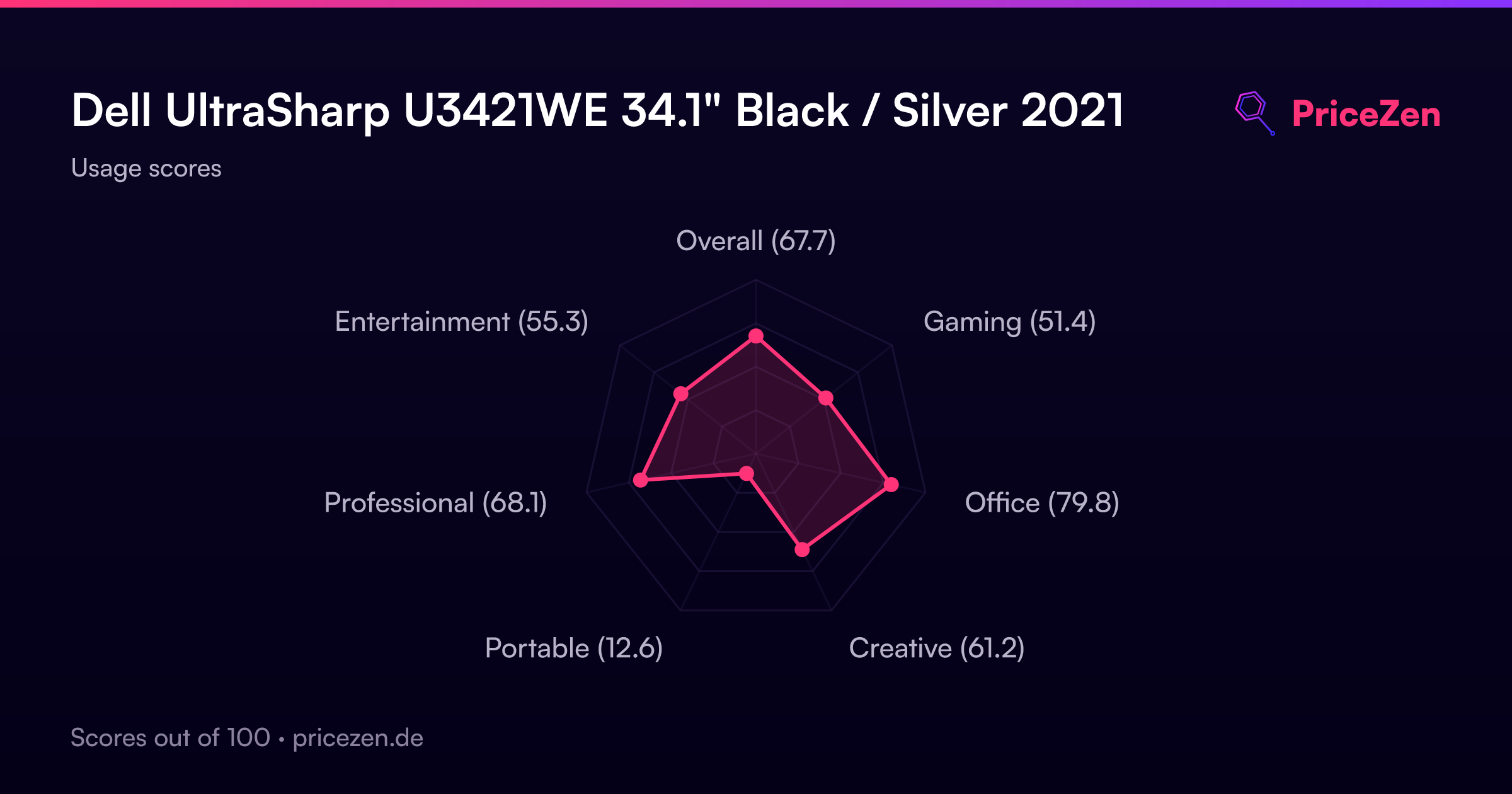
The Dell UltraSharp U3421WE is a productivity monitor wearing a very convincing disguise. It looks like it should be fun, what with the 34-inch curved ultrawide panel and all, but this thing is built for spreadsheets, not frag fests. And that's fine, because it's genuinely good at its actual job. Our scoring model puts it at 80.5/100 for office work, which is well above average, backed by top-tier connectivity and ergonomics that most monitors in this price range can't touch.
The one thing to know: this is a USB-C hub monitor first and a display second. Thunderbolt, USB-C, HDMI, DisplayPort, PIP/PBP support, and a stand that adjusts every which way. If your desk is a docking station nightmare, this monitor wants to fix that. Just don't expect it to keep up with anything moving faster than a cursor.
Common Questions
Q: Can I game on this monitor?
Technically yes, the same way you can technically run a marathon in dress shoes. 60Hz and 5ms response time mean motion will look sluggish compared to any gaming monitor. For slow-paced strategy games it's passable. For anything fast, look elsewhere.
Q: Is the USB-C connection enough to replace a docking station?
For most setups, yes. You get Thunderbolt plus USB-C, so a single cable to your laptop handles video and data. Add PIP/PBP for dual-source viewing and you've got a pretty complete desk solution without a separate dock.
Q: Is 3440 x 1440 sharp enough at 34 inches?
It's fine for productivity. The 0.2745mm pixel pitch means text is clean and readable. It's not 4K-sharp, but at normal viewing distances on a curved ultrawide, you won't be counting pixels.
Who Should Skip This
If you're looking for a gaming monitor, this isn't it. A 60Hz ultrawide in a market full of high-refresh alternatives is like bringing a calculator to a drag race. Go check out the Alienware AW3425DW if you want the same ultrawide format built for speed, or the Samsung Odyssey G60SD if you'd rather have a focused 27-inch gaming panel.
Verdict
Buy the Dell U3421WE if you want a single-cable desk setup with a big, color-accurate ultrawide for work. The Thunderbolt connectivity, full ergonomic adjustments, and PIP/PBP support make it a genuine productivity tool, and at USD 549 from Newegg, the price is right. Skip it entirely if gaming matters to you even a little. The 60Hz panel is a dealbreaker in a world where its competitors offer much more. This monitor knows what it is. Make sure you know what you need.
Usage Scores
- Overall68.4
- Gaming51.6
- Office80.5
- Creative61.5
- Portable12.7
- Professional68.3
- Entertainment55.4