Samsung Odyssey G4 LS25HG402ENXZA 25" Black
The 300Hz refresh rate and 1ms response time on its Fast IPS panel deliver split-second clarity for competitive shooters, while G-Sync and FreeSync Premium eliminate tearing. The fully adjustable stand with pivot and swivel, combined with the Black Equalizer feature, offers practical ergonomic and visibility advantages in dark game scenes. This monitor is best for esports gamers who prioritize motion clarity and responsiveness over high resolution or color-critical work.

No current retailer price











Snapshot
The 30-Second Version
A 300Hz esports panel for USD 150 that nails speed and punts on everything else. Buy it for shooters, not for scenery.
Pros & Cons
Pros
- 300Hz and 1ms GTG at USD 150 is absurd value 90th
- Both G-Sync Compatible and FreeSync Premium, no picking sides 79th
- Full height, tilt, swivel and pivot stand, well above average 70th
- Fast IPS with 178° viewing angles, so colors hold up off-axis
Cons
- 1080p on 25 inches looks soft next to everything else here
- Connectivity is a real letdown, bottom of our rankings
- HDR10 on paper only, color scores about average
- Only 15 owner ratings so far, thin track record
What owners think
The Word on the Street
The proof
Performance
The spec sheet reads like a monitor twice the price: 300Hz over DisplayPort, 1ms GTG, G-Sync Compatible plus FreeSync Premium. That combination is why performance ranks so high in our model, and it's the reason to buy this thing. What surprised us is how far the rest of the package falls behind. Connectivity is one of the worst showings we track, sitting near the bottom, so don't plan on this being your desk hub. Color lands around the middle of the pack despite the HDR10 badge, which tells you HDR here is a checkbox, not an experience. Ergonomics are the quiet win: height, tilt, swivel and pivot put it well above average, and owners get a stand that actually moves instead of a fixed plastic foot.
Specifications
Full Specifications
Display
| Size | 25" |
| Resolution | 1920x1080 (Full HD) |
| Panel Type | IPS |
| Aspect Ratio | 16:9 |
| Screen Finish | matte |
Performance
| Refresh Rate | 300 Hz |
| Response Time | 1 |
| Adaptive Sync | G-Sync Compatible |
Color & HDR
| HDR | HDR10 |
| HDR Support | HDR10 |
Ergonomics
| Height Adjustable | Yes |
| Tilt | Yes |
| Swivel | Yes |
| Pivot | Yes |
Features
| Weight | 5.4 kg / 11.9 lbs |
vs Competition
Every serious rival in our data is a 27-inch panel, and that's the fork in the road. The MSI MAG 271QP QD-OLED X28 and Gigabyte M Series OLED MO27Q28G are the ones to cross-shop if image quality is what you're after, because this Samsung's 1080p resolution and middling color score can't compete on visuals no matter how fast it refreshes. The ASUS ROG Strix XG27JCG and LG UltraGear 27G810A-B are the more natural cross-shops for competitive players who want a bigger, sharper canvas than 25 inches of FHD. And the Dell S2725QC is the pick if this is mostly a work screen, since our office score for the G4 is a flat 51/100. The G4 wins on one axis only: it's the cheapest way into 300Hz that we're tracking.
| Spec | Samsung Odyssey G4 LS25HG402ENXZA 25" | ASUS ROG Strix XG27UCDMG 27" | LG UltraGear 45GX950A-B 45" | Dell UltraSharp U4025QW 39.7" | Alienware AW-Series AW3425DW 34" | MSI MAG 271QPX QD-OLED E2 27" |
|---|---|---|---|---|---|---|
| Screen Size | 25 | 27 | 45 | 39.7 | 34 | 27 |
| Resolution | 1920 x 1080 | 3840 x 2160 | 5120 x 2160 | 5120 x 2160 | 3440 x 1440 | 2560 x 1440 |
| Panel Type | IPS | OLED | OLED | IPS | QD-OLED | QD-OLED |
| Refresh Rate | 300 | 240 | 330 | 120 | 240 | 240 |
| Response Time Ms | 1 | 0.03 | 0.03 | 5 | 0.03 | 0.03 |
| Adaptive Sync | G-Sync Compatible | FreeSync Premium Pro | FreeSync Premium Pro | Adaptive-Sync | FreeSync Premium Pro | FreeSync Premium Pro |
| Hdr | HDR10 | DisplayHDR True Black 400 | DisplayHDR True Black 400 | HDR600 | HDR400 | DisplayHDR True Black 400 |
| Compare | Compare | Compare | Compare | Compare |
| Product | Color | Portability | Display | Feature | Ergonomic | Performance | Connectivity | Social Proof |
|---|---|---|---|---|---|---|---|---|
| Samsung Odyssey G4 LS25HG402ENXZA 25" | 41.9 | 12.7 | 37.5 | 70.1 | 78.6 | 90.2 | 6.5 | 41.9 |
| ASUS ROG Strix XG27UCDMG 27" Compare | 96.5 | 57.4 | 97.7 | 85 | 90.7 | 97.9 | 81.1 | 98.9 |
| LG UltraGear 45GX950A-B 45" Compare | 99.4 | 76.5 | 99.7 | 96.3 | 90.7 | 99.4 | 96.9 | 92 |
| Dell UltraSharp U4025QW 39.7" Compare | 97.9 | 76.5 | 98.6 | 96.3 | 90.7 | 56.1 | 99.3 | 96.8 |
| Alienware AW-Series AW3425DW 34" Compare | 98.9 | 73.9 | 84.1 | 96.3 | 90.7 | 97.9 | 95.4 | 96.8 |
| MSI MAG 271QPX QD-OLED E2 27" Compare | 99.2 | 57.4 | 73.4 | 85 | 90.7 | 97.9 | 81.1 | 98.9 |
Price
Value & Pricing
Worth it, no hesitation. USD 150 for a 300Hz panel with a proper adjustable stand is the kind of price that makes our tracking spreadsheet look broken. We watch prices across stores and this is the low end of what a high-refresh monitor costs. Just go in knowing you're paying for refresh rate and nothing else.
Read more
Overview
At USD 150 on Amazon, the Odyssey G4 is a 300Hz IPS monitor that costs less than most people's keyboard-and-mouse combo. That's the whole story here. Our scoring model puts its performance in the top 10% against every monitor we track, which is genuinely rare air for a screen this cheap.
The catch is resolution. It's 25 inches of 1920 x 1080, and our display ranking lands it below the middle of the pack, around the 38th percentile. You're buying speed, not pixels. If you play competitive shooters and your GPU already pushes high frame rates at 1080p, this is one of the smartest buys in our data right now. If you want a screen that makes single-player games look gorgeous, keep scrolling.
Common Questions
Q: Do I need DisplayPort to hit 300Hz?
Yes. Samsung specs the 300Hz figure over DisplayPort, so use that cable and stop wondering why the refresh rate looks wrong.
Q: Is the HDR10 worth caring about?
No. Our color ranking puts this monitor around the middle of the pack, so treat HDR10 as a compatibility flag rather than a picture upgrade.
Q: Can I use it for work too?
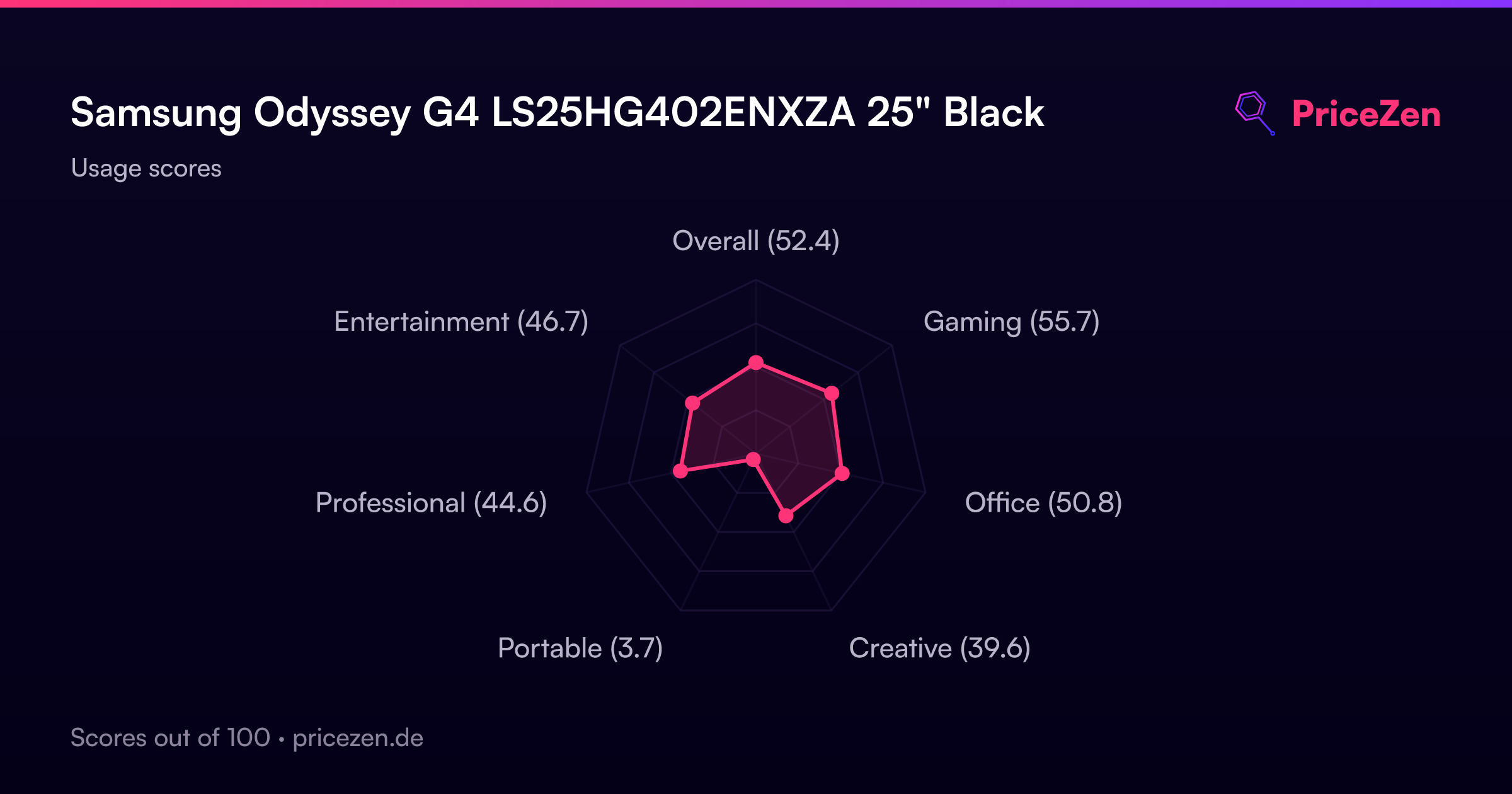
You can, but 1920 x 1080 across 25 inches is cramped for spreadsheets and code. Our office score is 51/100, dead average. The pivot mode helps for documents, at least.
Who Should Skip This
If you want sharp text, rich color or a monitor that handles your laptop, console and dock without a fight, this isn't it. The 1080p panel and bottom-tier connectivity ranking rule it out. Go look at the Dell S2725QC for desk duty, or the MSI MAG 271QP QD-OLED X28 if you want games to actually look good.
Verdict
Buy it if you're a shooter player on a tight budget with a GPU that lives at 1080p. The 300Hz refresh, 1ms response and dual adaptive sync support are legitimately competitive-grade, and the ergonomic stand means you won't be stacking books under it. Skip it if you want a monitor that doubles as your everything screen, because the resolution and connectivity won't carry that load. As a dedicated esports panel at USD 150, it's an easy yes.
Usage Scores
- Overall52.4
- Gaming55.7
- Office50.8
- Creative39.6
- Portable3.7
- Professional44.6
- Entertainment46.7