HP 24-cr0000a 24-cr0420 2025, Ryzen 3 7320U, 8GB, 256GB SSD, Shell White
Der AMD Ryzen 3 7320U mit 8 GB LPDDR5-RAM und 256 GB SSD bietet zuverlässige Leistung für alltägliche Aufgaben und schnelle Bootzeiten. Das 23,8-Zoll-Full-HD-Touchdisplay mit 178° Blickwinkel und das kompakte All-in-One-Design in Shell White machen ihn platzsparend und benutzerfreundlich. Ideal für Geschäftsanwender und Home-Office-Nutzer, die einen einfachen, aber soliden Desktop für Büroarbeit, Internet und Multimedia suchen.

Derzeit kein aktueller Händlerpreis




Überblick
The 30-Second Version
The HP 24-cr0420 is a budget all-in-one with a nice touchscreen but weak internals. 8GB of RAM and a 256GB SSD put it near the bottom of our rankings for memory and storage. It's fine for basic tasks at $670, but you're paying for the form factor, not performance.
Pros & Cons
Vorteile
- 23.8-inch Full HD touchscreen with wide viewing angles is genuinely nice at this price 70th
- Compact all-in-one design keeps your desk clutter-free
- Wi-Fi 6 and Ethernet give you solid connectivity options
- Fast boot times thanks to the SSD
Nachteile
- 8GB of RAM is barely enough for modern multitasking
- 256GB storage fills up fast and sits near the bottom of our rankings
- Integrated graphics can't handle anything beyond basic multimedia
- Only 3 customer reviews so far, so long-term reliability is a question mark
Die Fakten
Performance
The Ryzen 3 7320U is a 4-core chip that handles everyday tasks without throwing a tantrum. Web browsing, spreadsheets, streaming, all fine. But push it with heavier multitasking or anything creative and you'll feel the ceiling fast. The 8GB of RAM is the real bottleneck here, sitting in the 16th percentile. Chrome with a dozen tabs plus a video call will have you watching that memory fill up. The 256GB SSD boots Windows 11 quickly, but it's one of the smallest drives we've seen in this category, 13th percentile. You'll be leaning on cloud storage or an external drive before long. The integrated Radeon graphics are fine for video playback but land in the 27th percentile overall, so don't expect any gaming beyond solitaire or very light indie titles.
Specifications
Full Specifications
Processor
| CPU | AMD Ryzen 3 7320U |
| Cores | 4 |
| Frequency | 2.4 GHz |
| L3 Cache | 4 MB |
Graphics
| GPU | AMD Radeon Graphics |
| Type | Discrete |
Memory & Storage
| RAM | 8 GB |
| RAM Generation | DDR5 |
| Storage | 256 GB |
| Storage Type | SSD |
Build
| Form Factor | aio |
| PSU | 90 |
| Weight | 5.3 kg / 11.6 lbs |
Connectivity
| USB-C Ports | 1 |
| USB Ports | 4 |
| HDMI | 1 x HDMI |
| Wi-Fi | Wi-Fi 6 |
| Bluetooth | Bluetooth 5.3 |
| Ethernet | 1x Ethernet |
System
| OS | Windows 11 Home |
vs Competition
Stacked against something like the Apple Mac Studio M3 Ultra, this HP isn't even in the same conversation, but that's also a machine costing several times more and aimed at professionals. The more realistic comparison is against budget desktops like the Dell Desktop ECT1250 or entry-level towers from iBUYPOWER and MSI. Those will generally give you more upgradeability and better raw specs for the money. The HP's advantage is the integrated touchscreen and zero cable clutter. If you don't need the all-in-one form factor, a traditional desktop will almost always beat this on value. The Lenovo Legion and MSI Aegis are gaming machines, so they're not direct competitors, but they highlight how much more horsepower exists at similar or slightly higher price points.
| Spec | HP 24-cr0000a 24-cr0420 | Apple Mac Studio M5 Max | Lenovo T Series Towers Legion Tower 5a Gen 10 | Dell Desktop ECT1250 | ASUS ROG GM700 | MSI Aegis ZS2 A9NVP-1407US |
|---|---|---|---|---|---|---|
| CPU | AMD Ryzen 3 7320U | Apple M5 Max | AMD Ryzen 7 7800X3D | Intel Core Ultra 7 265 | AMD Ryzen 7 9800X3D | AMD Ryzen 9 9900X |
| RAM (GB) | 8 | 36 | 32 | 32 | 32 | 32 |
| Storage (GB) | 256 | 1024 | 4096 | 2048 | 2048 | 2048 |
| GPU | AMD Radeon Graphics | Apple (32-Core) | NVIDIA GeForce RTX 5070 Ti | Intel UHD Graphics | NVIDIA GeForce RTX 5070 Ti | NVIDIA GeForce RTX 5070 |
| Form Factor | aio | mini | mid-tower | sff | mid-tower | mid-tower |
| Psu W | 90 | 480 | 850 | 180 | 850 | 750 |
| OS | Windows 11 Home | macOS | Windows 11 Home | Windows 11 Home | Windows 11 Home | Windows 11 Home |
| Compare | Compare | Compare | Compare | Compare |
| Produkt | CPU | GPU | RAM | Anschlüsse | Speicher | Zuverlässigkeit | Nutzerresonanz |
|---|---|---|---|---|---|---|---|
| HP 24-cr0000a 24-cr0420 | 25.7 | 27.4 | 15.4 | 40.4 | 12.7 | 70.1 | 34.7 |
| Apple Mac Studio M5 Max Compare | 95.7 | 85.1 | 92.4 | 88.9 | 68.7 | 99.3 | 66.8 |
| Lenovo T Series Towers Legion Tower 5a Gen 10 Compare | 73.3 | 94.6 | 78 | 88.3 | 98.1 | 70.1 | 99.9 |
| Dell Desktop ECT1250 Compare | 88.1 | 60.2 | 81.6 | 74.5 | 82.6 | 70.1 | 98.2 |
| ASUS ROG GM700 Compare | 80.4 | 94.6 | 81.6 | 96 | 90 | 37.3 | 99.2 |
| MSI Aegis ZS2 A9NVP-1407US Compare | 92.4 | 90.7 | 87.1 | 90.3 | 82.6 | 37.3 | 99.2 |
Preis
Value & Pricing
At $670 USD, this is a tough sell unless you specifically want an all-in-one with a touchscreen. You're paying for the form factor and the display, not the internals. A similarly priced laptop or a small desktop plus a separate monitor would get you more RAM, more storage, and a faster processor. But if desk space is tight and you want one clean unit that just works for basic tasks, the price isn't outrageous. Just know you're buying convenience, not performance.
Mehr erfahren
Overview
The HP 24-cr0420 is a budget all-in-one that looks clean on a desk and handles the basics without drama. You get a 23.8-inch Full HD touchscreen, a Ryzen 3 7320U, 8GB of DDR5, and a 256GB SSD in a tidy shell white chassis. It's built for email, web browsing, video calls, and light office work, nothing more.
But the specs tell a story of compromise. In our database, this thing lands in the 13th percentile for storage and 16th for RAM. That's rough. HP is betting you'll trade performance for simplicity and a touchscreen, and for some people that math works out fine.
Common Questions
Q: Can this handle gaming?
Not really. The integrated AMD Radeon graphics sit in the 27th percentile in our database, so you're limited to very light indie games or browser-based titles. Anything demanding will struggle.
Q: Is 8GB of RAM enough for everyday use?
For basic tasks like email, web browsing, and document editing, yes. But with 8GB landing in the 16th percentile, heavy multitasking or lots of browser tabs will slow things down noticeably.
Q: Can I upgrade the RAM or storage later?
All-in-one PCs like this are typically difficult to upgrade compared to traditional desktops. The compact design usually means limited access to internal components, so you should assume you're stuck with the 8GB RAM and 256GB SSD for the life of the machine.
Who Should Skip This
Skip this if you need any real computing power. If you edit photos or video, run virtual machines, do any kind of development work, or just like having 30 browser tabs open, the 8GB of RAM and weak integrated graphics will frustrate you daily. Also skip it if you want to upgrade components down the road, all-in-ones like this are basically sealed boxes. And if you don't specifically need a touchscreen, you can get a much more capable traditional desktop for the same money.
Verdict
This is a machine for someone who wants a simple, clean computer for email, web browsing, video calls, and light document work. Parents setting up a family computer in the kitchen, students who just need something for online classes, or anyone who hates cable clutter and wants a touchscreen. If that's you, it'll do the job. If you need to edit video, run demanding software, or keep 40 browser tabs open, this isn't your machine.
Usage Scores
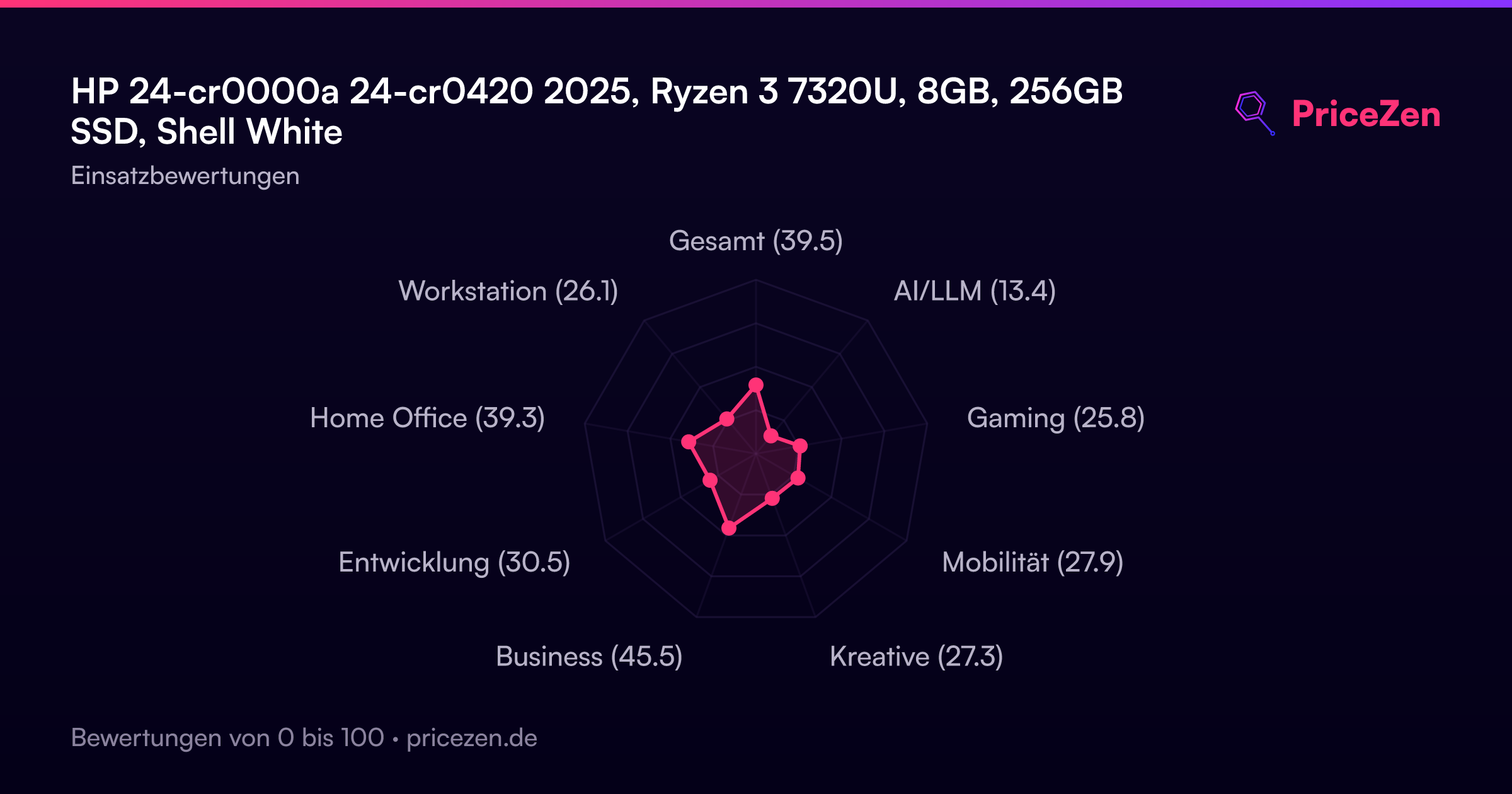
- Gesamt39.5
- AI/LLM13.4
- Gaming25.8
- Mobilität27.9
- Kreative27.3
- Business45.5
- Entwicklung30.5
- Home Office39.3
- Workstation26.1