MSI Modern MAM242TP1M1099 2024, Core i3, 8GB, 512GB SSD, Black
Der Intel Core i3 der 14. Generation mit Intel Iris Xe Grafik sorgt für flüssiges Arbeiten und 4K-Streaming. Das 23,8-Zoll-Full-HD-Touchdisplay, 8 GB DDR5-RAM und die 512-GB-SSD bieten schnelle Reaktionszeiten und klare Bilder. Dieses All-in-One-Gerät eignet sich am besten für Heimbüro-Nutzer, die einen platzsparenden Computer mit Touchscreen für alltägliche Aufgaben suchen.

Derzeit kein aktueller Händlerpreis











Überblick
The 30-Second Version
The MSI Modern AM242TP is a touchscreen all-in-one with a 23.8-inch display, 512GB SSD, and a clean design. Performance is modest at best, with 8GB of RAM and a Core 3-100U that lands in the 31st percentile. US pricing ranges from USD 600 to USD 825, so shop around. It's a decent light-use machine if you can get it cheap, but most buyers will find better value elsewhere.
Pros & Cons
Vorteile
- 23.8-inch touchscreen is a genuine differentiator at this price 65th
- 512GB SSD gives you decent breathing room out of the box
- Clean all-in-one design with a sleek black base
- Wi-Fi 6E and Ethernet give you solid connectivity options
- Lots of ports: 2x USB-C, 6x USB-A, 2x HDMI
Nachteile
- 8GB of RAM is tight for Windows 11 and modern multitasking
- Core 3-100U CPU lands in the 31st percentile, well below average
- Gaming score of 10.9 out of 100 makes the marketing copy feel misleading
- Reliability sits in the 36th percentile, which is a yellow flag
- Only one customer review, so long-term ownership data is thin
Was Besitzer sagen
The Word on the Street
Wie sich die Meinung der Besitzer im Lauf der Zeit verändert hat
ExklusivBasierend darauf, wann Kunden ihre Bewertungen tatsächlich geschrieben haben - so sehen Sie, ob das anfängliche Lob anhielt.
1 geschriebene Rezension, Apr. 2026: 1 zufrieden
Über alle 1 Shop-Bewertungen: 5,0★. Das Diagramm zählt die 1 geschriebene Rezension.
Jeder Punkt ist eine geschriebene Rezension, im Monat, in dem sie verfasst wurde. Zufrieden = 4-5★, gemischt = 3★, unzufrieden = 1-2★.
Die Fakten
Performance
Let's talk about what the Core 3-100U actually does. It's a 14th gen Intel chip with 6 cores, but the base clock is just 1.2GHz. In our database, this CPU lands in the 31st percentile for all-in-ones. That's not a disaster, but it's well below what you'd get from even a mid-range desktop. For everyday tasks like web browsing, document editing, and video calls, it'll feel responsive enough, especially with DDR5 memory helping things along. But push it with heavy multitasking or anything creative, and you'll feel the ceiling pretty quickly.
The 8GB of RAM is the bigger concern. That puts it in the 18th percentile, which means most competing machines ship with more. Windows 11 alone will happily eat 4-5GB, leaving you with a thin margin for browser tabs and apps. The 512GB SSD is solid for this class, though it's in the 31st percentile, so nothing special. Real-world takeaway: this machine is built for light, single-purpose use. Keep your expectations modest and it'll behave. Ask it to do too much and it'll remind you what you paid for.
Specifications
Full Specifications
Processor
| CPU | Intel Core 3 100U |
| Cores | 6 |
| Frequency | 1.2 GHz |
| L3 Cache | 10 MB |
Graphics
| GPU | Intel Iris Xe Graphics |
| Type | Integrated |
| VRAM Type | Shared |
Memory & Storage
| RAM | 8 GB |
| RAM Generation | DDR5 |
| Storage | 512 GB |
| Storage Type | SSD |
Build
| Form Factor | aio |
| Weight | 6.2 kg / 13.6 lbs |
Connectivity
| USB-C Ports | 2 |
| USB Ports | 6 |
| HDMI | 2x HDMI |
| Wi-Fi | Wi-Fi 6E |
| Bluetooth | ✓ |
| Ethernet | Gigabit Ethernet |
System
| OS | Windows 11 Home |
vs Competition
The MSI Modern AM242TP sits in an awkward spot. The Lenovo Legion 90YA003GUS is a gaming-focused machine that absolutely destroys this thing on performance, though you'll pay more and lose the touchscreen. If you care about gaming at all, the Legion is the obvious choice. The HP OmniDesk M03-0064 is a closer competitor in the all-in-one space, and HP tends to offer better reliability scores in our database. The Dell Tower Plus EBT2250 is a traditional tower, so you lose the all-in-one simplicity but gain upgradeability and typically better value per dollar.
The Apple Mac mini M4 Pro is a completely different animal. It's not an all-in-one, but at similar money in some configurations, it offers dramatically better CPU and GPU performance. If you already have a monitor, keyboard, and mouse, the Mac mini makes this MSI look overpriced. The iBUYPOWER Slate SWI7N56T01 is another tower option that'll run circles around the MSI for gaming and heavy work. The MSI's only real advantages are the touchscreen and the zero-cable setup. If those don't matter to you, skip it.
| Spec | MSI Modern MAM242TP1M1099 | Apple Mac Studio M5 Max | Lenovo T Series Towers Legion Tower 5a Gen 10 | Dell Desktop ECT1250 | HP OMEN GT16-0364 | ASUS ROG GM700 |
|---|---|---|---|---|---|---|
| CPU | Intel Core 3 100U | Apple M5 Max | AMD Ryzen 7 7800X3D | Intel Core Ultra 7 265 | AMD Ryzen 7 8700F | AMD Ryzen 7 9800X3D |
| RAM (GB) | 8 | 36 | 32 | 32 | 32 | 32 |
| Storage (GB) | 512 | 1024 | 4096 | 2048 | 1024 | 2048 |
| GPU | Intel Iris Xe Graphics | Apple (32-Core) | NVIDIA GeForce RTX 5070 Ti | Intel UHD Graphics | NVIDIA GeForce RTX 5070 | NVIDIA GeForce RTX 5070 Ti |
| Form Factor | aio | mini | mid-tower | sff | mid-tower | mid-tower |
| Psu W | - | 480 | 850 | 180 | 850 | 850 |
| OS | Windows 11 Home | macOS | Windows 11 Home | Windows 11 Home | Windows 11 Home | Windows 11 Home |
| Compare | Compare | Compare | Compare | Compare |
| Produkt | CPU | GPU | RAM | Anschlüsse | Speicher | User Sentiment | Zuverlässigkeit | Nutzerresonanz |
|---|---|---|---|---|---|---|---|---|
| MSI Modern MAM242TP1M1099 | 36.1 | 36.7 | 17.3 | 65.1 | 29.2 | 62.7 | 37.3 | 48.5 |
| Apple Mac Studio M5 Max Compare | 95.7 | 85.2 | 92.4 | 89 | 68.8 | 95 | 99.3 | 66.8 |
| Lenovo T Series Towers Legion Tower 5a Gen 10 Compare | 73.4 | 94.7 | 77.9 | 88.3 | 98.1 | 95 | 70 | 99.9 |
| Dell Desktop ECT1250 Compare | 88.2 | 60.3 | 81.6 | 74.5 | 82.7 | 98.5 | 70 | 98.2 |
| HP OMEN GT16-0364 Compare | 69.6 | 90.8 | 87.1 | 97.9 | 53.5 | 98.5 | 70 | 98.2 |
| ASUS ROG GM700 Compare | 80.5 | 94.7 | 81.6 | 96 | 90 | 98.5 | 37.3 | 99.2 |
Preis
Value & Pricing
Pricing is all over the map depending on where you shop. In the US, we're seeing listings from USD 600 to USD 825 across two vendors. That's a USD 225 spread for the exact same machine, which is wild. If you're buying in the US, the lower end of that range is the only price that makes sense. At USD 600, you're getting a touchscreen all-in-one with a 512GB SSD and a clean design, which is reasonable. At USD 825, you're paying a premium for specs that don't justify it.
For context, the European listing at EUR 1,438 and the UK listing at GBP 745 are both significantly higher than the US prices, though currency differences make direct comparison tricky. The takeaway is simple: shop around. If you can't find this under USD 650, you should probably look elsewhere, because the competition gets a lot stronger once you cross that line.
Wir verfolgen die Preise für dieses Produkt seit dem 4. Mai 2026. Das Diagramm erscheint, sobald mehr Daten vorliegen.
Mehr erfahren
Overview
The MSI Modern AM242TP is one of those machines that looks great on a desk and keeps things simple. It's a 23.8-inch all-in-one with a touchscreen, an Intel Core 3-100U processor, 8GB of DDR5, and a 512GB SSD. No tower, no cable mess, just a screen on a black base. For someone who wants a clean home office setup without building anything, that's genuinely appealing.
But here's the thing. The spec sheet reads more like a capable Chromebook than a desktop. The Core 3-100U is a 6-core chip running at 1.2GHz, and the graphics are Intel Iris Xe integrated. That's fine for email, spreadsheets, video calls, and streaming. It is not fine for gaming, despite MSI's marketing copy throwing around phrases like "Game without compromise." Our database puts gaming performance at 10.9 out of 100, which is about as close to a polite no as you can get.
Who is this actually for? Someone who wants a touchscreen all-in-one for light daily work, maybe a family computer in the kitchen or a front desk machine. The touchscreen is the standout feature here, and the 512GB SSD means you won't be juggling storage right away. But if you need real horsepower, keep reading before you click buy.
Common Questions
Q: Does this have USB ports?
Yes, and plenty of them. You get 2 USB-C ports and 6 USB-A ports, which is more than most all-in-ones in this price range. That's enough for a keyboard, mouse, external drive, printer, and still have room to spare.
Q: What's the screen resolution?
It's a 23.8-inch FHD IPS-grade panel, so 1920x1080. That's standard for this size and fine for everyday use, though it won't match the sharpness of a 4K display. The touchscreen capability is the bigger selling point here.
Q: Can I mount this on a wall?
The product listing doesn't mention VESA mount compatibility, and the all-in-one design with an integrated base suggests it's meant to sit on a desk. If wall mounting is a priority, you'll want to confirm with MSI directly or look at a model that explicitly supports VESA mounts.
Q: Is this good for gaming?
Honestly, no. Despite MSI's marketing language, the integrated Intel Iris Xe graphics and 8GB of RAM put gaming performance at 10.9 out of 100 in our database. You can play very light or older titles at low settings, but this is not a gaming machine.
Who Should Skip This
If you need to run demanding software, edit video, or do any real gaming, this machine will frustrate you. The 8GB of RAM and integrated graphics are simply not built for that workload. Look at the Lenovo Legion 90YA003GUS or a traditional tower like the iBUYPOWER Slate SWI7N56T01 instead. You'll sacrifice the touchscreen and all-in-one form factor, but you'll get performance that actually matches the price.
Also skip this if you're buying outside the US. The European and UK pricing is significantly higher, and at those numbers, the value proposition falls apart completely. You'd be paying premium money for entry-level specs. And if you're someone who likes to upgrade components over time, an all-in-one is the wrong choice entirely. The RAM and storage are not user-upgradeable in most AIO designs, so what you buy is what you're stuck with.
Verdict
If you want a touchscreen all-in-one for light daily use, and you can find this at the USD 600 end of the range, it's a reasonable buy. The screen is the star here, and the 512GB SSD means you won't immediately need external storage. For a kitchen computer, a reception desk, or a basic home office machine, it'll do the job without complaint.
But if you need anything more than that, look elsewhere. The 8GB of RAM is a real limitation, the CPU is below average for this class, and the gaming marketing is frankly misleading. For the same money, you can get a traditional desktop with far better specs, or spend a bit more and get a machine that won't feel dated in two years. This is a niche product for a niche buyer, and that buyer is someone who values the touchscreen and clean design above raw performance.
Usage Scores
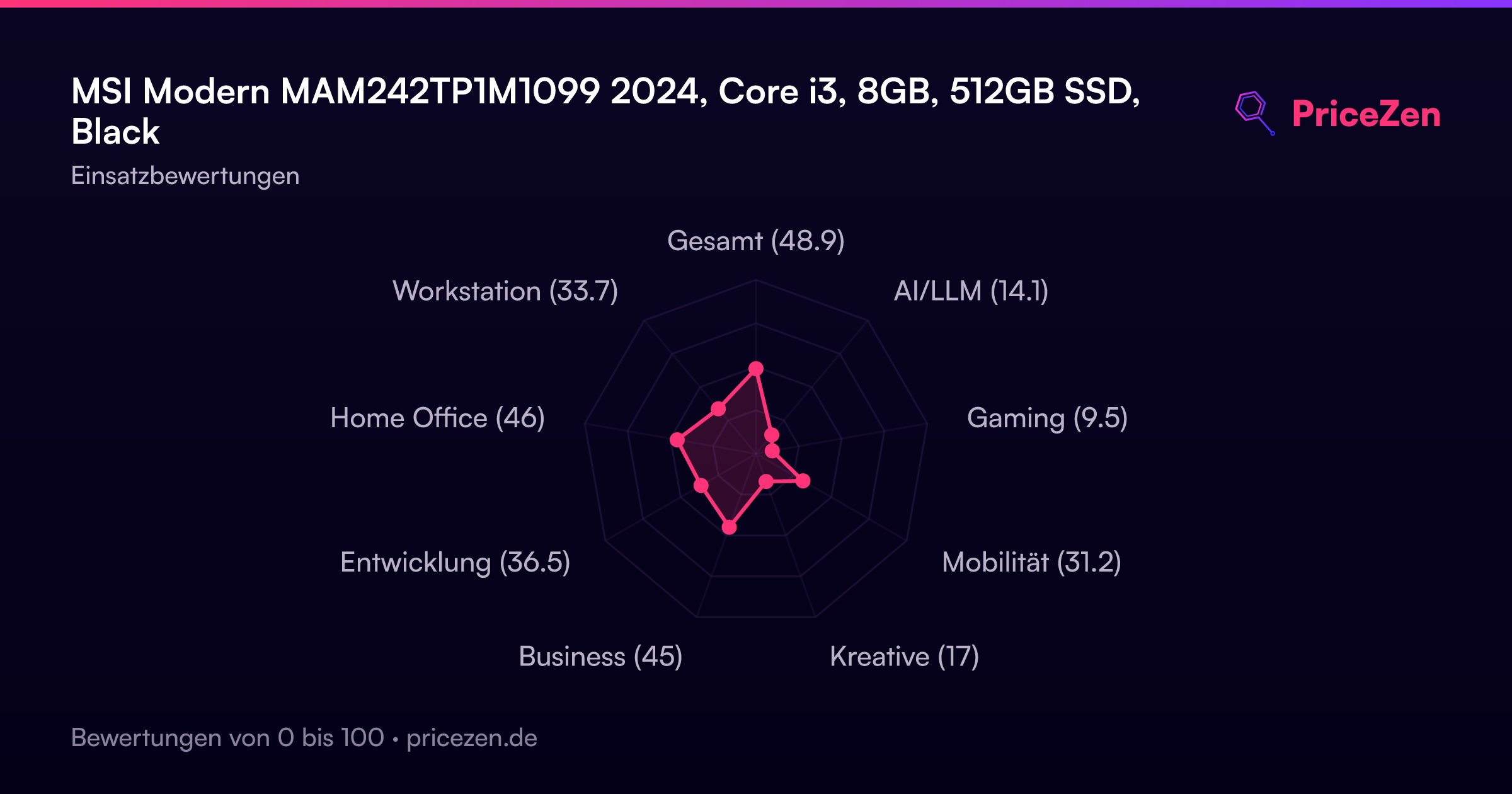
- Gesamt48.9
- AI/LLM14.1
- Gaming9.5
- Mobilität31.2
- Kreative17
- Business45
- Entwicklung36.5
- Home Office46
- Workstation33.7