Acer Chromebox CXI6-C716G 2025, Core 7 150U, 16GB, 256GB SSD, Black
Der Intel Core 7 150U mit 10 Kernen und 1,8 GHz, kombiniert mit 16 GB DDR4 und einer 256 GB PCIe 4.0 SSD, liefert flüssige Leistung für Multitasking. Mit 7 USB-A-Anschlüssen, 2 HDMI, DisplayPort und Wi-Fi 6E unterstützt er bis zu 4 Displays, ideal für einen kompakten Arbeitsplatz. Dieser Chromebox eignet sich für Home-Office-Nutzer, die Wert auf Konnektivität und geringes Gewicht (0,80 kg) unter ChromeOS legen.

Derzeit kein aktueller Händlerpreis











Überblick
The 30-Second Version
The Acer Chromebox CXI6-C716G pairs a surprisingly powerful Core 7 150U with 16GB of RAM in a tiny ChromeOS box. It's a multitasking beast for browser-based work, with excellent port selection including 7 USB-A ports and 2.5GbE. But the 256GB SSD is small, gaming performance is terrible, and the price hovers around $1,000 USD. Buy it if you live in Google Workspace and want a silent, compact desktop. Skip it if you need local storage, Windows apps, or any kind of gaming.
Pros & Cons
Vorteile
- Core 7 150U is overkill for ChromeOS, so everyday multitasking feels snappy 79th
- 16GB of RAM is generous for a Chromebox and handles heavy tab loads well
- Port selection is excellent: 7 USB-A, 2 HDMI, DisplayPort, USB-C, and 2.5GbE
- Compact 0.80kg chassis fits almost anywhere and stays quiet
- Wi-Fi 6E and Bluetooth give you solid wireless options out of the box
Nachteile
- 256GB SSD is small, landing in the 14th percentile for storage
- Integrated graphics are average at best, and gaming performance is abysmal
- CPU percentile of 34 is mediocre compared to other mini PCs
- ChromeOS limits what you can do with all that CPU power
- Reliability score sits in the 31st percentile, which is underwhelming
Die Fakten
Performance
The Core 7 150U is the star of the show here, and it's a weird choice for a Chromebox. This is a 10-core chip with a hybrid architecture, mixing performance and efficiency cores, and it's the kind of processor you'd normally find in a mid-range Windows ultrabook. In a ChromeOS box, that's a lot of headroom. ChromeOS is famously light, so the 150U barely breaks a sweat with everyday tasks. You can have 40 tabs open, a YouTube video playing, and a Google Meet call running, and this thing won't flinch. The 16GB of RAM helps a lot too, since ChromeOS has gotten better at using memory but still loves to eat it when you're deep in tab territory.
But here's the catch. The integrated Intel graphics put this machine in the 52nd percentile for GPU performance, which is dead average. That's fine for streaming video, light photo editing in web apps, and maybe some Android games from the Play Store. But the gaming score in our database is 10.2 out of 100, which is one of the worst we've seen. This is not a gaming machine, no matter what the marketing copy says. The 256GB PCIe 4.0 SSD is fast for what it is, but it's small, and that storage percentile of 14 means you'll be leaning hard on cloud storage or external drives. For a cloud-first OS, that's less of a problem, but it's still a limitation if you want to keep local files or install a bunch of Android apps.
Specifications
Full Specifications
Processor
| CPU | Intel Core 7 150U |
| Cores | 10 |
| Frequency | 1.8 GHz |
| L3 Cache | 12 MB |
Graphics
| GPU | Intel Graphics |
| Type | Integrated |
| VRAM Type | DDR4 SDRAM |
Memory & Storage
| RAM | 16 GB |
| RAM Generation | DDR4 |
| Storage | 256 GB |
| Storage Type | SSD |
Build
| Form Factor | mini |
| PSU | 90 |
| Weight | 0.8 kg / 1.8 lbs |
Connectivity
| USB-C Ports | 1 |
| USB Ports | 7 |
| HDMI | 2 x HDMI |
| DisplayPort | 1x DisplayPort |
| Wi-Fi | Wi-Fi 6 |
| Bluetooth | Bluetooth 5.3 |
| Ethernet | 2.5 Gigabit Ethernet |
System
| OS | ChromeOS |
vs Competition
Stacked against the Apple Mac Studio M5 Max, this thing looks like a toy, but that's not a fair fight. The Mac Studio is a workstation-class machine that costs several times more and targets creative professionals. The CXI6 isn't trying to compete there. A more realistic comparison is against Windows mini PCs in the same price bracket. The Lenovo Legion 90YA003GUS and HP OMEN GT16-0364 are gaming-focused desktops that absolutely demolish the CXI6 in GPU performance, but they're also bigger, louder, and run Windows. If you want to play games or do serious video editing, those are the obvious choices.
The Dell Tower Plus EBT2250 is another interesting comparison. It's a traditional tower, so it takes up more space, but it likely offers better expandability and storage options. The CXI6's 256GB SSD is a joke next to what you'd get in a tower at this price. But the CXI6 wins on footprint and simplicity. It's 0.80kg, silent, and sips power with a 90W PSU. For a front desk, a classroom, or a kiosk setup, that matters more than raw performance. The CLX SET TGMSETRTU5204BM is a gaming rig, so again, different world entirely. The CXI6's real competition is other ChromeOS devices, and there it's near the top of the heap, just with a price tag that reflects that.
| Spec | Acer Chromebox CXI6-C716G | Apple Mac Studio M5 Max | Lenovo T Series Towers Legion Tower 5a Gen 10 | Dell Desktop ECT1250 | HP OMEN GT16-0364 | ASUS ROG GM700 |
|---|---|---|---|---|---|---|
| CPU | Intel Core 7 150U | Apple M5 Max | AMD Ryzen 7 7800X3D | Intel Core Ultra 7 265 | AMD Ryzen 7 8700F | AMD Ryzen 7 9800X3D |
| RAM (GB) | 16 | 36 | 32 | 32 | 32 | 32 |
| Storage (GB) | 256 | 1024 | 4096 | 2048 | 1024 | 2048 |
| GPU | Intel Graphics | Apple (32-Core) | NVIDIA GeForce RTX 5070 Ti | Intel UHD Graphics | NVIDIA GeForce RTX 5070 | NVIDIA GeForce RTX 5070 Ti |
| Form Factor | mini | mini | mid-tower | sff | mid-tower | mid-tower |
| Psu W | 90 | 480 | 850 | 180 | 850 | 850 |
| OS | ChromeOS | macOS | Windows 11 Home | Windows 11 Home | Windows 11 Home | Windows 11 Home |
| Compare | Compare | Compare | Compare | Compare |
| Produkt | CPU | GPU | RAM | Anschlüsse | Speicher | Zuverlässigkeit |
|---|---|---|---|---|---|---|
| Acer Chromebox CXI6-C716G | 41.9 | 50.1 | 31.3 | 79 | 12.7 | 32.4 |
| Apple Mac Studio M5 Max Compare | 95.7 | 85 | 92.5 | 89.1 | 68.7 | 99.3 |
| Lenovo T Series Towers Legion Tower 5a Gen 10 Compare | 73.3 | 94.6 | 78 | 88.6 | 98.1 | 70.1 |
| Dell Desktop ECT1250 Compare | 88.1 | 60.2 | 81.6 | 75 | 82.6 | 70.1 |
| HP OMEN GT16-0364 Compare | 69.4 | 90.7 | 87.1 | 97.9 | 53.4 | 70.1 |
| ASUS ROG GM700 Compare | 80.4 | 94.6 | 81.6 | 96.1 | 90 | 37.5 |
Preis
Value & Pricing
Pricing on this thing is all over the map depending on where you live. In the US, you're looking at around $1,007 to $1,030, which feels steep for a Chromebox until you remember that most Chromeboxes are cheap plastic boxes with Celeron processors. The Core 7 150U and 16GB of RAM put this in a different class, but you're still paying a premium for ChromeOS hardware that can't run Windows or macOS apps natively. In Canada, it's listed at CAD 1,547, and in the UK it's GBP 1,384. Those are not small numbers for a machine with 256GB of storage.
The value question really comes down to whether you need ChromeOS specifically. If you do, and you want the fastest Chromebox you can buy without going to some exotic enterprise setup, this is probably it. But if you're just looking for a compact desktop and don't care about the OS, there are Windows mini PCs with similar or better specs for less money. The price-to-performance ratio here is skewed by the niche appeal of ChromeOS on powerful hardware. You're paying for the privilege of running a lightweight OS on a chip that's frankly bored most of the time.
Mehr erfahren
Overview
The Acer Chromebox CXI6-C716G is one of those machines that makes you stop and ask who exactly it's for. On paper, it's a tiny box with a surprisingly serious processor, the Intel Core 7 150U, which is a 10-core hybrid chip that Acer's marketing folks claim can handle gaming and content creation. But then you notice it runs ChromeOS, has integrated Intel graphics, and comes with 256GB of storage. So it's a bit of an odd duck, a mini PC with more CPU muscle than most Chromeboxes but the same cloud-first limitations.
For the right person, this thing is quietly compelling. If you live in Google Workspace, spend your days in Chrome tabs, Docs, Sheets, and Meet calls, and want something that sits behind a monitor and never makes a peep, the CXI6 has real appeal. The 16GB of DDR4 RAM is generous for ChromeOS, and the port selection is frankly better than what you get on most mini PCs at this price. We're talking 7 USB-A ports, 2 HDMI outs, DisplayPort, USB-C, and 2.5 Gigabit Ethernet. That's a connectivity flex.
But let's be honest about the elephant in the room. Our database puts this machine's compact score at 54.9 out of 100 and its total score at 48.9. The CPU lands in the 34th percentile among products of this type, which is mediocre, and the storage is down in the 14th percentile, a real weak spot. So while the Core 7 150U sounds impressive, the overall package doesn't exactly light up our charts. It's a niche product for a niche buyer, and we'll dig into whether that buyer is you.
Common Questions
Q: How much RAM does the Acer CXI6-C716G have?
It comes with 16GB of DDR4 SDRAM. That's on the higher end for a Chromebox, and it means you can run dozens of Chrome tabs, Android apps, and Linux containers without hitting memory limits. For ChromeOS, 16GB is plenty for all but the most extreme multitasking scenarios.
Q: What processor is inside this Chromebox?
The CXI6-C716G uses an Intel Core 7 150U, a 10-core hybrid chip with a 1.8GHz base clock. It's a mid-range mobile processor that's honestly overkill for ChromeOS, which means the system feels very responsive even under load. Just don't expect it to transform ChromeOS into a gaming or heavy content creation platform.
Q: Can this run Windows or macOS?
No, this is a ChromeOS device, so it runs Google's operating system exclusively. You can install Linux apps through the built-in Crostini container, and Android apps from the Play Store, but native Windows or macOS software is off the table. If you need those, you'll want a Windows mini PC or a Mac instead.
Q: How many displays can the CXI6-C716G support?
Acer says this machine supports up to 4 displays, and the port selection backs that up. You get 2 HDMI ports, a DisplayPort, and a USB-C port that can carry video. That's a lot of screen real estate for a box this small, which makes it great for trading desks, monitoring setups, or anyone who likes a multi-monitor workspace.
Who Should Skip This
If you need local storage for large files, this is not your machine. The 256GB SSD is small by any standard, and while ChromeOS leans on cloud storage, that's not always practical for video editors, photographers, or anyone with a big media library. You'd be better off with a Windows mini PC that has a 1TB NVMe drive or room for a second drive. The storage percentile of 14 in our database is a clear signal that this is a weak spot.
Gamers should also steer clear. The integrated Intel graphics put this in the 52nd percentile for GPU performance, and the gaming score of 10.2 out of 100 is one of the worst we've seen. Even light gaming is a stretch, and ChromeOS's game library is limited to Android titles and cloud streaming. If you want to play anything remotely demanding, look at the Lenovo Legion 90YA003GUS or HP OMEN GT16-0364 instead. And if you're just looking for a general-purpose desktop and don't specifically need ChromeOS, a Windows mini PC will give you more flexibility for the same money.
Verdict
If you're a Google Workspace power user who wants a desktop that never gets in the way, the CXI6-C716G is a solid pick. The Core 7 150U and 16GB of RAM mean you'll never wait on ChromeOS to catch up, and the port selection means you can run four displays and a pile of peripherals without dongles. It's a set-it-and-forget-it machine for offices, schools, and anyone who lives in the browser. The 2.5 Gigabit Ethernet is a nice touch for wired setups, and Wi-Fi 6E keeps wireless connections snappy.
But if you need local storage, want to play games, or run Windows or macOS software, look elsewhere. The 256GB SSD is a real limitation, and the integrated graphics are a dead end for anything beyond basic display output. The reliability score in the 31st percentile also gives us pause, especially at this price. For most people, a Windows mini PC or a traditional desktop will offer more flexibility for the same or less money. This is a specialist's machine, and it's very good at its specialty, but it's not a general-purpose computer.
Usage Scores
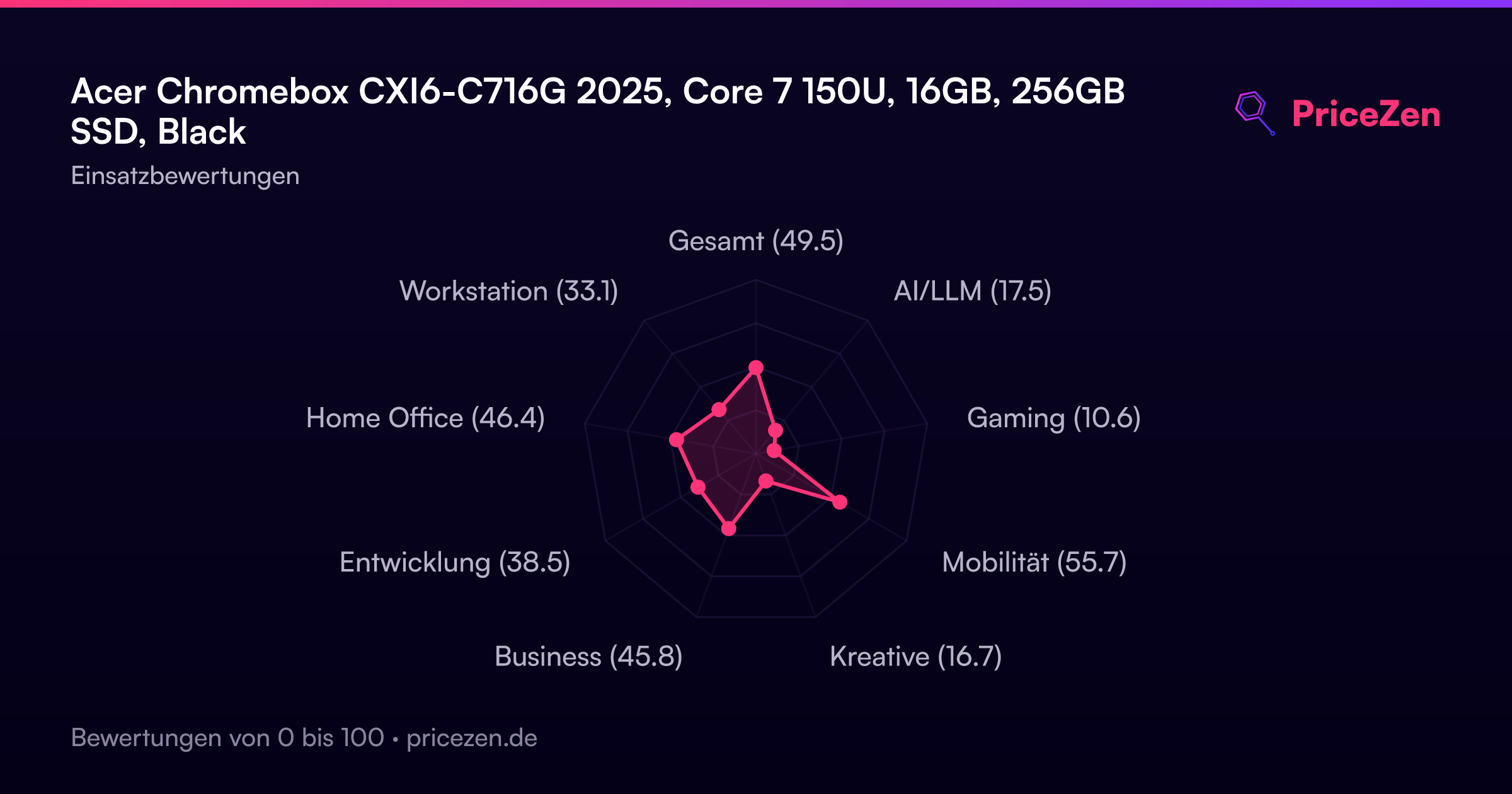
- Gesamt49.5
- AI/LLM17.5
- Gaming10.6
- Mobilität55.7
- Kreative16.7
- Business45.8
- Entwicklung38.5
- Home Office46.4
- Workstation33.1