ASUS NUC 15 Pro NUC15CRKV7, Core Ultra 7 265H, 96GB, Black
Der Intel Core Ultra 7 265H mit 16 Kernen und 24 MB Cache sowie DDR5-6400-Speicher mit bis zu 96 GB machen diesen Mini-PC zur starken Wahl für anspruchsvolle Workloads. Thunderbolt, Ethernet und Wi-Fi 7 sowie zwei M.2-Steckplätze für NVMe-SSDs mit bis zu 8 TB bieten bemerkenswerte Flexibilität im kompakten Format. Er eignet sich für Entwickler und Data-Visualisierungsexperten, die eine leistungsfähige, platzsparende Maschine für KI-Aufgaben und Multitasking benötigen.

Derzeit kein aktueller Händlerpreis
Überblick
The 30-Second Version
The ASUS NUC 15 Pro is a tiny barebone PC with best-in-class 96GB DDR5 support and a solid 16-core CPU. It's great for developers and memory-hungry workloads, but gaming is a non-starter and you'll need to add your own RAM, SSD, and OS. Worth it if you need max RAM in a mini form factor, skip it otherwise.
Pros & Cons
Vorteile
- 96GB DDR5-6400 support is the absolute best in this category 99th
- 16-core Core Ultra 7 265H handles heavy dev workloads well 72nd
- Tiny footprint with Wi-Fi 7 and Thunderbolt connectivity
- Two M.2 slots for up to 8TB of NVMe storage
Nachteile
- Barebone means you still need RAM, SSD, and an OS
- Port selection is a weak spot at the 24th percentile
- Integrated graphics can't handle gaming at all
- Reliability score is mediocre at the 37th percentile
Die Fakten
Performance
The Core Ultra 7 265H sits in the 74th percentile for CPU performance, which is solid but not earth-shattering. You get 16 cores and 24MB of cache, enough to chew through parallel builds and container workloads without breaking a sweat. The real star is the memory support. 96GB of DDR5-6400 is best-in-class for a mini PC, and that's what makes this box interesting for developers running multiple VMs or local AI models. The integrated Arc 140T graphics land at the 57th percentile, so it's about average for integrated GPUs. Fine for driving multiple displays and light graphical work, but don't expect to render anything heavy. Storage support is the sore spot. Two M.2 NVMe slots are nice, but the overall storage score is a dismal 2nd percentile, which suggests limited flexibility or bandwidth compared to competitors.
Specifications
Full Specifications
Processor
| CPU | Intel Core Ultra 7 265H |
| Cores | 16 |
| Frequency | 2.2 GHz |
| L3 Cache | 24 MB |
Graphics
| GPU | Intel Arc Graphics |
| Type | Integrated |
| VRAM Type | Shared |
Memory & Storage
| RAM | 96 GB |
| RAM Generation | DDR5 |
| Storage Type | NVMe SSD |
Build
| Form Factor | mini |
Connectivity
| USB Ports | 0 |
| Thunderbolt | Thunderbolt 4 |
| HDMI | Yes |
| Wi-Fi | Wi-Fi 7 |
| Bluetooth | Bluetooth 5.4 |
| Ethernet | 2.5 Gigabit Ethernet |
vs Competition
Against the Apple Mac Studio M3 Ultra, the NUC 15 Pro is dramatically cheaper and smaller, but it gives up a ton of GPU performance and overall polish. The Mac Studio is a workstation beast, while this NUC is a focused tool for CPU and memory-bound tasks. The Lenovo Legion Tower 5a and HP OMEN GT16 are gaming towers that crush this thing in graphics, but they're huge and power-hungry by comparison. The Dell ECT1250 and MSI Aegis Z2 sit somewhere in the middle, offering more balanced specs but without the NUC's compact form factor or RAM ceiling. If portability and memory capacity matter more than raw GPU power, the NUC wins. If you want an all-rounder, look at the towers.
| Spec | ASUS NUC 15 Pro NUC15CRKV7 | Apple Mac Studio M5 Max | Lenovo T Series Towers Legion Tower 5a Gen 10 | Dell Desktop ECT1250 | HP OMEN GT16-0364 | MSI Aegis ZS2 A9NVP-1407US |
|---|---|---|---|---|---|---|
| CPU | Intel Core Ultra 7 265H | Apple M5 Max | AMD Ryzen 7 7800X3D | Intel Core Ultra 7 265 | AMD Ryzen 7 8700F | AMD Ryzen 9 9900X |
| RAM (GB) | 96 | 36 | 32 | 32 | 32 | 32 |
| Storage (GB) | - | 1024 | 4096 | 2048 | 1024 | 2048 |
| GPU | Intel Arc Graphics | Apple (32-Core) | NVIDIA GeForce RTX 5070 Ti | Intel UHD Graphics | NVIDIA GeForce RTX 5070 | NVIDIA GeForce RTX 5070 |
| Form Factor | mini | mini | mid-tower | sff | mid-tower | mid-tower |
| Psu W | - | 480 | 850 | 180 | 850 | 750 |
| OS | - | macOS | Windows 11 Home | Windows 11 Home | Windows 11 Home | Windows 11 Home |
| Compare | Compare | Compare | Compare | Compare |
| Produkt | CPU | GPU | RAM | Anschlüsse | Speicher | Zuverlässigkeit |
|---|---|---|---|---|---|---|
| ASUS NUC 15 Pro NUC15CRKV7 | 72.4 | 60 | 99.2 | 27 | 1.8 | 37.8 |
| Apple Mac Studio M5 Max Compare | 95.7 | 84.9 | 92.5 | 89.1 | 68.6 | 99.3 |
| Lenovo T Series Towers Legion Tower 5a Gen 10 Compare | 73.2 | 94.6 | 78 | 88.6 | 98.1 | 70.3 |
| Dell Desktop ECT1250 Compare | 88.1 | 60 | 81.6 | 75 | 82.5 | 70.3 |
| HP OMEN GT16-0364 Compare | 69.4 | 90.7 | 87 | 97.9 | 53.3 | 70.3 |
| MSI Aegis ZS2 A9NVP-1407US Compare | 92.4 | 90.7 | 87 | 90.4 | 82.5 | 37.8 |
Preis
Value & Pricing
Pricing sits between $960 and $1,049 USD for the barebone unit, and that's before you add RAM, storage, and an OS. For a developer who already has spare parts or wants to spec it out exactly, that's not unreasonable. But if you're expecting a plug-and-play machine, the total cost climbs fast once you add 96GB of DDR5 and a decent NVMe drive. Compared to a Mac Studio M3 Ultra, you're getting far less GPU power but way more flexibility and a much smaller price tag. The value depends entirely on whether you need that 96GB RAM ceiling in a tiny box. If you do, it's hard to beat. If you don't, there are cheaper pre-built options.
Mehr erfahren
Overview
The ASUS NUC 15 Pro is a barebone mini PC aimed at developers and workstation users who want a tiny box with serious memory headroom. It packs an Intel Core Ultra 7 265H with 16 cores and supports up to 96GB of DDR5-6400 across two SO-DIMM slots. That RAM ceiling is the headline here, landing in the 99th percentile for this category. You bring your own SSD, OS, and RAM, so the price you see is just the starting point.
It's not a gaming rig and it's not trying to be. The integrated Intel Arc 140T graphics are fine for productivity, data visualization, and light AI work, but gaming lands at a rough 15.9 out of 100. If you need a compact machine for code compilation, virtual machines, or memory-hungry dev work, this thing has real appeal. Just know the port selection and storage flexibility are weak spots.
Common Questions
Q: Does this come with RAM and storage installed?
No, this is a barebone system. You'll need to add your own DDR5 SO-DIMMs and NVMe SSDs, plus an operating system.
Q: Can this handle gaming or video editing?
Gaming is not realistic on the integrated Arc 140T graphics, which scored 15.9 out of 100 in our database. Light video editing is possible, but heavy rendering will be slow.
Q: How much RAM can I actually install?
The board supports up to 96GB of DDR5-6400 across two SO-DIMM slots, which is the top of the charts for mini PCs in our database.
Who Should Skip This
Skip this if you need any kind of gaming or GPU-heavy workload. The integrated Arc graphics are a real letdown for that use case, and you'd be better off with a small tower or a laptop with a discrete GPU. Also skip it if you want a ready-to-go machine out of the box. By the time you add RAM, storage, and Windows or Linux, the total cost and setup time might push you toward a pre-built alternative.
Verdict
This is a niche machine for a specific buyer. Developers, data analysts, and homelab tinkerers who need a compact box with massive RAM support will love it. The 96GB ceiling and 16-core CPU make it a legit mini workstation. But if you're a gamer, a video editor, or someone who wants a plug-and-play desktop, this isn't your machine. The barebone nature means extra cost and setup time, and the weak port selection and storage score are real annoyances. Buy it for the RAM and the size, not for the overall experience.
Usage Scores
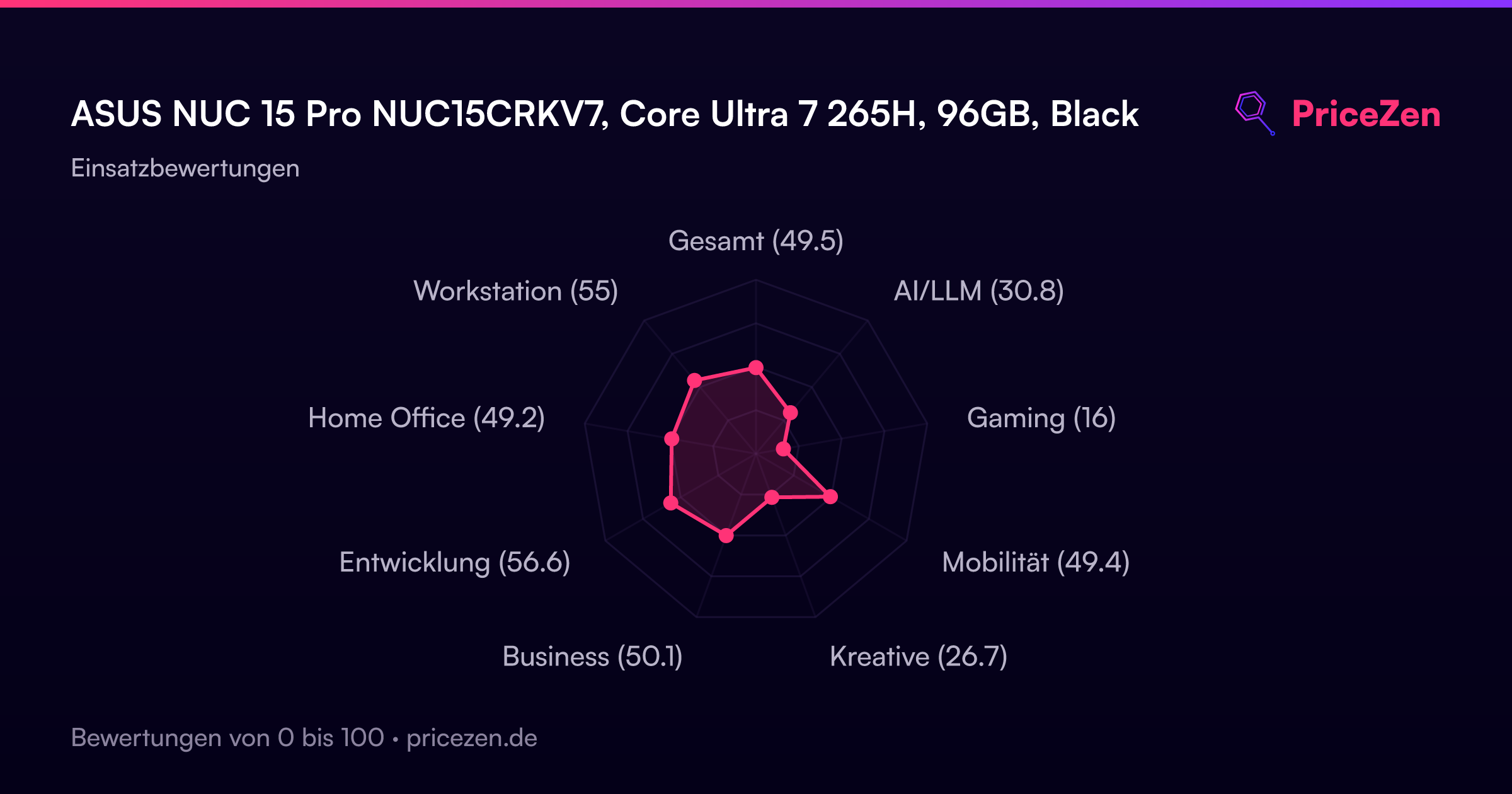
- Gesamt49.5
- AI/LLM30.8
- Gaming16
- Mobilität49.4
- Kreative26.7
- Business50.1
- Entwicklung56.6
- Home Office49.2
- Workstation55