Synology DiskStation DS1825+ 2025, Ryzen V1500B, 8GB, Schwarz
Der AMD Ryzen V1500B mit 4 Kernen und 2,2 GHz erreicht sequenzielle Lese-/Schreibraten von bis zu 2.239/1.573 MB/s, was für Büroanwendungen ausreicht. Integrierte 2,5GbE-Ports und die Unterstützung von 10GbE SFP+/RJ-45- sowie 25GbE SFP28-Adaptern ermöglichen flexible Netzwerkgeschwindigkeiten, während zwei DX525-Erweiterungseinheiten auf 18 Einschübe und 360 TB Rohspeicher erweitert werden können. Dieses NAS eignet sich am besten für kleine und mittlere Unternehmen, die eine skalierbare Speicherlösung für Backups, Synchronisierung und Überwachung benötigen, mit einer Kundenbewertung von 4,2/5 aus 4 Rezensionen.

Derzeit kein aktueller Händlerpreis
Überblick
The 30-Second Version
The DS1825+ is a boring, dependable storage workhorse that grows to 18 bays and 360 TB. Buy it for the office, not for fun.
Pros & Cons
Vorteile
- Scales to 18 bays and 360 TB with expansion units 76th
- Strong sequential read/write speeds for office workloads
- 2.5GbE built in, with 10GbE and 25GbE upgrade paths
- 3-year warranty, extendable to 5 years
Nachteile
- Diskless, so drives are a separate purchase
- 8GB of RAM is fine now but feels tight for heavy multitasking
- The Ryzen V1500B is not a powerhouse CPU
- No built-in 10GbE, you'll pay extra for that card
Was Besitzer sagen
The Word on the Street
Wie sich die Meinung der Besitzer im Lauf der Zeit verändert hat
ExklusivBasierend darauf, wann Kunden ihre Bewertungen tatsächlich geschrieben haben - so sehen Sie, ob das anfängliche Lob anhielt.
Die Fakten
Performance
Synology claims up to 2,239 MB/s sequential reads and 1,573 MB/s writes, and for a desktop NAS that's genuinely strong. The Ryzen V1500B is a low-power embedded chip, not a speed demon, but it's built for exactly this kind of always-on file serving. What surprised us is how well the networking options scale. Built-in 2.5GbE is nice, but the fact you can drop in a 25GbE SFP28 card later means this box can grow with your team instead of becoming e-waste in two years.
Specifications
Full Specifications
Processor
| CPU | AMD Ryzen V1500B |
| Cores | 4 |
| Frequency | 2.2 GHz |
| L3 Cache | 32 MB |
Memory & Storage
| RAM | 8 GB |
| RAM Generation | DDR4 |
| Storage Type | NVMe SSD |
Build
| Form Factor | desktop |
| Weight | 7.5 kg / 16.5 lbs |
Connectivity
| Ethernet | 2.5GbE |
System
| OS | Synology DiskStation Manager (DSM) |
vs Competition
The DS1825+ doesn't really compete with the Mac Studio M3 Ultra or gaming towers like the Legion Tower 5a, those are different animals entirely. The real comparison is against other Synology boxes and maybe QNAP's 8-bay lineup. Against a DS1821+, the DS1825+ gives you faster networking options and the same expansion story. If you're cross-shopping a QNAP TS-873A, the Synology wins on DSM polish and backup software, but QNAP often gives you more CPU and RAM for the money. For pure office file serving and backup, the DS1825+ is the safer, more boring choice, and boring is good here.
| Spec | Synology DiskStation DS1825+ | Apple Mac Studio M5 Max | Lenovo T Series Towers Legion Tower 5a Gen 10 | Dell Desktop ECT1250 | HP OMEN GT16-0364 | ASUS ROG GM700 |
|---|---|---|---|---|---|---|
| CPU | AMD Ryzen V1500B | Apple M5 Max | AMD Ryzen 7 7800X3D | Intel Core Ultra 7 265 | AMD Ryzen 7 8700F | AMD Ryzen 7 9800X3D |
| RAM (GB) | 8 | 36 | 32 | 32 | 32 | 32 |
| Storage (GB) | - | 1024 | 4096 | 2048 | 1024 | 2048 |
| GPU | - | Apple (32-Core) | NVIDIA GeForce RTX 5070 Ti | Intel UHD Graphics | NVIDIA GeForce RTX 5070 | NVIDIA GeForce RTX 5070 Ti |
| Form Factor | desktop | mini | mid-tower | sff | mid-tower | mid-tower |
| Psu W | - | 480 | 850 | 180 | 850 | 850 |
| OS | Synology DiskStation Manager (DSM) | macOS | Windows 11 Home | Windows 11 Home | Windows 11 Home | Windows 11 Home |
| Compare | Compare | Compare | Compare | Compare |
| Produkt | CPU | GPU | RAM | Anschlüsse | Speicher | User Sentiment | Zuverlässigkeit |
|---|---|---|---|---|---|---|---|
| Synology DiskStation DS1825+ | 6.7 | 8.1 | 9.1 | 12.7 | 1.8 | 75.9 | 11.6 |
| Apple Mac Studio M5 Max Compare | 95.7 | 85.2 | 92.4 | 88.9 | 68.8 | 95 | 99.3 |
| Lenovo T Series Towers Legion Tower 5a Gen 10 Compare | 73.4 | 94.6 | 77.9 | 88.3 | 98.1 | 95 | 70 |
| Dell Desktop ECT1250 Compare | 88.2 | 60.3 | 81.6 | 74.5 | 82.7 | 98.5 | 70 |
| HP OMEN GT16-0364 Compare | 69.5 | 90.8 | 87.1 | 97.9 | 53.5 | 98.5 | 70 |
| ASUS ROG GM700 Compare | 80.5 | 94.6 | 81.6 | 96 | 90 | 98.5 | 37.3 |
Preis
Value & Pricing
At around $1,150 USD diskless, this isn't cheap, but it's not outrageous for an 8-bay business NAS with this expansion ceiling. You'll spend real money on drives, but the chassis itself is a long-term investment. If you need 18 bays of raw storage without buying a rackmount server, this is one of the cleaner paths there.
Mehr erfahren
Overview
The Synology DS1825+ is an 8-bay NAS built for offices that need serious storage without the server-room drama. The headline here is expandability: slap on two DX525 units and you're looking at 18 bays and up to 360 TB of raw storage. That's a lot of spreadsheets. It's diskless, so budget for drives separately, but the 2.5GbE ports and optional 10GbE or 25GbE upgrades mean this thing won't choke when the whole office hits it at once.
Common Questions
Q: Does the DS1825+ come with hard drives?
No, it's diskless. You buy the drives separately, which stings at first but means you can pick the capacity and brand you actually want.
Q: How far can I expand this thing?
You can add two DX525 expansion units to hit 18 drive bays and up to 360 TB of raw storage. That's enough for a small company's entire data hoard.
Q: What kind of warranty does it have?
It comes with a 3-year limited hardware warranty, and in some markets you can extend that to 5 years. For a business NAS, that's solid peace of mind.
Who Should Skip This
If you're looking for a home media server with built-in 10GbE and a beefy CPU for transcoding, this isn't it. Go grab a QNAP with more RAM and a faster processor, or just build your own TrueNAS box and save some cash.
Verdict
Buy the DS1825+ if you run an office that's outgrowing smaller NAS boxes and you want something that scales to 18 bays without a rack. It's not exciting, but it's dependable, and the DSM software is still the best in the business. Skip it if you need raw compute power or built-in 10GbE without paying extra.
Usage Scores
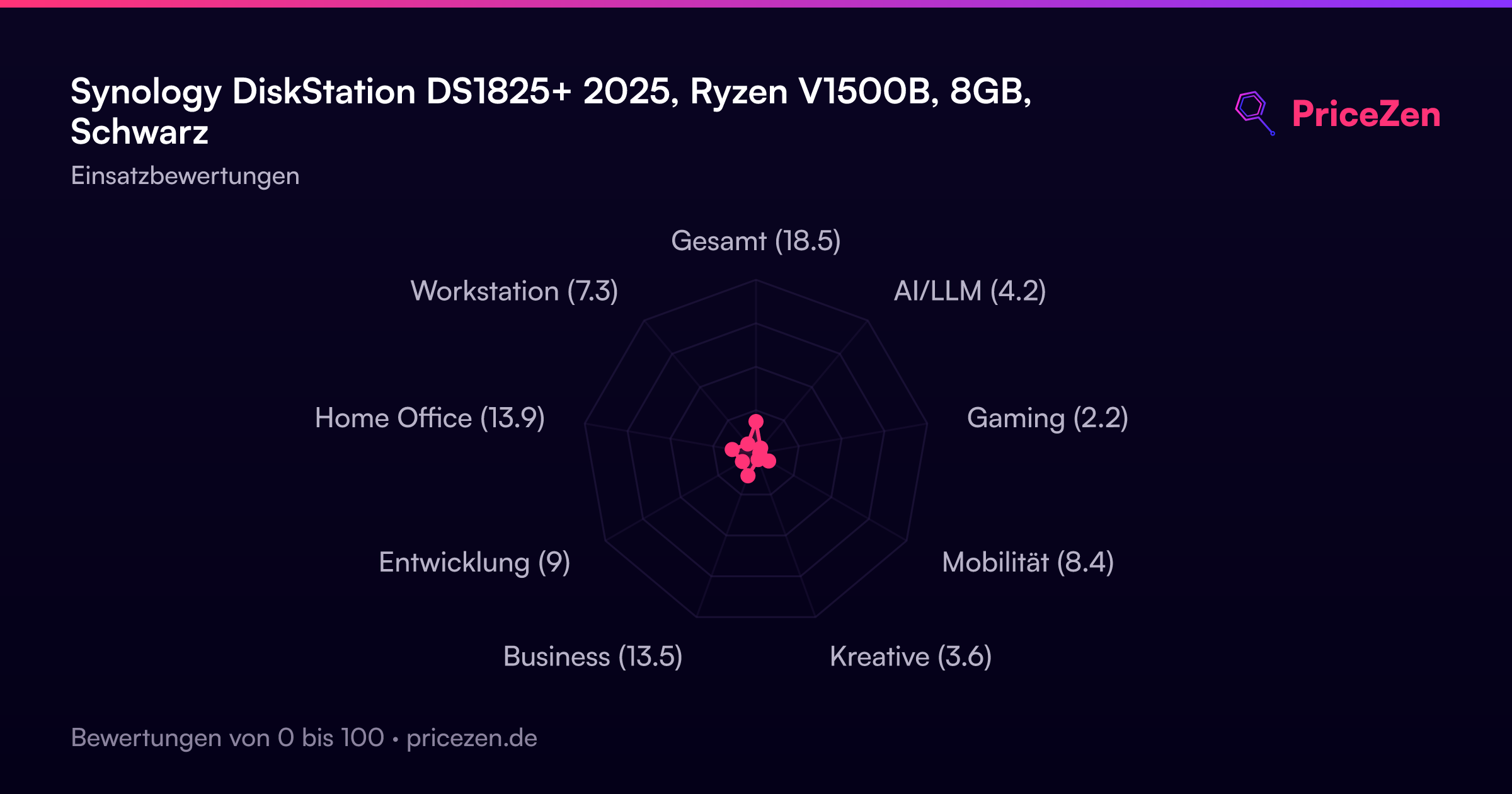
- Gesamt18.5
- AI/LLM4.2
- Gaming2.2
- Mobilität8.4
- Kreative3.6
- Business13.5
- Entwicklung9
- Home Office13.9
- Workstation7.3