ASUS Vivobook 14" LED Full HD 2025, Core i3-1315U, 16GB, 512GB SSD, Quiet Blue
Der Intel Core i3-1315U mit 6 Kernen, 16 GB DDR4-RAM und 512 GB NVMe-SSD bewältigt alltägliche Aufgaben flüssig, während das 14-Zoll-Full-HD-IPS-Display mit 250 Nits klare Bilder liefert. Mit 1,41 kg Gewicht und 45-Wh-Akku ist es tragbar und bietet einen vollständigen Anschluss-Satz inklusive USB-C und HDMI. Am besten geeignet für Studenten, die ein zuverlässiges, kompaktes Notebook für Notizen, Surfen und Büroarbeit benötigen, ohne Gaming-Anspruch.

Derzeit kein aktueller Händlerpreis
Überblick
The 30-Second Version
The ASUS Vivobook 14" LED Full HD is a budget Windows laptop at USD 397 with a Core i3-1315U, 16GB RAM and a 512GB NVMe SSD. It's a strong pick for students and everyday office work, but the Intel UHD graphics and 250-nit screen rule out gaming and outdoor use.
Pros & Cons
Vorteile
- 16GB RAM and a 512GB PCIe 4.0 SSD at under USD 400 83rd
- Strong value, well above average in our affordability ranking 80th
- Light at 1.41kg and just 0.78 inches thick
- Ethernet plus HDMI and three USB-A ports, rare on cheap thin laptops
- Full HD IPS panel rather than the TN screens common at this price
Nachteile
- Intel UHD graphics make gaming basically off the table
- 250-nit 60Hz screen is dim and below average overall
- Wi-Fi 5 only, no Wi-Fi 6
- 720p webcam looks dated on video calls
- Core i3 CPU falls behind most of the category under heavy load
Die Fakten
Performance
The i3-1315U lands in the lower-middle of our CPU rankings, around the 38th percentile against everything else in this category. In practice that means it's fine for Office, Google Docs, Zoom calls and 20 browser tabs, and it'll feel sluggish if you throw sustained multi-core work at it like big code compiles or long exports. The 16GB of RAM helps more than people expect here, since running out of memory is what makes cheap laptops feel awful, and 16GB is genuinely generous at this price even if DDR4-3200 isn't the fastest standard around. The 512GB PCIe 4.0 NVMe drive sits mid-pack for capacity but should keep boot and app loading snappy.
Graphics is the weak spot: Intel UHD ranks near the bottom quartile of our GPU data, and the 11.4/100 gaming score backs that up. Older indie titles and 2D games at low settings, sure. Modern AAA games, no. The display is a 250-nit 60Hz IPS panel, which our screen ranking places below average, so it's perfectly readable indoors but will wash out near a sunny window or outdoors. And with a 45Wh battery paired with a low-power U-series chip, you're looking at a machine built for classes and coffee shops rather than all-day unplugged marathons.
Specifications
Full Specifications
Processor
| CPU | Intel Core i3 1315U |
| Cores | 6 |
| Frequency | 3.5 GHz |
| L3 Cache | 10 MB |
Graphics
| GPU | Intel UHD Graphics |
| Type | Integrated |
| VRAM Type | Shared |
Memory & Storage
| RAM | 16 GB |
| RAM Generation | DDR4 |
| Storage | 512 GB |
| Storage Type | NVMe SSD |
Display
| Size | 14" |
| Resolution | 1920x1080 (Full HD) |
| Panel | IPS |
| Refresh Rate | 60 Hz |
| Brightness | 250 nits |
Connectivity
| USB-C Ports | 1 |
| USB Ports | 3 |
| HDMI | 1 x HDMI 1.4 |
| Wi-Fi | Wi-Fi 5 |
| Bluetooth | Yes |
| Ethernet | Gigabit Ethernet |
Physical
| Weight | 1.4 kg / 3.1 lbs |
| Battery | 45 Wh |
| OS | Windows 11 Home |
vs Competition
Cross-shopping the Apple MacBook Air 13.6" M4? That's a different tier of machine, and our rankings make the gap obvious: this Vivobook's CPU and GPU sit in the lower half of the category while its affordability sits near the top. If your budget can stretch, the Air is the better long-term buy. If it can't, the Vivobook still covers schoolwork and office tasks with 16GB of RAM and Windows 11 Home compatibility that some courses and workplaces require.
Against the Lenovo Slim 7 14" 83MC0001US and the HP OmniBook X Flip 14-fk0033dx, the argument for the ASUS is price and ports. It gives you Ethernet, HDMI 1.4 and three USB-A slots without dongles, at a price our data flags as a standout. The Samsung Galaxy Book5 Pro 14" NP944XHA-KG2US and Microsoft Surface Laptop 15" 7th Edition are the ones to look at if screen quality matters most to you, because the 250-nit 60Hz panel here is one of this laptop's clearest compromises.
| Spec | ASUS Vivobook 14" LED Full HD | Apple MacBook Pro 14.2" M4 Max | Lenovo Legion Pro 7i Gen 10 16" | HP OMEN Transcend | Samsung Galaxy Book5 Pro 14" NP944XHA-KG3US | Dell Premium 14.5" LDA14250-7667SLV-PUS |
|---|---|---|---|---|---|---|
| CPU | Intel Core i3 1315U | Apple M4 Max | Intel Core Ultra 9 275HX | Intel Core Ultra 9 285H | Intel Core Ultra 7 258V | Intel Core Ultra 7 255H |
| RAM (GB) | 16 | 64 | 32 | 32 | 32 | 32 |
| Storage (GB) | 512 | 4096 | 1024 | 1024 | 1024 | 1024 |
| Screen | 14" 1920x1080 | 14.2" 3024x1964 | 16" 2560x1600 | 14" 2880x1800 | 14" 2880x1800 | 14.5" 3200x2000 |
| GPU | Intel UHD Graphics | Apple (40-Core) | NVIDIA GeForce RTX 5070 Ti | NVIDIA GeForce RTX 5070 | Intel Arc Graphics 140V | Intel Arc Graphics |
| OS | Windows 11 Home | macOS | Windows 11 Home | Windows 11 Home | Windows 11 Pro | Windows 11 Home |
| Weight (kg) | 1.4 | 1.6 | 2.7 | 1.6 | 1.2 | 1.7 |
| Battery (Wh) | 45 | 72 | 99 | 71 | 63 | 62 |
| Compare | Compare | Compare | Compare | Compare |
| Produkt | CPU | GPU | RAM | Anschlüsse | Display | Mobilität | Speicher | Zuverlässigkeit | Affordability |
|---|---|---|---|---|---|---|---|---|---|
| ASUS Vivobook 14" LED Full HD | 37.4 | 28 | 36.1 | 41.7 | 30.4 | 79.6 | 50.9 | 60.6 | 82.5 |
| Apple MacBook Pro 14.2" M4 Max Compare | 93.7 | 91.6 | 95.7 | 73.2 | 99.3 | 68.8 | 98.5 | 98.3 | 1.7 |
| Lenovo Legion Pro 7i Gen 10 16" Compare | 97.2 | 96.6 | 89 | 97.2 | 95.6 | 9.5 | 79.2 | 82 | 5.5 |
| HP OMEN Transcend Compare | 90.1 | 93.6 | 89.7 | 89.3 | 96.5 | 72.2 | 65.2 | 33.6 | 8.4 |
| Samsung Galaxy Book5 Pro 14" NP944XHA-KG3US Compare | 65.8 | 69.7 | 79.5 | 83.1 | 91.5 | 89.5 | 79.2 | 82 | 20 |
| Dell Premium 14.5" LDA14250-7667SLV-PUS Compare | 87.1 | 69.7 | 89 | 65.9 | 97.2 | 61.1 | 65.2 | 33.6 | 14 |
Preis
Value & Pricing
At USD 397 from Newegg, this thing punches hard on the spec sheet. Our affordability ranking puts it well above average, and the combination of 16GB of RAM and a 512GB NVMe SSD is the kind of config you usually pay more for. We track its price over time, partly through our community browser extension, and the spread across the three US listings is tiny, so there's no clever waiting game to play here. The trade-offs are honest ones: dim screen, older Wi-Fi, weak graphics. You're buying memory, storage and portability, not polish.
Mehr erfahren
Overview
The ASUS Vivobook 14" LED Full HD is a budget 14-inch Windows laptop, and right now it sits at USD 397 to USD 399 across the three US listings we track, with Newegg cheapest at USD 397. For that money you get an Intel Core i3-1315U (6 cores, 8 threads, up to 4.5GHz), 16GB of DDR4-3200 RAM, a 512GB PCIe 4.0 NVMe SSD and Windows 11 Home on a 1920x1080 IPS panel. That's a lot of memory and storage for a sub-USD 400 machine.
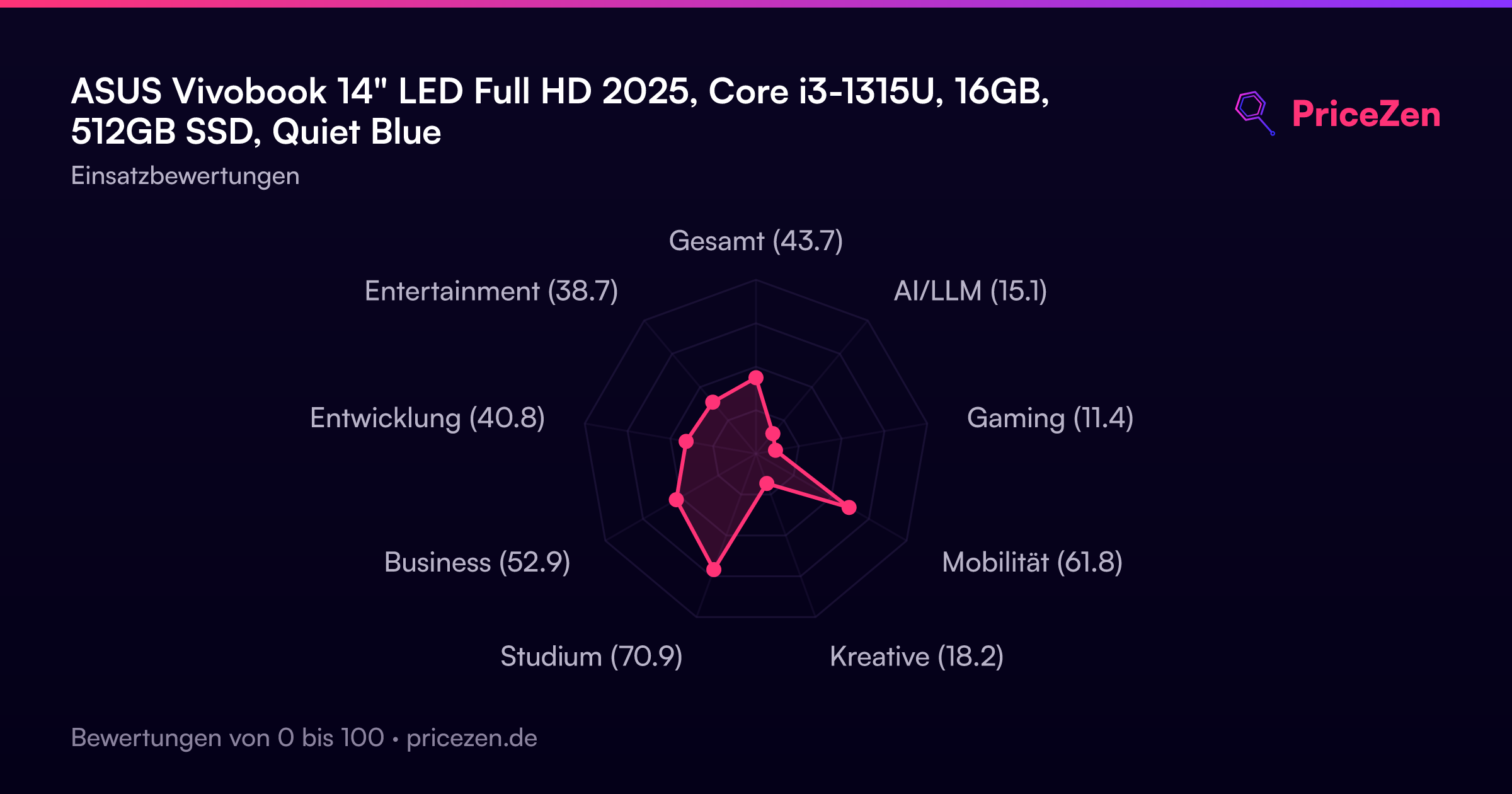
Our scoring model, built from specs and external benchmarks, puts it at 72.5/100 for students, 61.8 for compact carry and 52.9 for business use. Gaming is where it falls apart at 11.4/100, which is exactly what you'd expect from Intel UHD integrated graphics. So if you're searching for a cheap laptop for school, essays, spreadsheets and a browser full of tabs, this is aimed squarely at you. If you want to game or edit video, keep scrolling.
The physical side is sensible rather than exciting: 1.41kg (3.1 lbs), 0.78 inches thick, a 45Wh battery, and a port list that includes Ethernet, HDMI 1.4, one USB-C 3.2 and three USB-A ports. Wi-Fi is 5, not 6, and the webcam is 720p. Those are the corners that got cut to hit the price.
Common Questions
Q: Is the ASUS Vivobook 14 good for gaming?
No. Intel UHD integrated graphics score 11.4/100 in our gaming ranking, so stick to browser games and older 2D titles rather than anything modern.
Q: Is 16GB of RAM enough for college and multitasking?
Yes, 16GB of DDR4-3200 is plenty for essays, research tabs, Zoom and Office at once, and it's unusually generous on a laptop under USD 400.
Q: Can I connect this Vivobook to an external monitor?
You can, via the HDMI 1.4 port or the USB-C 3.2 port, and there's also Ethernet for wired networking plus three USB-A ports for peripherals.
Q: Is the 14-inch Full HD screen bright enough for outdoor use?
Not really. The 1920x1080 IPS panel is rated at 250 nits, which is fine indoors but struggles in direct sunlight, and our screen ranking puts it below average.
Who Should Skip This
Skip this if you game, edit video, do 3D work or spend hours outside, because the Intel UHD graphics and 250-nit 60Hz panel will frustrate you fast. Anyone needing Wi-Fi 6 or a sharp webcam for constant client calls should also look elsewhere. If your budget stretches, the Apple MacBook Air 13.6" M4 or Samsung Galaxy Book5 Pro 14" NP944XHA-KG2US are worth cross-shopping, and the Microsoft Surface Laptop 15" 7th Edition suits people who want more screen space.
Verdict
Should you buy the ASUS Vivobook 14" LED Full HD? If you're a student, a light office user or someone who needs a second Windows machine for under USD 400, yes. The 16GB of RAM, 512GB SSD, 1.41kg weight and real port selection add up to a practical daily driver, and our student score of 72.5/100 reflects that. Owners seem to agree, with a 4.8/5 rating across 20 reviews, though that's a small sample so treat it as encouraging rather than definitive.
But don't buy it hoping it'll grow into something more. The graphics and screen ceiling are fixed, and no amount of RAM changes that. Buy it for what it is: a cheap, light, well-specced Windows workhorse.
Usage Scores
- Gesamt43.7
- AI/LLM15.1
- Gaming11.4
- Mobilität61.8
- Kreative18.2
- Studium70.9
- Business52.9
- Entwicklung40.8
- Entertainment38.7