ZENAERO ExceBook 15.6" N5095 2025, Intel Jasper Lake N5095, 16GB, 512GB SSD, Gray
Der Intel Jasper Lake N5095 mit vier Kernen und bis zu 2,9 GHz Takt, kombiniert mit 16 GB LPDDR4-RAM und einer 512 GB NVMe-SSD, liefert solide Leistung für den Alltag. Das 15,6-Zoll-IPS-Display mit Full-HD-Auflösung und 178° Blickwinkel sowie die weiße Tastaturbeleuchtung in zwei Stufen erhöhen den Bedienkomfort. Mit nur 1,36 kg ist dieses Notebook ideal für Studierende, die ein leichtes Gerät für Büroarbeit, Internet und Medienwiedergabe suchen.

Derzeit kein aktueller Händlerpreis











Überblick
The 30-Second Version
The ZENAERO ExceBook N5095 packs 16GB of RAM and a 512GB NVMe SSD into a lightweight 1.36kg chassis at a very low price. The catch is the Intel N5095 CPU, which sits in the 12th percentile for performance and makes this a basic productivity machine only. At GBP 371, it's a solid deal for students and light office work, but the weak processor and 4th percentile reliability score mean it's not for demanding users.
Pros & Cons
Vorteile
- 16GB of RAM is generous at this price point and keeps multitasking smooth 95th
- 512GB NVMe SSD with up to 2100MB/s speeds means fast boot and app loading
- Very light at 1.36kg, easy to carry around campus or between job sites
- Windows 11 Pro included, which is rare for budget laptops
- Backlit keyboard and fingerprint reader are nice touches you don't always get at this price
Nachteile
- N5095 CPU sits in the 12th percentile for performance, one of the weakest we've tracked
- Integrated UHD 600 graphics make gaming essentially off the table
- Only 2 USB-A ports and 1 USB-C, port selection is limited
- WiFi 5 and Bluetooth 4.2 are outdated standards in 2025
- Reliability score in the 4th percentile is a serious red flag
Was Besitzer sagen
The Word on the Street
Wie sich die Meinung der Besitzer im Lauf der Zeit verändert hat
ExklusivBasierend darauf, wann Kunden ihre Bewertungen tatsächlich geschrieben haben - so sehen Sie, ob das anfängliche Lob anhielt.
1 geschriebene Rezension, Dez. 2023: 1 zufrieden
Über alle 4 Shop-Bewertungen: 5,0★. Die meisten Besitzer bewerten, ohne eine Rezension zu schreiben. Das Diagramm zählt die 1 geschriebene Rezension.
Jeder Punkt ist eine geschriebene Rezension, im Monat, in dem sie verfasst wurde. Zufrieden = 4-5★, gemischt = 3★, unzufrieden = 1-2★.
Die Fakten
Performance
Let's talk about that N5095 chip. It's a 4-core, 4-thread processor with a 2.0GHz base clock and up to 2.9GHz turbo. The 15W TDP means it sips power, which is great for battery life and fan noise, but it also means there's a hard ceiling on what it can do. In our database, this CPU lands in the 12th percentile for performance. That's not a typo. It's one of the weakest processors we've tracked in a modern laptop. For basic tasks like web browsing, word processing, and light multitasking, it's fine. But throw anything heavier at it, like photo editing or running multiple demanding apps, and you'll feel the slowdown immediately.
The integrated Intel UHD Graphics 600 is even more limited. It's a 9GB shared VRAM setup, but that number is misleading. The GPU itself is one of the weakest integrated solutions Intel has produced, landing in the 28th percentile for graphics performance. The gaming score of 4.8 out of 100 tells the real story. This is not a gaming laptop. Not even close. You can play Solitaire and maybe some 2D indie titles, but anything 3D from the last decade will struggle. The 16GB of RAM helps with multitasking, and the 512GB NVMe SSD with up to 2100MB/s read speeds means apps load quickly. But the CPU and GPU are the bottlenecks, and they're significant ones.
Specifications
Full Specifications
Processor
| CPU | Intel Jasper Lake N5095 |
| Cores | 4 |
| Frequency | 2.0 GHz |
Graphics
| GPU | Intel UHD Graphics 600 |
| Type | Integrated |
| VRAM Type | Shared |
Memory & Storage
| RAM | 16 GB |
| RAM Generation | LPDDR4 |
| Storage | 512 GB |
| Storage Type | NVMe SSD |
Display
| Size | 15.6" |
| Resolution | 1920x1080 (Full HD) |
| Panel | IPS |
Connectivity
| USB-C Ports | 1 |
| USB Ports | 2 |
| HDMI | HD port |
| Wi-Fi | WiFi 5 |
| Bluetooth | Bluetooth 4.2 |
Physical
| Weight | 1.6 kg / 3.4 lbs |
| OS | Windows 11 Pro |
vs Competition
When you stack this against the competition, the picture gets clearer. The Lenovo Slim 7 and ASUS Zenbook UX3402VA are in a completely different league. Those machines have proper performance CPUs and GPUs, better displays, and more ports. They also cost significantly more. The Apple MacBook Air M2 is another universe entirely, with the M2 chip absolutely demolishing the N5095 in every benchmark we track. But again, you're paying a premium for that performance.
The HP OmniBook X Flip and Samsung Galaxy Book6 Pro are similar stories. They're premium ultrabooks with better screens, faster processors, and more modern connectivity. The ZENAERO's WiFi 5 and Bluetooth 4.2 feel dated next to the WiFi 6E and Bluetooth 5.3 you'll find on those machines. The real question is whether you need that extra performance. If you're just doing basic tasks, the ZENAERO gets you 80% of the way there for a fraction of the price. If you need to do real work, the extra money for a Lenovo or ASUS is well spent.
| Spec | ZENAERO ExceBook 15.6" N5095 | Apple MacBook Pro 14.2" M4 Max | ASUS ROG Zephyrus 14" GA403WW-G14.R95080 | Lenovo Legion Pro 7i Gen 10 16" | HP OMEN Transcend | Samsung Galaxy Book5 Pro 14" NP944XHA-KG3US |
|---|---|---|---|---|---|---|
| CPU | Intel Jasper Lake N5095 | Apple M4 Max | AMD Ryzen AI 9 HX 370 | Intel Core Ultra 9 275HX | Intel Core Ultra 9 285H | Intel Core Ultra 7 258V |
| RAM (GB) | 16 | 64 | 32 | 32 | 32 | 32 |
| Storage (GB) | 512 | 4096 | 2048 | 1024 | 1024 | 1024 |
| Screen | 15.6" 1920x1080 | 14.2" 3024x1964 | 14" 2880x1800 | 16" 2560x1600 | 14" 2880x1800 | 14" 2880x1800 |
| GPU | Intel UHD Graphics 600 | Apple (40-Core) | NVIDIA GeForce RTX 5080 | NVIDIA GeForce RTX 5070 Ti | NVIDIA GeForce RTX 5070 | Intel Arc Graphics 140V |
| OS | Windows 11 Pro | macOS | Windows 11 Home | Windows 11 Home | Windows 11 Home | Windows 11 Pro |
| Weight (kg) | 1.6 | 1.6 | 1.6 | 2.7 | 1.6 | 1.2 |
| Battery (Wh) | - | 72 | - | 99 | 71 | 63 |
| Compare | Compare | Compare | Compare | Compare |
| Produkt | CPU | GPU | RAM | Anschlüsse | Display | Mobilität | Speicher | Zuverlässigkeit | Nutzerresonanz | Affordability |
|---|---|---|---|---|---|---|---|---|---|---|
| ZENAERO ExceBook 15.6" N5095 | 13.4 | 28.1 | 36.2 | 23.1 | 38.8 | 55.4 | 50.8 | 4 | 57.3 | 94.9 |
| Apple MacBook Pro 14.2" M4 Max Compare | 93.7 | 91.6 | 95.7 | 73.2 | 99.3 | 68.9 | 98.5 | 98.3 | 73.3 | 1.7 |
| ASUS ROG Zephyrus 14" GA403WW-G14.R95080 Compare | 91.2 | 98.3 | 90.9 | 89.2 | 96.5 | 73.6 | 89.7 | 60.6 | 96.5 | 5.7 |
| Lenovo Legion Pro 7i Gen 10 16" Compare | 97.2 | 96.6 | 89 | 97.2 | 95.6 | 9.5 | 79.2 | 82.1 | 99.7 | 5.5 |
| HP OMEN Transcend Compare | 90.1 | 93.6 | 89.7 | 89.2 | 96.5 | 72.3 | 65.1 | 33.6 | 94.1 | 8.3 |
| Samsung Galaxy Book5 Pro 14" NP944XHA-KG3US Compare | 65.7 | 69.6 | 79.4 | 83.1 | 91.5 | 89.5 | 79.2 | 82.1 | 96.5 | 20.1 |
Preis
Value & Pricing
Here's where things get interesting. The affordability score is in the 95th percentile, which means this is one of the cheapest laptops in our entire database relative to what you get. The GBP 371 price tag is genuinely low for a laptop with 16GB of RAM and a 512GB SSD. Most machines with those specs cost significantly more. The INR 70,659 and MXN 6,632 listings tell the same story in their respective markets. This is a budget laptop through and through, and the price reflects that.
But value isn't just about the sticker price. It's about what you're getting for that money. And here's the trade-off: you're getting great RAM and storage specs paired with a very weak CPU and GPU. It's like putting premium tires on a car with a small engine. The tires are great, but they won't make the car go faster. For basic productivity, this is a solid deal. For anything more demanding, you'd be better off saving up for something with a stronger processor, even if it means settling for less RAM or storage.
Mehr erfahren
Overview
The ZENAERO ExceBook N5095 is one of those laptops that makes you do a double take at the spec sheet. 16GB of RAM, a 512GB NVMe SSD, Windows 11 Pro, and a 15.6-inch FHD IPS display, all wrapped in a 1.36kg chassis. On paper, that's a lot of laptop for what this thing costs. And that's exactly the pitch here: maximum specs per dollar, aimed at students and anyone who needs a basic workhorse without emptying their wallet.
But here's the thing. The CPU inside is an Intel Jasper Lake N5095, a 4-core, 4-thread chip from Intel's budget line. It's not a performance monster. It's a low-power SoC designed for basic tasks, web browsing, document editing, and light media consumption. The 16GB of RAM is generous, but it's paired with a processor that sits in the 12th percentile for CPU performance in our database. That's a real mismatch, and it tells you exactly who this laptop is for: people who need lots of open tabs and documents, not people who need raw processing power.
So who's the target? Students, small business owners doing paperwork, and anyone who wants a lightweight Windows 11 machine for everyday tasks. The customer reviews, all four of them, are from business owners using it for work orders and parts research. That's the sweet spot. If your workload is email, spreadsheets, and web research, this thing will feel surprisingly capable. If you're hoping to edit video or play games, keep walking.
Common Questions
Q: Can this laptop handle gaming?
No, not really. The integrated Intel UHD Graphics 600 is one of the weakest GPUs we've tracked, landing in the 28th percentile for graphics performance. The gaming score of 4.8 out of 100 confirms it. You can play basic 2D games and older titles, but anything 3D from the last decade will struggle or be unplayable.
Q: Is 16GB of RAM enough for multitasking?
Yes, 16GB is plenty for the kind of work this laptop is designed for. You can keep dozens of browser tabs open, run multiple office applications, and switch between them without issues. The RAM is actually one of the strongest specs here, sitting in the 37th percentile, which is solid for a budget machine.
Q: How good is the battery life?
We don't have specific battery life data for this model, but the 15W TDP of the N5095 processor suggests it should be decent for basic tasks. Low-power chips like this tend to sip battery, so you can likely expect a full day of light use. However, without official numbers, we can't give a precise estimate.
Q: Is this laptop good for students?
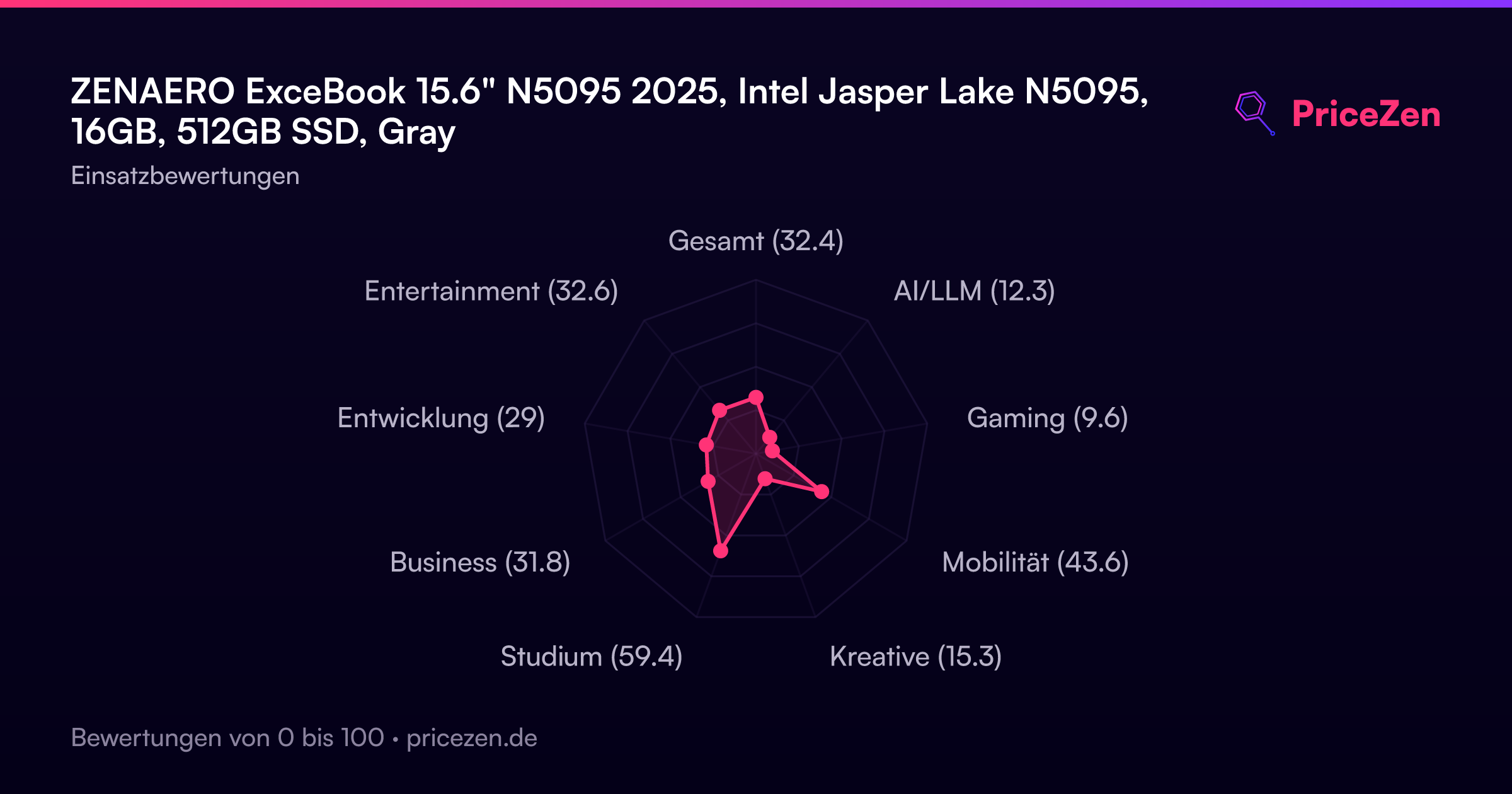
For most students, yes. The student score of 28.3 out of 100 is the highest of any use case for this machine. It's lightweight, has a good display for reading, and the 16GB of RAM handles research and writing tasks well. Just don't expect it to run demanding software like CAD programs or video editing suites.
Who Should Skip This
If you need to do any kind of creative work, programming with heavy IDEs, or gaming, this laptop will frustrate you. The N5095 CPU simply doesn't have the horsepower for those tasks, and the integrated graphics are a non-starter for anything 3D. You'd be better off looking at something with at least an Intel Core i5 or AMD Ryzen 5 processor, even if it means spending more or settling for less RAM.
Also, if you need modern connectivity, skip this. WiFi 5 and Bluetooth 4.2 are dated standards, and the port selection is limited with just 2 USB-A ports and 1 USB-C. If you use multiple peripherals or need fast wireless speeds, look at machines with WiFi 6 or 6E and more ports. The Lenovo Slim 7 or ASUS Zenbook lines are good places to start.
Verdict
For students and small business owners who need a basic Windows machine for documents, web research, and light multitasking, the ZENAERO ExceBook N5095 is a genuinely good deal. The 16GB of RAM means you can keep dozens of browser tabs open without the system grinding to a halt, and the 512GB SSD gives you plenty of room for files. The backlit keyboard and fingerprint reader are nice bonuses at this price. The 1.36kg weight makes it easy to toss in a bag and carry all day.
But if you need to do anything beyond basic productivity, look elsewhere. Video editing, photo work, programming with heavy IDEs, or any kind of gaming will frustrate you on this machine. The CPU is simply too weak. And the reliability score in the 4th percentile is concerning. With only 4 customer reviews, all positive but all from the same type of user, there's not much data to go on. But that low reliability percentile suggests we've seen issues with similar budget machines in this category. For a student on a tight budget, it's worth considering. For anyone else, save up for something with a stronger processor.
Usage Scores
- Gesamt32.3
- AI/LLM12.3
- Gaming9.6
- Mobilität43.6
- Kreative15.3
- Studium59.4
- Business31.8
- Entwicklung29
- Entertainment32.6