HP Chromebook 14" HP 2023, Celeron N4120, 4GB, 64GB eMMC, Black
Der Intel Celeron N4120 mit 4 Kernen und bis zu 2,6 GHz sowie 4 GB LPDDR4x-RAM sorgen für flüssiges Multitasking, während das 14-Zoll-HD-Display mit Antireflexbeschichtung klare Bilder liefert. Mit bis zu 14 Stunden Akkulaufzeit und Schnellladung von 50 % in etwa 45 Minuten ist dieses Chromebook für den ganzen Tag geeignet. Es ist ideal für Studenten, die ein leichtes, zuverlässiges Gerät für Surfen, Dokumente und Online-Kurse benötigen.

Derzeit kein aktueller Händlerpreis
Hier haben wir es zuletzt gesehen. Den aktuellen Preis zeigt der Händler.










Überblick
The 30-Second Version
The HP Chromebook 14 is a cheap, long-lasting laptop for basic schoolwork and browsing. Its best feature is the battery life, and its biggest weakness is the low-res screen and sluggish Celeron CPU. Worth buying if you need a simple, affordable Chromebook and nothing more.
Pros & Cons
Vorteile
- Excellent battery life, up to 14 hours claimed 97th
- Very affordable, 97th percentile for price 90th
- Lightweight and compact for a 14-inch laptop 74th
- Solid port selection with USB-C, USB-A, and HDMI
Nachteile
- Screen resolution is a low 1366x768
- Only 64GB of storage, and it's slow eMMC
- 4GB of RAM chokes on multitasking
- CPU is one of the slowest we've seen
Was Besitzer sagen
The Word on the Street
Wie sich die Meinung der Besitzer im Lauf der Zeit verändert hat
ExklusivBasierend darauf, wann Kunden ihre Bewertungen tatsächlich geschrieben haben - so sehen Sie, ob das anfängliche Lob anhielt.
9 geschriebene Rezensionen, Aug. 2025 – Feb. 2026: 8 zufrieden, 1 unzufrieden
Über alle 193 Shop-Bewertungen: 4,5★. Die meisten Besitzer bewerten, ohne eine Rezension zu schreiben. Das Diagramm zählt die 9 geschriebenen Rezensionen.
Jeder Punkt ist eine geschriebene Rezension, im Monat, in dem sie verfasst wurde. Zufrieden = 4-5★, gemischt = 3★, unzufrieden = 1-2★.
Die Fakten
Performance
The Celeron N4120 is a quad-core chip with a 1.1GHz base clock and 2.6GHz boost. In our database, it lands in the 3rd percentile for CPU performance, which means it's slower than almost everything else we've tested. The 4GB of RAM sits at the 2nd percentile, so multitasking is tight. You can run a few Chrome tabs and a document, but push it past that and things start to crawl. The integrated Intel UHD 600 graphics are also near the bottom at the 28th percentile. This is not a machine for games or photo editing. For basic web work, it's fine. For anything heavier, it's a struggle.
Specifications
Full Specifications
Processor
| CPU | Intel Celeron N4120 |
| Cores | 4 |
| Frequency | 1.1 GHz |
Graphics
| GPU | Intel UHD Graphics 600 |
| Type | Integrated |
| VRAM Type | Shared |
Memory & Storage
| RAM | 4 GB |
| RAM Generation | LPDDR4X |
| Storage | 64 GB |
| Storage Type | eMMC |
Display
| Size | 14" |
| Resolution | 1366x768 |
Connectivity
| USB-C Ports | 1 |
| USB Ports | 2 |
| HDMI | 1 x HDMI |
| Bluetooth | Yes |
Physical
| Weight | 1.5 kg / 3.4 lbs |
| OS | ChromeOS |
vs Competition
Stacked against something like the Lenovo ThinkPad X1 Carbon or Apple MacBook Pro 16, this HP is in a completely different league. Those machines cost several times more and offer vastly better screens, CPUs, and build quality. But that's not a fair fight. The more realistic comparison is other budget Chromebooks. The Acer Aspire A14-52M-72FH, for example, offers a similar experience but with a better screen in some configurations. The Dell Latitude 7430 is a business machine with a much stronger CPU and more RAM, but it costs significantly more. If you're choosing between this HP and a used ThinkPad or Latitude, the used business laptop will almost always be faster and better built, though you'll lose the long battery life and ChromeOS simplicity.
| Spec | HP Chromebook 14" HP | Apple MacBook Pro 14.2" M4 Pro | ASUS ROG Zephyrus 14" GA403WW-G14.R95080 | Lenovo Legion Pro 7i Gen 10 16" | Samsung Galaxy Book5 Pro 14" NP944XHA-KG3US | Dell Premium 14.5" LDA14250-7667SLV-PUS |
|---|---|---|---|---|---|---|
| CPU | Intel Celeron N4120 | Apple M4 Pro | AMD Ryzen AI 9 HX 370 | Intel Core Ultra 9 275HX | Intel Core Ultra 7 258V | Intel Core Ultra 7 255H |
| RAM (GB) | 4 | 48 | 32 | 32 | 32 | 32 |
| Storage (GB) | 64 | 4096 | 2048 | 1024 | 1024 | 1024 |
| Screen | 14" 1366x768 | 14.2" 3024x1964 | 14" 2880x1800 | 16" 2560x1600 | 14" 2880x1800 | 14.5" 3200x2000 |
| GPU | Intel UHD Graphics 600 | Apple (16-Core) | NVIDIA GeForce RTX 5080 | NVIDIA GeForce RTX 5070 Ti | Intel Arc Graphics 140V | Intel Arc Graphics |
| OS | ChromeOS | macOS | Windows 11 Home | Windows 11 Home | Windows 11 Pro | Windows 11 Home |
| Weight (kg) | 1.5 | 1.6 | 1.6 | 2.7 | 1.2 | 1.7 |
| Battery (Wh) | - | 72 | - | 99 | 63 | 62 |
| Compare | Compare | Compare | Compare | Compare |
| Produkt | CPU | GPU | RAM | Anschlüsse | Display | Mobilität | Speicher | Zuverlässigkeit | Nutzerresonanz | Affordability |
|---|---|---|---|---|---|---|---|---|---|---|
| HP Chromebook 14" HP | 3.5 | 28.3 | 2.4 | 25.5 | 4 | 74.4 | 3.7 | 33.7 | 90.4 | 96.6 |
| Apple MacBook Pro 14.2" M4 Pro Compare | 92.4 | 78.9 | 90.6 | 73.9 | 99.1 | 68.9 | 98.4 | 98.2 | 99.7 | 4.7 |
| ASUS ROG Zephyrus 14" GA403WW-G14.R95080 Compare | 91.2 | 98.3 | 90.8 | 89.5 | 96 | 73.6 | 89.7 | 60.6 | 95.6 | 6.1 |
| Lenovo Legion Pro 7i Gen 10 16" Compare | 97.2 | 96.7 | 89 | 97.3 | 95 | 9.5 | 79.3 | 82 | 99.7 | 5.9 |
| Samsung Galaxy Book5 Pro 14" NP944XHA-KG3US Compare | 65.8 | 69.7 | 79.5 | 83.5 | 90.3 | 89.4 | 79.3 | 82 | 95.6 | 21.3 |
| Dell Premium 14.5" LDA14250-7667SLV-PUS Compare | 87 | 69.7 | 89 | 66.7 | 96.8 | 61.3 | 65.4 | 33.7 | 95.6 | 14.8 |
Preis
Value & Pricing
At around $222 USD, this Chromebook is dirt cheap. It's in the 97th percentile for affordability, which means you're getting a functional laptop for less than a decent phone. The trade-off is performance and screen quality. If you need a second machine for travel or a first laptop for a kid, the value is hard to beat. But if you can stretch your budget by $100 or so, you'll get a much better display and more RAM, which will make a bigger difference than you'd think.
Mehr erfahren
Overview
The HP Chromebook 14 is a budget machine aimed squarely at students and anyone who lives in a browser. It packs an Intel Celeron N4120, 4GB of RAM, and 64GB of eMMC storage. That's about as entry-level as it gets in 2024, but for the price, it's not pretending to be anything else.
HP claims up to 14 hours of battery life and throws in fast charging, which is a nice touch for a laptop this cheap. The 14-inch HD display is anti-glare and micro-edge, but the 1366x768 resolution is a throwback. If you just need something to write papers, watch lectures, and check email, this will do the job. Just don't expect it to do much more.
Common Questions
Q: Can this Chromebook run Android apps?
Yes, ChromeOS supports Android apps through the Google Play Store, so you can install apps like Zoom, Microsoft Office, and many others. Just keep in mind the 4GB of RAM and slow storage will limit how many apps you can run smoothly at once.
Q: Is the screen good enough for watching movies?
The 14-inch HD display is anti-glare and fine for casual viewing, but the 1366x768 resolution is low by modern standards. Text and video will look softer than on a Full HD panel, so don't expect sharp detail.
Q: How much storage do I actually get?
The laptop has 64GB of eMMC storage, but ChromeOS and system files take up some of that space. You'll likely have around 40-45GB free for apps and downloads, so cloud storage or a microSD card is a good idea for extra files.
Who Should Skip This
Skip this if you need to run demanding software, edit photos or video, or play games. The Celeron N4120 and 4GB of RAM will choke on anything beyond basic web apps. Also skip it if you care about screen quality, the 1366x768 panel is one of the worst we've seen. If you need more storage, look elsewhere, because 64GB fills up fast and eMMC is slow.
Verdict
This is a student laptop, plain and simple. If you need something to take notes, write essays, and watch YouTube, it's a solid pick at this price. The battery life is a real highlight, and ChromeOS keeps things simple and secure. But if you're a creator, a gamer, or someone who keeps 20 tabs open, this machine will frustrate you. Buy it for what it is, not what you wish it were.
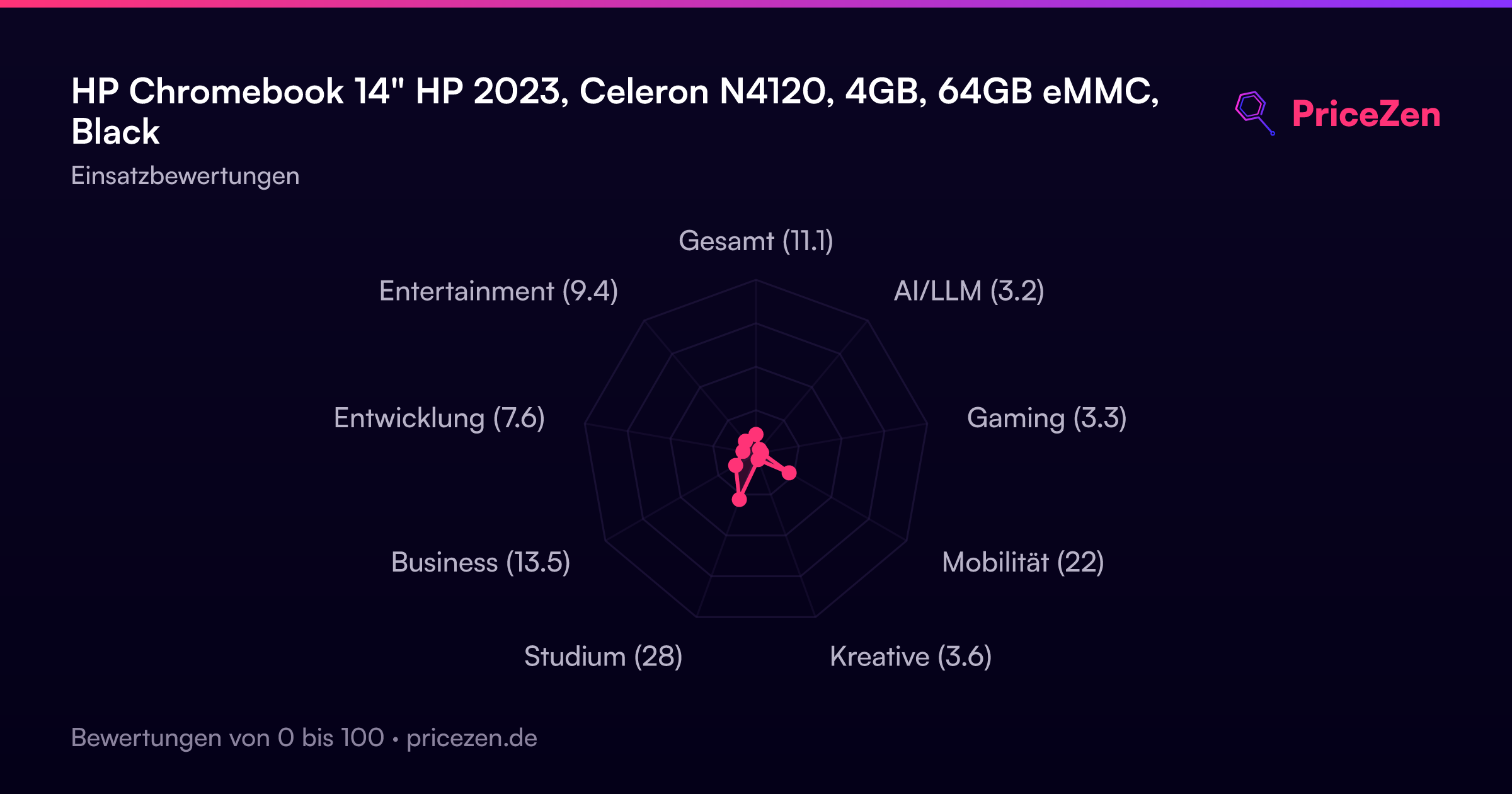
Usage Scores
- Gesamt11.1
- AI/LLM3.2
- Gaming3.3
- Mobilität22
- Kreative3.6
- Studium28
- Business13.5
- Entwicklung7.6
- Entertainment9.4