HP 14-dq0000 2024, Celeron N4120, 16GB, 384GB eMMC + 256GB, Rose Gold
Der Intel Celeron N4120 Quad-Core-Prozessor und 16 GB DDR4-RAM bewältigen alltägliches Multitasking, Streaming und Surfen ohne Anstrengung. Das 14-Zoll-HD-Display mit BrightView und Micro-Edge-Design bietet weite Blickwinkel, während HP Fast Charge in 45 Minuten 50 % erreicht und ein einjähriges Office-365-Abonnement enthalten ist. Dieses erneuerte Notebook eignet sich für Studenten und preisbewusste Nutzer, die ein tragbares, zuverlässiges Gerät für Notizen, Recherche und leichte Produktivität benötigen.

Derzeit kein aktueller Händlerpreis











Überblick
The 30-Second Version
The Celeron N4120 ranks in the bottom handful of CPUs in this category, and the 1366x768 220-nit screen is nearly dead last. Yet 242 owners give it 4.3/5 and it's one of the most affordable laptops we track, from USD 300. Great cheap student box at the low price, poor value at Amazon's USD 499.
Pros & Cons
Vorteile
- One of the most affordable laptops in our rankings, with listings from USD 300 93rd
- 4.3/5 across 242 reviews puts it among the best-liked machines we track 89th
- 16GB of DDR4 is a lot of memory at this price
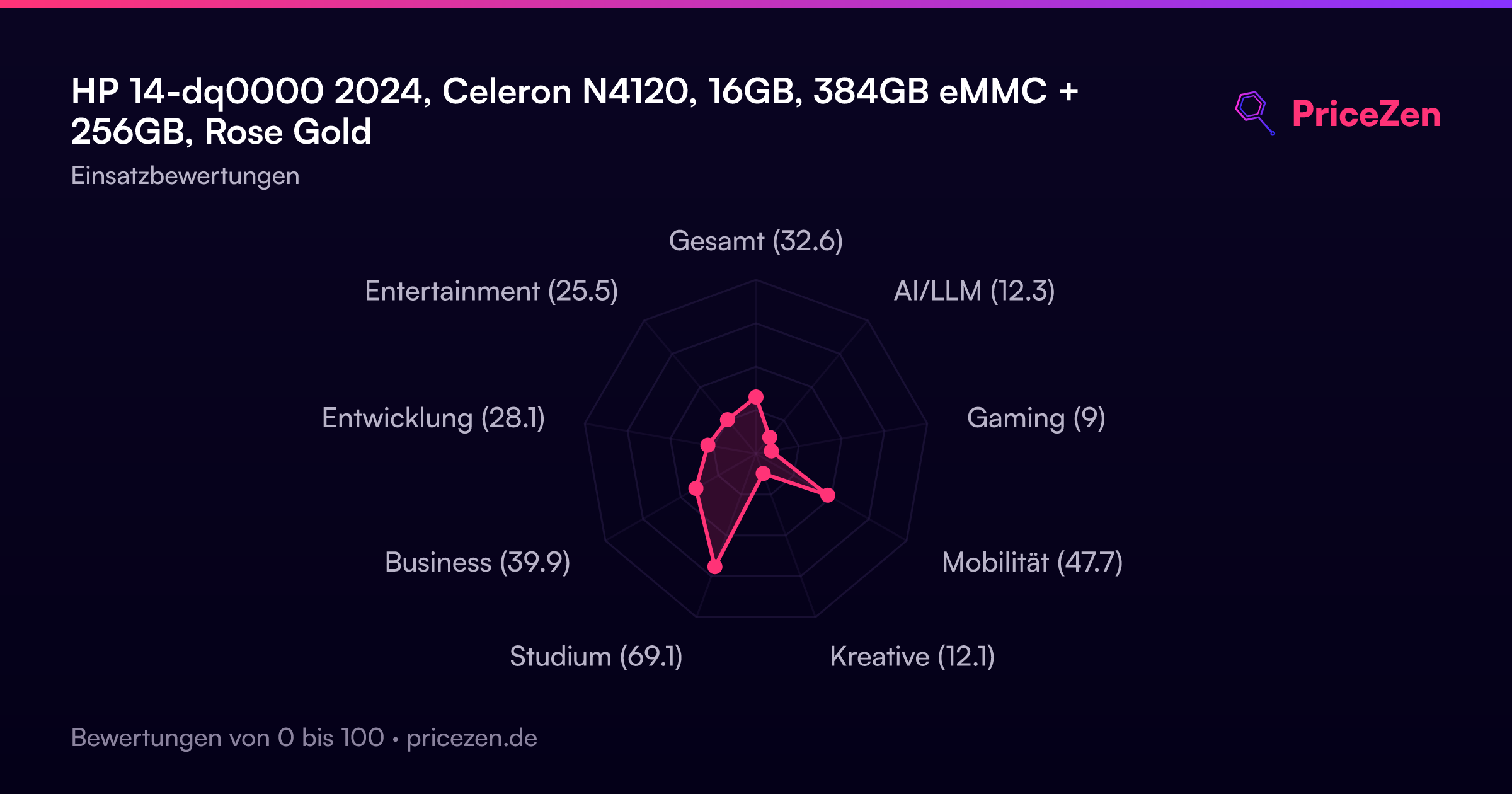
- Best-fit score of 72.2/100 for students, its strongest use case
- Year of Office 365 included, plus 0 to 50% charge in a claimed 45 minutes
Nachteile
- Celeron N4120 (1.1GHz base, 2.6GHz boost) is one of the weakest CPUs in the category
- 1366x768 at 220 nits is one of the worst screens we've seen here
- Gaming scores 9.2/100, and integrated UHD graphics lag behind most rivals
- 256GB of the 384GB total lives on an SD card, not internal storage
- 2.01kg and a 48.2/100 compact score mean it's not really a grab-and-go machine
Was Besitzer sagen
The Word on the Street
Wie sich die Meinung der Besitzer im Lauf der Zeit verändert hat
ExklusivBasierend darauf, wann Kunden ihre Bewertungen tatsächlich geschrieben haben - so sehen Sie, ob das anfängliche Lob anhielt.
8 geschriebene Rezensionen, Juli–Dez. 2025: 6 zufrieden, 1 gemischt, 1 unzufrieden
Über alle 242 Shop-Bewertungen: 4,3★. Die meisten Besitzer bewerten, ohne eine Rezension zu schreiben. Das Diagramm zählt die 8 geschriebenen Rezensionen.
Jeder Punkt ist eine geschriebene Rezension, im Monat, in dem sie verfasst wurde. Zufrieden = 4-5★, gemischt = 3★, unzufrieden = 1-2★.
Die Fakten
Performance
Start with the chip, because it's the bottleneck. The Celeron N4120 is a 4-core part with a 1.1GHz base clock and a 2.6GHz boost, and in our CPU ranking it sits near dead last against other traditional laptops. Pair that with integrated Intel UHD Graphics, which falls behind most of the field, and you've got a machine built for browser tabs, documents and video calls, not for anything that asks the processor to work hard. The 16GB of DDR4 helps it juggle a lot of tabs without choking, though our RAM ranking still only puts it in mediocre territory for this category, where the bar has moved on.
Storage is the other thing to understand before you buy: 128GB of eMMC plus a 256GB SD card. eMMC is not an SSD, and both storage and port selection land in disappointing territory in our rankings, even with 1x USB-C 3.0, 2x USB-A 3.0, HDMI 1.4, a microSD slot and Wi-Fi 5 on board. The screen is the real weak spot: 1366x768 across 14 inches at 220 nits ranks second-from-the-bottom in our data. Owners say it looks clear enough indoors for assignments and streaming, and we believe them, but 220 nits near a sunny window is a fight you'll lose. HP's fast charge claim of 0 to 50% in 45 minutes is nice; actual battery capacity isn't listed, and one owner flatly says the runtime disappoints.
Specifications
Full Specifications
Processor
| CPU | Intel Celeron N4120 |
| Cores | 4 |
| Frequency | 2.6 GHz |
Graphics
| GPU | Intel UHD Graphics |
| Type | Integrated |
| VRAM Type | Shared |
Memory & Storage
| RAM | 16 GB |
| RAM Generation | DDR4 |
| Storage 1 | 384 GB |
| Storage 1 Type | eMMC |
| Storage 2 | 256 GB |
Display
| Size | 14" |
| Resolution | 1366x768 |
| Brightness | 220 nits |
Connectivity
| USB-C Ports | 1 |
| USB Ports | 2 |
| HDMI | HDMI 1.4 |
| Wi-Fi | Wi-Fi 5 |
| Bluetooth | ✓ |
Physical
| Weight | 2.0 kg / 4.4 lbs |
| OS | Windows 11 Home |
vs Competition
Against the Apple MacBook Air 13.3" M1, Lenovo ThinkPad X1 Carbon 14" 21KC00A8US, ASUS Vivobook 14" TP3407SA-DS74T, Samsung Galaxy Book4 Edge 16" NP960XMA-KB1US and MSI Prestige 16 Evo 15.6" PRE16EVO13407, the HP wins on exactly two axes in our data: affordability, where it's a standout, and owner sentiment, where 242 reviews at 4.3/5 put it near the top. Everywhere else it's playing defense. Its CPU ranks in the bottom handful of the category, its screen ranks second-from-last, and its GPU, storage and ports all fall behind most of the field. If your workload is essays, spreadsheets and lecture videos and your budget tops out around USD 300, cross-shop it against nothing, just buy it. If you can stretch to a Vivobook 14 or a MacBook Air M1, do that instead, because a 41.1/100 business score and a 9.2/100 gaming score tell you this machine has no headroom to grow into.
| Spec | HP 14-dq0000 | Apple MacBook Pro 14.2" M4 Max | ASUS ROG Zephyrus 14" GA403WW-G14.R95080 | Lenovo Legion Pro 7i Gen 10 16" | Samsung Galaxy Book5 Pro 14" NP944XHA-KG3US | MSI Raider 16" RAIDERGE6814247 |
|---|---|---|---|---|---|---|
| CPU | Intel Celeron N4120 | Apple M4 Max | AMD Ryzen AI 9 HX 370 | Intel Core Ultra 9 275HX | Intel Core Ultra 7 258V | Intel Core i9 14900HX |
| RAM (GB) | 16 | 64 | 32 | 32 | 32 | 32 |
| Storage (GB) | 384 | 4096 | 2048 | 1024 | 1024 | 2048 |
| Screen | 14" 1366x768 | 14.2" 3024x1964 | 14" 2880x1800 | 16" 2560x1600 | 14" 2880x1800 | 16" 3840x2160 |
| GPU | Intel UHD Graphics | Apple (40-Core) | NVIDIA GeForce RTX 5080 | NVIDIA GeForce RTX 5070 Ti | Intel Arc Graphics 140V | NVIDIA GeForce RTX 4070 |
| OS | Windows 11 Home | macOS | Windows 11 Home | Windows 11 Home | Windows 11 Pro | Windows 11 Home |
| Weight (kg) | 2 | 1.6 | 1.6 | 2.7 | 1.2 | 2.7 |
| Battery (Wh) | - | 72 | - | 99 | 63 | 100 |
| Compare | Compare | Compare | Compare | Compare |
| Produkt | CPU | GPU | RAM | Anschlüsse | Display | Mobilität | Speicher | Zuverlässigkeit | Nutzerresonanz | Affordability |
|---|---|---|---|---|---|---|---|---|---|---|
| HP 14-dq0000 | 3.3 | 28.2 | 36.3 | 27.9 | 1.7 | 63.7 | 28 | 33.5 | 93.3 | 89.2 |
| Apple MacBook Pro 14.2" M4 Max Compare | 93.7 | 91.7 | 95.7 | 73.3 | 99.3 | 68.9 | 98.5 | 98.1 | 87.7 | 1.7 |
| ASUS ROG Zephyrus 14" GA403WW-G14.R95080 Compare | 91.3 | 98.4 | 90.9 | 89.3 | 96.5 | 73.6 | 89.8 | 60.4 | 98.4 | 5.6 |
| Lenovo Legion Pro 7i Gen 10 16" Compare | 97.3 | 96.7 | 89.1 | 97.2 | 95.7 | 9.5 | 79.4 | 81.8 | 99.9 | 5.4 |
| Samsung Galaxy Book5 Pro 14" NP944XHA-KG3US Compare | 65.9 | 69.8 | 79.6 | 83.2 | 91.6 | 89.4 | 79.4 | 81.8 | 98.4 | 20.1 |
| MSI Raider 16" RAIDERGE6814247 Compare | 93.2 | 95.5 | 86.4 | 98.6 | 98 | 9.3 | 94 | 60.4 | 50.2 | 10.2 |
Preis
Value & Pricing
In USD we're tracking a spread of USD 199, from USD 300 up to USD 499, and the only per-store price we have right now is Amazon at USD 499, which is the top of that range. At USD 300 the argument writes itself: 16GB of RAM, Office 365 for a year and a 4.3/5 owner rating for the price of a decent monitor. At USD 499 you're paying near-full budget-laptop money for a bottom-tier CPU and a bottom-tier screen, and that's a much harder sell. There's also a Mexican listing at MXN 15,827 if you're shopping there. We track prices over time, partly through our community browser extension, so if you want this one, wait for the low end rather than paying the ceiling.
Mehr erfahren
Overview
4.3 out of 5 from 242 owners, and our ranking puts it in the top tier for social proof and among the most affordable traditional laptops we track. That's the pitch: a cheap, well-liked machine that people actually buy and keep. Then you look at the spec sheet. The Intel Celeron N4120 lands in the bottom handful of CPUs in this category, and the 14-inch 1366x768 panel at 220 nits is one of the worst screens we've seen here. Those two numbers explain almost everything about this laptop.
The rest is a strange mix. You get 16GB of DDR4, which is generous for the money, plus 384GB of storage split as 128GB eMMC and a 256GB SD card, Windows 11 Home in S Mode, and a year of Office 365 thrown in. Our scoring gives it 72.2/100 for students, 48.2 for compact use and 41.1 for business. Gaming sits at 9.2/100, which is the polite way of saying don't. We collect specs, prices and owner reviews across stores with our own system and rank every laptop against the others in its category, so this isn't a vibe, it's where the numbers land.
Common Questions
Q: Can it handle gaming or video editing?
No. Our gaming score for it is 9.2/100, the weakest area by far, and the integrated Intel UHD Graphics falls behind most laptops in this category. The 4-core Celeron N4120 boosts to 2.6GHz but ranks near the bottom for CPU performance, so treat this as a documents-and-browser machine.
Q: Is 384GB of storage really 384GB inside the laptop?
Not quite. It's 128GB of eMMC plus a 256GB SD card, so most of your space sits on removable media rather than internal storage. eMMC is slower than an SSD, and our storage ranking puts this setup in disappointing territory for the category.
Q: Do I need to get out of Windows 11 S Mode?
If you want to install anything outside the Microsoft Store, yes. It ships with Windows 11 Home in S Mode, and switching out is free through Settings, Activation and the Store. With 16GB of DDR4 on board, memory won't be your limit once you do, the N4120 will be.
Who Should Skip This
Anyone who needs the screen to be good should walk away: 1366x768 at 220 nits ranks second-from-the-bottom in our data, so photo work, design or long reading sessions are a bad fit. Gamers are out at 9.2/100. Anyone buying it as a work machine should think twice given the 41.1/100 business score and a CPU near the bottom of the category. And if you want something genuinely pocketable, 2.01kg and a 48.2/100 compact score aren't it, whatever the marketing photos suggest. Battery capacity isn't listed and at least one owner calls the runtime a letdown, so road warriors should look elsewhere too.
Verdict
Buy it at USD 300 for schoolwork and browsing, skip it at USD 499. The 72.2/100 student score is the honest summary: 16GB of RAM, a bundled Office year and a 4.3/5 rating from 242 owners make it a genuinely useful cheap laptop. But the N4120 sits near the bottom of our CPU ranking and the 220-nit 1366x768 panel is one of the worst we track, so this is a machine you tolerate, not one you enjoy. Nobody can pay us to soften that. If the price is right and your expectations are calibrated, it does the job.
Usage Scores
- Gesamt34.4
- AI/LLM12.6
- Gaming9.2
- Mobilität48.2
- Kreative12.4
- Studium71.2
- Business41.1
- Entwicklung29.3
- Entertainment27