ASUS ExpertBook 14" B1403CVA-XS54 2025, Core i5-1335U, 16GB, 512GB SSD, RTX 4070, Eclipse Gray
Der Intel Core i5-1335U mit 16 GB DDR5-RAM bewältigt anspruchsvolle Multitasking-Aufgaben, während das 14-Zoll-IPS-Display mit 300 Nits und 100 % sRGB für klare Farben sorgt. Mit 1,40 kg und einem 50-Wh-Akku ist er leicht und mobil, dazu kommen USB-C, HDMI, Ethernet und Wi-Fi 6E für flexible Anschlüsse. Ideal für Studenten und alle, die ein kompaktes, vielseitiges Business-Notebook für den täglichen Einsatz suchen.

Derzeit kein aktueller Händlerpreis
Überblick
The 30-Second Version
The ASUS ExpertBook B1 is a solid, lightweight business laptop with great ports and 16GB of RAM. It's not a performance monster, but it handles office work without drama. At $880, it's a fair deal for the right buyer.
Pros & Cons
Vorteile
- Lightweight at 1.40kg, easy to toss in a bag 97th
- Full port selection including Ethernet and HDMI 96th
- 16GB of DDR5 RAM is plenty for multitasking 81st
- Military-grade durability rating for clumsy coworkers
Nachteile
- Integrated graphics are weak, even for light gaming
- 512GB storage fills up fast
- 300-nit display is dim for outdoor use
- CPU performance is middle of the pack
Die Fakten
Performance
The Core i5-1335U is a 10-core chip that handles everyday business tasks without breaking a sweat. Our database puts it at the 45th percentile for CPU performance, which sounds mediocre until you remember this thing sips power. The 16GB of DDR5 RAM is right at the 50th percentile, and it's enough for a dozen browser tabs, Slack, and a few Office apps running simultaneously. The 512GB SSD sits at the 36th percentile, which is a bit tight if you hoard files locally. The integrated Intel UHD Graphics are, well, integrated. Don't expect to game on this. The 28th percentile GPU score tells you everything. This is a work machine, not a play machine.
Specifications
Full Specifications
Processor
| CPU | Intel Core i5 1335U |
| Cores | 10 |
| Frequency | 3.6 GHz |
| L3 Cache | 12 MB |
Graphics
| GPU | NVIDIA GeForce RTX 4070 |
| Type | Discrete |
| VRAM | 12 GB |
| VRAM Type | GDDR6X |
Memory & Storage
| RAM | 16 GB |
| RAM Generation | DDR4 |
| Storage | 512 GB |
| Storage Type | SSD |
Display
| Size | 14" |
| Resolution | 1920x1080 (Full HD) |
| Panel | IPS |
| Refresh Rate | 60 Hz |
| Brightness | 300 nits |
| Color Gamut | 100% sRGB |
Connectivity
| USB-C Ports | 2 |
| USB Ports | 4 |
| HDMI | HDMI 1.4b |
| Wi-Fi | 802.11ax |
| Bluetooth | Bluetooth 5.3 |
| Ethernet | RJ45 |
Physical
| Weight | 1.4 kg / 3.1 lbs |
| Battery | 50 Wh |
| OS | Windows 11 Pro |
vs Competition
Stacked against the Apple MacBook Air M4, the ExpertBook loses on raw performance and battery life, but wins on ports and price. The MacBook Air is a better machine overall, but it costs more and forces you into dongle territory. The Lenovo Legion 5i and MSI Raider are gaming laptops that crush this thing on GPU performance, but they're heavier and pricier. The HP OmniBook X Flip is a closer competitor, offering a convertible design and better screen, but you'll pay for that flexibility. The Dell Premium is another solid business option, but the ExpertBook's port selection gives it an edge for IT departments.
| Spec | ASUS ExpertBook 14" B1403CVA-XS54 | Apple MacBook Pro 14.2" M4 Max | Lenovo Legion Pro 7i Gen 10 16" | HP OMEN Transcend | Samsung Galaxy Book5 Pro 14" NP944XHA-KG3US | Dell Premium 14.5" LDA14250-7667SLV-PUS |
|---|---|---|---|---|---|---|
| CPU | Intel Core i5 1335U | Apple M4 Max | Intel Core Ultra 9 275HX | Intel Core Ultra 9 285H | Intel Core Ultra 7 258V | Intel Core Ultra 7 255H |
| RAM (GB) | 16 | 64 | 32 | 32 | 32 | 32 |
| Storage (GB) | 512 | 4096 | 1024 | 1024 | 1024 | 1024 |
| Screen | 14" 1920x1080 | 14.2" 3024x1964 | 16" 2560x1600 | 14" 2880x1800 | 14" 2880x1800 | 14.5" 3200x2000 |
| GPU | NVIDIA GeForce RTX 4070 | Apple (40-Core) | NVIDIA GeForce RTX 5070 Ti | NVIDIA GeForce RTX 5070 | Intel Arc Graphics 140V | Intel Arc Graphics |
| OS | Windows 11 Pro | macOS | Windows 11 Home | Windows 11 Home | Windows 11 Pro | Windows 11 Home |
| Weight (kg) | 1.4 | 1.6 | 2.7 | 1.6 | 1.2 | 1.7 |
| Battery (Wh) | 50 | 72 | 99 | 71 | 63 | 62 |
| Compare | Compare | Compare | Compare | Compare |
| Produkt | CPU | GPU | RAM | Anschlüsse | Display | Mobilität | Speicher | Zuverlässigkeit | Affordability |
|---|---|---|---|---|---|---|---|---|---|
| ASUS ExpertBook 14" B1403CVA-XS54 | 44.6 | 95.5 | 36.2 | 97.2 | 53 | 80.9 | 35.7 | 60.6 | 50.8 |
| Apple MacBook Pro 14.2" M4 Max Compare | 93.7 | 91.6 | 95.7 | 73.2 | 99.3 | 68.9 | 98.5 | 98.3 | 1.7 |
| Lenovo Legion Pro 7i Gen 10 16" Compare | 97.2 | 96.6 | 89 | 97.2 | 95.6 | 9.5 | 79.2 | 82 | 5.5 |
| HP OMEN Transcend Compare | 90.1 | 93.6 | 89.7 | 89.2 | 96.5 | 72.2 | 65.2 | 33.6 | 8.3 |
| Samsung Galaxy Book5 Pro 14" NP944XHA-KG3US Compare | 65.8 | 69.7 | 79.4 | 83.1 | 91.5 | 89.5 | 79.2 | 82 | 20 |
| Dell Premium 14.5" LDA14250-7667SLV-PUS Compare | 87.1 | 69.7 | 89 | 65.9 | 97.2 | 61.1 | 65.2 | 33.6 | 14 |
Preis
Value & Pricing
At $880 USD, this is a fair price for a business laptop with Windows 11 Pro and a solid build. You're not getting a bargain, but you're not getting ripped off either. The affordability score lands at the 51st percentile, which is about as average as it gets. For a corporate fleet purchase, the durability and port selection justify the cost. For a personal buy, you might find better specs for the same money if you're willing to sacrifice the business features.
Mehr erfahren
Overview
The ASUS ExpertBook B1 B1403CVA-XS54 is a business laptop that knows exactly what it is. A 14-inch, 1.40kg machine with a Core i5-1335U, 16GB of DDR5, and a 512GB SSD. It's not trying to be a gaming rig or a creator workstation. It's built for spreadsheets, video calls, and surviving a commute.
And honestly, it nails that brief. The port selection is refreshingly complete for 2025. You get two USB-C, two USB-A, HDMI, and even Ethernet. No dongle life required. The 300-nit anti-glare display won't win any color grading awards, but it's fine for office work and bright enough for most indoor settings.
Common Questions
Q: Can this laptop handle light gaming?
Not really. The integrated Intel UHD Graphics score in the 28th percentile, so even older games will struggle at 1080p. Stick to productivity tasks and maybe some very light indie games.
Q: Is the display bright enough for outdoor use?
At 300 nits, it's fine for indoor offices and classrooms, but direct sunlight will wash it out. If you work outside often, look for something with 400+ nits.
Q: How does the battery life hold up for a full workday?
The 50Wh battery paired with the efficient Core i5-1335U should get you through a typical 8-hour workday of web browsing and document editing. Heavy video calls will drain it faster.
Who Should Skip This
Skip this if you need any kind of graphical horsepower. Video editors, 3D modelers, and even casual gamers will be frustrated by the integrated graphics. Also skip it if you need lots of local storage, 512GB disappears quickly with modern file sizes. And if you work outside often, the 300-nit display will have you squinting.
Verdict
This is a laptop for office workers, students on a budget, and IT managers who need reliable fleet machines. If you live in Excel, Outlook, and Teams, the ExpertBook B1 will serve you well. The lightweight design and full port selection make it a practical daily driver. Just don't expect it to do anything beyond business tasks.
Usage Scores
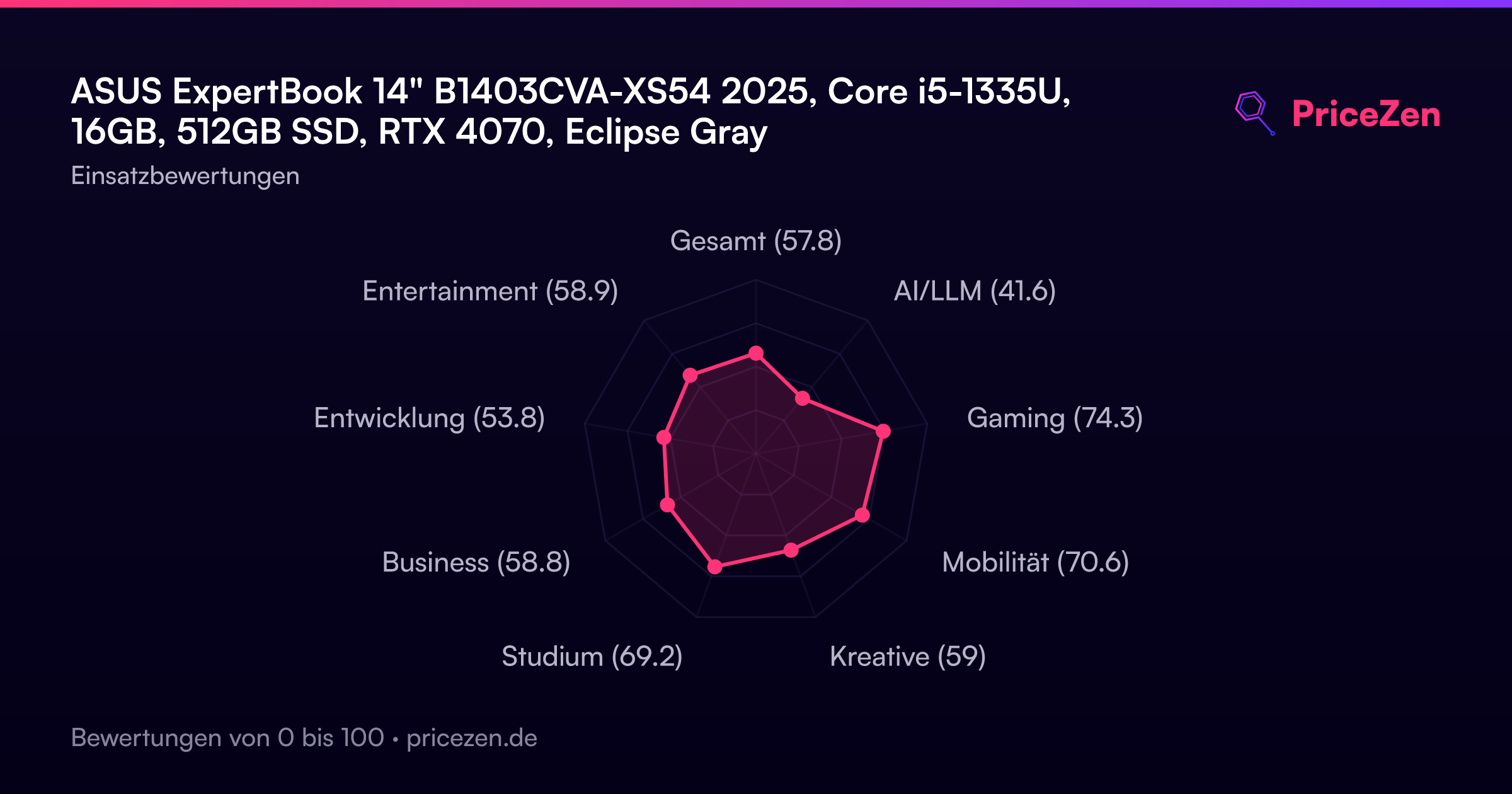
- Gesamt57.8
- AI/LLM41.6
- Gaming74.3
- Mobilität70.6
- Kreative59
- Studium69.2
- Business58.8
- Entwicklung53.8
- Entertainment58.9