Dell Latitude 11.6" 3140 2023, Intel N100, 4GB, 64GB SSD
Der Intel N100 Quad-Core-Prozessor und 4 GB RAM bewältigen einfache Aufgaben, während das 11,6-Zoll-HD-TN-Display und die 64-GB-SSD den Speicher begrenzen. Mit 5,39 kg ist es für ein kompaktes Notebook schwer, aber Wi-Fi 6 und Windows 11 Pro Education bieten Konnektivität und Softwarewert. Am besten geeignet für Studenten, die ein günstiges, robustes Gerät für Surfen und Textverarbeitung brauchen, nicht für Gaming.

Derzeit kein aktueller Händlerpreis











Überblick
The 30-Second Version
The Latitude 3140 is a CAD 400 classroom-and-kiosk machine, not a daily driver. Its standout traits are size and price, both near the top of our rankings, while the 4GB of soldered RAM and 1366x768 TN screen sit at the very bottom. The N100 chip and 64GB drive handle one task at a time and nothing more. Buy it for a fleet or a light-duty second machine, skip it if it's your only computer.
Pros & Cons
Vorteile
- CAD 400 at Newegg, one of the cheapest laptops in our pricing data 97th
- Top-tier compactness score, 97th percentile against every laptop we track 93rd
- Windows 11 Pro Education included, not a stripped-down home edition
- Wi-Fi 6 plus a webcam, so video calls and modern networks are covered
- Fanless-class N100 chip sips power, ideal for single-task kiosk or classroom duty
Nachteile
- 4GB of soldered RAM, near the very bottom of our memory rankings with no upgrade path
- 64GB of storage is one of the smallest capacities we track
- 1366x768 TN panel ranks dead last in our screen scoring
- Only one HDMI output and a port score that lags behind most laptops
- Gaming score of 2.4/100 and below-average integrated graphics rule out anything demanding
Was Besitzer sagen
The Word on the Street
Die Fakten
Performance
The Intel N100 is a four-core efficiency chip clocked at 0.7GHz base, and our CPU ranking puts it in disappointing territory, well behind most laptops we compare. In practice that means it's fine for one thing at a time: a document, a video call, a single browser window with a couple of tabs. Push past that and you'll feel it. The bigger bottleneck is memory, though. 4GB on board, with no expansion path since it's soldered, is one of the worst RAM configurations in our data. Windows 11 Pro alone eats a big chunk of that before you've opened anything, so heavy tab habits or multiple apps side by side will push the system into swapping onto that 64GB drive. And 64GB fills up faster than people expect once Windows updates start stacking up.
Graphics are integrated Intel UHD, which ranks below average even among integrated solutions, and the gaming score of 2.4/100 is about as clear a "don't" as our model produces. Video playback and classroom software are the realistic ceiling. The display holds things back too: 1366x768 on an 11.6" TN panel means limited vertical space for documents and spreadsheets, plus the washed-out viewing angles TN is known for. Owners rating it 3.9/5 across three reviews suggests people who bought it for light work are broadly okay with it, but that's a tiny sample and our social proof ranking reflects how little feedback exists. One oddity worth flagging: the listed weight is 5.39kg, which doesn't square with an 11.6" clamshell, so treat that figure as a listing quirk rather than something you'll be carrying.
Specifications
Full Specifications
Processor
| CPU | Intel Processor N100 |
| Cores | 4 |
| Frequency | 700 MHz |
| L3 Cache | 6 MB |
Graphics
| GPU | Intel UHD Graphics |
| Type | Integrated |
| VRAM Type | Shared |
Memory & Storage
| RAM | 4 GB |
| Storage | 64 GB |
| Storage Type | SSD |
Display
| Size | 11.6" |
| Resolution | 1366x768 |
| Panel | TN |
Connectivity
| HDMI | 1 x HDMI |
| Wi-Fi | Wi-Fi 6 |
| Bluetooth | Yes |
Physical
| Weight | 5.4 kg / 11.9 lbs |
| OS | Windows 11 Pro |
vs Competition
The competitors our system pairs this with are in a completely different class, and that's the point. The Apple MacBook Air 13.6" M4, the Lenovo Slim 7 14" 83MC0001US and the Samsung Galaxy Book5 Pro 14" NP944XHA-KG2US are all machines people buy as their one and only computer. Against them, the Latitude 3140 wins on exactly two axes: it's smaller and it costs far less. On everything else it gives ground, and not narrowly. Its CPU ranks in disappointing territory, its 4GB of RAM is close to the worst we track, and its 1366x768 TN screen is the lowest-ranked display in the whole set. If you're deciding between this and any of those three, you're not really cross-shopping, you're deciding whether you need a real computer or a terminal.
The ASUS Vivobook Pro 15 N6506CU-PS97 and HP OmniBook X Flip 14-fk0033dx are the ones to look at if you want a machine that handles creative work or heavier multitasking, because the Latitude's 2.4/100 gaming score and below-average GPU ranking make it a non-starter there. Where the Dell earns its place is fleet buying. When you need ten identical, cheap, small Windows machines for a classroom or a checkout counter, the per-unit price and the Pro Education license matter more than benchmark position. Buy one of the others for yourself. Buy a stack of these for a room.
| Spec | Dell Latitude 11.6" 3140 | Apple MacBook Pro 14.2" M4 Max | ASUS ROG Zephyrus 14" GA403WW-G14.R95080 | Lenovo Legion Pro 7i Gen 10 16" | HP OMEN Transcend | Samsung Galaxy Book5 Pro 14" NP944XHA-KG3US |
|---|---|---|---|---|---|---|
| CPU | Intel Processor N100 | Apple M4 Max | AMD Ryzen AI 9 HX 370 | Intel Core Ultra 9 275HX | Intel Core Ultra 9 285H | Intel Core Ultra 7 258V |
| RAM (GB) | 4 | 64 | 32 | 32 | 32 | 32 |
| Storage (GB) | 64 | 4096 | 2048 | 1024 | 1024 | 1024 |
| Screen | 11.6" 1366x768 | 14.2" 3024x1964 | 14" 2880x1800 | 16" 2560x1600 | 14" 2880x1800 | 14" 2880x1800 |
| GPU | Intel UHD Graphics | Apple (40-Core) | NVIDIA GeForce RTX 5080 | NVIDIA GeForce RTX 5070 Ti | NVIDIA GeForce RTX 5070 | Intel Arc Graphics 140V |
| OS | Windows 11 Pro | macOS | Windows 11 Home | Windows 11 Home | Windows 11 Home | Windows 11 Pro |
| Weight (kg) | 5.4 | 1.6 | 1.6 | 2.7 | 1.6 | 1.2 |
| Battery (Wh) | - | 72 | - | 99 | 71 | 63 |
| Compare | Compare | Compare | Compare | Compare |
| Produkt | CPU | GPU | RAM | Anschlüsse | Display | Mobilität | Speicher | Zuverlässigkeit | Nutzerresonanz | Affordability |
|---|---|---|---|---|---|---|---|---|---|---|
| Dell Latitude 11.6" 3140 | 16.3 | 28.2 | 2.3 | 18.6 | 0.3 | 96.8 | 4.6 | 33.5 | 8.9 | 92.7 |
| Apple MacBook Pro 14.2" M4 Max Compare | 93.7 | 91.6 | 95.7 | 73.3 | 99.3 | 68.9 | 98.5 | 98.1 | 87.7 | 1.7 |
| ASUS ROG Zephyrus 14" GA403WW-G14.R95080 Compare | 91.3 | 98.4 | 90.9 | 89.3 | 96.5 | 73.6 | 89.8 | 60.4 | 98.4 | 5.6 |
| Lenovo Legion Pro 7i Gen 10 16" Compare | 97.2 | 96.7 | 89.1 | 97.2 | 95.6 | 9.5 | 79.4 | 81.8 | 99.9 | 5.4 |
| HP OMEN Transcend Compare | 90.2 | 93.6 | 89.8 | 89.3 | 96.5 | 72.3 | 65.3 | 33.5 | 97.3 | 8.3 |
| Samsung Galaxy Book5 Pro 14" NP944XHA-KG3US Compare | 65.8 | 69.7 | 79.6 | 83.2 | 91.6 | 89.4 | 79.4 | 81.8 | 98.4 | 20.1 |
Preis
Value & Pricing
At CAD 400 from Newegg, this is genuinely cheap, and our affordability ranking puts it in the top tier of everything we track. For a school buying a cart of them, or a small business that needs a reception terminal running a browser all day, the math works. You get a proper Windows 11 Pro Education license, Wi-Fi 6 and a webcam in a package small enough to toss in a bag. Nothing else in our comparison set is playing at this end of the price scale.
But cheap and good value aren't the same thing. The 4GB RAM ceiling means this machine has a short useful life if your workload grows at all, and there's no fixing it later because the memory is on board. Our reliability ranking sits below the middle of the pack too, so we wouldn't assume long-term durability just because it wears a Latitude badge. If you can stretch the budget, stretching it is the smarter move. If CAD 400 is a hard wall, this is a reasonable way to spend it, as long as you go in knowing what you're accepting.
Mehr erfahren
Overview
The Dell Latitude 3140 is the kind of machine that gets bought by the dozen, not one at a time. It's an 11.6" clamshell built around Intel's N100 quad-core chip, with 4GB of RAM soldered on board, 64GB of flash storage and Windows 11 Pro Education preinstalled. That combination tells you exactly who it was designed for: schools, training labs, kiosks, front-desk terminals, anywhere the job is a browser and a handful of web apps. Our automated system pulls specs, prices and owner ratings from across stores, and this one lands at CAD 400 at Newegg, which puts it among the cheapest laptops we track.
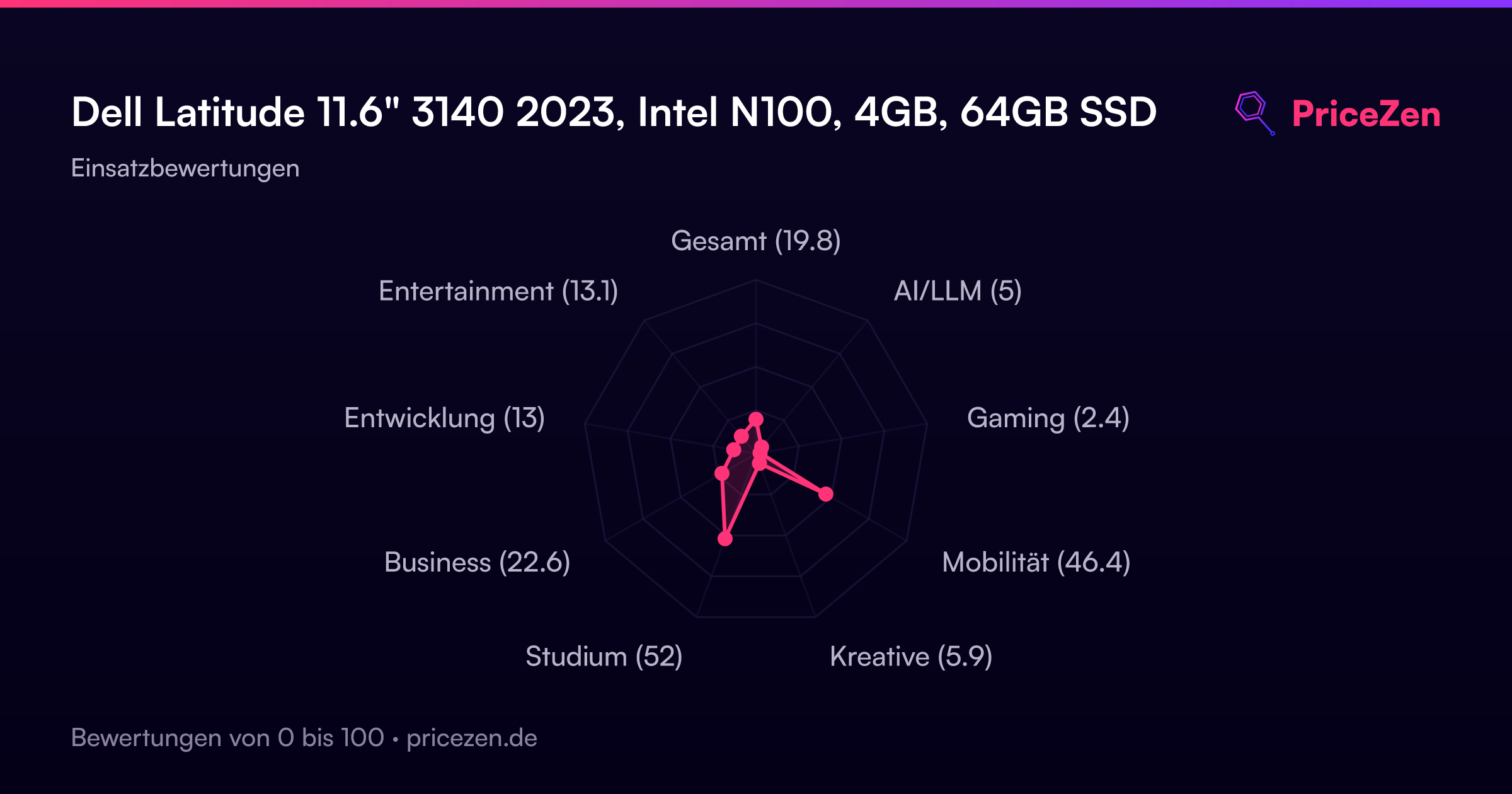
Here's the interesting part. In our scoring model it ranks near the very top for compactness and affordability, and its student suitability score of 52.6/100 is the highest of any use case we rate it for. Everything else falls off fast: business sits at 22.7/100 and gaming at 2.4/100. So this isn't a cheap laptop that secretly does everything. It's a cheap laptop that does one narrow job, and the spec sheet is honest about it.
The trade-off is baked into every line item. The 1366x768 TN panel is the weakest screen in our entire ranking, the 4GB of memory is close to the bottom, and 64GB of storage is barely more room than a phone gives you. You're paying for small size, low price and a Windows Pro license, and you're giving up basically everything else. If that trade sounds acceptable for your situation, keep reading. If it doesn't, no amount of discount will fix it.
Common Questions
Q: Can I upgrade the RAM or storage later?
The 4GB of memory is listed as on-board, which means it's soldered and not something you can add to. That's the single biggest limitation here, since 4GB ranks near the very bottom of every laptop we track and Windows 11 Pro uses a good share of it before you open anything. Buy assuming 4GB is what you'll have forever.
Q: Is this enough for schoolwork?
For essays, research, learning platforms and video calls, yes, and our student suitability score of 52.6/100 is the highest of any category we rate it for. The included webcam and Wi-Fi 6 cover remote classes properly. But if your course involves coding environments, design software or heavy multitasking, the N100 and 4GB of RAM will hold you back.
Q: Can it run games at all?
Realistically, no. Our gaming score for it is 2.4/100, the weakest area we rate, and the integrated Intel UHD graphics rank below average even among integrated chips. Simple browser games are the ceiling. If gaming matters even a little, look at the ASUS Vivobook Pro 15 instead.
Q: Is 64GB of storage going to be a problem?
It's one of the smallest drives in our data, and Windows plus updates takes a meaningful bite out of it before you store anything. Plan on cloud storage for documents and photos, and avoid installing large applications. For a browser-first machine it's workable, for a general-purpose laptop it's tight.
Who Should Skip This
Skip this if it's going to be your only computer. The 4GB of soldered RAM, the disappointing CPU ranking and the 64GB drive add up to a machine that feels cramped fast, and the 1366x768 TN panel is the lowest-ranked screen we track, which you'll notice every single hour you spend on it. Anyone doing office work with multiple apps open, photo editing, coding, or long writing sessions should look at the Lenovo Slim 7 14" or the Samsung Galaxy Book5 Pro 14" instead.
Gamers and creative users shouldn't even consider it, given the 2.4/100 gaming score and below-average GPU ranking. The ASUS Vivobook Pro 15 N6506CU-PS97 and HP OmniBook X Flip 14-fk0033dx are the sensible directions there. And if you want one laptop to carry you through several years of whatever you throw at it, the Apple MacBook Air 13.6" M4 is a better long-term bet than saving money on a machine with no upgrade path.
Verdict
If you're a student on a genuinely tight budget doing writing, research and web-based coursework, this is defensible. Our student score of 52.6/100 is middling, not glowing, but it's the best fit this laptop has, and CAD 400 with Windows 11 Pro Education and Wi-Fi 6 is a lot of practical basics for the money. Same story for a home secondary machine, a kid's first laptop, or a dedicated terminal for one web app. Keep your files in cloud storage so the 64GB drive doesn't become a weekly chore, and keep your tab count honest.
For anyone who needs this to be their main computer, we'd say no. The 4GB memory ceiling and the low-ranked CPU mean it'll feel slow within a year of normal use, and the screen is the weakest we track. Business suitability at 22.7/100 reflects that: it's not built for spreadsheets, multitasking or long days in front of it. Spend more on one of the alternatives if you can. And if gaming is anywhere on your list, the 2.4/100 score should settle that question immediately.
Usage Scores
- Gesamt19.8
- AI/LLM5
- Gaming2.4
- Mobilität46.4
- Kreative5.9
- Studium52
- Business22.6
- Entwicklung13
- Entertainment13.1