HP 14 Laptop 2025, Celeron N4500, 4GB, 64GB eMMC, Pale Rose Gold

Integrierter Kartenleser für Speicherkarten geprüft am 29. Nov.
25/100 Gesamtwertung 4,2 Durchschnitt aus 567 Besitzerbewertungen
- CPU
- Intel Celeron N4500
- RAM
- 4 GB
- Storage
- 64 GB
- Screen
- 14" 1366x768
- GPU
- Intel UHD Graphics
- OS
- Windows 11 Home in S Mode
- Weight
- 1.5 kg
- Battery
- 41 Wh
Preise bei 1 Shop vergleichen
Günstigste zuerst. Neue, generalüberholte und gebündelte Angebote werden getrennt gehalten, damit du Gleiches mit Gleichem vergleichst.
| Shop | Verkauft von | Farbe und Zustand | Preis | ggü. Tiefstpreis | Zuletzt geprüft | Link |
|---|---|---|---|---|---|---|
| Neu1 AngebotEinzelstück | ||||||
| Bei der letzten Prüfung nicht vorrätig | ||||||
| Amazon | Unbekannt | Nicht angegeben | Kein Preis | Nicht vorrätig | 4. Nov. | Zum Shop |
 Quelle: PriceZen, geprüft am 4. Nov. 2026
Ein Preis gilt als aktuell, wenn wir ihn in den letzten 7 Tagen geprüft haben. „Marktplatz-Händler“ bedeutet einen Drittanbieter in diesem Shop, nicht den Shop selbst.











Überblick
The 30-Second Version
The HP 14 is a featherweight budget laptop with a fatal flaw: 4GB of RAM and 64GB of storage. It's fine for light browsing and schoolwork at the USD 98 end of the price range. Pay more than that and you're getting ripped off.
Pros & Cons
Vorteile
- Lightweight at 1.40kg and easy to carry around 82nd
- Attractive design that buyers consistently praise 76th
- Wi-Fi 6 support is a nice surprise at this price
- Battery life is decent for light use
Nachteile
- 4GB of RAM is the lowest we've seen in this category
- 64GB eMMC storage fills up almost immediately
- The 1366x768 screen is dim and washed out
- Celeron N4500 chokes on anything beyond basic tasks
Was Besitzer sagen
The Word on the Street
- Many owners love the design and color, saying it looks more expensive than it is
- Several buyers mention it's a solid value for basic schoolwork and light browsing
- A common complaint is that the base configuration feels sluggish even for everyday tasks
- Multiple users report touchpad issues and occasional delivery problems
Wie sich die Meinung der Besitzer im Lauf der Zeit verändert hat
ExklusivBasierend darauf, wann Kunden ihre Bewertungen tatsächlich geschrieben haben - so sehen Sie, ob das anfängliche Lob anhielt.
34 geschriebene Rezensionen, Dez. 2025 – Aug. 2026: 26 zufrieden, 2 gemischt, 6 unzufrieden
Über alle 567 Shop-Bewertungen: 4,2★. Die meisten Besitzer bewerten, ohne eine Rezension zu schreiben. Das Diagramm zählt die 34 geschriebenen Rezensionen.
- Jan.–März 202619 von 23 zufrieden
Buyers in Q1 2026 found this HP laptop affordable and suitable for basic tasks like school, work, and streaming, but many reported significant slowness, especially with the base configuration.
- Great value for basic use: schoolwork, streaming, and everyday tasks; praised for price, portability, and battery life.
- Performance is very slow, especially with base RAM; webpages and apps load slowly, making it frustrating for even light use.
- Upgradeability (RAM/SSD) is a plus, but upgrading is difficult and requires disassembling the bottom; screen resolution is low.
- Keyboard lacks backlight and numeric keypad; key material feels cheap and may slow typing.
- Okt.–Dez. 20255 von 8 zufrieden
Buyers in this period had mixed experiences: some praised performance and value, while others reported slow operation, low memory, and a delivery failure.
- Performance issues: laptop runs slow, especially for school tasks like Zoom, with low bandwidth errors.
- Delivery failure: order not received by Christmas, store pickup mishandled, causing disappointment.
- Value and performance: praised as best buy for price and speed, easy setup and use.
- Insufficient memory: low storage space for Windows, warnings even without many apps installed.
Jeder Punkt ist eine geschriebene Rezension, im Monat, in dem sie verfasst wurde. Zufrieden = 4-5★, gemischt = 3★, unzufrieden = 1-2★. Die Zusammenfassungen je Zeitraum sind auf Englisch.
Die Fakten
Performance
The Celeron N4500 is a 2-core chip running at 1.1GHz base. It's fine for one or two browser tabs and a document, but open ten tabs and you'll feel it wheeze. The 4GB of DDR4 RAM is the real bottleneck here. Windows 11 in S Mode helps a bit by restricting what you can install, but it also means you're locked into the Microsoft Store unless you switch out of S Mode. The 64GB eMMC storage is slow and tiny. Windows alone eats a big chunk of that. The integrated Intel UHD graphics land at the 37th percentile, which means video playback is okay but gaming is basically a slideshow. Our gaming score for this thing is 9.2 out of 100. That's not a score, that's a cry for help.
Specifications
Full Specifications
Processor
| CPU | Intel Celeron N4500 |
| Cores | 2 |
| Frequency | 1.1 GHz |
| L3 Cache | 4 MB |
Graphics
| GPU | Intel UHD Graphics |
| Type | Integrated |
| VRAM Type | Shared |
Memory & Storage
| RAM | 4 GB |
| RAM Generation | DDR4 |
| Storage | 64 GB |
| Storage Type | eMMC |
Display
| Size | 14" |
| Resolution | 1366x768 |
| Panel | IPS |
| Brightness | 250 nits |
| Color Gamut | 45% NTSC |
Connectivity
| USB-C Ports | 1 |
| USB Ports | 2 |
| HDMI | HDMI 1.4b |
| Wi-Fi | Wi-Fi 6 |
| Bluetooth | Bluetooth 5.4 |
Physical
| Weight | 1.5 kg / 3.2 lbs |
| Battery | 41 Wh |
| OS | Windows 11 Home in S Mode |
vs Competition
Against something like the Lenovo IdeaPad Slim 3 15, this HP gets embarrassed on specs. The IdeaPad typically ships with more RAM, a proper SSD, and a better screen for not much more money. The ASUS Vivobook X1404VA also offers dramatically better performance with a real Core i3 or i5. Even the aging Microsoft Surface Laptop 3 beats this on display quality and build. Where the HP wins is pure portability and price floor. The MacBook Pro and Dell Latitude 7430 aren't even in the same conversation, they're premium machines that cost several times more. If you can stretch your budget by USD 50 to 100, you'll get a dramatically better laptop from Lenovo or ASUS.
| Spec | HP 14 Laptop | Apple MacBook Pro 14.2" M4 Pro | ASUS ROG Zephyrus 14" GA403WW-G14.R95080 | Lenovo Legion Pro 7i Gen 10 16" | Samsung Galaxy Book5 Pro 14" NP944XHA-KG3US | MSI Raider 16 Max HX |
|---|---|---|---|---|---|---|
| CPU | Intel Celeron N4500 | Apple M4 Pro | AMD Ryzen AI 9 HX 370 | Intel Core Ultra 9 275HX | Intel Core Ultra 7 258V | Intel Core Ultra 9 290HX |
| RAM (GB) | 4 | 48 | 32 | 32 | 32 | 32 |
| Storage (GB) | 64 | 4096 | 2048 | 1024 | 1024 | 1024 |
| Screen | 14" 1366x768 | 14.2" 3024x1964 | 14" 2880x1800 | 16" 2560x1600 | 14" 2880x1800 | 16" 2560x1600 |
| GPU | Intel UHD Graphics | Apple (16-Core) | NVIDIA GeForce RTX 5080 | NVIDIA GeForce RTX 5070 Ti | Intel Arc Graphics 140V | NVIDIA GeForce RTX 5080 |
| OS | Windows 11 Home in S Mode | macOS | Windows 11 Home | Windows 11 Home | Windows 11 Pro | Windows 11 Home |
| Weight (kg) | 1.5 | 1.6 | 1.6 | 2.7 | 1.2 | 2.6 |
| Battery (Wh) | 41 | 72 | - | 99 | 63 | 100 |
| Compare | Compare | Compare | Compare | Compare |
| Produkt | CPU | GPU | RAM | Anschlüsse | Display | Mobilität | Speicher | User Sentiment | Zuverlässigkeit | Nutzerresonanz | Affordability |
|---|---|---|---|---|---|---|---|---|---|---|---|
| HP 14 Laptop | 2 | 28.3 | 0.8 | 42.8 | 8.5 | 76.3 | 3.7 | 12.3 | 33.7 | 82.2 | 0 |
| Apple MacBook Pro 14.2" M4 Pro Compare | 92.4 | 78.9 | 90.6 | 73.8 | 99.1 | 68.9 | 98.4 | 90.8 | 98.2 | 99.7 | 4.7 |
| ASUS ROG Zephyrus 14" GA403WW-G14.R95080 Compare | 91.2 | 98.3 | 90.8 | 89.4 | 96 | 73.6 | 89.7 | 99.1 | 60.6 | 95.7 | 6.1 |
| Lenovo Legion Pro 7i Gen 10 16" Compare | 97.2 | 96.7 | 89 | 97.3 | 94.9 | 9.5 | 79.3 | 90.8 | 82 | 99.7 | 5.9 |
| Samsung Galaxy Book5 Pro 14" NP944XHA-KG3US Compare | 65.8 | 69.6 | 79.6 | 83.5 | 90.4 | 89.4 | 79.3 | 0 | 82 | 95.7 | 21.4 |
| MSI Raider 16 Max HX Compare | 99.6 | 98.3 | 86.3 | 98.6 | 91.4 | 10.9 | 79.3 | 75.3 | 60.6 | 78 | 7.9 |
Preis
Value & Pricing
Pricing is all over the place. We're seeing USD 98 to USD 200 across three US listings, which is a USD 102 spread. At the low end, this is a genuinely tempting deal for a kid's first laptop or a couch browsing machine. At the high end, you're getting fleeced. If you're shopping, hunt for the listing closer to USD 98. The included one-year Microsoft 365 subscription and free wireless mouse sweeten the pot a bit, but they don't fix the fundamental hardware limitations.
Mehr erfahren
Overview
The HP 14 with a Celeron N4500 is a budget laptop that knows exactly what it is. It's light, it's cheap, and it'll handle web browsing, email, and Word docs without much fuss. Just don't expect it to do anything beyond that without complaining.
Our database puts this thing at the 1st percentile for RAM and 4th for storage. That's not a typo. 4GB of RAM and 64GB of eMMC storage in 2024 is rough, even for a budget machine. But the compact score lands at the 81st percentile, and buyers seem to genuinely like the design and portability.
Common Questions
Q: Can I upgrade the RAM and storage on this laptop?
Yes, several owners report the RAM and SSD are upgradeable, which is rare for a budget laptop. Swapping in 8GB of RAM and a proper SSD would dramatically improve the experience.
Q: Is this laptop good for gaming?
No. The integrated Intel UHD graphics and Celeron N4500 score a 9.2 out of 100 for gaming in our database. Stick to solitaire and browser games.
Q: What is Windows 11 S Mode and can I turn it off?
S Mode restricts you to apps from the Microsoft Store for security and performance. You can switch out of S Mode for free in the Windows Store, but with only 4GB of RAM and 64GB of storage, you won't want to install much anyway.
Who Should Skip This
Skip this if you need to run anything beyond a browser and Office. The 4GB of RAM will have you pulling your hair out with more than a few tabs open. If you need to store photos, videos, or install real software, the 64GB eMMC drive will fill up in a week. Anyone doing photo editing, coding, or even heavy multitasking should look at a used ThinkPad or a Lenovo IdeaPad with 8GB of RAM and a real SSD instead.
Verdict
This is a laptop for people who need the absolute cheapest functional Windows machine possible. Students on a tight budget who only need Word and Chrome will survive. Anyone who needs to run real software, keep lots of files, or multitask should run the other direction. The 4GB RAM and 64GB storage are dealbreakers for most people in 2024.
Usage Scores
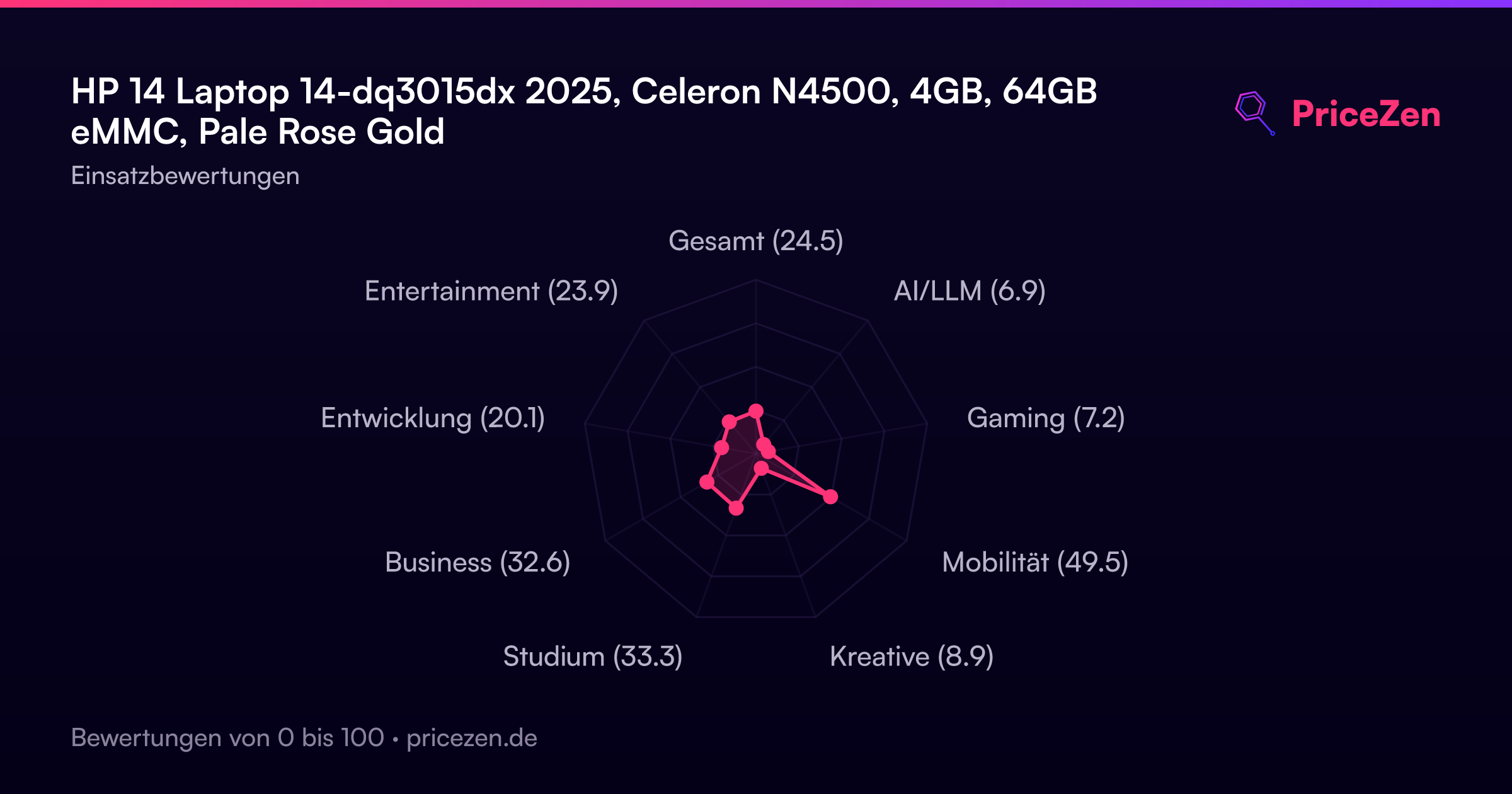
- Gesamt24.5
- AI/LLM6.9
- Gaming7.2
- Mobilität49.5
- Kreative8.9
- Studium33.3
- Business32.6
- Entwicklung20.1
- Entertainment23.9