Lenovo IdeaPad 14" 83FW0005US, Celeron N4500, 4GB, 128GB eMMC, Silver
Der Intel Celeron N4500 mit 4 GB RAM sorgt für flüssige Alltagsleistung, unterstützt durch ein 14-Zoll-HD-Display mit 87 % aktiver Fläche und zwei Dolby-Audio-Lautsprechern. Das 17,9 mm dünne Gehäuse und das Gewicht von 1,50 kg machen ihn tragbar, während die Akkulaufzeit bis zu 11 Stunden beträgt. Ideal für Studenten, die ein preiswertes Gerät für Büroarbeit, Surfen und Videokonferenzen suchen, mit 720P-Kamera und Datenschutzschieber.

Derzeit kein aktueller Händlerpreis











Überblick
The 30-Second Version
The Lenovo IdeaPad 1i is a budget 14-inch Windows laptop with a Celeron N4500, 4GB RAM, and 128GB eMMC storage. It's fine for basic web browsing and document work, but the slow CPU and limited RAM make multitasking painful. At around $269 with Microsoft 365 included, it's cheap, but most people will be happier spending a bit more on something with 8GB of RAM and a real SSD.
Pros & Cons
Vorteile
- Very affordable at around $269 95th
- Lightweight and compact for easy carrying 82nd
- 12-month Microsoft 365 subscription included 75th
- Decent reliability score for a budget laptop 67th
- Privacy shutter on the webcam
Nachteile
- Celeron N4500 is painfully slow for multitasking
- 4GB RAM fills up almost immediately
- 128GB eMMC storage is cramped and slow
- HD display with poor screen quality
- Windows 11 S mode limits app choices
Die Fakten
Performance
Let's be direct: the Intel Celeron N4500 is a 2-core processor running at 1.1GHz, and it ranks dead last in our CPU benchmarks. That's not hyperbole, it's the 1st percentile. Paired with 4GB of RAM (2nd percentile) and 128GB of eMMC storage (5th percentile), this machine is built for patience. Opening multiple browser tabs will cause noticeable slowdowns. Streaming video works fine, but don't expect to edit photos, run spreadsheets with thousands of rows, or keep 15 Chrome tabs open without the fan spinning up and things getting sluggish.
The integrated GPU sits in the 14th percentile, which means gaming is essentially off the table. Our gaming score for this laptop is 6.7 out of 100. You can play Solitaire or stream games via cloud services, but native gaming on this hardware is a slideshow. The eMMC storage is also slower than even a budget SATA SSD, so boot times and app launches will feel sluggish compared to anything with proper solid-state storage. Windows 11 S mode helps by limiting background processes, but it's a band-aid on hardware that's fundamentally constrained.
Specifications
Full Specifications
Processor
| CPU | Intel Celeron N4500 |
| Cores | 2 |
| Frequency | 1.1 GHz |
| L3 Cache | 4 MB |
Graphics
| Type | Integrated |
Memory & Storage
| RAM | 4 GB |
| Storage | 128 GB |
| Storage Type | eMMC |
Display
| Size | 14" |
Physical
| Weight | 1.5 kg / 3.3 lbs |
| OS | Windows 11 S |
vs Competition
Stacked against the competition in our database, the IdeaPad 1i occupies a strange space. The Apple MacBook Pro MWP72LL/A, HP OmniBook X Flip, and Samsung Galaxy Book4 Edge are all in completely different leagues, costing 4-10x more and delivering performance this Lenovo can't touch. That's not a fair fight, and nobody cross-shops a $269 laptop against a MacBook Pro. The more relevant comparison is against Chromebooks in the $200-300 range, where the IdeaPad 1i's Windows 11 S mode actually makes it feel like a Chromebook with extra steps. The ASUS Vivobook TP3407SA-DS74T and Microsoft Surface Laptop 165H are also far more expensive and far more capable.
Where the IdeaPad 1i does stand out is reliability. Its 81st percentile reliability score is genuinely good for a budget machine, and the 87th percentile social proof suggests buyers who knew what they were getting are mostly satisfied. But the screen quality (21st percentile) and port selection (14th percentile) are weak spots. If you need a laptop for schoolwork that involves anything beyond Google Docs, you'll outgrow this machine within a year.
| Spec | Lenovo IdeaPad 14" 83FW0005US | Apple MacBook Air 13.6" M4 | HP OmniBook X Flip | Samsung Galaxy Book5 Pro 14" NP944XHA-KG2US | ASUS Zenbook 14" UX3402VA-GH95 | Microsoft Surface Laptop 15" 7th Edition |
|---|---|---|---|---|---|---|
| CPU | Intel Celeron N4500 | Apple M4 | AMD Ryzen AI 7 350 | Intel Core Ultra 7 256V | Intel Core i9 13900H | Qualcomm Snapdragon X Elite X1E-84-100 |
| RAM (GB) | 4 | 32 | 24 | 16 | 16 | 32 |
| Storage (GB) | 128 | 256 | 1024 | 512 | 1024 | 1024 |
| Screen | 14" | 13.6" 2560x1664 | 14" 1920x1200 | 14" 2880x1800 | 14" 2880x1800 | 15" 2496x1664 |
| GPU | - | Apple (10-Core) | AMD Radeon 860M | Intel Arc Graphics | Intel Iris Xe Graphics | Qualcomm Adreno |
| OS | Windows 11 S | macOS | Windows 11 Home | Windows 11 Pro | Windows 11 Home | Windows 11 Home |
| Weight (kg) | 1.5 | 1.2 | 1.4 | 1.2 | 1.4 | 1.7 |
| Battery (Wh) | - | 54 | 59 | 63 | 75 | 66 |
| Compare | Compare | Compare | Compare | Compare |
| Produkt | CPU | GPU | RAM | Anschlüsse | Display | Mobilität | Speicher | Zuverlässigkeit | Nutzerresonanz | Affordability |
|---|---|---|---|---|---|---|---|---|---|---|
| Lenovo IdeaPad 14" 83FW0005US | 1.9 | 28.2 | 2.3 | 13.1 | 19.8 | 74.9 | 5.3 | 81.9 | 67.3 | 94.8 |
| Apple MacBook Air 13.6" M4 Compare | 75.9 | 75.8 | 79.5 | 51.1 | 87.1 | 91.4 | 24 | 98.2 | 97.6 | 38.3 |
| HP OmniBook X Flip Compare | 80.1 | 64.7 | 82.3 | 77.2 | 74.1 | 79.4 | 65.3 | 33.6 | 94.1 | 43.5 |
| Samsung Galaxy Book5 Pro 14" NP944XHA-KG2US Compare | 68.5 | 69.8 | 49.9 | 83.2 | 91.6 | 89.4 | 51 | 81.9 | 96.5 | 37.5 |
| ASUS Zenbook 14" UX3402VA-GH95 Compare | 82.3 | 47.9 | 59.7 | 71.1 | 96.8 | 81.8 | 79.3 | 60.5 | 70.7 | 41.1 |
| Microsoft Surface Laptop 15" 7th Edition Compare | 79.4 | 13.4 | 79.5 | 57.7 | 89.3 | 59.3 | 79.3 | 81.9 | 88.3 | 14.4 |
Preis
Value & Pricing
At $269 in the US, the IdeaPad 1i is cheap, but you need to understand what you're getting. The European pricing tells an interesting story: EUR 333 to EUR 566 across four listings in Germany, Spain, France, and Italy. That's a EUR 233 spread, which is wild for the same laptop. If you're in Europe, shop around because paying EUR 566 for this hardware is a bad deal, while EUR 333 is much more reasonable. The included Microsoft 365 subscription adds roughly $70 of value if you'd pay for it anyway, which effectively drops the real cost of the hardware. But even at its best price, you're buying a machine with a 1st percentile CPU and 2nd percentile RAM. For similar money, a used ThinkPad or a Chromebook will often deliver a better experience for the same basic tasks.
Wir verfolgen die Preise für dieses Produkt seit dem 20. Okt. 2026. Das Diagramm erscheint, sobald mehr Daten vorliegen.
Mehr erfahren
Overview
The Lenovo IdeaPad 1i 83FW0005US is a budget 14-inch Windows laptop that sits firmly in the "cheap enough to not overthink it" category. At around $269 in the US, it's aimed at students, kids, or anyone who needs a basic machine for web browsing, email, and light document work. The headline specs are modest: an Intel Celeron N4500, 4GB of RAM, and 128GB of eMMC storage. That's about as entry-level as it gets in 2025, and our database backs that up with the CPU landing in the 1st percentile and RAM in the 2nd percentile among all laptops we track.
But here's the thing: this laptop isn't trying to impress anyone with specs. It's trying to be a functional, portable machine that costs less than a decent smartphone. And for that specific job, it mostly works. The 14-inch HD display, Dolby Audio speakers, and included 12-month Microsoft 365 subscription sweeten the deal a bit. Lenovo claims up to 11 hours of battery life, which would be genuinely useful for a student hauling this between classes.
Is the IdeaPad 1i good for everyday use? For light tasks, yes. For anything beyond that, you'll feel the limitations fast. Windows 11 S mode restricts you to Microsoft Store apps, which actually helps performance on this hardware but frustrates anyone who needs traditional desktop software. The 1.5kg weight and 17.9mm chassis make it easy to carry, and the compact score of 76th percentile means it won't hog your backpack space.
Common Questions
Q: Is the Lenovo IdeaPad 1i good for students?
It can work for students with very light workloads like note-taking, email, and web research. But the 4GB of RAM and slow Celeron processor will struggle with multiple tabs or any demanding school software.
Q: Can the Lenovo IdeaPad 1i run Windows 11 properly?
It runs Windows 11 in S mode, which restricts you to Microsoft Store apps. This helps performance on the limited hardware, but you'll need to switch out of S mode to install traditional desktop programs.
Q: How much storage does the Lenovo IdeaPad 1i have?
It has 128GB of eMMC storage, which is slower than a standard SSD. After Windows and pre-installed software, you'll have roughly 80-90GB of usable space, so external storage or cloud storage is recommended.
Q: Is the Lenovo IdeaPad 1i good for gaming?
No. The integrated graphics and Celeron processor score 6.7 out of 100 for gaming in our benchmarks. It can handle basic browser games, but anything more demanding will be unplayable.
Who Should Skip This
Skip the IdeaPad 1i if you need to run anything beyond a web browser and Office apps. Gamers, programmers, photo editors, and anyone who keeps more than a handful of tabs open will find the 4GB RAM and Celeron N4500 infuriating. If you need a cheap laptop for school, consider a Chromebook instead, which handles light tasks more smoothly at this price point. If you need Windows specifically, look for a used or refurbished laptop with at least 8GB of RAM and an SSD. The extra $100-150 will transform your experience. Also skip this if you need a good screen, the HD panel here ranks in the 21st percentile and won't impress anyone.
Verdict
Should you buy the Lenovo IdeaPad 1i? Only if your needs are extremely basic and your budget is extremely tight. This is a laptop for checking email, writing documents, browsing the web, and streaming video. It's not for gaming, photo editing, programming, or running anything more demanding than a web browser with a few tabs open. The 4GB of RAM is the biggest bottleneck, and it's not upgradeable in most configurations.
If you're a student who needs a machine for note-taking and research, this will work, but barely. The included Microsoft 365 subscription is a nice touch, and the battery life claim of up to 11 hours would be genuinely useful. But our advice is to save a bit more and get something with at least 8GB of RAM and a proper SSD. The jump in everyday usability is massive, and you'll avoid the frustration of waiting for everything to load.
Usage Scores
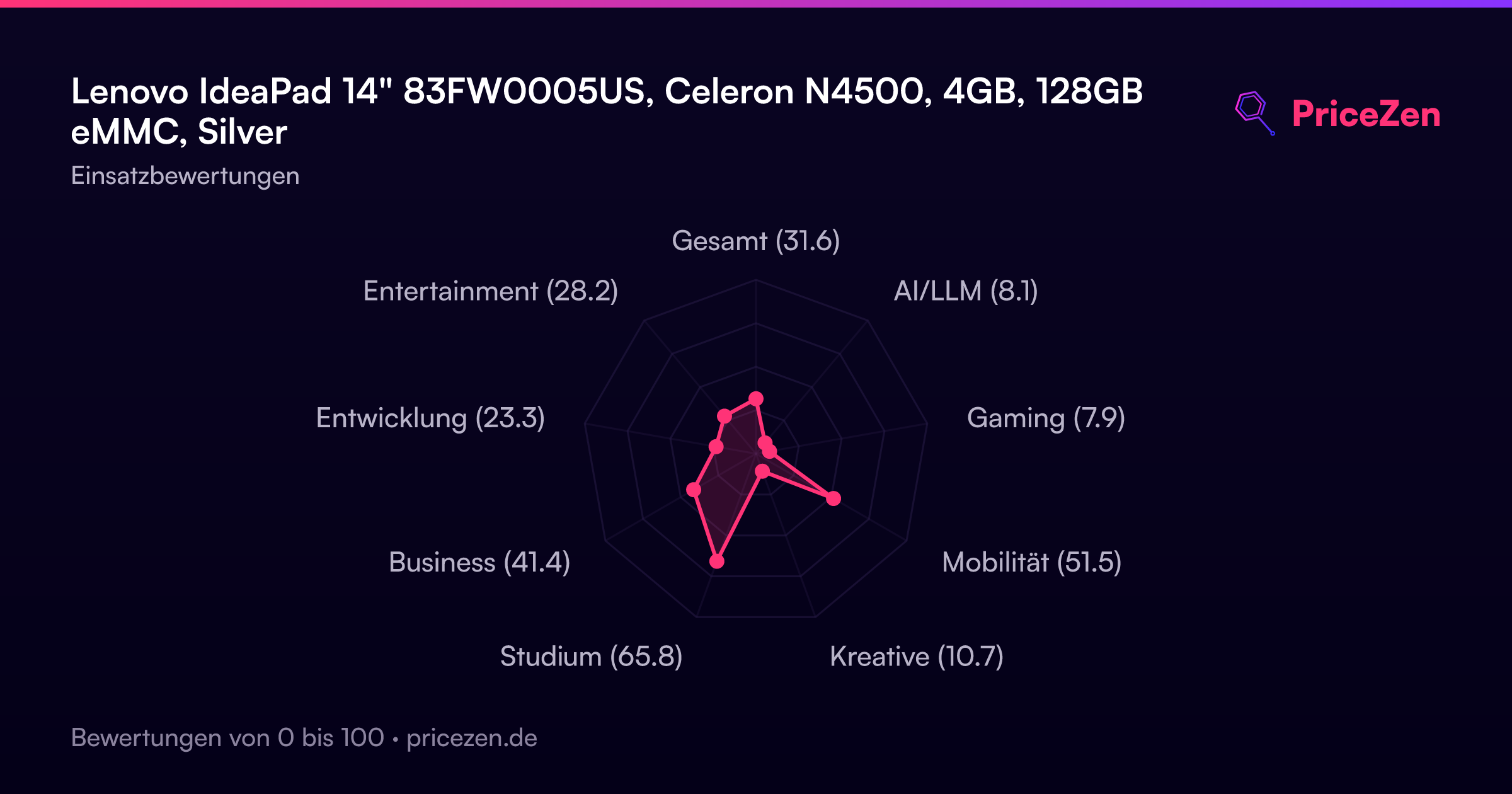
- Gesamt31.6
- AI/LLM8.1
- Gaming7.9
- Mobilität51.5
- Kreative10.7
- Studium65.8
- Business41.4
- Entwicklung23.3
- Entertainment28.2