Lenovo ThinkPad L13 Yoga 20R5000NUS, Core i7-10510U, 16GB, 512GB SSD
Der Intel i7-10510U mit 16 GB RAM bietet genug Leistung für Office und Surfen, während das 13,3-Zoll-Touchdisplay mit integriertem Stift handschriftliche Notizen und Skizzen ermöglicht. Das neu gestaltete Gehäuse mit schmalen Rändern ist leicht und dank Militärstandard robust für den täglichen Einsatz. Dieses Convertible ist ideal für Studierende, die ein kompaktes Gerät für Vorlesungen, Notizen und Medienkonsum suchen, ohne Wert auf Gaming zu legen.

Derzeit kein aktueller Händlerpreis
Überblick
The 30-Second Version
The ThinkPad L13 Yoga is a durable, budget-friendly 2-in-1 with a pen and touchscreen. It handles everyday tasks fine but struggles with graphics and has a below-average screen. At $319 used, it's a decent buy for basic productivity, not for gaming or media work.
Pros & Cons
Vorteile
- Compact and light, easy to carry around. 89th
- Garaged rechargeable pen included, no batteries to worry about. 88th
- 16GB RAM and 512GB SSD handle multitasking well. 82nd
- ThinkPad build quality with military-grade durability testing.
Nachteile
- Integrated graphics are weak, gaming score is 4.5 out of 100.
- Screen quality is below average for this class.
- Port selection is extremely limited, 4th percentile.
- CPU is aging, sits in the 32nd percentile.
Die Fakten
Performance
The i7-10510U handles everyday tasks fine. Email, spreadsheets, video calls, all smooth. The 16GB of RAM is a nice touch for multitasking, and the 512GB SSD keeps things snappy. But the integrated graphics are a weak spot, landing in the 14th percentile. This thing is not built for gaming or any kind of GPU-heavy work. The screen also falls behind at the 21st percentile, so don't expect vibrant colors or high brightness. For a business 2-in-1, the core performance is adequate, but the graphics and display hold it back.
Specifications
Full Specifications
Processor
| CPU | Intel Core i7 10510U |
| Cores | 4 |
| Frequency | 1.8 GHz |
| L3 Cache | 8 MB |
Memory & Storage
| RAM | 16 GB |
| Storage | 512 GB |
| Storage Type | SSD |
Display
| Size | 13.3" |
Physical
| OS | Windows 10 Pro |
vs Competition
Stacked against the Apple MacBook Pro MWP72LL/A or the ASUS Zenbook UX3405CA-U7512, the L13 Yoga looks dated. Those competitors have better screens, faster CPUs, and more modern designs. The HP OmniBook X Flip and Samsung Galaxy Book4 Edge also outclass it in display quality and port selection. Where the ThinkPad wins is price and durability. It's a fraction of the cost of those machines, and it'll survive a drop better than most. If you need a cheap, tough 2-in-1 for basic work, this fits. If you want performance or a great screen, look elsewhere.
| Spec | Lenovo ThinkPad L13 Yoga 20R5000NUS | Apple MacBook Pro 14.2" M4 Max | ASUS ROG Zephyrus 14" GA403WW-G14.R95080 | HP OMEN Transcend | Samsung Galaxy Book5 Pro 14" NP944XHA-KG3US | Dell Premium 14.5" LDA14250-7667SLV-PUS |
|---|---|---|---|---|---|---|
| CPU | Intel Core i7 10510U | Apple M4 Max | AMD Ryzen AI 9 HX 370 | Intel Core Ultra 9 285H | Intel Core Ultra 7 258V | Intel Core Ultra 7 255H |
| RAM (GB) | 16 | 64 | 32 | 32 | 32 | 32 |
| Storage (GB) | 512 | 4096 | 2048 | 1024 | 1024 | 1024 |
| Screen | 13.3" | 14.2" 3024x1964 | 14" 2880x1800 | 14" 2880x1800 | 14" 2880x1800 | 14.5" 3200x2000 |
| GPU | - | Apple (40-Core) | NVIDIA GeForce RTX 5080 | NVIDIA GeForce RTX 5070 | Intel Arc Graphics 140V | Intel Arc Graphics |
| OS | Windows 10 Pro | macOS | Windows 11 Home | Windows 11 Home | Windows 11 Pro | Windows 11 Home |
| Weight (kg) | - | 1.6 | 1.6 | 1.6 | 1.2 | 1.7 |
| Battery (Wh) | - | 72 | - | 71 | 63 | 62 |
| Compare | Compare | Compare | Compare | Compare |
| Produkt | CPU | GPU | RAM | Anschlüsse | Display | Mobilität | Speicher | Zuverlässigkeit | Affordability |
|---|---|---|---|---|---|---|---|---|---|
| Lenovo ThinkPad L13 Yoga 20R5000NUS | 24.7 | 6.5 | 36.2 | 3.4 | 19.7 | 88.7 | 35.7 | 82.1 | 88.4 |
| Apple MacBook Pro 14.2" M4 Max Compare | 93.7 | 91.6 | 95.7 | 73.2 | 99.3 | 68.9 | 98.5 | 98.3 | 1.7 |
| ASUS ROG Zephyrus 14" GA403WW-G14.R95080 Compare | 91.2 | 98.3 | 90.9 | 89.2 | 96.5 | 73.6 | 89.7 | 60.6 | 5.7 |
| HP OMEN Transcend Compare | 90.1 | 93.6 | 89.7 | 89.2 | 96.5 | 72.3 | 65.1 | 33.6 | 8.3 |
| Samsung Galaxy Book5 Pro 14" NP944XHA-KG3US Compare | 65.8 | 69.6 | 79.4 | 83.1 | 91.6 | 89.5 | 79.2 | 82.1 | 20.1 |
| Dell Premium 14.5" LDA14250-7667SLV-PUS Compare | 87.1 | 69.6 | 89 | 65.9 | 97.2 | 61.2 | 65.1 | 33.6 | 14 |
Preis
Value & Pricing
At $319 used, this is a budget-friendly way to get a ThinkPad 2-in-1. You're getting a durable chassis, a touchscreen, a pen, and enough RAM and storage to be productive. But you're also getting an older CPU, weak graphics, and a mediocre screen. For the price, it's a reasonable deal if you need a basic business convertible and don't care about gaming or media quality. Just know you're buying a machine that's already a few generations behind.
Mehr erfahren
Overview
The ThinkPad L13 Yoga is a compact 2-in-1 that's all about flexibility. You get a 13.3-inch touchscreen, a garaged rechargeable pen, and that classic ThinkPad build quality in a chassis that's been slimmed down from older models. It's a business machine first, with Windows 10 Pro and ThinkShield security baked in.
Under the hood it's running an Intel i7-10510U with 16GB of RAM and a 512GB SSD. That's a solid combo for office work, web browsing, and note-taking. Just don't expect it to flex much muscle beyond that.
Common Questions
Q: Can this laptop handle gaming?
No. The integrated graphics score 4.5 out of 100 in our database, which puts it near the bottom for gaming. Stick to basic tasks and maybe some light browser games.
Q: Is the screen good for watching movies or editing photos?
Not really. The display ranks in the 21st percentile for this category, so colors and brightness are below average. It's fine for documents and web browsing, but not great for media consumption.
Q: Does the included pen need batteries?
No. The pen is garaged inside the laptop and recharges when docked, so you never have to worry about buying batteries or losing charge mid-note.
Who Should Skip This
Skip this if you need any kind of graphics performance. Gamers, video editors, and 3D modelers should look elsewhere because the integrated GPU is one of the weakest we've seen. Also skip it if you care about screen quality or need multiple ports, since both are major weak spots here.
Verdict
This is a machine for students, field workers, or anyone who needs a durable touchscreen laptop on a tight budget. The pen and 2-in-1 design make it handy for note-taking and presentations. It's not for gamers, content creators, or anyone who cares about display quality. If your needs are basic and your budget is small, it's worth a look.
Usage Scores
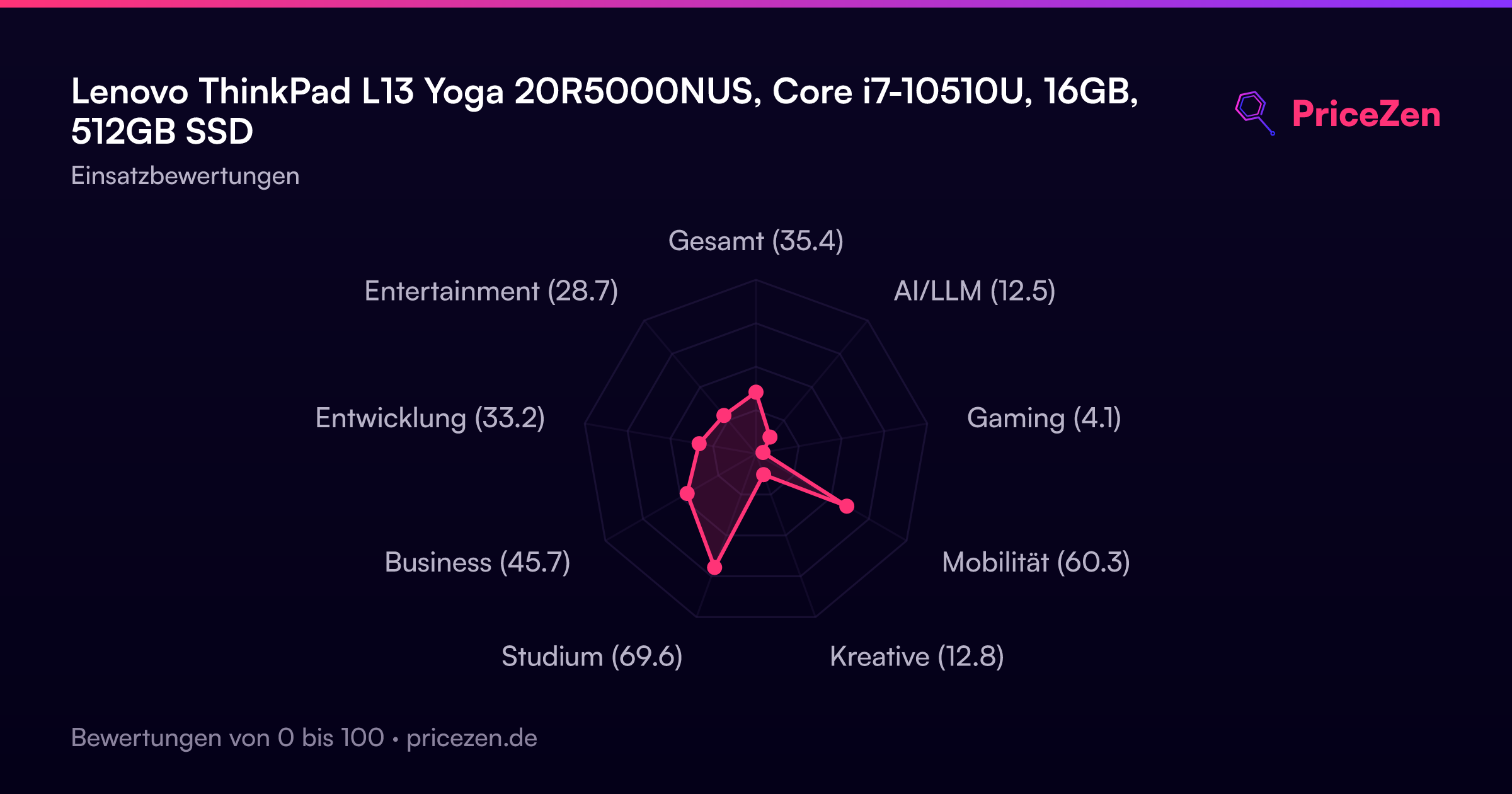
- Gesamt35.4
- AI/LLM12.5
- Gaming4.1
- Mobilität60.3
- Kreative12.8
- Studium69.6
- Business45.7
- Entwicklung33.2
- Entertainment28.7