HP 14 Series , Intel N150, 4GB, 128GB SSD, Moonlight Blue
Der Intel Processor N150 mit vier Kernen und 0.8GHz, kombiniert mit 4GB DDR4-RAM und 128GB SSD, liefert zuverlässige Leistung für den Alltag. Das 14-Zoll-IPS-Touchdisplay mit 250 Nits und entspiegelter Oberfläche ist auch bei Sonnenlicht gut ablesbar, und mit 1.47kg Gewicht sowie 41Wh-Akku ist das Gerät angenehm mobil. Dieses generalüberholte Notebook eignet sich am besten für Studierende, die ein günstiges Gerät für Textverarbeitung, Internet und Online-Vorlesungen suchen, aber keine hohen Grafikansprüche haben.

Derzeit kein aktueller Händlerpreis











Überblick
The 30-Second Version
The HP 14-dq6103ds is a super cheap 14-inch touchscreen laptop that's perfect for light student work and basic browsing. The standout spec is the price, ranging from USD 200 to USD 264, which puts it in the 97th percentile for affordability. But the 4GB of RAM and 1366x768 display are serious compromises that will frustrate anyone who multitasks. If your budget is tight and your needs are simple, it's worth a look. Otherwise, save up a bit more for something with 8GB of RAM.
Pros & Cons
Vorteile
- Extremely affordable at USD 200-264, ranking in the 97th percentile for price 97th
- Lightweight at 1.47kg with a compact 14-inch footprint 76th
- Touchscreen display with anti-glare coating, rare at this price point
- Wi-Fi 6 support for faster, more reliable wireless connections
- Windows 11 Home included with a Copilot key for AI assistance
Nachteile
- Only 4GB of RAM, ranking in the 2nd percentile, severely limits multitasking
- 128GB storage is tiny and sits in the 8th percentile
- 1366x768 display resolution is dated and ranks in the 8th percentile for screen quality
- CPU performance lands in the 17th percentile, weak even for basic tasks
- Factory recertified with only a 90-day warranty, reliability ranks in the 33rd percentile
Die Fakten
Performance
Let's talk about that Intel N150 processor first. It's a quad-core chip with a base clock of 0.8GHz, which sounds alarmingly slow until you remember that modern Intel chips boost well above their base clocks under load. In our database, the CPU performance lands at the 17th percentile, which means it's near the bottom of the barrel compared to other laptops. For basic web browsing, word processing, and video streaming, it'll get the job done. But don't expect to have 30 Chrome tabs open while editing photos in the background. This chip is built for patience.
The integrated Intel Graphics are similarly modest, sitting at the 28th percentile. The marketing copy mentions streaming 4K content and playing games in 720p, and technically that's true if you're talking about older titles or very light indie games. But the gaming score of 6.5 out of 100 tells the real story. This is not a gaming machine, not even close. The 4GB of DDR4 RAM is the bigger bottleneck for everyday use though. Windows 11 alone will happily chew through a good chunk of that, leaving you with very little headroom for multitasking. If you're the type who keeps Spotify, a browser, and a document open at once, you'll feel the squeeze.
Specifications
Full Specifications
Processor
| CPU | Intel Processor N150 |
| Cores | 4 |
| Frequency | 800 MHz |
| L3 Cache | 6 MB |
Graphics
| GPU | Intel Graphics |
| Type | Integrated |
Memory & Storage
| RAM | 4 GB |
| RAM Generation | DDR4 |
| Storage | 128 GB |
| Storage Type | SSD |
Display
| Size | 14" |
| Resolution | 1366x768 |
| Panel | IPS |
| Brightness | 250 nits |
| Color Gamut | 45% NTSC |
Connectivity
| USB-C Ports | 1 |
| USB Ports | 2 |
| HDMI | HDMI 1.4b |
| Wi-Fi | Wi-Fi 6 |
| Bluetooth | Bluetooth 5.4 |
Physical
| Weight | 1.5 kg / 3.2 lbs |
| Battery | 41 Wh |
| OS | Windows 11 Home |
vs Competition
Stack this against the Lenovo ThinkPad X1 Carbon and the difference is night and day. The ThinkPad is a business-class machine with a much better display, far more RAM, and a processor that actually has some muscle. But it also costs several times more. The HP isn't trying to compete there. It's competing with the Acer Aspire A14-52M-72FH and the ASUS Vivobook X1407QA, both of which sit in a similar budget-friendly space. The Acer and ASUS tend to offer more RAM and better screens for a bit more money, which might be worth it if you can stretch your budget.
The Dell Latitude 7430 is another interesting comparison. It's a refurbished-friendly business laptop that often shows up at discount retailers, and it typically offers better build quality and more upgrade options. The trade-off is that you'll usually pay more for a Latitude, and you might not get the touchscreen at this price. The Apple MacBook Pro 16" is in a completely different universe, so we won't waste your time there. The point is, if you need a laptop that can handle more than one thing at a time, the HP's 4GB of RAM is going to frustrate you. The Acer and ASUS alternatives are worth a serious look.
| Spec | HP 14 Series | Apple MacBook Pro 14.2" M4 Max | ASUS ROG Zephyrus 14" GA403WW-G14.R95080 | Lenovo Legion Pro 7i Gen 10 16" | Samsung Galaxy Book5 Pro 14" NP944XHA-KG3US | Dell Premium 14.5" LDA14250-7667SLV-PUS |
|---|---|---|---|---|---|---|
| CPU | Intel Processor N150 | Apple M4 Max | AMD Ryzen AI 9 HX 370 | Intel Core Ultra 9 275HX | Intel Core Ultra 7 258V | Intel Core Ultra 7 255H |
| RAM (GB) | 4 | 64 | 32 | 32 | 32 | 32 |
| Storage (GB) | 128 | 4096 | 2048 | 1024 | 1024 | 1024 |
| Screen | 14" 1366x768 | 14.2" 3024x1964 | 14" 2880x1800 | 16" 2560x1600 | 14" 2880x1800 | 14.5" 3200x2000 |
| GPU | Intel Graphics | Apple (40-Core) | NVIDIA GeForce RTX 5080 | NVIDIA GeForce RTX 5070 Ti | Intel Arc Graphics 140V | Intel Arc Graphics |
| OS | Windows 11 Home | macOS | Windows 11 Home | Windows 11 Home | Windows 11 Pro | Windows 11 Home |
| Weight (kg) | 1.5 | 1.6 | 1.6 | 2.7 | 1.2 | 1.7 |
| Battery (Wh) | 41 | 72 | - | 99 | 63 | 62 |
| Compare | Compare | Compare | Compare | Compare |
| Produkt | CPU | GPU | RAM | Anschlüsse | Display | Mobilität | Speicher | Zuverlässigkeit | Affordability |
|---|---|---|---|---|---|---|---|---|---|
| HP 14 Series | 17.2 | 28.1 | 2.3 | 41.6 | 7.4 | 76.4 | 7.3 | 33.6 | 97 |
| Apple MacBook Pro 14.2" M4 Max Compare | 93.7 | 91.6 | 95.7 | 73.2 | 99.3 | 68.9 | 98.5 | 98.3 | 1.7 |
| ASUS ROG Zephyrus 14" GA403WW-G14.R95080 Compare | 91.2 | 98.3 | 90.9 | 89.2 | 96.5 | 73.6 | 89.7 | 60.6 | 5.7 |
| Lenovo Legion Pro 7i Gen 10 16" Compare | 97.2 | 96.6 | 89 | 97.2 | 95.6 | 9.5 | 79.2 | 82.1 | 5.5 |
| Samsung Galaxy Book5 Pro 14" NP944XHA-KG3US Compare | 65.7 | 69.6 | 79.4 | 83.1 | 91.5 | 89.5 | 79.2 | 82.1 | 20.1 |
| Dell Premium 14.5" LDA14250-7667SLV-PUS Compare | 87 | 69.6 | 89 | 65.9 | 97.2 | 61.2 | 65.1 | 33.6 | 14 |
Preis
Value & Pricing
Here's where things get interesting. The price spread across US retailers runs from USD 200 to USD 264, which is a USD 64 gap for the exact same machine. That's a meaningful difference when you're shopping in this price bracket, so it pays to shop around. The affordability ranking of 97th percentile means this is one of the cheapest laptops in our entire database, and for a 14-inch touchscreen machine with Windows 11, that's genuinely hard to beat.
But value isn't just about the sticker price. You're getting a factory recertified unit with a 90-day warranty, which is a big step down from the standard one-year coverage you'd get on a new machine. The reliability score of 33rd percentile reflects that risk. If you're comfortable with the gamble, the upfront savings are real. Just know that if something goes wrong after three months, you're on your own. For a student on a tight budget, that might be a risk worth taking. For anyone who depends on their laptop for work, probably not.
Mehr erfahren
Overview
The HP 14-dq6103ds is one of those laptops that makes you do a double take at the price tag. We're talking about a 14-inch touchscreen machine with Windows 11, Wi-Fi 6, and a quad-core Intel N150 processor, and it's floating around the USD 200 to USD 264 range depending on where you look. That's firmly in 'impulse buy at the checkout aisle' territory, and honestly, that's kind of the point. This is a factory recertified unit with a 90-day warranty, so HP is clearly aiming at budget shoppers who need something functional without emptying their wallet.
The target audience here is pretty specific. Students who live in a browser, people who need a second machine for travel or couch duty, or anyone whose computing life revolves around Google Docs, email, and streaming. The 55.6 out of 100 student score in our database backs that up. It's not pretending to be a workstation, and you shouldn't expect it to be one. What it does promise is a lightweight 1.47kg body, a touchscreen, and enough battery to get through a school day, assuming you're not pushing it too hard.
But here's the thing. The spec sheet reads like a study in compromise. 4GB of RAM in 2025 is rough, the 1366x768 display is a throwback, and that 128GB of storage will fill up faster than you'd think. The affordability ranking sits at the 97th percentile, which is genuinely impressive, but the RAM ranking is down at the 2nd percentile. So the real question isn't whether this laptop is good. It's whether the trade-offs are worth the savings for what you actually need to do.
Common Questions
Q: What kind of display does this laptop have?
The HP 14-dq6103ds has a 14-inch touchscreen display with a resolution of 1366x768. It's an IPS panel with 250 nits of brightness and an anti-glare coating, which helps reduce reflections when you're working near windows or outside. The resolution is on the low side by modern standards, so text won't be as sharp as on a 1080p screen, but it's perfectly usable for everyday tasks.
Q: Can this laptop handle multitasking?
Not really, and that's the honest truth. With only 4GB of DDR4 RAM, Windows 11 will use a significant portion of that just to run the operating system. You'll be able to have a browser open with a few tabs and maybe a document or two, but anything beyond that will start to slow things down. If you're the type who keeps lots of apps open at once, you'll want to look for a laptop with at least 8GB of RAM.
Q: Is the storage upgradeable?
The 128GB of storage is on the small side, and it's UFS storage rather than a traditional SSD, which means it's not as fast and likely not user-upgradeable. You'll want to rely on cloud storage or an external drive for anything beyond basic documents and a few apps. Windows 11 itself takes up a good chunk of that 128GB, so you'll be working with limited space from day one.
Q: What does 'factory recertified' mean for this laptop?
Factory recertified means the laptop was previously returned or had a defect that HP has since repaired and tested to meet their standards. It's not brand new, and it comes with a 90-day limited warranty instead of the typical one-year coverage. The reliability ranking in our database sits at the 33rd percentile, so there's some risk involved. The trade-off is a significantly lower price, which is why this machine is so affordable.
Who Should Skip This
If you're a gamer, creative professional, or anyone who runs demanding software, walk away. The gaming score of 6.5 out of 100 should tell you everything you need to know. The integrated Intel Graphics and 4GB of RAM simply can't handle modern games or heavy applications like video editing or 3D modeling. You'd be better off saving for something with a dedicated GPU and at least 16GB of RAM.
Also skip this if you're buying a laptop for work that you depend on. The 90-day warranty and factory recertified status mean you're taking a gamble on reliability, and the 33rd percentile reliability ranking doesn't inspire confidence. If your income depends on your laptop, spend more on a new machine with a full warranty. The Lenovo ThinkPad X1 Carbon or Dell Latitude 7430 are much safer bets for business use, even if they cost more upfront.
Verdict
If you're a student who lives in Google Docs, watches lectures, and occasionally streams Netflix, this HP will get you through the day. The touchscreen is a nice bonus for note-taking or casual browsing, and the lightweight design makes it easy to toss in a backpack. Just keep your expectations in check. One or two apps at a time, and you'll be fine. Push it harder and you'll be staring at a spinning wheel more often than you'd like.
For anyone who needs to run real software, keep dozens of tabs open, or do any kind of creative work, this isn't the machine for you. The 4GB of RAM is the dealbreaker, and the 128GB storage means you'll be managing space constantly. If you can stretch your budget by USD 50 to USD 100, you'll find laptops with 8GB of RAM and 256GB SSDs that will feel dramatically better. But if USD 200 is your hard ceiling and you need something now, the HP 14-dq6103ds is a functional, if flawed, option.
Usage Scores
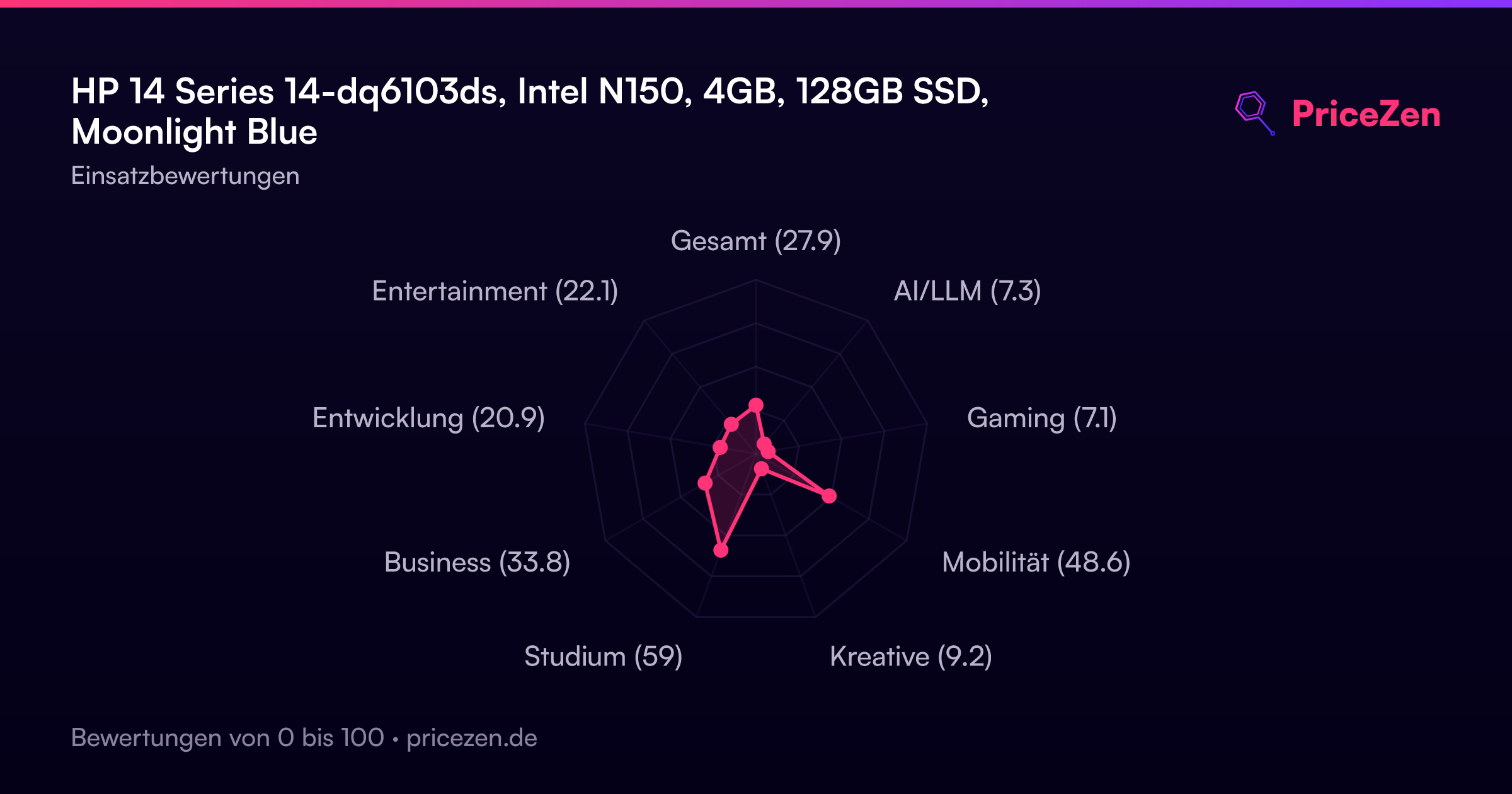
- Gesamt27.9
- AI/LLM7.3
- Gaming7.1
- Mobilität48.6
- Kreative9.2
- Studium59
- Business33.8
- Entwicklung20.9
- Entertainment22.1