Lenovo IdeaPad 1 14IGL7 2024, N4020, 4GB, 128GB SSD, Gray
Der Intel Celeron N4020 mit 1,1 GHz und 4 GB DDR4-RAM bewältigen alltägliche Anwendungen flüssig, während die 128 GB SSD für schnelle Startzeiten sorgt. Das 14-Zoll-TN-Display mit 220 Nits und das Gewicht von 1,27 kg machen ihn leicht transportierbar, ergänzt durch Wi-Fi 6 und einen Ethernet-Anschluss. Ideal für Studenten, die ein preiswertes Notebook für Textverarbeitung, Internet und Online-Vorlesungen suchen.






Überblick
The 30-Second Version
The Lenovo IdeaPad 1 14IGL7 is a $270 budget laptop with a painfully slow Celeron N4020, 4GB of RAM, and a dim 1366x768 display. It's light and has good ports, but the specs are among the worst in our database. Some owners love it for basic tasks and Linux, while others report constant freezing and S mode headaches. Only worth it if you need the cheapest possible Windows machine and have very low expectations.
Pros & Cons
Vorteile
- Very light at 1.27kg, easy to carry around 94th
- WiFi 6 support is a nice surprise at this price 87th
- Good port selection with USB-C, HDMI, and Ethernet 82nd
- Runs Linux well according to multiple owners 66th
- Cheap enough to be a low-risk secondary machine
Nachteile
- Celeron N4020 CPU is painfully slow, 2nd percentile in our database
- 4GB RAM is not enough for Windows 11 multitasking
- 1366x768 TN display with 220 nits is dim and washed out
- 128GB eMMC storage fills up fast and is slow
- Windows 11 S mode locks you out of installing normal apps
Was Besitzer sagen
The Word on the Street
Wie sich die Meinung der Besitzer im Lauf der Zeit verändert hat
ExklusivBasierend darauf, wann Kunden ihre Bewertungen tatsächlich geschrieben haben - so sehen Sie, ob das anfängliche Lob anhielt.
9 geschriebene Rezensionen, Mai 2024 – Feb. 2026: 5 zufrieden, 4 unzufrieden
Über alle 42 Shop-Bewertungen: 4,0★. Die meisten Besitzer bewerten, ohne eine Rezension zu schreiben. Das Diagramm zählt die 9 geschriebenen Rezensionen.
Jeder Punkt ist eine geschriebene Rezension, im Monat, in dem sie verfasst wurde. Zufrieden = 4-5★, gemischt = 3★, unzufrieden = 1-2★.
Die Fakten
Performance
Let's talk about that Celeron N4020. It's a 2-core, 2-thread chip with a base clock of 1.1GHz and a max turbo of 2.8GHz. In our database, this CPU sits at the 2nd percentile, which is a polite way of saying it's one of the slowest processors we've tracked in a modern laptop. For context, even budget Chromebooks with ARM chips will run circles around this thing in most tasks. The 4GB of DDR4 RAM is also at the 1st percentile, and that's the real killer. Windows 11 alone will happily eat 3GB just sitting there.
The 128GB eMMC storage is another weak spot, landing at the 8th percentile. eMMC is basically a slower cousin of a real SSD, and with Windows 11 taking up a big chunk of that 128GB, you're left with maybe 70-80GB of usable space. The integrated Intel UHD Graphics are fine for video playback and basic web browsing, but the gaming score of 9.5 out of 100 tells you everything you need to know. Don't even think about Minecraft at anything above low settings. For basic tasks like word processing, email, and light web browsing, it'll get by, but you'll feel the lag the moment you open more than a few browser tabs.
Specifications
Full Specifications
Processor
| CPU | Intel Celeron N4020 |
| Cores | 2 |
| Frequency | 1.1 GHz |
Graphics
| GPU | Intel UHD Graphics |
| Type | Integrated |
| VRAM Type | Shared |
Memory & Storage
| RAM | 4 GB |
| RAM Generation | DDR4 |
| Storage | 128 GB |
| Storage Type | SSD |
Display
| Size | 14" |
| Resolution | 1366x768 |
| Panel | TN |
| Brightness | 220 nits |
| Color Gamut | 45%NTSC |
Connectivity
| USB-C Ports | 1 |
| USB Ports | 3 |
| HDMI | 1x HDMI |
| Wi-Fi | WiFi 6 |
| Bluetooth | ✓ |
| Ethernet | RJ-45 |
Physical
| Weight | 1.3 kg / 2.8 lbs |
| OS | Windows 11 Home |
vs Competition
The IdeaPad 1's competitors in our database are mostly in a completely different league. The Apple MacBook Pro MWP72LL/A and Samsung Galaxy Book4 Edge are premium machines that cost 3-5 times as much, so comparing them directly feels almost unfair. But it does highlight the gap: those machines have fast processors, plenty of RAM, and gorgeous displays, while the IdeaPad 1 is fighting just to open a web browser without stuttering.
A more realistic comparison is against budget Chromebooks or used business laptops. A refurbished Dell Latitude 7400, which shows up in our competitor list, can often be found for similar money with a proper SSD, 8GB of RAM, and a much better display. The trade-off is that you're buying used hardware without a warranty. The ASUS Vivobook TP3407SA-DS74T is another option that costs more but offers a convertible design and better internals. If you're set on a new Windows laptop under $300, the IdeaPad 1 is one of the few options, but you're making real compromises to get there.
| Spec | Lenovo IdeaPad 1 14IGL7 | Apple MacBook Air 13.6" M4 | HP OmniBook X Flip | ASUS Vivobook Pro 15 N6506CU-PS97 | Samsung Galaxy Book5 Pro 14" NP944XHA-KG2US | Microsoft Surface Laptop 15" 7th Edition |
|---|---|---|---|---|---|---|
| CPU | Intel Celeron N4020 | Apple M4 | AMD Ryzen AI 7 350 | Intel Core Ultra 9 285H | Intel Core Ultra 7 256V | Qualcomm Snapdragon X Elite X1E-84-100 |
| RAM (GB) | 4 | 32 | 24 | 24 | 16 | 32 |
| Storage (GB) | 128 | 256 | 1024 | 1024 | 512 | 1024 |
| Screen | 14" 1366x768 | 13.6" 2560x1664 | 14" 1920x1200 | 15.6" 2880x1620 | 14" 2880x1800 | 15" 2496x1664 |
| GPU | Intel UHD Graphics | Apple (10-Core) | AMD Radeon 860M | NVIDIA GeForce RTX 4050 | Intel Arc Graphics | Qualcomm Adreno |
| OS | Windows 11 Home | macOS | Windows 11 Home | Windows 11 Home | Windows 11 Pro | Windows 11 Home |
| Weight (kg) | 1.3 | 1.2 | 1.4 | 1.8 | 1.2 | 1.7 |
| Battery (Wh) | - | 54 | 59 | 75 | 63 | 66 |
| Compare | Compare | Compare | Compare | Compare |
| Produkt | CPU | GPU | RAM | Anschlüsse | Display | Mobilität | Speicher | User Sentiment | Zuverlässigkeit | Nutzerresonanz | Affordability |
|---|---|---|---|---|---|---|---|---|---|---|---|
| Lenovo IdeaPad 1 14IGL7 | 1 | 28.1 | 0.5 | 60.4 | 0.5 | 87.2 | 7.4 | 6.9 | 82.1 | 66.4 | 93.9 |
| Apple MacBook Air 13.6" M4 Compare | 75.9 | 75.7 | 79.4 | 50.9 | 87 | 91.4 | 23.8 | 81.3 | 98.3 | 97.6 | 38.3 |
| HP OmniBook X Flip Compare | 80 | 64.5 | 82.2 | 77.1 | 74 | 79.4 | 65.1 | 99 | 33.6 | 94.1 | 43.5 |
| ASUS Vivobook Pro 15 N6506CU-PS97 Compare | 90.1 | 83.9 | 64.9 | 94.4 | 95.1 | 44.9 | 79.2 | 70.4 | 60.6 | 56.2 | 34.6 |
| Samsung Galaxy Book5 Pro 14" NP944XHA-KG2US Compare | 68.4 | 69.6 | 49.8 | 83.1 | 91.5 | 89.5 | 50.8 | 0 | 82.1 | 96.5 | 37.5 |
| Microsoft Surface Laptop 15" 7th Edition Compare | 79.3 | 13.3 | 79.4 | 57.6 | 89.3 | 59.3 | 79.2 | 81.3 | 82.1 | 88.3 | 14.3 |
Preis
Value & Pricing
At $270 USD, the value proposition is complicated. On paper, you're getting a full Windows 11 laptop with a 14-inch screen for less than a lot of tablets. That's genuinely impressive. The social proof score sits at the 86th percentile, and the 4 out of 5 star rating from 42 reviews suggests most buyers knew what they were getting into. But the user sentiment score is a brutal 7th percentile, which tells a different story.
The problem is that $270 is still real money, and this machine has some fundamental limitations. The 4GB of RAM and Celeron processor mean you're buying a laptop that's already struggling on day one. If you can stretch to $350-400, you'll find machines with 8GB of RAM and proper SSDs that will feel dramatically better. The European pricing is even harder to justify at EUR 413-417, which is roughly 50% more than the US price for the same hardware. At that price, you're getting into territory where much better options exist.
Amazon 1 Angebot Ab 417 €
Preisverlauf
Mehr erfahren
Overview
The Lenovo IdeaPad 1 14IGL7 is the laptop equivalent of a beater car. It gets you from point A to point B, but you're not going to brag about it at a stoplight. At around $270 USD, this is a machine aimed squarely at people who need a basic Windows laptop for light tasks and don't want to spend real money. The pitch is simple: a 14-inch screen, Windows 11, and a keyboard for less than the cost of a decent smartphone.
Who's this actually for? Students on a tight budget, grandparents who check email and Facebook, or anyone who wants a cheap machine to throw Linux on and use as a secondary device. The compact score sits at 87th percentile in our database, which makes sense given the 1.27kg weight and slim profile. But that's about the only place this thing shines.
The interesting part is the mismatch between the spec sheet and the user reviews. Lenovo markets this as a capable everyday laptop, but the Celeron N4020 processor and 4GB of RAM are specs we'd have called entry-level five years ago. Some owners love it for the price. Others report constant freezing and a Windows 11 S mode that won't go away. We'll dig into all of that.
Common Questions
Q: Can I upgrade the RAM or storage on the IdeaPad 1?
No. Both the 4GB of RAM and the 128GB eMMC storage are soldered directly to the motherboard. There's no way to add more memory or swap in a larger drive. If you need more than 4GB of RAM or more storage, you'll need to look at a different laptop from the start.
Q: Can I install regular Windows 11 apps, or am I stuck with S mode?
The laptop ships with Windows 11 Home in S mode, which only allows apps from the Microsoft Store. Microsoft does offer a free one-way switch out of S mode, but several owners report having trouble completing this process on this specific model. If you can't get out of S mode, you won't be able to install traditional desktop applications like Chrome or Steam.
Q: Is this laptop good for school or college?
It depends on what you're studying. For basic note-taking, email, and web research, it can work, though the dim 220-nit TN display and slow processor will make long study sessions less pleasant. For anything involving specialized software, video editing, or heavy multitasking, the 4GB of RAM and Celeron CPU will be a serious bottleneck. Our student score for this machine is 51.5 out of 100, which reflects those limitations.
Q: How does the battery life actually hold up?
Battery life reports are inconsistent. Some owners report excellent battery life, particularly after switching to Linux, which is lighter on resources than Windows 11. Others complain the battery barely holds a charge. The mixed feedback suggests quality control may vary between units, or that battery life depends heavily on how you use the machine. With the Celeron processor being relatively power-efficient, light use should get you through a school or work day, but don't expect all-day battery under heavier loads.
Who Should Skip This
If you plan to run anything beyond a web browser and basic office apps, look elsewhere. The 4GB of RAM and Celeron N4020 will choke on photo editing, video calls with multiple participants, or even heavy browser use with lots of tabs. Gamers should absolutely skip this, the gaming score of 9.5 out of 100 is one of the lowest we've recorded. Anyone who needs a bright, sharp display should also pass, the 1366x768 TN panel with 220 nits is dim and has poor color coverage at 45% NTSC.
If you're buying for a student who needs to run specific Windows software, or anyone who values reliability, we'd suggest looking at refurbished business laptops like the Dell Latitude 7400 or saving up for something with at least 8GB of RAM and a proper SSD. The European pricing of EUR 413-417 makes this even harder to recommend, at that price you can find significantly better new laptops with Ryzen or Core i3 processors and 8GB of RAM.
Verdict
If you need a cheap laptop for very light tasks and you're comfortable with Linux, the IdeaPad 1 can work. Several owners report that it runs Linux well, and the battery life improves dramatically once you ditch Windows 11. The port selection is genuinely useful, with Ethernet and HDMI making it easy to use as a basic desktop replacement for web browsing and document editing.
But for most people, we'd say skip this one. The 4GB of RAM and Celeron processor are a recipe for frustration with Windows 11, and the S mode restriction adds another layer of annoyance. If you're buying for a student who needs to run actual applications, or anyone who plans to keep more than a handful of browser tabs open, this machine will disappoint. Save up a bit more, or look at refurbished options with better specs.
Usage Scores
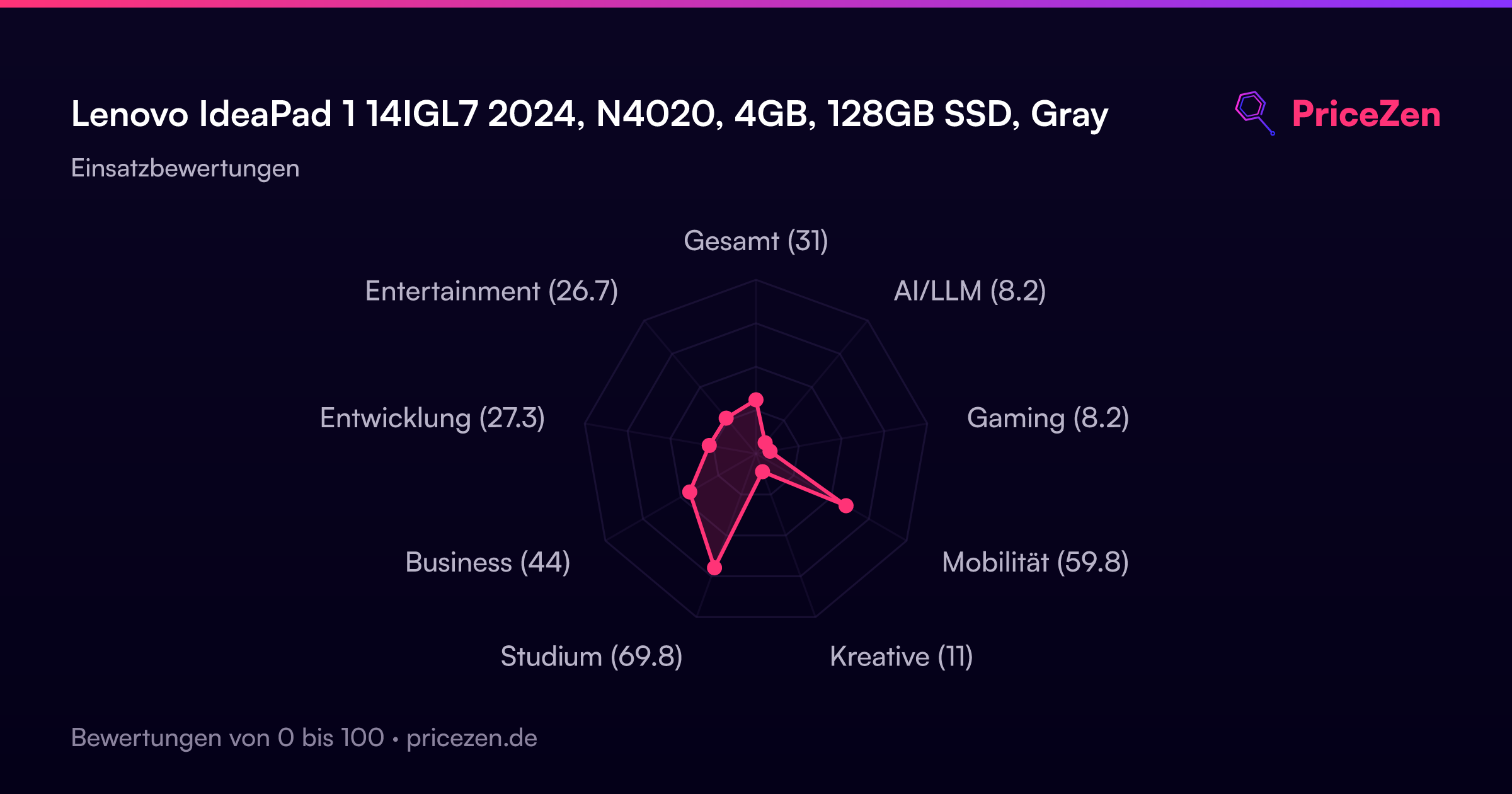
- Gesamt31
- AI/LLM8.2
- Gaming8.2
- Mobilität59.8
- Kreative11
- Studium69.8
- Business44
- Entwicklung27.3
- Entertainment26.7