Samsung Chromebook 12.2" PW_XE520QAB, Celeron 3965Y, 4GB, 64GB eMMC, Silver
Der Intel Celeron 3965Y und 4GB DDR4-RAM bieten ausreichend Leistung für alltägliche Aufgaben, unterstützt durch ein 12,2-Zoll-IPS-Touchdisplay mit 1920x1080 Pixeln. Das 2-in-1-Design und das Gewicht von 1,35kg machen es besonders mobil, während der 64GB-eMMC-Speicher für leichte Nutzung ausgelegt ist. Dieses Chromebook eignet sich am besten für Studenten, die ein kompaktes Gerät für Notizen, Surfen und Schularbeiten suchen.

Derzeit kein aktueller Händlerpreis
Überblick
The 30-Second Version
The Samsung Chromebook PW_XE520QAB is in the 98th percentile for compactness but the 2nd percentile for both CPU and RAM. At $399 USD, it's a cheap and tiny 2-in-1 with a decent 1920x1200 touchscreen. Just don't expect it to do much beyond basic browsing and cloud apps.
Pros & Cons
Vorteile
- 98th percentile for compactness, this thing is tiny and light at 1.35kg 98th
- 1920x1200 IPS touchscreen with a 2-in-1 hinge for tablet mode 83rd
- 81st percentile reliability rating, owners report few issues 82nd
- 82nd percentile affordability at $399 USD
- Fanless design means silent operation
Nachteile
- 2nd percentile CPU, the Celeron 3965Y is painfully slow
- 2nd percentile RAM, 4GB fills up fast with Chrome tabs
- 4th percentile storage, 64GB eMMC is nearly full out of the box
- 25th percentile port selection, only 2 USB-C and 1 USB-A
- Wi-Fi 5 only, no Wi-Fi 6 support
Was Besitzer sagen
The Word on the Street
Die Fakten
Performance
Let's be real about the Celeron 3965Y. It's a 2-core chip running at 1.5GHz, and it sits in the 2nd percentile for CPU performance in our database. That's about as close to the bottom as it gets. Paired with 4GB of DDR4 RAM, also in the 2nd percentile, this machine is happiest doing one thing at a time. A few Chrome tabs, a Google Doc, maybe a YouTube video. Push it harder and you'll feel the slowdown immediately.
The integrated Intel 615 graphics land in the 15th percentile, which is fine for ChromeOS animations and 1080p video but nothing more. The 64GB eMMC storage is in the 4th percentile, so you're living in the cloud whether you like it or not. On the bright side, the 12.2-inch 1920x1200 IPS touchscreen is solid, sitting right around the middle of the pack at the 40th percentile. It's bright enough for indoor use and the touch response is snappy.
Specifications
Full Specifications
Processor
| CPU | Intel Celeron 3965Y |
| Cores | 2 |
| Frequency | 1.5 GHz |
| L3 Cache | 2 MB |
Graphics
| GPU | Integrated Intel 615 Graphics |
Memory & Storage
| RAM | 4 GB |
| RAM Generation | DDR4 |
| Storage | 64 GB |
| Storage Type | eMMC |
Display
| Size | 12.2" |
| Resolution | 1920x1200 (Full HD) |
| Panel | IPS |
Connectivity
| USB-C Ports | 2 |
| USB Ports | 1 |
| Wi-Fi | Wi-Fi 5 |
| Bluetooth | Bluetooth 4.0 |
Physical
| Weight | 1.4 kg / 3.0 lbs |
| Battery | 39 Wh |
| OS | ChromeOS |
vs Competition
Stacked against the Apple MacBook Air M4 or the Microsoft Surface Laptop 7th Edition, this Samsung doesn't even play the same game. Those machines are in a completely different performance universe, with CPUs that would run circles around the Celeron 3965Y. The Lenovo Slim 7 and ASUS Zenbook UX3402VA also offer dramatically better specs for more money. Where the Samsung wins is portability and price. At 1.35kg and $399 USD, it undercuts all of them significantly. But you're trading away performance, storage, and ports to get there. The HP OmniBook X Flip is the closest in spirit as a 2-in-1, but it's also far more powerful and far more expensive.
| Spec | Samsung Chromebook 12.2" PW_XE520QAB | Apple MacBook Pro 14.2" M4 Pro | ASUS ROG Zephyrus 14" GA403WW-G14.R95080 | Lenovo Legion Pro 7i Gen 10 16" | HP OMEN Transcend | Dell Premium 14.5" LDA14250-7667SLV-PUS |
|---|---|---|---|---|---|---|
| CPU | Intel Celeron 3965Y | Apple M4 Pro | AMD Ryzen AI 9 HX 370 | Intel Core Ultra 9 275HX | Intel Core Ultra 9 285H | Intel Core Ultra 7 255H |
| RAM (GB) | 4 | 48 | 32 | 32 | 32 | 32 |
| Storage (GB) | 64 | 4096 | 2048 | 1024 | 1024 | 1024 |
| Screen | 12.2" 1920x1200 | 14.2" 3024x1964 | 14" 2880x1800 | 16" 2560x1600 | 14" 2880x1800 | 14.5" 3200x2000 |
| GPU | Integrated Intel 615 Graphics | Apple (16-Core) | NVIDIA GeForce RTX 5080 | NVIDIA GeForce RTX 5070 Ti | NVIDIA GeForce RTX 5070 | Intel Arc Graphics |
| OS | ChromeOS | macOS | Windows 11 Home | Windows 11 Home | Windows 11 Home | Windows 11 Home |
| Weight (kg) | 1.4 | 1.6 | 1.6 | 2.7 | 1.6 | 1.7 |
| Battery (Wh) | 39 | 72 | - | 99 | 71 | 62 |
| Compare | Compare | Compare | Compare | Compare |
| Produkt | CPU | GPU | RAM | Anschlüsse | Display | Mobilität | Speicher | Zuverlässigkeit | Affordability |
|---|---|---|---|---|---|---|---|---|---|
| Samsung Chromebook 12.2" PW_XE520QAB | 0.3 | 16.1 | 2.4 | 23.9 | 53.9 | 97.5 | 3.7 | 82 | 83 |
| Apple MacBook Pro 14.2" M4 Pro Compare | 92.4 | 78.9 | 90.6 | 73.9 | 99.1 | 68.9 | 98.4 | 98.2 | 4.6 |
| ASUS ROG Zephyrus 14" GA403WW-G14.R95080 Compare | 91.2 | 98.3 | 90.8 | 89.5 | 96 | 73.6 | 89.7 | 60.6 | 6.1 |
| Lenovo Legion Pro 7i Gen 10 16" Compare | 97.2 | 96.7 | 89 | 97.3 | 95 | 9.5 | 79.3 | 82 | 5.9 |
| HP OMEN Transcend Compare | 90.1 | 93.5 | 89.7 | 89.5 | 96 | 72.2 | 65.4 | 33.7 | 9 |
| Dell Premium 14.5" LDA14250-7667SLV-PUS Compare | 87 | 69.7 | 89 | 66.8 | 96.8 | 61.3 | 65.4 | 33.7 | 14.9 |
Preis
Value & Pricing
At $399 USD, this Chromebook sits in the 82nd percentile for affordability in our database. That's a genuinely good price for a 2-in-1 with a 1080p-class touchscreen. But value isn't just about the sticker price. You're getting a CPU and RAM combo that ranks in the bottom 2% of all laptops we track. For the same money, you can find refurbished Windows laptops or newer Chromebooks with faster processors and more memory. The compact form factor is the main thing justifying the price here.
Mehr erfahren
Overview
The Samsung Chromebook PW_XE520QAB nails the compact brief, landing in the 98th percentile for portability in our database. At 1.35kg with a 12.2-inch touchscreen, it's the kind of machine you toss in a bag and forget about until you need it. The 1920x1200 IPS panel is a nice touch at this size, and the 2-in-1 hinge means you can flip it into tablet mode for reading or scribbling notes.
But here's the catch. The Celeron 3965Y and 4GB of RAM put this thing in the 2nd percentile for both CPU and RAM among all laptops we track. That's not a typo. This is a Chromebook built for light browsing, document editing, and streaming, and it will remind you of that every time you open more than a handful of tabs.
Common Questions
Q: Can this Chromebook handle multitasking?
Not really. The Celeron 3965Y and 4GB of RAM both rank in the 2nd percentile in our database. You can manage a few lightweight tabs, but anything beyond basic browsing and document editing will cause noticeable slowdowns.
Q: Is the screen good for watching videos?
The 12.2-inch 1920x1200 IPS panel sits at the 40th percentile, which is about average. It's sharp and the touch response is good, but it's not particularly bright or color-accurate. Fine for casual streaming, not great for photo editing.
Q: How much storage do I actually get?
64GB of eMMC storage, which ranks in the 4th percentile. ChromeOS takes up a chunk of that out of the box, so you're realistically looking at around 40GB of usable space. You'll need to rely on cloud storage or a USB-C drive for anything beyond the basics.
Who Should Skip This
Skip this if you plan to do any real work. The 2nd percentile CPU and RAM scores mean this machine will frustrate anyone who needs to run multiple apps, edit documents with heavy formatting, or keep more than a few browser tabs open. The 4th percentile storage is also a dealbreaker if you want to install Android apps or keep files locally. And with only 2 USB-C ports and 1 USB-A port, you'll need dongles for anything beyond the basics. If you need a Chromebook for school or work, spend a bit more on something with at least 8GB of RAM and a faster processor.
Verdict
The Samsung Chromebook PW_XE520QAB is a niche machine. If you need the smallest, lightest Chromebook possible for basic tasks and you're on a tight budget, the 98th percentile compactness and 82nd percentile affordability make a decent case. But the 2nd percentile CPU and RAM scores are hard to ignore. This is a single-purpose device for light browsing and cloud-based work. For anyone who needs to multitask, run Android apps, or keep more than a handful of tabs open, there are better options at similar prices.
Usage Scores
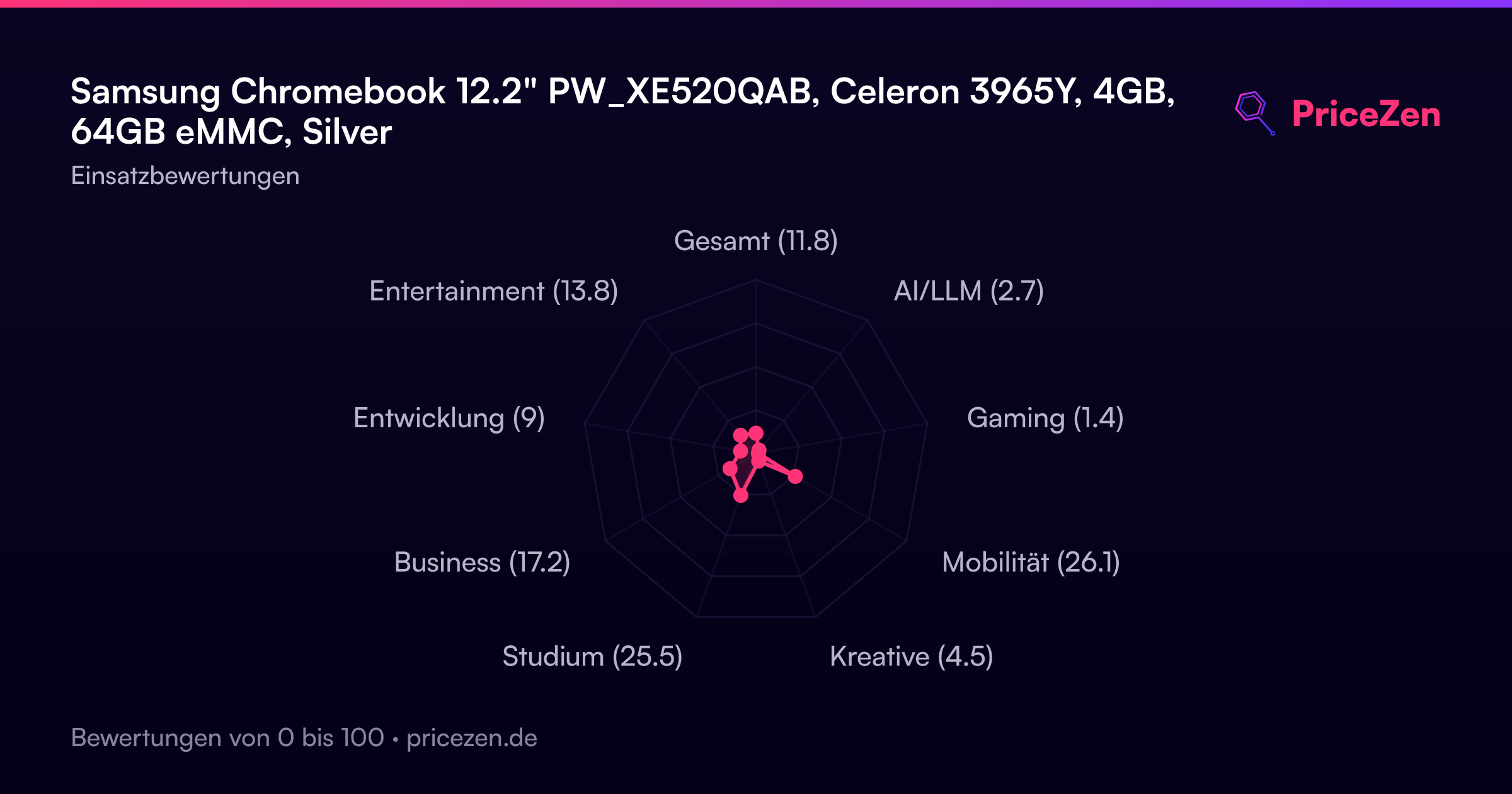
- Gesamt11.8
- AI/LLM2.7
- Gaming1.4
- Mobilität26.1
- Kreative4.5
- Studium25.5
- Business17.2
- Entwicklung9
- Entertainment13.8