Acer Chromebook 15.6" NX.AZ0AA.001 2022, Celeron N4500, 4GB, 64GB eMMC, Silver

ChromeOS: schneller Start, automatische Updates geprüft am 29. Nov.
12/100 Gesamtwertung 4,5 Durchschnitt aus 456 Besitzerbewertungen
- CPU
- Intel Celeron N4500
- RAM
- 4 GB
- Storage
- 64 GB
- Screen
- 15.6" 1920x1080
- GPU
- Intel UHD Graphics
- OS
- ChromeOS
- Weight
- 1.6 kg
Preise bei 1 Shop vergleichen
Günstigste zuerst. Neue, generalüberholte und gebündelte Angebote werden getrennt gehalten, damit du Gleiches mit Gleichem vergleichst.
| Shop | Verkauft von | Farbe und Zustand | Preis | ggü. Tiefstpreis | Zuletzt geprüft | Link |
|---|---|---|---|---|---|---|
| Neu1 AngebotEinzelstück | ||||||
| In den letzten 7 Tagen nicht geprüft, daher können sich diese Preise geändert haben | ||||||
| Amazon | Marktplatz-Händler | Nicht angegeben | 371,04 € | 10. Nov. | Zum Shop | |
 Quelle: PriceZen, geprüft am 10. Nov. 2026
Ein Preis gilt als aktuell, wenn wir ihn in den letzten 7 Tagen geprüft haben. „Marktplatz-Händler“ bedeutet einen Drittanbieter in diesem Shop, nicht den Shop selbst.
Preisverlauf
An dem Tag geprüftAn dem Tag nicht geprüft, weiter im Angebot
Quelle: PriceZen, checked 10. Nov. 2026











Überblick
The 30-Second Version
The Acer Chromebook CB315-4H-C8XU is a budget-friendly 15.6-inch Chromebook that nails the basics. The Full HD IPS display is great for streaming and browsing, and performance is smooth for everyday tasks. Just make sure you're paying a low price and be aware of potential reliability issues and the 4GB RAM ceiling.
Pros & Cons
Vorteile
- Excellent value, especially at renewed prices 97th
- Large 15.6-inch Full HD IPS display looks sharp 91st
- Lightweight and easy to carry at 1.6kg 71st
- Good port selection with USB-C and USB-A
- Snappy boot times and smooth everyday performance
Nachteile
- Only 4GB of RAM limits multitasking
- 64GB eMMC storage is slow and cramped
- Bottom-firing speakers get muffled on a lap
- Some units reportedly can't access Google Play Store
- Reliability scores are worryingly low
Was Besitzer sagen
The Word on the Street
- Buyers consistently praise the excellent value for money, with many saying it's hard to beat at the price.
- The large 15.6-inch Full HD screen is a recurring highlight, described as sharp and clear for streaming and work.
- A common complaint is the bottom-firing speakers, which get muffled when the laptop is used on a lap or soft surface.
Wie sich die Meinung der Besitzer im Lauf der Zeit verändert hat
ExklusivBasierend darauf, wann Kunden ihre Bewertungen tatsächlich geschrieben haben - so sehen Sie, ob das anfängliche Lob anhielt.
19 geschriebene Rezensionen, Nov. 2023 – Mai 2026: 18 zufrieden, 1 unzufrieden
Über alle 456 Shop-Bewertungen: 4,5★. Die meisten Besitzer bewerten, ohne eine Rezension zu schreiben. Das Diagramm zählt die 19 geschriebenen Rezensionen.
Jeder Punkt ist eine geschriebene Rezension, im Monat, in dem sie verfasst wurde. Zufrieden = 4-5★, gemischt = 3★, unzufrieden = 1-2★.
Die Fakten
Performance
Let's be real about what the Celeron N4500 and 4GB of RAM can do. It's not going to set any speed records. In our database, the RAM sits at the 1st percentile, which is about as low as it gets for a modern laptop. The CPU and GPU hover around the middle of the pack, but that's compared to all laptops, including other budget Chromebooks. In practice, this means you can keep a handful of Chrome tabs open, stream video, and type up documents without much fuss. Push it harder with a dozen tabs and some Android apps, and you'll feel the 4GB limitation pretty quickly.
The 64GB eMMC storage is also a weak spot, landing in the 5th percentile. It's not fast, and it's not spacious. But Chrome OS leans heavily on cloud storage, and you get 100GB of Google Drive space thrown in, so local storage is less of a concern than it would be on a Windows machine. Boot times are snappy, and waking from sleep is instant, which is exactly what you want from a grab-and-go laptop. Just don't expect to install a bunch of Linux apps or download a massive media library directly to the device.
Specifications
Full Specifications
Processor
| CPU | Intel Celeron N4500 |
| Cores | 2 |
| Frequency | 1.1 GHz |
| L3 Cache | 4 MB |
Graphics
| GPU | Intel UHD Graphics |
| Type | Integrated |
| VRAM Type | Shared |
Memory & Storage
| RAM | 4 GB |
| RAM Generation | LPDDR4X |
| Storage | 64 GB |
| Storage Type | eMMC |
Display
| Size | 15.6" |
| Resolution | 1920x1080 (Full HD) |
| Panel | IPS |
Connectivity
| USB-C Ports | 2 |
| USB Ports | 2 |
| Wi-Fi | Wi-Fi 6 |
| Bluetooth | Bluetooth 5.1 |
Physical
| Weight | 1.6 kg / 3.5 lbs |
| OS | ChromeOS |
vs Competition
Stacked against the Lenovo IdeaPad 82VG00TYUS, the Acer gives you a bigger, better display and Chrome OS simplicity, while the Lenovo runs Windows and typically comes with more RAM. If you need offline desktop apps, the IdeaPad makes more sense. The NIMO N152 is a closer competitor in the Chromebook space, but its screen is smaller and the build quality feels even cheaper based on user feedback. On the other end of the spectrum, something like the Microsoft Surface Laptop 3 or Apple MacBook Pro MR9Q2LL/A is in a completely different universe of performance and build quality, but you're paying ten times the price. For someone who just needs a big screen for web browsing and streaming, the Acer holds its own surprisingly well against pricier options.
The HP EliteBook 15.6" is an interesting comparison because it's also a 15.6-inch laptop, but it's a business-class Windows machine. It'll run circles around the Acer in raw performance and has far better reliability scores, but it also costs significantly more. If you're considering the Acer, you're probably not cross-shopping an EliteBook. The real question is whether you can live with Chrome OS and 4GB of RAM, and for a lot of people, the answer is yes.
| Spec | Acer Chromebook 15.6" NX.AZ0AA.001 | Apple MacBook Air 13.6" M4 | Lenovo Slim 7 14" 83MC0001US | HP OmniBook X Flip | NIMO N158 15.6" | ASUS ExpertBook 14" P5405CSA-DH54 |
|---|---|---|---|---|---|---|
| CPU | Intel Celeron N4500 | Apple M4 | Intel Core Ultra 7 256V | AMD Ryzen AI 7 350 | AMD Ryzen 7 8745HS | Intel Core Ultra 5 226V |
| RAM (GB) | 4 | 16 | 16 | 24 | 32 | 16 |
| Storage (GB) | 64 | 256 | 1024 | 1024 | 1024 | 512 |
| Screen | 15.6" 1920x1080 | 13.6" 2560x1664 | 14" 1920x1200 | 14" 1920x1200 | 15.6" 1920x1080 | 14" 2560x1600 |
| GPU | Intel UHD Graphics | Apple M4 8-core | Intel Arc 140V | AMD Radeon 860M | AMD Radeon 780M | Intel Arc 130V GPU |
| OS | ChromeOS | macOS | Windows 11 Home | Windows 11 Home | Windows 11 | Windows 11 Home |
| Weight (kg) | 1.6 | 1.2 | 1.3 | 1.4 | 1.7 | 1.3 |
| Battery (Wh) | - | 54 | 70 | 59 | 75 | 63 |
| Compare | Compare | Compare | Compare | Compare |
| Produkt | CPU | GPU | RAM | Anschlüsse | Display | Mobilität | Speicher | User Sentiment | Zuverlässigkeit | Nutzerresonanz | Affordability |
|---|---|---|---|---|---|---|---|---|---|---|---|
| Acer Chromebook 15.6" NX.AZ0AA.001 | 2 | 28.3 | 0.7 | 29.4 | 37.5 | 52.6 | 3.7 | 70.9 | 11 | 90.5 | 96.9 |
| Apple MacBook Air 13.6" M4 Compare | 75.9 | 75.7 | 49.9 | 64.4 | 87.2 | 91.4 | 24 | 61.3 | 98.2 | 98.9 | 52.1 |
| Lenovo Slim 7 14" 83MC0001US Compare | 68.5 | 65.9 | 66.7 | 83.5 | 80.7 | 86.8 | 79.3 | 0 | 82 | 97.6 | 40.4 |
| HP OmniBook X Flip Compare | 80 | 64.5 | 82.3 | 89.4 | 71.7 | 79.3 | 65.4 | 99.1 | 33.7 | 93.3 | 44.5 |
| NIMO N158 15.6" Compare | 84.5 | 74.2 | 86.3 | 94.6 | 37.5 | 48.2 | 79.3 | 70.9 | 4.1 | 87.5 | 66.6 |
| ASUS ExpertBook 14" P5405CSA-DH54 Compare | 62.8 | 62.7 | 65.9 | 89.4 | 87.5 | 87.2 | 51.1 | 0 | 60.6 | 0 | 45.4 |
Preis
Value & Pricing
Value is where this Chromebook either shines or falls flat, depending on what you pay. The price spread we're seeing is wild, ranging from $110 to over $47,000, which is clearly a data error on the high end. In the real world, you should be looking at renewed units in the $110 to $150 range. At that price, it's a steal for a 15.6-inch Full HD laptop that handles the basics well. If you're seeing it listed for much more, walk away. The Lenovo IdeaPad 82VG00TYUS offers similar specs in a Windows package, and the NIMO N152 is another budget Chromebook alternative, but neither matches this Acer's screen size at the low end. Just make sure you're buying from a seller with a solid return policy, because our reliability data for this model is concerning.
Mehr erfahren
Overview
The Acer Chromebook CB315-4H-C8XU is one of those devices that makes you question why you'd ever spend a grand on a laptop for basic tasks. It's a 15.6-inch Chromebook built around an Intel Celeron N4500, 4GB of RAM, and 64GB of eMMC storage. If those specs sound modest, that's because they are. But Chrome OS is light enough that this thing actually handles everyday browsing, email, and streaming without feeling like it's constantly gasping for air. For students or anyone who lives in a browser, it's a compelling pitch, especially when you see what it costs.
Acer didn't skimp on the display, which is a pleasant surprise at this end of the market. You get a 15.6-inch Full HD IPS panel that's sharp and clear, making it great for watching Netflix or working on documents. The port selection is solid too, with two USB-C and two USB-A ports, plus Wi-Fi 6. It's not going to win any design awards, and the all-plastic build feels exactly like what you'd expect for the price, but it's lightweight enough to toss in a bag without a second thought.
Now, a quick heads-up. This model is frequently sold as a renewed unit, so prices are all over the place. We've seen it listed anywhere from $110 to frankly absurd numbers that are clearly placeholder errors. If you're shopping around, stick to the lower end of that range. Paying more than $150 or so defeats the whole purpose of this machine.
Common Questions
Q: Is the Acer Chromebook 315 good for students?
Yes, it's a solid choice for students who need a large screen for writing papers, research, and streaming lectures. The lightweight design and long battery life make it easy to carry around campus, though the 4GB of RAM means you can't have too many tabs open at once.
Q: Can the Acer Chromebook CB315 run Android apps?
It's supposed to, and most users have no issues downloading apps from the Google Play Store. However, we've seen at least one verified report of the Play Store not connecting, so there's a small risk of compatibility problems.
Q: How is the battery life on the Acer Chromebook 315?
Users report good battery life that easily lasts through a full day of classes or casual use. Acer doesn't publish official battery estimates for this model, but real-world feedback suggests you can expect around 8 to 10 hours of mixed use.
Q: Is 4GB of RAM enough for a Chromebook?
For basic tasks like browsing, email, and streaming, 4GB is enough on Chrome OS. You'll notice slowdowns if you open more than 8 to 10 tabs or try to run demanding Android apps, so power users should look for an 8GB model.
Who Should Skip This
Skip this Chromebook if you need to run Windows or Mac software, or if you're a heavy multitasker who keeps dozens of tabs open. The 4GB of RAM will frustrate you quickly. It's also not a good fit if you plan to use Android apps heavily, given the reported Play Store issues on some units. If reliability is a top concern, the low percentile score here is a genuine warning sign. Look at the Lenovo IdeaPad 82VG00TYUS for a Windows alternative with more RAM, or the NIMO N152 if you want to stick with Chrome OS but need a more dependable track record.
Verdict
Should you buy the Acer Chromebook CB315-4H-C8XU? If you need a big, cheap laptop for basic tasks and you can find it for around $110 to $150, absolutely. It's a fantastic deal for students, casual users, or anyone who wants a secondary machine for the kitchen or couch. The 15.6-inch Full HD screen is the star here, and Chrome OS keeps things running smoothly despite the modest internals.
But there are some real risks. The reliability score is in the 10th percentile, which is a red flag. And while most users report a great experience, we've seen at least one verified report of the Google Play Store not working, which would be a dealbreaker if you rely on Android apps. If you can live with those caveats and stick to a low price, this Chromebook is an easy recommendation. If you need something more dependable or powerful, save up for a Lenovo IdeaPad or a used Windows laptop with more RAM.
Usage Scores
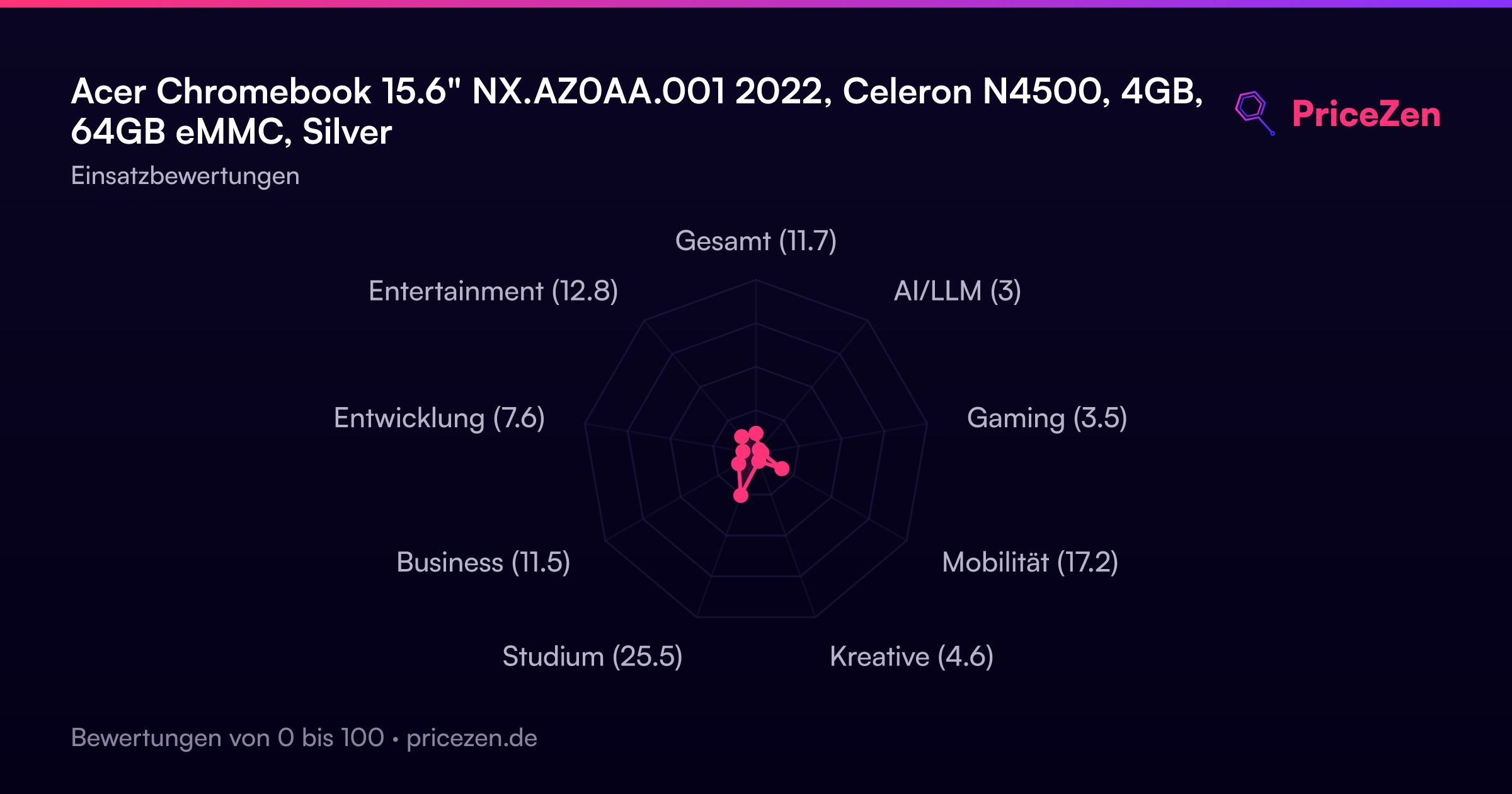
- Gesamt11.7
- AI/LLM3
- Gaming3.5
- Mobilität17.2
- Kreative4.6
- Studium25.5
- Business11.5
- Entwicklung7.6
- Entertainment12.8