HP Essential 14" TPN-Q221 2023, Celeron N4120, 8GB, 64GB eMMC + 32GB eMMC, Silver
Der Intel Celeron N4120 mit vier Kernen und 2,6 GHz sowie 8 GB DDR4 sorgen für flüssiges Wechseln zwischen Anwendungen, während der 64-GB-eMMC-Speicher schnelle Bootzeiten ermöglicht. Das 14-Zoll-TN-Display mit 220 Nits und 45 % NTSC ist schlicht, aber das geringe Gewicht von 1,47 kg und die Anschlüsse wie USB-C, HDMI und Ethernet machen das Gerät flexibel. Ideal für Studierende, die ein zuverlässiges Notebook für Textverarbeitung, Online-Vorlesungen und Surfen benötigen, ohne Gaming-Anspruch.

Derzeit kein aktueller Händlerpreis
Überblick
The 30-Second Version
The HP Essential TPN-Q221 is a budget 14-inch laptop that works for very light tasks but struggles with Windows 11 on 8GB of RAM and a tiny 64GB eMMC drive. The screen is dim and washed out, and user sentiment is among the worst we've tracked. At the low end of its USD 246 to USD 399 price range it's tolerable, but most people should spend a little more elsewhere.
Pros & Cons
Vorteile
- Very affordable entry-level price 86th
- Full-size keyboard and 14-inch screen 81st
- Includes 1 year of Office 365 77th
- Decent port selection with USB-C, USB-A, and HDMI
- Light enough for basic student use
Nachteile
- 64GB eMMC storage fills up almost immediately
- Screen is dim, washed out, and has terrible viewing angles
- Celeron N4120 struggles with multitasking
- Windows 11 on 8GB RAM leads to slowdowns
- Multiple reports of freezing and keyboard failures
Was Besitzer sagen
The Word on the Street
Wie sich die Meinung der Besitzer im Lauf der Zeit verändert hat
ExklusivBasierend darauf, wann Kunden ihre Bewertungen tatsächlich geschrieben haben - so sehen Sie, ob das anfängliche Lob anhielt.
Zufriedene Besitzer: zuletzt 71 %, 73 % in Apr. 2024 – März 2025
Zu wenige Rezensionen, um von einer Veränderung zu sprechen.
Über alle 774 Shop-Bewertungen: 4,1★. Die meisten Besitzer bewerten, ohne eine Rezension zu schreiben. Das Diagramm zählt die 32 geschriebenen Rezensionen mit Sternen und eigenem Datum.
Zahlen anzeigen
| Zeitraum | Rezensionen | Zufrieden | Gemischt | Unzufrieden | Anteil zufrieden |
|---|---|---|---|---|---|
| Apr. 2024 – März 2025 | 11 | 8 | 0 | 3 | 73 % |
| Apr. 2025 – Feb. 2026 | 21 | 15 | 0 | 6 | 71 % |
Jede Säule fasst Quartale zusammen, bis sie mindestens 10 Rezensionen mit Sternen und eigenem Datum enthält. Zufrieden = 4-5★, gemischt = 3★, unzufrieden = 1-2★.
Die Fakten
Performance
The Celeron N4120 lands at the 48th percentile for CPU performance in our database. That's middle of the pack for budget laptops, which sounds okay until you remember what it's competing against. This is a chip designed for very light tasks. Web browsing with a few tabs, email, Word documents, maybe a video call. Push it harder and you'll feel it.
RAM is the bigger problem. At 8GB, this config sits at the 13th percentile for memory. Windows 11 really wants 8GB just to breathe, and several owners report the OS eating through available RAM quickly. The 64GB eMMC storage is even worse, landing at the 5th percentile. That's one of the smallest drives we've seen in a modern laptop. You'll be leaning on cloud storage or external drives almost immediately. The integrated Intel UHD Graphics sit at the 37th percentile, which means light browser games are fine but anything 3D is off the table. Gaming overall scores 9.4 out of 100, so no, this is not a gaming laptop in any sense.
Specifications
Full Specifications
Processor
| CPU | Intel Celeron N4120 |
| Cores | 4 |
| Frequency | 1.1 GHz |
| L3 Cache | 6 MB |
Graphics
| GPU | Intel UHD Graphics |
| Type | Integrated |
| VRAM Type | Shared |
Memory & Storage
| RAM | 8 GB |
| RAM Generation | DDR4 |
| Storage 1 | 64 GB |
| Storage 1 Type | eMMC |
| Storage 2 | 32 GB |
| Storage 2 Type | eMMC |
Display
| Size | 14" |
| Resolution | 1366x768 |
| Panel | TN |
| Brightness | 220 nits |
| Color Gamut | 45% NTSC |
Connectivity
| USB-C Ports | 1 |
| USB Ports | 3 |
| HDMI | ✓ |
| Wi-Fi | Wi-Fi 5 |
| Ethernet | RJ-45 |
Physical
| Weight | 1.5 kg / 3.2 lbs |
| OS | Windows 11 Home |
vs Competition
Stacked against the Lenovo ThinkPad X1 Carbon, there's no contest. The ThinkPad has a better screen, better keyboard, better build quality, and actual SSD storage. It also costs several times more, so that's not entirely fair. But even against other budget options, the HP Essential falls short. The ASUS Vivobook TP3407SA-DS74T offers a convertible design and a much better display for not much more money. The Samsung Galaxy Book5 NP750XHD-KB1US brings a brighter screen and faster processor to the same general price bracket.
Where the HP does okay is raw port selection. You get USB-C, multiple USB-A ports, HDMI, and Ethernet, which is more than some ultrabooks offer. But the missing RJ-45 port on some configs has annoyed buyers who expected wired networking. And the Apple MacBook Pro MVVK2LL/A and Microsoft Surface Laptop 165H are in a completely different league. If you're cross-shopping those, you're looking at the wrong laptop.
| Spec | HP Essential 14" TPN-Q221 | Apple MacBook Pro 14.2" M4 Max | ASUS ROG Zephyrus 14" GA403WW-G14.R95080 | Lenovo Legion Pro 7i Gen 10 16" | Samsung Galaxy Book5 Pro 14" NP944XHA-KG3US | Dell Premium 14.5" LDA14250-7667SLV-PUS |
|---|---|---|---|---|---|---|
| CPU | Intel Celeron N4120 | Apple M4 Max | AMD Ryzen AI 9 HX 370 | Intel Core Ultra 9 275HX | Intel Core Ultra 7 258V | Intel Core Ultra 7 255H |
| RAM (GB) | 8 | 64 | 32 | 32 | 32 | 32 |
| Storage (GB) | 64 | 4096 | 2048 | 1024 | 1024 | 1024 |
| Screen | 14" 1366x768 | 14.2" 3024x1964 | 14" 2880x1800 | 16" 2560x1600 | 14" 2880x1800 | 14.5" 3200x2000 |
| GPU | Intel UHD Graphics | Apple (40-Core) | NVIDIA GeForce RTX 5080 | NVIDIA GeForce RTX 5070 Ti | Intel Arc Graphics 140V | Intel Arc Graphics |
| OS | Windows 11 Home | macOS | Windows 11 Home | Windows 11 Home | Windows 11 Pro | Windows 11 Home |
| Weight (kg) | 1.5 | 1.6 | 1.6 | 2.7 | 1.2 | 1.7 |
| Battery (Wh) | - | 72 | - | 99 | 63 | 62 |
| Compare | Compare | Compare | Compare | Compare |
| Produkt | CPU | GPU | RAM | Anschlüsse | Display | Mobilität | Speicher | User Sentiment | Zuverlässigkeit | Nutzerresonanz | Affordability |
|---|---|---|---|---|---|---|---|---|---|---|---|
| HP Essential 14" TPN-Q221 | 3.4 | 28 | 13.2 | 42.8 | 0.6 | 76.5 | 4.6 | 1.8 | 33.7 | 81.2 | 85.7 |
| Apple MacBook Pro 14.2" M4 Max Compare | 93.7 | 91.5 | 95.6 | 73.8 | 99.1 | 68.9 | 98.4 | 99 | 98.3 | 73.4 | 1.7 |
| ASUS ROG Zephyrus 14" GA403WW-G14.R95080 Compare | 91.2 | 98.3 | 90.8 | 89.4 | 96 | 73.7 | 89.7 | 99 | 60.7 | 96.6 | 5.9 |
| Lenovo Legion Pro 7i Gen 10 16" Compare | 97.2 | 96.7 | 89 | 97.3 | 95 | 9.5 | 79.2 | 90.8 | 82.1 | 99.7 | 5.7 |
| Samsung Galaxy Book5 Pro 14" NP944XHA-KG3US Compare | 65.7 | 69.6 | 79.4 | 83.4 | 90.3 | 89.5 | 79.2 | 0 | 82.1 | 96.6 | 20.9 |
| Dell Premium 14.5" LDA14250-7667SLV-PUS Compare | 87 | 69.6 | 89 | 66.7 | 96.8 | 61.2 | 65.2 | 90.8 | 33.7 | 96.6 | 14.5 |
Preis
Value & Pricing
Pricing on this thing is all over the place. We're seeing USD 246 to USD 399 across six US listings, which is a USD 153 spread for what should be the same laptop. At USD 246, it's a tolerable deal if you need a basic machine for typing and web browsing. At USD 399, you're getting ripped off. For that money you can find refurbished ThinkPads or older MacBook Airs that will run circles around this thing. The cheapest listing in our data is the one to look for if you're set on this model. Just know that the 1-year Office 365 subscription adds some real value if you actually use it, since that's roughly USD 70 on its own.
Mehr erfahren
Overview
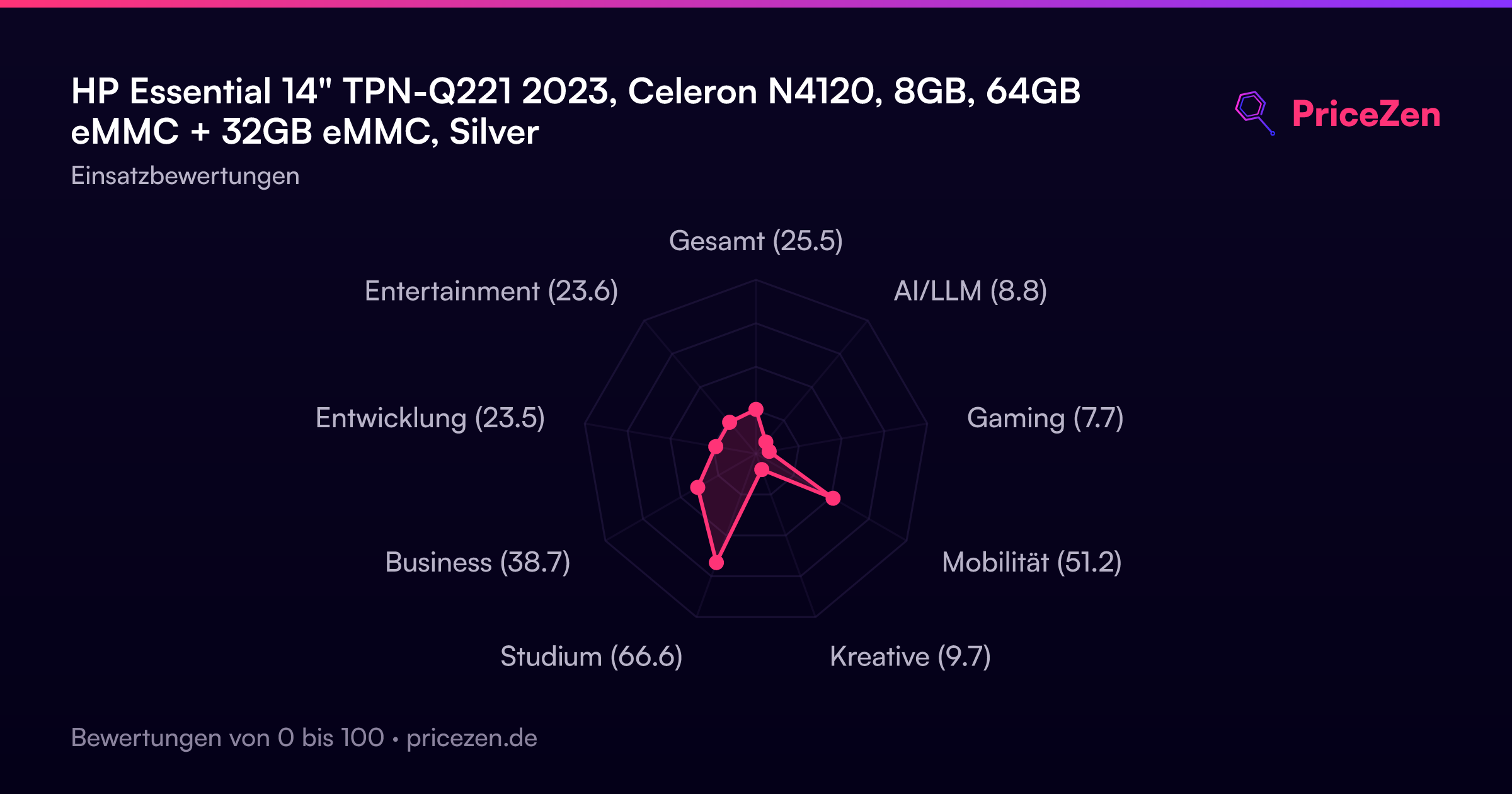
The HP Essential TPN-Q221 is a budget 14-inch Windows laptop aimed at students and light office work. It sits in that under-$400 space where you're mostly paying for portability and a full keyboard, not speed. Our database puts it at 46.2 out of 100 for student use and 41.7 for business, which tells you right away this is a basic machine, not a workhorse.
Spec-wise you're looking at an Intel Celeron N4120, a quad-core chip that tops out at 2.6GHz, paired with 8GB of DDR4 RAM in the base config. Storage is a 64GB eMMC drive, and some listings mention a second 32GB eMMC module. That's not a lot of room. Windows 11 alone will eat a big chunk of it before you install anything.
The display is a 14-inch 1366x768 TN panel rated at 220 nits with 45% NTSC color coverage. That's about as entry-level as screens get in 2025. If you've used a nicer laptop or even a decent tablet, you'll notice the washed-out colors and narrow viewing angles immediately.
Common Questions
Q: Is the HP Essential TPN-Q221 good for students?
It can handle very light student work like writing papers and browsing the web, but the slow Celeron processor and limited 64GB storage make it frustrating for multitasking or running heavier apps.
Q: Can the HP Essential TPN-Q221 run Windows 11 smoothly?
Windows 11 will run, but not smoothly. With only 8GB of RAM and a Celeron N4120, expect slowdowns when multiple apps are open. Several owners specifically mention Windows 11 using too much RAM on this machine.
Q: How much storage does the HP Essential TPN-Q221 have?
It comes with 64GB of eMMC storage, and some configurations add a second 32GB eMMC module. That's very little space, and Windows 11 plus a few apps will fill most of it quickly.
Q: Is the HP Essential TPN-Q221 good for gaming?
No. The integrated Intel UHD Graphics and Celeron processor score 9.4 out of 100 for gaming in our database. Light browser games might work, but anything more demanding will be unplayable.
Who Should Skip This
Skip this if you plan to do any real multitasking, photo editing, coding, or gaming. The Celeron N4120 and 8GB of RAM will frustrate you within a week. Also skip it if you need local storage for files, since 64GB eMMC is barely enough for the OS and a few apps. Anyone who cares about screen quality should look elsewhere too, the TN panel here is one of the worst we've seen. If you're a student who needs a reliable machine for four years, spend a bit more on a refurbished ThinkPad or a Chromebook with better specs. If you're a business user who needs something dependable, this is not the laptop for you. The recurring reports of freezing and keyboard failures make it a risky choice for anything important.
Verdict
Should you buy the HP Essential TPN-Q221? Only if your budget is extremely tight and your needs are extremely light. It works for basic web browsing, email, and document editing, assuming you don't open too many tabs. The 14-inch screen is fine for reading, but the TN panel is genuinely bad by modern standards. Colors look flat, brightness tops out at 220 nits, and tilting the screen even slightly changes everything.
The bigger concern is reliability. Our user sentiment score for this laptop is 38 out of 100, which lands at the 2nd percentile. That's one of the worst scores in our entire database. Multiple owners report freezing, slow performance with basic apps, keyboard keys failing, and difficulty even turning the machine on. A few people are happy with it for basic needs, and the 4.1-star Amazon rating suggests not everyone has a bad time. But the negative reports are specific and recurring. For a student laptop, that's a risky bet. If you can stretch your budget by USD 50 to USD 100, you'll find something dramatically better.
Usage Scores
- Gesamt25.5
- AI/LLM8.8
- Gaming7.7
- Mobilität51.2
- Kreative9.7
- Studium66.6
- Business38.7
- Entwicklung23.5
- Entertainment23.6