ASUS Chromebook ASUS 14" Touchscreen Chromebook, Celeron N4500, 8GB, 160GB SSD + 32GB SSD, Gray
Das 14-Zoll-Full-HD-Touchdisplay mit 1920x1080 Pixeln und Antireflexbeschichtung reduziert die Augenbelastung, während der Intel Celeron N4500 mit 8 GB RAM flüssiges Multitasking für Studium und Streaming ermöglicht. Mit 160 GB Speicher, 2 TB Cloud und einem 6-in-1-Zubehörpaket bietet dieses Chromebook ein praktisches Gesamtpaket für Studenten. Es eignet sich für Schüler und Studierende, die ein leichtes, reaktionsschnelles Gerät für Online-Kurse, Recherchen und kreative Projekte suchen.

Derzeit kein aktueller Händlerpreis











Überblick
The 30-Second Version
A budget Chromebook that punches above its weight with 8GB RAM and a touchscreen. Skip it if you need real storage or any kind of gaming.
Pros & Cons
Vorteile
- 8GB RAM keeps Chrome tabs from turning into a slideshow 87th
- 14-inch FHD touchscreen is a rare find at this price
- Wi-Fi 6 and Bluetooth 5.4 are surprisingly current
- The 6-in-1 accessory kit is genuinely useful for students
Nachteile
- Celeron N4500 is one of the weakest CPUs we've tracked
- Storage is a weird eMMC plus SD card combo, not a real SSD
- Port selection is bare bones, just one USB-A and one USB-C
- No backlit keyboard, which stings for late-night study sessions
Was Besitzer sagen
The Word on the Street
Wie sich die Meinung der Besitzer im Lauf der Zeit verändert hat
ExklusivBasierend darauf, wann Kunden ihre Bewertungen tatsächlich geschrieben haben - so sehen Sie, ob das anfängliche Lob anhielt.
2 geschriebene Rezensionen, Apr.–Dez. 2025: 2 zufrieden
Über alle 5 Shop-Bewertungen: 4,5★. Die meisten Besitzer bewerten, ohne eine Rezension zu schreiben. Das Diagramm zählt die 2 geschriebenen Rezensionen.
Jeder Punkt ist eine geschriebene Rezension, im Monat, in dem sie verfasst wurde. Zufrieden = 4-5★, gemischt = 3★, unzufrieden = 1-2★.
Die Fakten
Performance
The Intel Celeron N4500 is a modest chip, and our database puts it in the bottom quarter for CPU performance. But here's the thing: ChromeOS is light enough that 8GB of RAM makes this feel snappier than the spec sheet suggests. The 160GB of storage is a mix of eMMC and an SD card, which is a bit of a head-scratcher. eMMC is slow, and the SD card isn't much better. Don't expect to store a massive media library locally. The 2TB of cloud storage is the real workaround, but that requires a decent internet connection.
Specifications
Full Specifications
Processor
| CPU | Intel Celeron N4500 |
| Cores | 2 |
| Frequency | 1.1 GHz |
| L3 Cache | 6 MB |
Graphics
| GPU | Intel UHD Graphics |
| Type | Integrated |
| VRAM Type | Shared |
Memory & Storage
| RAM | 8 GB |
| RAM Generation | DDR4 |
| Storage 1 | 160 GB |
| Storage 1 Type | SSD |
| Storage 2 | 32 GB |
| Storage 2 Type | SSD |
Display
| Size | 14" |
| Resolution | 1920x1080 (Full HD) |
Connectivity
| Wi-Fi | Wi-Fi 6 |
Physical
| Weight | 2.4 kg / 5.2 lbs |
| OS | ChromeOS |
vs Competition
Stack this against the Samsung Galaxy Book5 Pro 360 and you'll see the gap immediately. The Samsung has a much better screen, faster processor, and a premium build, but it costs several times more. The Apple MacBook Pro M4 Max is in a completely different universe. For a student Chromebook, the real competition is other budget Chromebooks, and this ASUS holds its own with the 8GB RAM and touchscreen. The Lenovo Legion Pro 7i and MSI Vector are gaming machines, so they're not even in the same conversation. If you're comparing this to a Windows laptop at the same price, the Chromebook wins on simplicity and battery life, but loses on software flexibility.
| Spec | ASUS Chromebook ASUS 14" Touchscreen Chromebook | Apple MacBook Pro 14.2" M4 Max | Lenovo Legion Pro 7i Gen 10 16" | HP OMEN Transcend | Samsung Galaxy Book5 Pro 14" NP944XHA-KG3US | Dell Premium 14.5" LDA14250-7667SLV-PUS |
|---|---|---|---|---|---|---|
| CPU | Intel Celeron N4500 | Apple M4 Max | Intel Core Ultra 9 275HX | Intel Core Ultra 9 285H | Intel Core Ultra 7 258V | Intel Core Ultra 7 255H |
| RAM (GB) | 8 | 64 | 32 | 32 | 32 | 32 |
| Storage (GB) | 160 | 4096 | 1024 | 1024 | 1024 | 1024 |
| Screen | 14" 1920x1080 | 14.2" 3024x1964 | 16" 2560x1600 | 14" 2880x1800 | 14" 2880x1800 | 14.5" 3200x2000 |
| GPU | Intel UHD Graphics | Apple (40-Core) | NVIDIA GeForce RTX 5070 Ti | NVIDIA GeForce RTX 5070 | Intel Arc Graphics 140V | Intel Arc Graphics |
| OS | ChromeOS | macOS | Windows 11 Home | Windows 11 Home | Windows 11 Pro | Windows 11 Home |
| Weight (kg) | 2.4 | 1.6 | 2.7 | 1.6 | 1.2 | 1.7 |
| Battery (Wh) | - | 72 | 99 | 71 | 63 | 62 |
| Compare | Compare | Compare | Compare | Compare |
| Produkt | CPU | GPU | RAM | Anschlüsse | Display | Mobilität | Speicher | Zuverlässigkeit | Nutzerresonanz | Affordability |
|---|---|---|---|---|---|---|---|---|---|---|
| ASUS Chromebook ASUS 14" Touchscreen Chromebook | 1.9 | 28 | 13.2 | 9.9 | 20.3 | 62.2 | 9.8 | 60.7 | 28.8 | 86.9 |
| Apple MacBook Pro 14.2" M4 Max Compare | 93.7 | 91.5 | 95.6 | 73.8 | 99.1 | 68.9 | 98.4 | 98.3 | 73.4 | 1.7 |
| Lenovo Legion Pro 7i Gen 10 16" Compare | 97.2 | 96.7 | 89 | 97.3 | 95 | 9.5 | 79.2 | 82.1 | 99.7 | 5.7 |
| HP OMEN Transcend Compare | 90.1 | 93.5 | 89.6 | 89.4 | 96 | 72.3 | 65.2 | 33.7 | 94.2 | 8.9 |
| Samsung Galaxy Book5 Pro 14" NP944XHA-KG3US Compare | 65.7 | 69.6 | 79.4 | 83.4 | 90.3 | 89.5 | 79.2 | 82.1 | 96.6 | 20.9 |
| Dell Premium 14.5" LDA14250-7667SLV-PUS Compare | 87 | 69.6 | 89 | 66.7 | 96.8 | 61.2 | 65.2 | 33.7 | 96.6 | 14.5 |
Preis
Value & Pricing
At MXN 11,390, this is a solid deal for what it is. The affordability score lands in the 86th percentile, which means you're getting a lot of Chromebook for the money. The accessory kit alone would cost a decent chunk if bought separately. If you need a basic machine for school or light browsing, this is a smart buy. Just don't expect it to do anything beyond that.
Mehr erfahren
Overview
This ASUS Chromebook is a no-frills school machine that nails the basics. The 14-inch touchscreen and 8GB of RAM are the real story here, giving it enough headroom for a pile of Chrome tabs without choking. It's not going to win any speed contests, but for homework, streaming, and web browsing, it's a dependable pick. The bundled accessory kit is a nice touch too, especially if you're buying for a student who needs the whole setup in one box.
Common Questions
Q: Can this Chromebook run Windows or Mac apps?
Nope. It runs ChromeOS, so you're limited to web apps, Android apps from the Play Store, and Linux apps if you enable developer mode. If you need full Windows software, get a Windows laptop instead.
Q: Is the touchscreen any good?
It's a 1080p panel with anti-glare coating, which is fine for a budget machine. Don't expect iPad-level responsiveness, but it works well for scrolling, tapping, and basic drawing apps.
Q: How much storage do I actually get?
You get 128GB of eMMC storage plus a 32GB SD card, so 160GB total. That's not a lot, but the 2TB of cloud storage is included. Keep your files in Google Drive and you'll be fine.
Who Should Skip This
If you're looking for a machine to edit video, run demanding software, or play games, this isn't it. The Celeron N4500 and integrated graphics are a weak spot, and the storage is too slow for heavy local work. Go grab a Windows laptop with a real SSD and a Ryzen or Core i5 instead. Also skip this if you need lots of ports, because two USB ports total is rough.
Verdict
This ASUS Chromebook is a straightforward recommendation for students and anyone who lives in a browser. The 8GB RAM and FHD touchscreen are the highlights, and the accessory kit sweetens the deal. It's not a powerhouse, and the storage setup is a bit janky, but for the price, it's hard to beat. If you need a cheap, reliable machine for schoolwork and streaming, this is the one to get.
Usage Scores
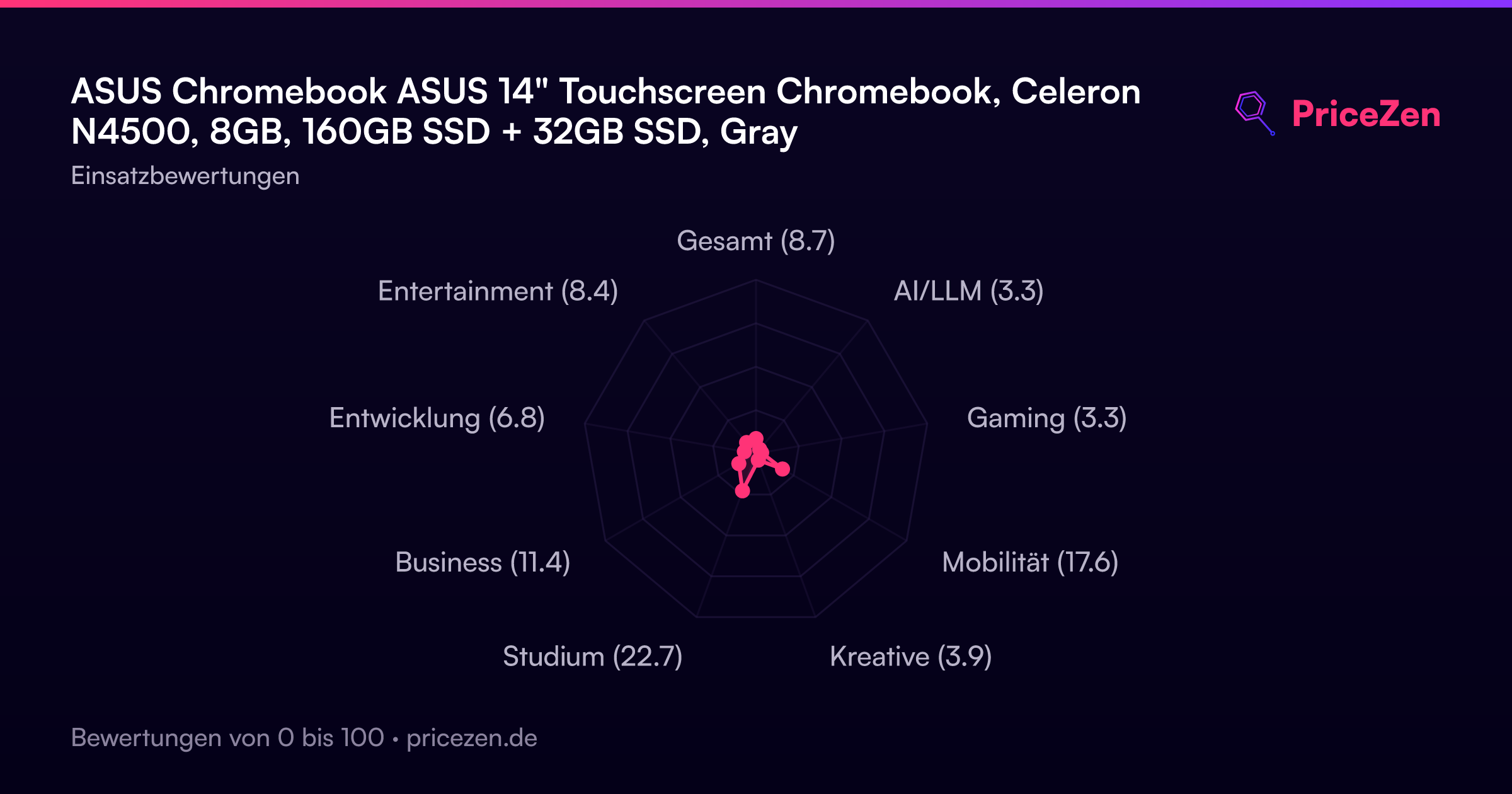
- Gesamt8.7
- AI/LLM3.3
- Gaming3.3
- Mobilität17.6
- Kreative3.9
- Studium22.7
- Business11.4
- Entwicklung6.8
- Entertainment8.4