HP 14" Laptop, Celeron N, 4GB, 64GB SSD, Dale White
Der Intel Celeron Dual-Core-Prozessor mit 2,6 GHz und 4 GB DDR4-RAM bieten grundlegende Reaktionsfähigkeit für einfache Büroaufgaben, während das 14-Zoll-HD-BrightView-Display eine ordentliche Lesbarkeit gewährleistet. Mit 64 GB SSD und USB-C- sowie USB-A-Anschlüssen hebt sich dieses generalüberholte Notebook durch seinen günstigen Preis und ausreichende Konnektivität für den Alltag ab. Es eignet sich für Studenten mit kleinem Budget, die ein zuverlässiges Gerät für Surfen, Textverarbeitung und Online-Vorlesungen benötigen, ohne Grafikleistung zu erwarten.

Derzeit kein aktueller Händlerpreis











Überblick
The 30-Second Version
The HP 14" renewed laptop is cheap, like really cheap, and the battery life is solid. But 4GB of RAM and a 64GB SSD make it feel slow out of the box, and the Celeron CPU is near the bottom of our rankings. Worth it only if your budget is fixed and your needs are basic.
Pros & Cons
Vorteile
- Dirt cheap at $219, affordability is top-tier 96th
- Battery life gets consistent praise from owners 81st
- Clean physical condition on renewed units 69th
- Decent audio and screen brightness for the price
Nachteile
- 4GB of RAM is the lowest we've seen in this category
- 64GB SSD fills up fast, Windows 11 alone eats a third of it
- Celeron CPU struggles with anything beyond basic tasks
- Keyboard quality gets called out by multiple buyers
Was Besitzer sagen
The Word on the Street
Wie sich die Meinung der Besitzer im Lauf der Zeit verändert hat
ExklusivBasierend darauf, wann Kunden ihre Bewertungen tatsächlich geschrieben haben - so sehen Sie, ob das anfängliche Lob anhielt.
20 geschriebene Rezensionen, Apr. 2023 – Mai 2026: 14 zufrieden, 3 gemischt, 3 unzufrieden
Über alle 1.137 Shop-Bewertungen: 4,1★. Die meisten Besitzer bewerten, ohne eine Rezension zu schreiben. Das Diagramm zählt die 20 geschriebenen Rezensionen.
Jeder Punkt ist eine geschriebene Rezension, im Monat, in dem sie verfasst wurde. Zufrieden = 4-5★, gemischt = 3★, unzufrieden = 1-2★.
Die Fakten
Performance
The Celeron N-series processor lands in the 6th percentile for CPUs, which is rough. Paired with 4GB of RAM (1st percentile, dead last in our database), this thing chokes the moment you open more than a handful of browser tabs. The 64GB SSD is also near the bottom at the 5th percentile, and Windows 11 eats a big chunk of that before you install anything. On the bright side, the integrated Intel graphics actually score in the 61st percentile, which sounds impressive until you remember the gaming score is 10 out of 100. Owners report occasional lag after startup, and one buyer even received a unit with the wrong processor. For basic tasks like word processing or streaming, it's tolerable. For anything else, it's a waiting game.
Specifications
Full Specifications
Processor
| CPU | Celeron N |
| Cores | 2 |
Graphics
| GPU | Intel Graphics |
| Type | Integrated |
Memory & Storage
| RAM | 4 GB |
| RAM Generation | DDR4 |
| Storage | 64 GB |
| Storage Type | SSD |
Display
| Size | 14" |
| Resolution | 1366x768 |
Connectivity
| USB-C Ports | 1 |
| USB Ports | 2 |
| Wi-Fi | Wi-Fi 5 |
| Bluetooth | ✓ |
Physical
| Weight | 1.9 kg / 4.3 lbs |
| OS | Windows 11 |
vs Competition
Stacked against the Lenovo ThinkPad X1 Carbon or Dell Latitude 7430, this HP looks like it's from a different decade. Those machines have real processors, 16GB of RAM, and SSDs measured in hundreds of gigabytes. They also cost four to five times as much. The Acer Aspire A14-52M-72FH is a closer budget rival, but even that offers more storage and a better screen. The honest comparison here is with cheap Chromebooks, not Windows ultrabooks. And against a Chromebook at the same price, this HP gives you full Windows 11, which matters if you need specific Windows software. But you're trading away speed and storage to get it.
| Spec | HP 14" Laptop | Apple MacBook Pro 14.2" M4 Pro | ASUS ROG Zephyrus 14" GA403WW-G14.R95080 | Lenovo Legion Pro 7i Gen 10 16" | Samsung Galaxy Book5 Pro 14" NP944XHA-KG3US | Dell Premium 14.5" LDA14250-7667SLV-PUS |
|---|---|---|---|---|---|---|
| CPU | Celeron N | Apple M4 Pro | AMD Ryzen AI 9 HX 370 | Intel Core Ultra 9 275HX | Intel Core Ultra 7 258V | Intel Core Ultra 7 255H |
| RAM (GB) | 4 | 48 | 32 | 32 | 32 | 32 |
| Storage (GB) | 64 | 4096 | 2048 | 1024 | 1024 | 1024 |
| Screen | 14" 1366x768 | 14.2" 3024x1964 | 14" 2880x1800 | 16" 2560x1600 | 14" 2880x1800 | 14.5" 3200x2000 |
| GPU | Intel Graphics | Apple (16-Core) | NVIDIA GeForce RTX 5080 | NVIDIA GeForce RTX 5070 Ti | Intel Arc Graphics 140V | Intel Arc Graphics |
| OS | Windows 11 | macOS | Windows 11 Home | Windows 11 Home | Windows 11 Pro | Windows 11 Home |
| Weight (kg) | 1.9 | 1.6 | 1.6 | 2.7 | 1.2 | 1.7 |
| Battery (Wh) | - | 72 | - | 99 | 63 | 62 |
| Compare | Compare | Compare | Compare | Compare |
| Produkt | CPU | GPU | RAM | Anschlüsse | Display | Mobilität | Speicher | User Sentiment | Zuverlässigkeit | Nutzerresonanz | Affordability |
|---|---|---|---|---|---|---|---|---|---|---|---|
| HP 14" Laptop | 2.6 | 6.5 | 0.6 | 23.6 | 4 | 68.6 | 4.4 | 11.9 | 33.7 | 81.2 | 96.4 |
| Apple MacBook Pro 14.2" M4 Pro Compare | 92.4 | 78.8 | 90.6 | 73.8 | 99.1 | 68.9 | 98.4 | 90.8 | 98.3 | 99.7 | 4.5 |
| ASUS ROG Zephyrus 14" GA403WW-G14.R95080 Compare | 91.2 | 98.3 | 90.8 | 89.4 | 96 | 73.7 | 89.7 | 99 | 60.7 | 96.6 | 6 |
| Lenovo Legion Pro 7i Gen 10 16" Compare | 97.2 | 96.7 | 89 | 97.3 | 94.9 | 9.6 | 79.2 | 90.8 | 82.1 | 99.7 | 5.7 |
| Samsung Galaxy Book5 Pro 14" NP944XHA-KG3US Compare | 65.7 | 69.6 | 79.4 | 83.4 | 90.3 | 89.5 | 79.2 | 0 | 82.1 | 96.6 | 21 |
| Dell Premium 14.5" LDA14250-7667SLV-PUS Compare | 87 | 69.6 | 89 | 66.7 | 96.8 | 61.2 | 65.1 | 90.8 | 33.7 | 96.6 | 14.6 |
Preis
Value & Pricing
At $219, this is one of the cheapest Windows laptops you can buy, and the affordability percentile proves it. For a student who needs a machine for essays, email, and web research, it's hard to argue with the price. But value isn't just about the sticker. The 64GB SSD means you'll be juggling storage constantly, and 4GB of RAM will have you closing tabs to keep things responsive. If you can stretch your budget by $80 to $100, you'll find laptops with double the RAM and storage that will last you years instead of months. This is a buy-it-because-you-have-to laptop, not a buy-it-because-it's-good laptop.
Mehr erfahren
Overview
This is a $219 renewed HP 14" laptop that exists for one reason: getting you online without emptying your wallet. The affordability score sits in the 96th percentile, which means it's cheaper than almost everything else in our database. But you feel every corner that got cut to hit that price.
The specs tell the story. A Celeron dual-core CPU, 4GB of RAM, and a 64GB SSD. That's a Chromebook pretending to run Windows 11. It'll handle email, web browsing, and document editing if you keep your expectations grounded. Just don't ask it to do much more.
Common Questions
Q: Can this laptop run Windows 11 smoothly with only 4GB of RAM?
It runs Windows 11, but smoothly is a stretch. Expect lag when multitasking or opening multiple browser tabs. Stick to one or two apps at a time and it's manageable.
Q: How much usable storage is actually available out of the box?
The 64GB SSD has roughly 40GB free after Windows 11 and preinstalled software. That fills up fast if you install apps or save photos and videos locally.
Q: Is this good enough for a student?
For writing papers, checking email, and light web research, yes. But if your coursework involves video editing, coding, or running demanding software, you'll hit the RAM and storage limits quickly.
Who Should Skip This
Skip this if you need to run anything beyond a browser and Office apps. Gamers should look elsewhere immediately, the gaming score is 10 out of 100 and the storage can't hold modern titles anyway. If you're a power user who keeps 20 tabs open or edits photos, the 4GB of RAM will drive you nuts. And if you need a machine that will still feel usable in three years, spend a bit more now. This laptop is a stopgap, not a long-term companion.
Verdict
This laptop is for someone who needs Windows on a very tight budget and understands exactly what they're getting. A student with light workloads, a grandparent who checks email and Facebook, or someone who needs a backup machine for travel. The battery life and clean renewed condition are genuine positives. But if you plan to keep this for more than a year or two, the 4GB of RAM and 64GB SSD will frustrate you daily. Buy it for the price, not the performance.
Usage Scores
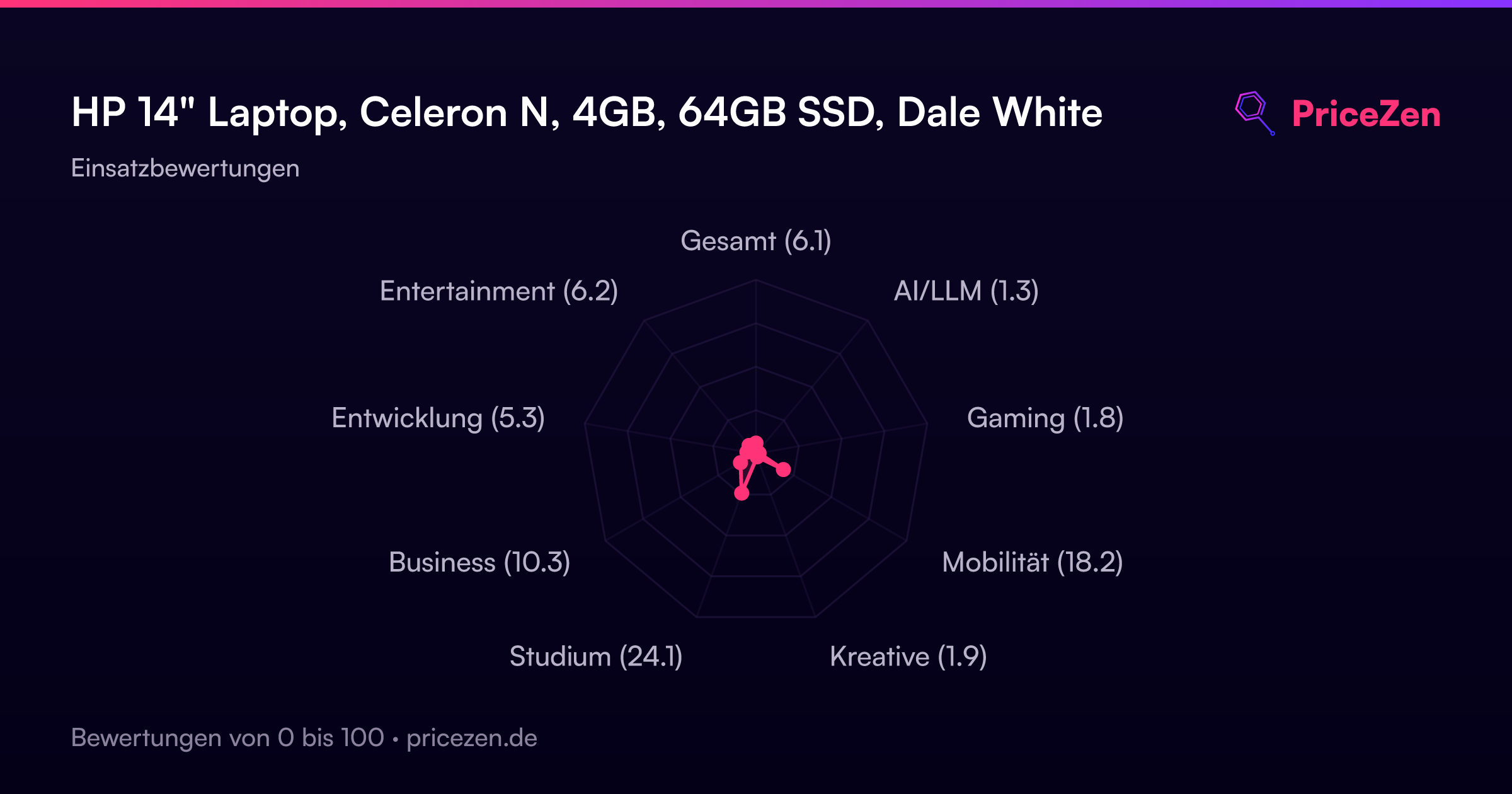
- Gesamt6.1
- AI/LLM1.3
- Gaming1.8
- Mobilität18.2
- Kreative1.9
- Studium24.1
- Business10.3
- Entwicklung5.3
- Entertainment6.2