ASUS Vivobook 14" X1404VA-I512256, Core i5-1355U, 32GB, 1TB SSD, Quiet Blue
The Intel Core i5-1355U processor with 10 cores and 32GB of DDR4 RAM handles heavy multitasking across research tools, writing software, and video lectures without slowdowns. Its 14-inch Nano-IPS display with TÜV Rheinland certification reduces eye strain during long study sessions, while the 1TB SSD provides fast boot times and ample storage for academic files. This laptop is best for students who need a lightweight, durable machine with a 180-degree lay-flat hinge and privacy shutter for daily campus use.

Derzeit kein aktueller Händlerpreis











Überblick
The 30-Second Version
The ASUS Vivobook X1404VA-I512256 is a 14-inch Windows laptop with an Intel Core i5-1355U, 32GB of RAM, and a 1TB SSD. It's light, durable, and built for multitasking, making it a great pick for students and office workers. Just don't expect it to handle gaming or heavy creative workloads.
Pros & Cons
Vorteile
- 32GB of RAM is a huge amount for this class 80th
- 1TB SSD gives you plenty of storage 72nd
- Lightweight at 1.40kg and easy to carry 65th
- Military-grade 810H durability rating
- NumberPad built into the trackpad is handy
Nachteile
- Integrated graphics can't handle gaming or heavy creative work
- HDMI 1.4b limits external display options
- Screen quality is just average
- No Thunderbolt support
- Limited social proof and reviews available
Die Fakten
Performance
The Core i5-1355U is a 10-core, 12-thread processor with a max turbo of 4.6GHz. In our database, it lands at the 42nd percentile for CPU performance among traditional laptops, which puts it firmly in the middle of the pack. That's not a knock. For web browsing, document editing, spreadsheets, and even light photo work, this chip handles things without breaking a sweat. The 32GB of DDR4 RAM is the real standout here. It's at the 73rd percentile for memory, which means you can keep dozens of Chrome tabs open, run Zoom, and have Spotify going without the system slowing to a crawl. Most laptops in this class ship with 8GB or 16GB, so 32GB is a genuine advantage.
The 1TB SSD is also a nice upgrade over the 256GB or 512GB drives you often see at this price point. It sits at the 67th percentile for storage, which is solid. Boot times are quick, and file transfers feel snappy. The integrated Intel UHD Graphics, on the other hand, is the weak link. It's at the 14th percentile for GPU performance, which means it's fine for streaming video and basic tasks but struggles with anything more demanding. Don't expect to play modern games or render 3D models on this thing. The display is a 14-inch FHD panel at the 41st percentile for screen quality, so it's about average. Colors are fine for documents and web browsing, but it's not a screen that will impress anyone doing color-sensitive work.
Specifications
Full Specifications
Processor
| CPU | Intel Core i5-1355U |
| Cores | 10 |
| Frequency | 1.3 GHz |
| L3 Cache | 12 MB |
Graphics
| GPU | Intel UHD Graphics |
| Type | Integrated |
Memory & Storage
| RAM | 32 GB |
| RAM Generation | DDR4 |
| Storage | 1 TB |
| Storage Type | SSD |
Display
| Size | 14" |
| Resolution | 1920x1080 (Full HD) |
| Panel | Nano-IPS |
Connectivity
| USB-C Ports | 1 |
| USB Ports | 3 |
| HDMI | HDMI 1.4b |
Physical
| Weight | 1.4 kg / 3.1 lbs |
| OS | Windows 11 Home |
vs Competition
Stacked against the Microsoft Surface Laptop 7th Edition, the Vivobook X1404VA wins on raw specs per dollar. The Surface has a better screen, better build quality, and a more premium feel, but you'll typically pay more for less RAM and storage. The HP OMEN Transcend 14-fb1023dx is a different beast entirely. It has a dedicated GPU and a much better display, but it's heavier, more expensive, and aimed at gamers and creators. If you need graphics performance, the OMEN is the obvious choice. If you just need a work machine, the Vivobook makes more sense.
The MSI Prestige PRE13EVOA2088 is another competitor in the thin-and-light productivity space. It tends to offer better port selection and sometimes a nicer screen, but again, you're often paying more. The Lenovo Legion Pro 7i Gen 10 and Apple MacBook Pro M4 Max are in a completely different league. Those are high-performance machines with price tags to match. Comparing the Vivobook to them is like comparing a reliable commuter car to a sports car. Different tools for different jobs. For the student or office worker on a budget, the Vivobook holds its own where it counts: memory, storage, and portability.
| Spec | ASUS Vivobook 14" X1404VA-I512256 | Apple MacBook Pro 14.2" M4 Max | Lenovo Legion Pro 7i Gen 10 16" | HP OMEN Transcend | Samsung Galaxy Book5 Pro 14" NP944XHA-KG3US | Dell Premium 14.5" LDA14250-7667SLV-PUS |
|---|---|---|---|---|---|---|
| CPU | Intel Core i5-1355U | Apple M4 Max | Intel Core Ultra 9 275HX | Intel Core Ultra 9 285H | Intel Core Ultra 7 258V | Intel Core Ultra 7 255H |
| RAM (GB) | 32 | 64 | 32 | 32 | 32 | 32 |
| Storage (GB) | 1024 | 4096 | 1024 | 1024 | 1024 | 1024 |
| Screen | 14" 1920x1080 | 14.2" 3024x1964 | 16" 2560x1600 | 14" 2880x1800 | 14" 2880x1800 | 14.5" 3200x2000 |
| GPU | Intel UHD Graphics | Apple (40-Core) | NVIDIA GeForce RTX 5070 Ti | NVIDIA GeForce RTX 5070 | Intel Arc Graphics 140V | Intel Arc Graphics |
| OS | Windows 11 Home | macOS | Windows 11 Home | Windows 11 Home | Windows 11 Pro | Windows 11 Home |
| Weight (kg) | 1.4 | 1.6 | 2.7 | 1.6 | 1.2 | 1.7 |
| Battery (Wh) | - | 72 | 99 | 71 | 63 | 62 |
| Compare | Compare | Compare | Compare | Compare |
| Produkt | CPU | GPU | RAM | Anschlüsse | Display | Mobilität | Speicher | Zuverlässigkeit | Nutzerresonanz | Affordability |
|---|---|---|---|---|---|---|---|---|---|---|
| ASUS Vivobook 14" X1404VA-I512256 | 44.6 | 28 | 72 | 31.8 | 37.5 | 80.1 | 65.2 | 60.7 | 19.4 | 0 |
| Apple MacBook Pro 14.2" M4 Max Compare | 93.7 | 91.5 | 95.6 | 73.8 | 99.1 | 68.9 | 98.4 | 98.3 | 73.4 | 1.7 |
| Lenovo Legion Pro 7i Gen 10 16" Compare | 97.2 | 96.7 | 89 | 97.3 | 94.9 | 9.5 | 79.2 | 82.1 | 99.7 | 5.7 |
| HP OMEN Transcend Compare | 90.1 | 93.5 | 89.6 | 89.4 | 96 | 72.3 | 65.2 | 33.7 | 94.2 | 8.9 |
| Samsung Galaxy Book5 Pro 14" NP944XHA-KG3US Compare | 65.7 | 69.6 | 79.4 | 83.4 | 90.3 | 89.5 | 79.2 | 82.1 | 96.6 | 21 |
| Dell Premium 14.5" LDA14250-7667SLV-PUS Compare | 87 | 69.6 | 89 | 66.7 | 96.8 | 61.2 | 65.2 | 33.7 | 96.6 | 14.4 |
Preis
Value & Pricing
Without a confirmed price, it's hard to judge the exact value proposition, but the spec sheet tells a clear story. You're getting 32GB of RAM and a 1TB SSD, which are upgrades that usually cost extra. If this lands in the budget to mid-range bracket, it's a strong deal for students and office workers who prioritize multitasking headroom over raw processing power. The trade-off is the integrated graphics and the average display. Compared to something like the Microsoft Surface Laptop 7th Edition, you're giving up build quality and screen quality, but you're likely paying less and getting more memory and storage. For someone who just needs a reliable daily driver for school or work, this is a sensible pick.
Mehr erfahren
Overview
The ASUS Vivobook X1404VA-I512256 sits in that crowded middle ground of 14-inch Windows laptops aimed at students and office workers who need something light enough to toss in a backpack but capable enough to handle a full day of tabs, docs, and video calls. It's not a flashy machine. No dedicated GPU, no OLED panel, no aluminum unibody. What it does offer is a surprisingly generous 32GB of RAM and a 1TB SSD, which is more than you typically see at this end of the market. The Intel Core i5-1355U is a 10-core chip from Intel's 13th gen lineup, and while it's not going to set any records, it's a solid workhorse for everyday productivity.
People searching for a budget-friendly student laptop or a lightweight business machine will find a lot to like here. The 14-inch FHD NanoEdge display keeps the footprint small, and at 1.40kg it's easy to carry between classes or meetings. The military-grade 810H durability rating is a nice touch for anyone who's ever dropped a laptop on a dorm room floor. But the integrated Intel UHD Graphics means this is not a machine for gaming or heavy creative work, and the port selection feels a bit dated with HDMI 1.4b and no Thunderbolt.
We don't have a confirmed price for this specific configuration, but based on the specs and the bundle accessories mentioned in the listing, it's positioned as a value-oriented option. The 4.3-star customer rating suggests most buyers are happy with what they got, though the social proof percentile in our database is on the lower side, meaning there just aren't that many reviews out there yet.
Common Questions
Q: Is the ASUS Vivobook X1404VA good for gaming?
No, this laptop is not good for gaming. It uses integrated Intel UHD Graphics, which sits at the 14th percentile for GPU performance in our database. You can play very light or older games at low settings, but modern titles will struggle or won't run at all.
Q: How much RAM does the ASUS Vivobook X1404VA have?
This configuration comes with 32GB of DDR4 RAM, which is well above average for a laptop in this class. That's enough for heavy multitasking, dozens of browser tabs, and running multiple applications at once without slowdowns.
Q: Is the ASUS Vivobook X1404VA good for students?
Yes, it's a solid choice for students. It's lightweight at 1.40kg, has a military-grade durability rating, and includes a privacy shutter on the webcam. The 32GB of RAM and 1TB SSD mean it can handle research, writing, and video lectures without running out of space or memory.
Q: Does the ASUS Vivobook X1404VA have a touchscreen?
No, the 14-inch FHD NanoEdge display on this model is not a touchscreen. It's a standard LED panel with a 1920x1080 resolution, which is fine for productivity but not particularly impressive in terms of color accuracy or brightness.
Who Should Skip This
Skip this laptop if you need any kind of graphics horsepower. Gamers, video editors, 3D modelers, and anyone who works with GPU-accelerated software should look at something with a dedicated GPU, like the HP OMEN Transcend 14-fb1023dx or a Lenovo Legion model. Creative professionals who care about color accuracy and display quality will also be disappointed by the average screen. If you want a premium-feeling device with a better panel, the Microsoft Surface Laptop 7th Edition or a MacBook Air are better options, though you'll pay more. And if you need Thunderbolt connectivity for external GPUs or high-speed docks, this Vivobook doesn't have it.
Verdict
Should you buy the ASUS Vivobook X1404VA-I512256? If you're a student or office worker who needs a light, durable laptop with enough RAM and storage to handle serious multitasking, then yes, this is a strong candidate. The 32GB of RAM is the headline feature here. It future-proofs the machine in a way that most budget laptops can't match. The 1TB SSD means you won't be juggling external drives or deleting files to free up space. And the 1.40kg weight makes it genuinely pleasant to carry around all day.
But if you need to play games, edit video, or do any kind of 3D work, look elsewhere. The integrated Intel UHD Graphics is a hard limit. The screen is also nothing special, so photographers and designers should keep shopping. And if you care about having a premium-feeling device with a bright, color-accurate display, the Surface Laptop 7th Edition or even a used MacBook Air might be a better fit. For everyone else, this Vivobook is a practical, no-nonsense workhorse that gets the job done.
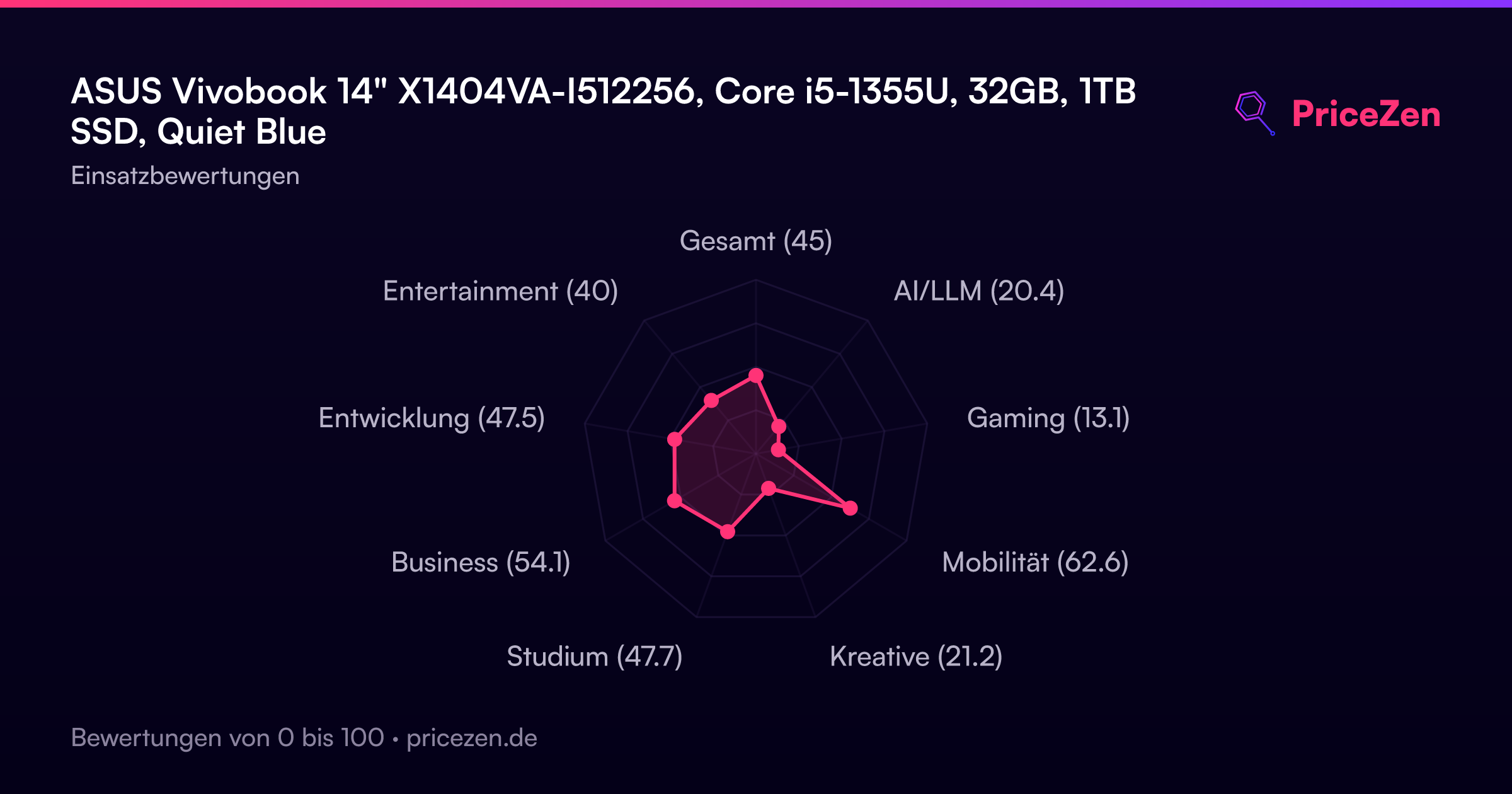
Usage Scores
- Gesamt45
- AI/LLM20.4
- Gaming13.1
- Mobilität62.6
- Kreative21.2
- Studium47.7
- Business54.1
- Entwicklung47.5
- Entertainment40