Lenovo 14e Chromebook 82W60000US 2023, Intel N100, 4GB, 32GB eMMC, Storm Gray
Der Intel N100 Prozessor und der 57Wh Akku ermöglichen eine ganztägige Nutzung dieses 14-Zoll-Chromebooks, das mit 1,45kg leicht genug für unterwegs ist. Die MIL-STD-810H-Zertifizierung und die verstärkte Bauweise überstehen Stürze und Spritzer, was es ideal für den Schulalltag macht. Dieses Lenovo 14e richtet sich an Schüler und mobile Berufstätige, die Wert auf Robustheit und die Einfachheit von ChromeOS für Cloud- und Büroarbeiten legen.

Derzeit kein aktueller Händlerpreis











Überblick
The 30-Second Version
Great battery life trapped in a chassis with a screen from 2012 and RAM from a budget phone. Buy it only if it's the cheapest thing you can find and you literally only need a browser.
Pros & Cons
Vorteile
- Battery life is genuinely excellent, 57Wh on an N100 goes forever 87th
- Lightweight at 1.45kg, easy to toss in a backpack 82nd
- Wi-Fi 6E and Ethernet on a budget Chromebook is a nice surprise 78th
- ChromeOS is secure and dead simple for students
Nachteile
- 1366x768 TN panel is one of the worst screens we've seen, 45% NTSC and 250 nits is rough
- 4GB RAM and 32GB eMMC storage are bottom-tier even for Chromebooks
- CPU sits in the 15th percentile, fine for basics but nothing more
- Only one USB-C port and it's likely needed for charging
Die Fakten
Performance
The Intel N100 is a plucky little chip for basic browsing and Google Docs, but it sits in the 15th percentile for CPUs in our database. That's not a typo. The 4GB of LPDDR5 RAM is the real bottleneck here, landing in the bottom 4 percent of all laptops we've tested. ChromeOS is light, sure, but it's not magic. Open ten tabs and you'll feel the swap file grinding against that 32GB eMMC, which is also near the bottom of the barrel. The one bright spot is the 57Wh battery, which genuinely delivers all-day runtime. Just don't expect to do anything demanding while you're unplugged.
Specifications
Full Specifications
Processor
| CPU | Intel Processor N100 |
| Cores | 4 |
| Frequency | 800 MHz |
| L3 Cache | 6 MB |
Graphics
| GPU | Intel UHD Graphics |
| Type | Integrated |
| VRAM Type | Shared |
Memory & Storage
| RAM | 4 GB |
| RAM Generation | LPDDR5 |
| Storage | 32 GB |
| Storage Type | eMMC |
Display
| Size | 14" |
| Resolution | 1366x768 |
| Panel | TN |
| Refresh Rate | 60 Hz |
| Brightness | 250 nits |
| Color Gamut | 45% NTSC |
Connectivity
| USB-C Ports | 1 |
| USB Ports | 2 |
| HDMI | HDMI 1.4 |
| Wi-Fi | Wi-Fi 6E |
| Bluetooth | BT5.1 |
| Ethernet | No Onboard Ethernet |
Physical
| Weight | 1.4 kg / 3.2 lbs |
| Battery | 57 Wh |
| OS | ChromeOS |
vs Competition
The competitors listed here are all premium ultrabooks that cost three to five times as much, so comparing them directly feels a bit unfair. The MacBook Pro M1 Pro and Dell XPS 13 are in a completely different universe for performance and display quality. The real comparison for this Chromebook is against other budget education machines, not flagship laptops. If you're cross-shopping this against an HP OmniBook or ASUS Zenbook, you're either confused or about to be very disappointed. For actual Chromebook alternatives, look for anything with 8GB of RAM and an IPS panel, even if it costs USD 50 more.
| Spec | Lenovo 14e Chromebook 82W60000US | Apple MacBook Pro 14.2" M4 Max | ASUS ROG Zephyrus 14" GA403WW-G14.R95080 | HP OMEN Transcend | Samsung Galaxy Book5 Pro 14" NP944XHA-KG3US | Dell Premium 14.5" LDA14250-7667SLV-PUS |
|---|---|---|---|---|---|---|
| CPU | Intel Processor N100 | Apple M4 Max | AMD Ryzen AI 9 HX 370 | Intel Core Ultra 9 285H | Intel Core Ultra 7 258V | Intel Core Ultra 7 255H |
| RAM (GB) | 4 | 64 | 32 | 32 | 32 | 32 |
| Storage (GB) | 32 | 4096 | 2048 | 1024 | 1024 | 1024 |
| Screen | 14" 1366x768 | 14.2" 3024x1964 | 14" 2880x1800 | 14" 2880x1800 | 14" 2880x1800 | 14.5" 3200x2000 |
| GPU | Intel UHD Graphics | Apple (40-Core) | NVIDIA GeForce RTX 5080 | NVIDIA GeForce RTX 5070 | Intel Arc Graphics 140V | Intel Arc Graphics |
| OS | ChromeOS | macOS | Windows 11 Home | Windows 11 Home | Windows 11 Pro | Windows 11 Home |
| Weight (kg) | 1.5 | 1.6 | 1.6 | 1.6 | 1.2 | 1.7 |
| Battery (Wh) | 57 | 72 | - | 71 | 63 | 62 |
| Compare | Compare | Compare | Compare | Compare |
| Produkt | CPU | GPU | RAM | Anschlüsse | Display | Mobilität | Speicher | Zuverlässigkeit | Affordability |
|---|---|---|---|---|---|---|---|---|---|
| Lenovo 14e Chromebook 82W60000US | 16.1 | 28.1 | 4.3 | 47.8 | 0.6 | 78 | 2.5 | 82.1 | 87.3 |
| Apple MacBook Pro 14.2" M4 Max Compare | 93.7 | 91.6 | 95.7 | 73.2 | 99.3 | 68.9 | 98.5 | 98.3 | 1.7 |
| ASUS ROG Zephyrus 14" GA403WW-G14.R95080 Compare | 91.2 | 98.3 | 90.9 | 89.2 | 96.5 | 73.6 | 89.7 | 60.6 | 5.8 |
| HP OMEN Transcend Compare | 90.1 | 93.6 | 89.7 | 89.2 | 96.5 | 72.3 | 65.2 | 33.6 | 8.5 |
| Samsung Galaxy Book5 Pro 14" NP944XHA-KG3US Compare | 65.8 | 69.6 | 79.4 | 83.1 | 91.6 | 89.5 | 79.2 | 82.1 | 20.5 |
| Dell Premium 14.5" LDA14250-7667SLV-PUS Compare | 87 | 69.6 | 89 | 65.9 | 97.2 | 61.2 | 65.2 | 33.6 | 14 |
Preis
Value & Pricing
At USD 327 to USD 360 across US listings, this is a tough sell unless you find it at the low end. The spread between vendors is real, and the cheapest US listing is the only one that makes any sense. For USD 360 you're dangerously close to better Chromebooks with 8GB of RAM and IPS displays. If you're in Europe, the EUR 672 to EUR 693 pricing is frankly absurd for these specs. Buy it cheap or don't buy it.
Mehr erfahren
Overview
The Lenovo 14e Chromebook is a budget classroom machine that knows exactly what it is, and what it isn't. The one thing to know: you're trading almost everything for battery life and a low price. The 57Wh battery paired with a low-power Intel N100 means this thing will outlast your attention span, but the 1366x768 TN panel and 4GB of RAM will test your patience every single time you open more than a few tabs.
Common Questions
Q: Can this handle video calls and online classes?
Barely. Google Meet will run, but with 4GB of RAM and a 15th percentile CPU, expect stutters if you have more than a couple tabs open alongside the call. The 720p webcam and TN screen won't do you any favors either.
Q: Is 32GB of storage enough?
For ChromeOS, mostly yes, if you live in the cloud. But Android apps and offline downloads will eat that space fast. You'll be managing storage constantly, and that gets old quick.
Q: Can I upgrade the RAM or storage?
No. The RAM is soldered and the storage is eMMC, not a replaceable SSD. What you buy is what you get forever, so the 4GB RAM limit is permanent.
Who Should Skip This
If you plan to do anything beyond web browsing and Google Docs, this isn't it. Go get a Chromebook with 8GB of RAM and an IPS display instead. If you need Windows apps or any kind of creative work, skip Chromebooks entirely and look at a used ThinkPad or a budget Windows laptop with a Ryzen 5.
Verdict
The Lenovo 14e Chromebook is a one-trick pony, and that trick is battery life. For a student who only needs Google Classroom, Docs, and maybe some YouTube, it works. But the 4GB RAM ceiling and that awful TN screen make it hard to recommend when slightly more expensive Chromebooks fix both problems. If you can grab it at the USD 327 end of the range and your needs are truly basic, it's acceptable. Otherwise, save up a little more and get something with 8GB of RAM and an IPS display.
Usage Scores
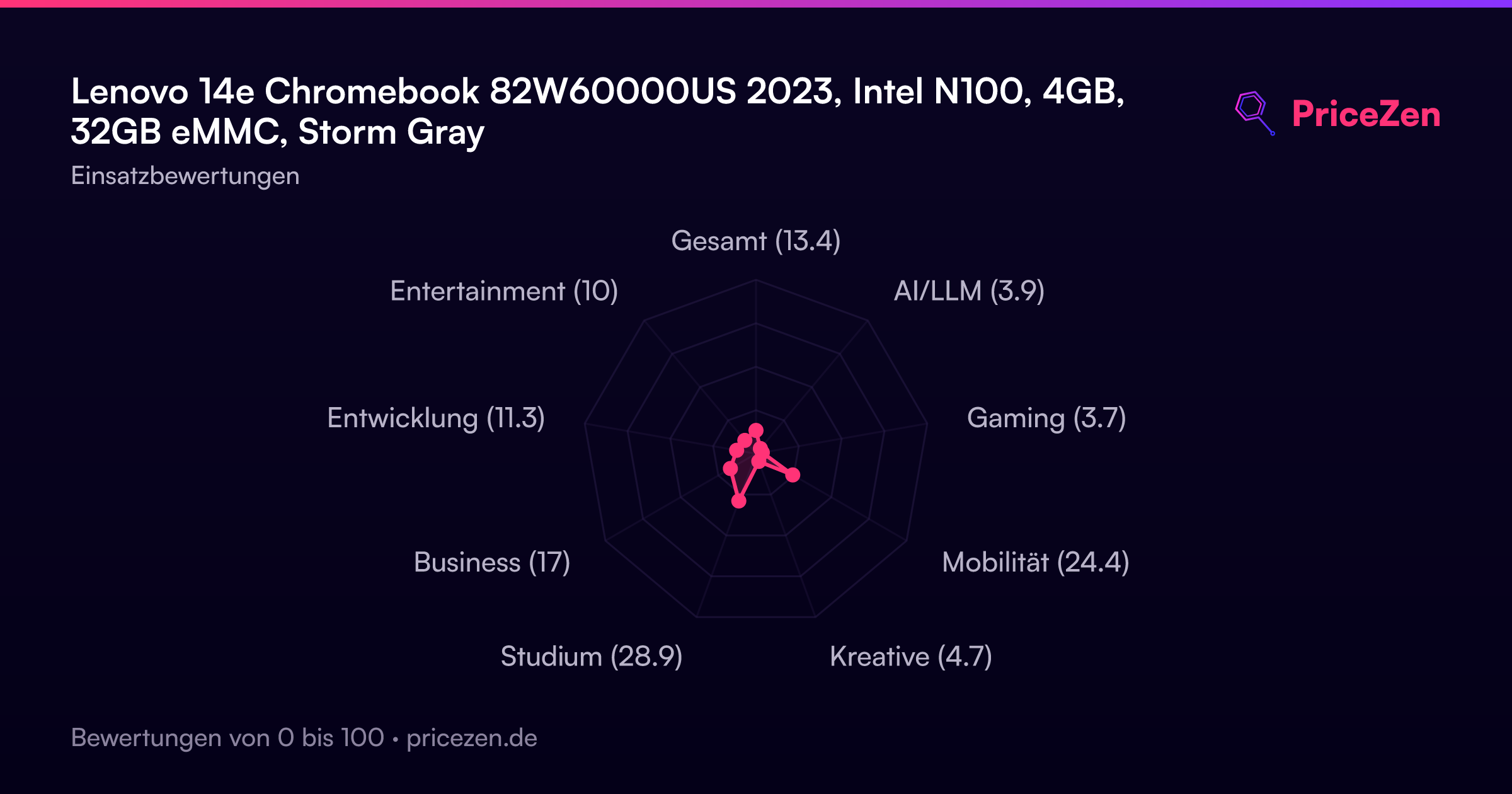
- Gesamt13.4
- AI/LLM3.9
- Gaming3.7
- Mobilität24.4
- Kreative4.7
- Studium28.9
- Business17
- Entwicklung11.3
- Entertainment10