LG SM3G 22SM3G-B 21.5" Black 2020
Der Quad-Core-SoC mit webOS 4.0 spielt Inhalte ohne externen Mediaplayer ab, auf einem 21,5-Zoll-IPS-Panel mit Full-HD-Auflösung (1920 x 1080), 250 Nits und HDR10. Die Unterstützung von SNMP und Crestron Connected erleichtert die Einbindung in Automationssysteme, während zwei HDMI-Eingänge und VESA 100x100 für flexible Installation sorgen. Dieser Monitor eignet sich für Systemintegratoren und Facility-Manager, die digitale Beschilderung mit zentraler Fernverwaltung benötigen.

Derzeit kein aktueller Händlerpreis









Überblick
The 30-Second Version
The LG SM3G 22SM3G-B is a 21.5 inch commercial signage display with a quad-core SoC, webOS 4.0, and built-in Wi-Fi. It's great for lobby screens and office dashboards that run 16/7, but the 14ms response time and 250 nits brightness make it a poor choice as a desktop monitor. Buy it for signage, skip it for everything else.
Pros & Cons
Vorteile
- Quad-core SoC with webOS 4.0 handles signage content without an external player 84th
- Built-in Wi-Fi plus LAN and RS-232C control for easy integration 71st
- 16/7 duty cycle rated for all-day commercial use
- Portrait and landscape orientation supported with pivot
- SNMP and Crestron Connected support for automation systems
Nachteile
- 14ms response time is one of the slowest we've seen
- 250 nits brightness is dim for bright rooms
- 60Hz refresh rate feels dated even for office work
- 25% haze coating softens text and fine details
- No DisplayPort, just two HDMI ports
Die Fakten
Performance
Let's be blunt. The performance numbers here are rough if you're thinking about this as a desktop monitor. The 14ms response time lands in the 2nd percentile of all displays we track. That's not a typo. It's one of the slowest panels in our database, and ghosting will be visible on any fast-moving content. The 60Hz refresh rate is fine for static signage but feels dated next to even budget consumer monitors.
The quad-core SoC is the real workhorse here. It handles 1080p content playback smoothly through the built-in webOS platform, and you can push content over HDMI, USB, LAN, or Wi-Fi. For a signage loop, that's plenty. The two HDMI inputs with HDCP 2.2 support mean you can chain in a media player or laptop without fuss. But don't expect this to handle anything beyond basic video and image rotation. The display itself sits in the 22nd percentile overall, which reflects the modest brightness and standard color coverage.
Specifications
Full Specifications
Display
| Size | 21.5" |
| Resolution | 1920x1080 (Full HD) |
| Panel Type | IPS |
| Aspect Ratio | 16:9 |
| Curved | No |
Performance
| Refresh Rate | 60 Hz |
| Response Time | 14 |
Color & HDR
| Brightness | 250 nits |
| HDR | HDR10 |
Connectivity
| HDMI Ports | 2 |
| Speakers | Yes |
Ergonomics
| Height Adjustable | No |
| Tilt | No |
| Swivel | No |
| Pivot | No |
| VESA Mount | 100x100 |
Features
| Touchscreen | No |
| PIP/PBP | Yes |
| Power | 30 |
| Weight | 3.3 kg / 7.4 lbs |
vs Competition
The competitors listed in our database are all gaming monitors, which tells you how weird this product category is. The ASUS ROG Strix XG27AQDPG, MSI MAG 271QPX QD-OLED E2, Samsung Odyssey G60SD, Gigabyte M Series OLED MO27U2 SA, and Alienware AW2725D are all high-refresh gaming panels with OLED or QD-OLED tech. They absolutely destroy the LG SM3G in response time, color, and brightness. But they're also not trying to do the same job. Those are consumer displays meant for desks and gaming rigs. The LG is a signage panel meant to sit in a lobby and play a content loop for 16 hours a day.
If you're comparing the SM3G to those gaming monitors, you're asking the wrong question. The real comparison is against other commercial signage displays from Samsung, NEC, or ViewSonic. In that space, the LG holds up well thanks to the webOS platform and the quad-core SoC. The feature set lands in the 85th percentile for commercial displays, which is genuinely strong. But the display quality itself is middle of the pack at best.
| Spec | LG SM3G 22SM3G-B 21.5" | ASUS ROG Strix XG27UCDMG 27" | Dell UltraSharp U4025QW 39.7" | MSI MAG 271QPX QD-OLED E2 27" | Alienware AW-Series AW3425DW 34" | Samsung Odyssey G60SD 27" |
|---|---|---|---|---|---|---|
| Screen Size | 21.5 | 27 | 39.70000076293945 | 27 | 34 | 27 |
| Resolution | 1920 x 1080 | 3840 x 2160 | 5120 x 2160 | 2560 x 1440 | 3440 x 1440 | 2560 x 1440 |
| Panel Type | IPS | OLED | IPS | QD-OLED | QD-OLED | OLED |
| Refresh Rate | 60 | 240 | 120 | 240 | 240 | 360 |
| Response Time Ms | 14 | 0.029999999329447746 | 5 | 0.029999999329447746 | 0.029999999329447746 | 0.029999999329447746 |
| Adaptive Sync | - | FreeSync Premium Pro | Adaptive-Sync | FreeSync Premium Pro | FreeSync Premium Pro | FreeSync Premium Pro |
| Hdr | HDR10 | DisplayHDR True Black 400 | DisplayHDR 600 | DisplayHDR True Black 400 | DisplayHDR 400 True Black | HDR10+ |
| Compare | Compare | Compare | Compare | Compare |
| Produkt | Color | Mobilität | Display | Feature | Ergonomic | Performance | Connectivity |
|---|---|---|---|---|---|---|---|
| LG SM3G 22SM3G-B 21.5" | 42.1 | 71.2 | 21.4 | 83.7 | 30.7 | 2.1 | 39.2 |
| ASUS ROG Strix XG27UCDMG 27" Compare | 96.1 | 57.5 | 97.9 | 83.7 | 90.8 | 98 | 81.3 |
| Dell UltraSharp U4025QW 39.7" Compare | 98.2 | 76.5 | 98.7 | 95.7 | 90.8 | 56.1 | 99.3 |
| MSI MAG 271QPX QD-OLED E2 27" Compare | 99.1 | 57.5 | 77.3 | 83.7 | 90.8 | 98 | 81.3 |
| Alienware AW-Series AW3425DW 34" Compare | 99 | 73.9 | 85.7 | 89.8 | 90.8 | 98 | 95.4 |
| Samsung Odyssey G60SD 27" Compare | 90.3 | 39.6 | 77.3 | 67 | 90.8 | 99.5 | 87.6 |
Preis
Value & Pricing
Pricing is all over the place depending on where you shop. In the US, we're seeing listings between USD 400 and USD 480 across two vendors, so it pays to shop around. The Canadian market is even wilder, with prices ranging from CAD 249 to CAD 454. If you're in Canada, the CAD 249 listing is the obvious pick, assuming it's from a reputable seller. At the low end, this is a reasonable deal for a commercial signage panel with built-in content management. At the high end, you're paying a premium for the LG badge and the webOS ecosystem. For comparison, a decent 24 inch consumer IPS monitor costs half as much and has better response times, but it won't run 16/7 or integrate with Crestron.
Mehr erfahren
Overview
The LG SM3G 22SM3G-B is a 21.5 inch commercial display aimed at digital signage, lobby screens, and office dashboards. It's not a consumer monitor in the traditional sense, and that matters. You're getting a 1080p IPS panel, a quad-core SoC running webOS 4.0, and built-in Wi-Fi for content management. The whole pitch is that you can plug it in, connect it to LG's SuperSign CMS, and run a 16/7 duty cycle without an external media player.
People searching for a small commercial display usually ask two things. Is it good for office use? And can it double as a regular monitor? The answer to the first is a qualified yes. The answer to the second is a hard no for most people. This thing is built for signage, not spreadsheets or gaming. The 14ms response time and 60Hz refresh rate tell you everything about where its priorities lie.
At 250 nits brightness with a 25% haze coating, it's designed to reduce glare in bright retail environments. That haze layer also softens the image slightly, which is fine for a menu board but less ideal for pixel-perfect work. The 1000:1 static contrast ratio is standard for IPS panels in this class.
Common Questions
Q: Is the LG SM3G good for gaming?
No. The 14ms response time and 60Hz refresh rate put it in the 2nd percentile of all displays we track, which means visible ghosting and lag on any fast-moving content. It's built for static signage, not gaming.
Q: Can I use the LG SM3G as a regular computer monitor?
You can, but you probably shouldn't. The 25% haze coating softens text, the 250 nits brightness is dim for typical office lighting, and the slow response time makes even cursor movement feel laggy. A budget consumer IPS monitor will serve you better.
Q: Does the LG SM3G need an external media player?
No. The built-in quad-core SoC with webOS 4.0 handles content playback directly from USB, LAN, or Wi-Fi. You can manage everything through LG's SuperSign CMS without any additional hardware.
Q: How bright is the LG SM3G display?
It's rated at 250 nits, which is on the lower end for commercial displays. The 25% haze coating helps reduce glare in bright environments, but the panel itself won't punch through direct sunlight.
Who Should Skip This
Skip this if you want a desktop monitor for work, gaming, or creative tasks. The slow response time, modest brightness, and haze coating will frustrate anyone trying to read text or edit photos. If you need a small office monitor, grab a 24 inch consumer IPS panel from Dell or ASUS for less money and better image quality. And if you're a gamer, the competitors in our database like the ASUS ROG Strix XG27AQDPG or MSI MAG 271QPX QD-OLED E2 are in a completely different league. This LG is for signage, period.
Verdict
Should you buy the LG SM3G 22SM3G-B? If you're outfitting a retail location, office lobby, or conference room with a small signage display, yes. The built-in webOS platform, Wi-Fi connectivity, and 16/7 duty cycle make it a solid choice for that specific job. You won't need an external media player, and the SNMP and Crestron support mean your IT team can manage it remotely.
But if you're looking for a desktop monitor for work or play, walk away. The 14ms response time is a dealbreaker for anything with motion, the 250 nits brightness will struggle in a sunny room, and the haze coating will make text look slightly soft. This is a signage panel, not a productivity display. Buy it for what it is, not what you wish it were.
Usage Scores
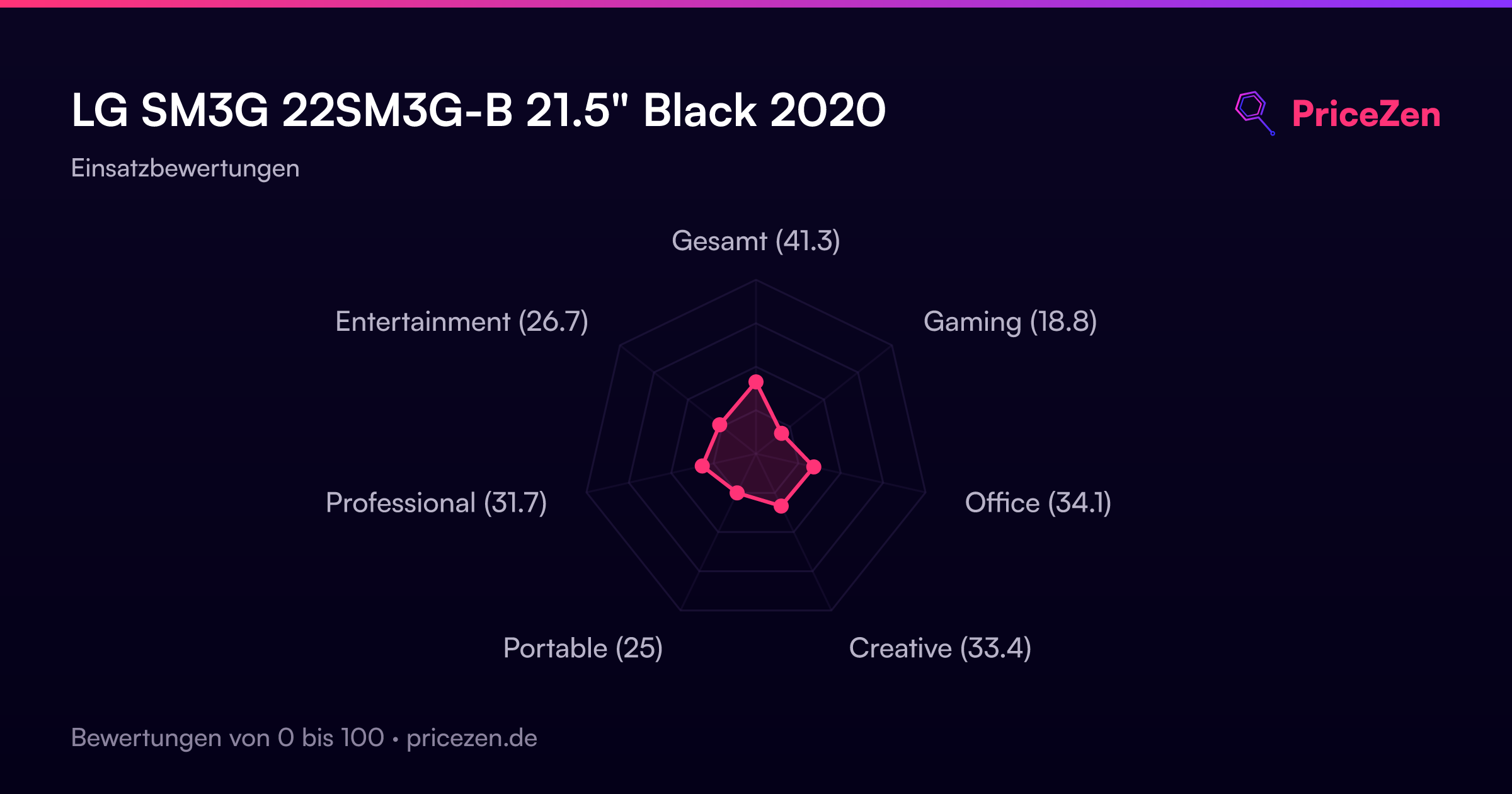
- Gesamt41.3
- Gaming18.8
- Office34.1
- Creative33.4
- Portable25
- Professional31.7
- Entertainment26.7