ASUS VA279HAE 27" BLACK 2022
Das 27-Zoll-VA-Panel mit Full-HD-Auflösung bietet ein Kontrastverhältnis von 3.000:1 und eine Helligkeit von 300 cd/m², wobei der 178°-Betrachtungswinkel Farbverschiebungen minimiert. Die zertifizierten Flicker-free- und Low-Blue-Light-Technologien reduzieren die Augenbelastung bei langen Arbeitszeiten, und die VESA-100x100-Halterung ermöglicht eine flexible Wandmontage. Dieser Monitor eignet sich für Büroanwender, die Wert auf augenschonendes Arbeiten und unkomplizierte Anschlüsse über HDMI, D-Sub und VGA legen.










Überblick
The 30-Second Version
A comfortable, contrast-rich budget monitor for office drones who value their eyeballs. Just don't expect color accuracy or modern connectivity.
Pros & Cons
Vorteile
- Excellent contrast for the price, blacks actually look black 84th
- Flicker-free and low blue light tech genuinely helps with eye strain
- Easy setup, includes an HDMI cable in the box
- Stable stand with tilt adjustment, no wobble
Nachteile
- Only one HDMI port plus D-Sub and VGA, connectivity is stuck in 2012
- Color accuracy is weak, 17th percentile is hard to ignore
- Built-in speakers are basically a formality
- On-screen controls are fiddly and annoying to navigate
Was Besitzer sagen
The Word on the Street
Wie sich die Meinung der Besitzer im Lauf der Zeit verändert hat
ExklusivBasierend darauf, wann Kunden ihre Bewertungen tatsächlich geschrieben haben - so sehen Sie, ob das anfängliche Lob anhielt.
12 geschriebene Rezensionen, Jan.–Aug. 2023: 11 zufrieden, 1 unzufrieden
Über alle 202 Shop-Bewertungen: 4,5★. Die meisten Besitzer bewerten, ohne eine Rezension zu schreiben. Das Diagramm zählt die 12 geschriebenen Rezensionen.
Jeder Punkt ist eine geschriebene Rezension, im Monat, in dem sie verfasst wurde. Zufrieden = 4-5★, gemischt = 3★, unzufrieden = 1-2★.
Die Fakten
Performance
The VA panel here is a mixed bag. That 3,000:1 contrast ratio is the star of the show, giving you noticeably richer blacks than most IPS panels at this price. But the color performance lands in the 17th percentile, which is rough. Colors look a bit washed compared to what you'd get from a decent IPS panel, and the 1080p resolution stretched across 27 inches means text isn't as crisp as it would be on a 24-inch or a 1440p display. For documents and web browsing, it's fine. For anything color-sensitive, it's a letdown.
Specifications
Full Specifications
Display
| Size | 27" |
| Resolution | 1920x1080 (Full HD) |
| Panel Type | VA |
| Aspect Ratio | 16:9 |
| Screen Finish | glossy |
Connectivity
| HDMI Ports | 1 |
Ergonomics
| VESA Mount | 100x100 |
Features
| Weight | 5.4 kg / 12.0 lbs |
vs Competition
Against the Dell S2725QC, the ASUS loses on connectivity and resolution, the Dell brings 4K and USB-C to the table. The LG UltraGear 27G810A-B is a different animal entirely, built for gaming with higher refresh rates and better response times. The BenQ MA270U targets creative work with far superior color accuracy. Where the ASUS wins is pure price and eye comfort. If you just need a second monitor for documents and email, it's hard to beat at the US price. But any of those competitors will serve you better if you want more than the bare minimum.
| Spec | ASUS VA279HAE 27" | MSI MAG 271QPX QD-OLED E2 27" | Alienware AW-Series AW3425DW 34" | Samsung Odyssey G60SD 27" | LG UltraGear 32GX850A-B 32" | Gigabyte AORUS FO32U2 32" |
|---|---|---|---|---|---|---|
| Screen Size | 27 | 27 | 34 | 27 | 32 | 32 |
| Resolution | 1920 x 1080 | 2560 x 1440 | 3440 x 1440 | 2560 x 1440 | 3840 x 2160 | 3840 x 2160 |
| Panel Type | VA | QD-OLED | QD-OLED | OLED | OLED | OLED |
| Refresh Rate | - | 240 | 240 | 360 | 165 | 240 |
| Response Time Ms | - | 0.029999999329447746 | 0.029999999329447746 | 0.029999999329447746 | 0.029999999329447746 | 0.029999999329447746 |
| Adaptive Sync | - | FreeSync Premium Pro | FreeSync Premium Pro | FreeSync Premium Pro | FreeSync Premium Pro | FreeSync Premium Pro |
| Hdr | - | DisplayHDR True Black 400 | DisplayHDR 400 True Black | HDR10+ | DisplayHDR True Black 400 | DisplayHDR True Black 400 |
| Compare | Compare | Compare | Compare | Compare |
| Produkt | Color | Mobilität | Display | Feature | User Sentiment | Ergonomic | Performance | Connectivity | Nutzerresonanz |
|---|---|---|---|---|---|---|---|---|---|
| ASUS VA279HAE 27" | 15.7 | 12.9 | 44.8 | 19.2 | 54.3 | 30.6 | 22.4 | 21 | 84.1 |
| MSI MAG 271QPX QD-OLED E2 27" Compare | 99.1 | 57.5 | 77.3 | 83.7 | 95.7 | 90.8 | 98 | 81.3 | 98.9 |
| Alienware AW-Series AW3425DW 34" Compare | 99 | 73.9 | 85.7 | 89.7 | 95.7 | 90.8 | 98 | 95.5 | 96.9 |
| Samsung Odyssey G60SD 27" Compare | 90.3 | 39.6 | 77.3 | 66.9 | 95.7 | 90.8 | 99.5 | 87.6 | 92.1 |
| LG UltraGear 32GX850A-B 32" Compare | 78.8 | 49.6 | 99.1 | 66.9 | 76.4 | 90.8 | 96.3 | 98.2 | 74.9 |
| Gigabyte AORUS FO32U2 32" Compare | 79.4 | 63 | 99.1 | 83.7 | 61 | 90.8 | 98 | 87.6 | 92.1 |
Preis
Value & Pricing
At USD 149 in the US, this is a solid deal for a basic office monitor. But the EUR pricing is all over the place, ranging from EUR 312 to EUR 433 across three listings. That's a EUR 121 spread for the exact same panel, which is absurd. If you're in Europe, shop around hard and don't pay more than the low end of that range. At the higher EUR prices, you're getting into territory where better monitors with more ports and better color exist.
Amazon 1 Angebot Ab 329 €
Preisverlauf
Mehr erfahren
Overview
The ASUS VA279HAE is a budget 27-inch workhorse that nails the basics and skips everything else. It's a 1080p VA panel with a 3,000:1 contrast ratio and 300 nits of brightness, which means deep blacks and decent punch for an office setup. The one thing to know? This is an eye-comfort monitor first, a performance display second. If you're staring at spreadsheets for eight hours, it's a genuinely smart buy. If you're editing photos or gaming, keep scrolling.
Common Questions
Q: Is this monitor good for gaming?
Not really. It's a 60Hz VA panel with no adaptive sync and response times that won't impress anyone. Casual games will look fine thanks to the contrast, but if you play anything fast-paced, get a proper gaming monitor like the LG UltraGear instead.
Q: Can I mount this on a monitor arm?
Yes, it has a standard VESA 100x100 mount. The included stand is stable enough, but if you want to free up desk space, any standard VESA arm will work.
Q: Is 1080p on a 27-inch screen too blurry?
It's noticeable if you sit close. Text isn't as sharp as it would be on a 24-inch 1080p or a 27-inch 1440p display. For most office work it's acceptable, but if you're picky about text clarity, consider a smaller screen or higher resolution.
Who Should Skip This
If you need accurate colors for photo editing, design work, or anything creative, this isn't your monitor. The color performance is near the bottom of the barrel. Go grab a BenQ MA270U or a Dell S2725QC instead. And if you want to game, the LG UltraGear 27G810A-B is the obvious pick. This ASUS is for spreadsheets and email, nothing more.
Verdict
Buy it if you need a cheap, comfortable monitor for office work and don't care about color accuracy or modern ports. The eye-care features are legit, the contrast is better than expected, and the US price is right. But don't overpay in Europe, and don't buy this expecting anything beyond basic productivity. It's a one-trick pony, but it does that trick well.
Usage Scores
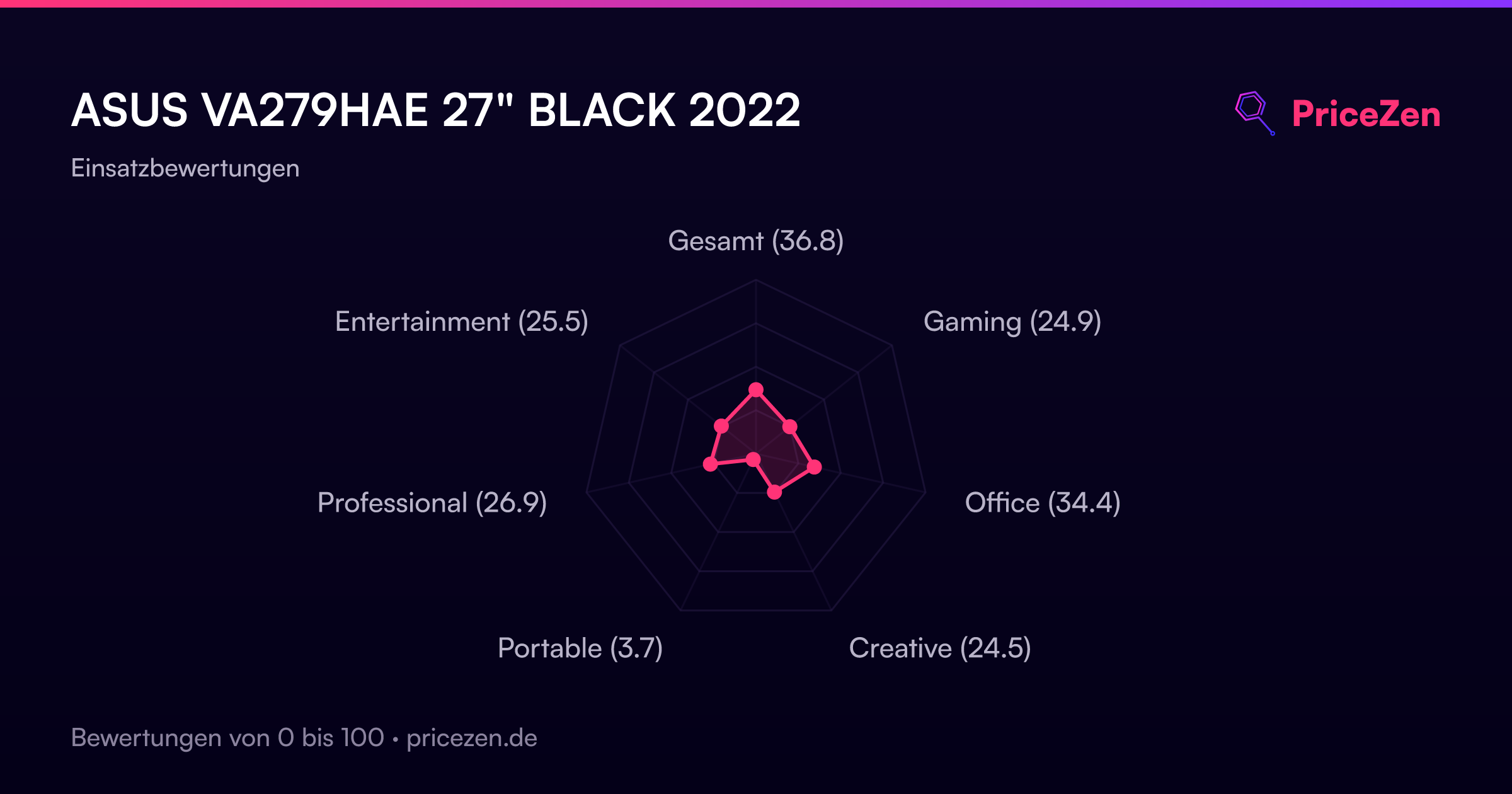
- Gesamt36.9
- Gaming25.2
- Office34.6
- Creative26
- Portable3.7
- Professional26.9
- Entertainment25.9