CODi MO34H-UC 34" black 2025
Das 34-Zoll-Panel mit 3440x1440 Auflösung und 100Hz Bildwiederholrate bietet eine breite, flüssige Arbeitsfläche, während der USB-C-Anschluss mit 90W Power Delivery den Monitor zur Dockingstation mit einem einzigen Kabel macht. Zusätzlich sind Ethernet und mehrere USB-Ports integriert, was die Verbindung von Peripherie und Netzwerk vereinfacht. Dieses Modell eignet sich für Remote-Profis und Content-Ersteller, die einen vollständigen und aufgeräumten Arbeitsplatz wünschen.

Derzeit kein aktueller Händlerpreis











Überblick
The 30-Second Version
A great USB-C dock hiding inside a mediocre monitor. Buy it for the ports, not the picture.
Pros & Cons
Vorteile
- Built-in USB-C dock with 90W charging is genuinely useful
- 34-inch ultrawide with 1500R curve is great for multitasking
- Tons of ports, including Ethernet and four USB-A
- WQHD resolution keeps text sharp
Nachteile
- 100Hz refresh rate is underwhelming for a curved ultrawide
- Color accuracy is near the bottom of the barrel
- Ergonomics are basically nonexistent
- Heavy as hell at over 11kg
Was Besitzer sagen
The Word on the Street
Die Fakten
Performance
The 100Hz refresh rate is fine for smooth scrolling and casual use, but it's nothing special in a world where 144Hz and up is the norm for anything with a curve this aggressive. Connectivity is where this thing actually shines, landing in the 85th percentile. Two DisplayPort 1.4 ports, HDMI 2.0, four USB-A 3.2 ports, two USB-C, Ethernet, and audio out. That's a legit docking station bolted onto a monitor. But the color performance is a weak spot, sitting in the 16th percentile. If you're doing any kind of color-critical work, this panel will frustrate you.
Specifications
Full Specifications
Display
| Size | 34" |
| Resolution | 3440x1440 |
| Aspect Ratio | 21:9 |
| Curved | Yes |
| Curvature | 1500 |
Performance
| Refresh Rate | 100 Hz |
Connectivity
| HDMI Ports | 1 |
| DisplayPort | 1 |
| USB-C | 1 |
Features
| Weight | 11.3 kg / 24.9 lbs |
vs Competition
The Alienware AW3425DW is the obvious competitor here. It's also a 34-inch curved ultrawide, but it brings QD-OLED picture quality and a 175Hz refresh rate. The CODi can't touch it on image quality or speed. The LG UltraGear 45GX950A-B is bigger and faster, but it's also a different beast entirely, aimed at gamers with deep pockets. If you want a productivity ultrawide with a dock, the CODi is a niche pick. If you want a monitor that looks good doing anything, the Alienware is the move.
| Spec | CODi MO34H-UC 34" | LG UltraGear 45GX950A-B 45" | ASUS ROG Strix XG27UCDMG 27" | Dell UltraSharp U4025QW 39.7" | MSI MAG 271QPX QD-OLED E2 27" | Alienware AW-Series AW3425DW 34" |
|---|---|---|---|---|---|---|
| Screen Size | 34 | 45 | 27 | 39.70000076293945 | 27 | 34 |
| Resolution | 3440 x 1440 | 5120 x 2160 | 3840 x 2160 | 5120 x 2160 | 2560 x 1440 | 3440 x 1440 |
| Panel Type | - | OLED | OLED | IPS | QD-OLED | QD-OLED |
| Refresh Rate | 100 | 330 | 240 | 120 | 240 | 240 |
| Response Time Ms | - | 0.029999999329447746 | 0.029999999329447746 | 5 | 0.029999999329447746 | 0.029999999329447746 |
| Adaptive Sync | - | FreeSync Premium Pro | FreeSync Premium Pro | Adaptive-Sync | FreeSync Premium Pro | FreeSync Premium Pro |
| Hdr | - | DisplayHDR True Black 400 | DisplayHDR True Black 400 | DisplayHDR 600 | DisplayHDR True Black 400 | DisplayHDR 400 True Black |
| Compare | Compare | Compare | Compare | Compare |
| Produkt | Color | Mobilität | Display | Feature | Ergonomic | Performance | Connectivity |
|---|---|---|---|---|---|---|---|
| CODi MO34H-UC 34" | 15.7 | 49.6 | 58.2 | 43.2 | 9.7 | 48 | 62.6 |
| LG UltraGear 45GX950A-B 45" Compare | 99.4 | 76.5 | 99.7 | 95.7 | 90.8 | 99.4 | 97 |
| ASUS ROG Strix XG27UCDMG 27" Compare | 96.1 | 57.5 | 97.9 | 83.7 | 90.8 | 98 | 81.3 |
| Dell UltraSharp U4025QW 39.7" Compare | 98.2 | 76.5 | 98.7 | 95.7 | 90.8 | 56.1 | 99.3 |
| MSI MAG 271QPX QD-OLED E2 27" Compare | 99.1 | 57.5 | 77.3 | 83.7 | 90.8 | 98 | 81.3 |
| Alienware AW-Series AW3425DW 34" Compare | 99 | 73.9 | 85.7 | 89.7 | 90.8 | 98 | 95.5 |
Preis
Value & Pricing
At $629 to $651 USD, this is a tough sell unless you specifically need the docking station. You're paying a premium for the USB-C hub and getting a mediocre panel in return. If you don't need the dock, there are better ultrawides for less money. If you do need the dock, it's a reasonable all-in-one solution, but don't expect it to impress you visually.
Mehr erfahren
Overview
The CODi MO34H-UC is a productivity monitor wearing a gaming monitor's clothes. You get a big 34-inch ultrawide with a 1500R curve and WQHD resolution, but the 100Hz refresh rate and middling color performance tell you this thing was built for spreadsheets, not frags. The real story here is the USB-C docking station. One cable gets you 90W charging, video, Ethernet, and a pile of USB ports. That's the feature that makes this monitor worth a look if you're drowning in laptop dongles.
Common Questions
Q: Can this monitor charge my laptop?
Yes. The USB-C port delivers up to 90W of power, which is enough for most ultrabooks and many productivity laptops. It won't keep a beefy gaming laptop topped up under full load, but for everyday work it's solid.
Q: Is this good for gaming?
Not really. The 100Hz refresh rate is okay for casual games, but the color performance and lack of adaptive sync features make it a poor choice for serious gaming. If you want a curved ultrawide for games, look at the Alienware AW3425DW instead.
Q: Does the stand adjust?
Barely. The ergonomics score is in the 10th percentile, which means you get minimal tilt and probably no height adjustment. Plan on buying a VESA mount if you care about your neck.
Who Should Skip This
If you're looking for a gaming monitor or anything with accurate colors, this isn't it. Go get the Alienware AW3425DW for a proper curved ultrawide experience, or the ASUS ROG Strix XG27UCDMG if you want speed and color without the ultrawide footprint. The CODi is for desk jockeys who want a dock and don't care about the panel.
Verdict
The CODi MO34H-UC is a docking station with a monitor attached. If you're a remote worker or developer who wants a single-cable setup and doesn't care about color accuracy or high refresh rates, it's a functional choice. But for anyone who cares about image quality, gaming, or ergonomics, this monitor falls short. It's a niche product that does one thing well and a lot of things just okay.
Usage Scores
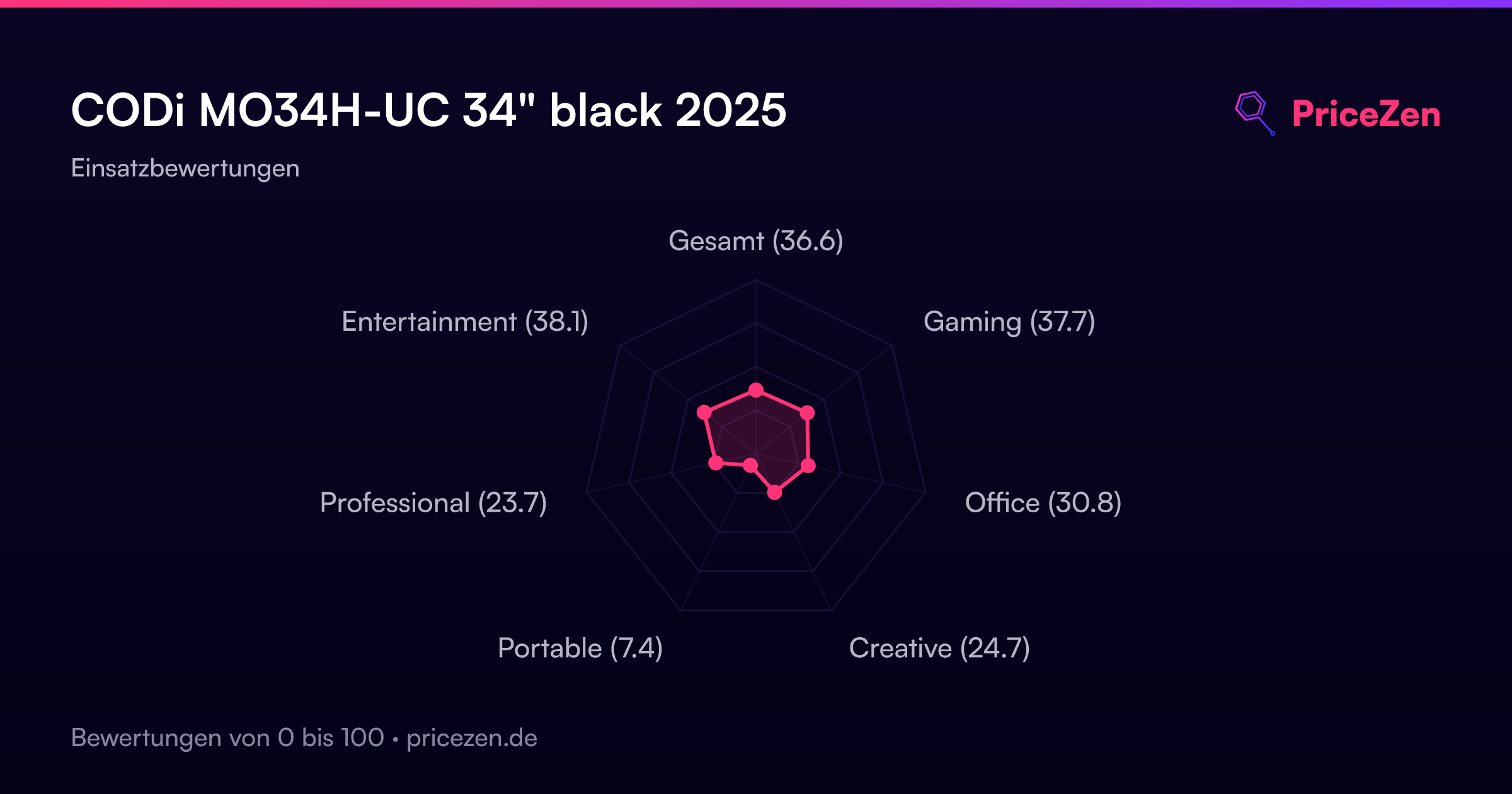
- Gesamt33.5
- Gaming33.8
- Office27.7
- Creative22.6
- Portable6.9
- Professional20.4
- Entertainment33.3