Hosyond 8bcecda9-db00-4965-91c5-3fa62b8abf7a 10.1"
Das 10,1-Zoll-IPS-Panel mit 1024x600 Pixeln und Fünf-Punkt-Kapazitiv-Touch liefert klare Bilder und weite Blickwinkel, bei nur 20 mm Dicke und 850 g Gewicht. Die Drehregler für Helligkeit und Lautstärke, die integrierten Stereo-Lautsprecher und der Kopfhöreranschluss machen es zu einem praktischen Multimedia-Begleiter. Es ist ideal für Bastler, die einen Plug-and-Play-Touchscreen für Raspberry Pi suchen, oder als Zweitmonitor fürs Büro.












Überblick
The 30-Second Version
The Hosyond 10.1 inch IPS touchscreen is a solid Raspberry Pi display with a clever cable-free mounting design, responsive touch input, and built-in speakers. It's a great value at $76 USD, but the 1024x600 resolution, blue color cast, and occasional touchscreen issues after OS updates keep it from being a slam dunk. If you're building a Pi project and want a clean setup, this is worth a look. If you need color accuracy or a general-purpose portable monitor, look elsewhere.
Pros & Cons
Vorteile
- Cable-free mounting with included Pi 3/4/5 adapters 99th
- IPS panel with good viewing angles and crisp image 75th
- Five-point capacitive touch is accurate and responsive
- Built-in speakers and headphone jack
- Low power draw, runs off the Pi's USB port
- Includes HDMI cable, USB power cable, and stand
Nachteile
- 1024x600 resolution is dated for a 10.1 inch panel
- Blue color cast compared to official Raspberry Pi displays
- Reflective screen surface hurts outdoor or bright-room use
- Touchscreen can stop working after OS updates
- Some users report HDMI port damage on Pi 5
- Mounting is awkward compared to official screens
Was Besitzer sagen
The Word on the Street
Wie sich die Meinung der Besitzer im Lauf der Zeit verändert hat
ExklusivBasierend darauf, wann Kunden ihre Bewertungen tatsächlich geschrieben haben - so sehen Sie, ob das anfängliche Lob anhielt.
11 geschriebene Rezensionen, Apr. 2023 – Feb. 2026: 8 zufrieden, 2 gemischt, 1 unzufrieden
Über alle 581 Shop-Bewertungen: 4,4★. Die meisten Besitzer bewerten, ohne eine Rezension zu schreiben. Das Diagramm zählt die 11 geschriebenen Rezensionen.
Jeder Punkt ist eine geschriebene Rezension, im Monat, in dem sie verfasst wurde. Zufrieden = 4-5★, gemischt = 3★, unzufrieden = 1-2★.
Die Fakten
Performance
Let's be real about what this screen is and isn't. The 1024x600 resolution on a 10.1 inch panel gives you roughly 118 pixels per inch. That's fine for a Pi desktop, retro gaming, or a dashboard display, but text can look a little soft if you're used to a modern laptop screen. The 60Hz refresh rate and 4ms response time are perfectly adequate for this use case. You're not playing competitive shooters on a Raspberry Pi, and if you are, we need to have a different conversation.
The touchscreen uses a GT9271 capacitive controller and supports five-point touch. In practice, owners report the touch response is accurate and responsive, at least until an OS update breaks it. That's a recurring theme in the reviews. The display works great out of the box, then a Raspberry Pi OS update rolls through and suddenly the touch input stops working until you fiddle with config files. It's not a dealbreaker for everyone, but it's the kind of friction that separates a polished product from a hobbyist accessory.
Power draw is impressively low. The module pulls between 0.7W and 4.8W depending on brightness and volume. That means you can run it off the Pi's USB port in most cases, which keeps the whole setup nice and portable. The built-in dual speakers are 8Ω 2W units, and while they won't fill a room, they're perfectly serviceable for system sounds, retro game audio, or watching a video at your desk.
Specifications
Full Specifications
Display
| Size | 10.1" |
| Resolution | 1024x600 |
| Panel Type | IPS |
| Aspect Ratio | 16:9 |
| Curved | No |
| Screen Finish | glossy |
Performance
| Refresh Rate | 60 Hz |
| Response Time | 4 |
Connectivity
| HDMI Ports | 1 |
| DisplayPort | 0 |
| USB-C | 1 |
| Speakers | Yes |
| Headphone Jack | Yes |
Ergonomics
| Height Adjustable | No |
| Tilt | No |
| Swivel | No |
| Pivot | No |
Features
| Webcam | No |
| Touchscreen | Yes |
| PIP/PBP | No |
| Weight | 0.8 kg / 1.9 lbs |
vs Competition
The most obvious comparison is the official Raspberry Pi 7 inch touchscreen display. The official screen has better color accuracy and a more polished mounting solution, but it's smaller, lower resolution, and typically more expensive. The Hosyond gives you a bigger 10.1 inch panel and a more flexible setup, but you trade away some color accuracy and build quality. Owners who have used both consistently mention the blue color cast on the Hosyond compared to the official display.
If you're thinking about this as a general-purpose portable monitor for a laptop or gaming console, you should probably look elsewhere. Something like a SANSUI 27 inch or an ASUS TUF Gaming VG27AQL5A is a completely different product category. Those are proper desktop monitors with high refresh rates and better panels. The Hosyond is a Pi accessory first and a portable monitor second. It works with Windows 7/8/10 and consoles like Xbox and PS4, but the 1024x600 resolution is going to feel cramped for anything beyond basic use.
| Spec | Hosyond 8bcecda9-db00-4965-91c5-3fa62b8abf7a 10.1" | ASUS ROG Strix XG27JCG 27" | Dell S2725QC 27" | HP OMEN 27QS G2 27" | Acer Nitro XV272U W2bmiiprx 27" | LG UltraGear 27GS75Q-B 27" |
|---|---|---|---|---|---|---|
| Screen Size | 10.100000381469727 | 27 | 27 | 27 | 27 | 27 |
| Resolution | 1024 x 600 | 5120 x 2880 | 3840 x 2160 | 2560 x 1440 | 2560 x 1440 | 2560 x 1440 |
| Panel Type | IPS | IPS | IPS | IPS | IPS | IPS |
| Refresh Rate | 60 | 330 | 120 | 280 | 240 | 200 |
| Response Time Ms | 4 | 0.30000001192092896 | 8 | 1 | 0.5 | 1 |
| Adaptive Sync | - | FreeSync Premium Pro | FreeSync Premium | G-Sync Compatible | FreeSync Premium | G-Sync Compatible |
| Hdr | - | DisplayHDR 600 | HDR | DisplayHDR 400 | HDR400 | HDR10 |
| Compare | Compare | Compare | Compare | Compare |
| Produkt | Color | Mobilität | Display | Feature | User Sentiment | Ergonomic | Performance | Connectivity | Nutzerresonanz |
|---|---|---|---|---|---|---|---|---|---|
| Hosyond 8bcecda9-db00-4965-91c5-3fa62b8abf7a 10.1" | 15.7 | 98.7 | 0.8 | 50.6 | 29.3 | 9.7 | 39.9 | 47.8 | 74.9 |
| ASUS ROG Strix XG27JCG 27" Compare | 93.1 | 68 | 99.5 | 66.9 | 0 | 90.8 | 95.6 | 81.2 | 84.1 |
| Dell S2725QC 27" Compare | 71.6 | 76.5 | 88.4 | 66.9 | 95.7 | 90.8 | 44.3 | 87.6 | 96.9 |
| HP OMEN 27QS G2 27" Compare | 75.3 | 81.3 | 70.5 | 66.9 | 95.7 | 90.8 | 89.5 | 97 | 98.9 |
| Acer Nitro XV272U W2bmiiprx 27" Compare | 90.1 | 54.4 | 70.5 | 66.9 | 95.7 | 90.8 | 93.6 | 91.1 | 62.3 |
| LG UltraGear 27GS75Q-B 27" Compare | 82.9 | 49.5 | 70.5 | 66.9 | 76.4 | 78.8 | 84.8 | 87.6 | 74.9 |
Preis
Value & Pricing
At $76 USD, this is a solid value for what it does. The EUR pricing is a bit of a mess though. We're seeing listings from EUR 96 to EUR 169 across German and Spanish vendors, which is a huge spread for the same product. If you're in Europe, shop around. The lower end of that range is a fair price. The higher end is pushing into territory where you could start looking at official Raspberry Pi displays or other name-brand options. For the US price, you're getting a touchscreen, speakers, all the cables, and the clever PCB adapters. That's a lot of hardware for under $80. Just don't expect it to feel like a premium monitor.
Amazon 1 Angebot Ab 87 €
Preisverlauf
Mehr erfahren
Overview
The Hosyond 10.1 inch IPS touchscreen is one of those Raspberry Pi accessories that fills a very specific niche. It's a portable HDMI monitor with a capacitive touch panel, built-in speakers, and a 1024x600 resolution. At around $76 USD (or EUR 96 to EUR 169 depending on where you shop), it's aimed squarely at tinkerers, hobbyists, and anyone building a compact Pi-powered project. You're not buying this to replace your desk monitor. You're buying it because you want a small, self-contained display that plugs directly into a Pi without a mess of cables.
And honestly, for that job, it's pretty clever. The included PCB adapters let you mount the display directly onto a Raspberry Pi 3, 4, or 5 with no HDMI cable dangling between them. It's a neat design that keeps your build looking clean. The display itself is an IPS panel, so viewing angles are solid, and the tempered glass touch surface feels more premium than you'd expect at this price.
But this isn't a flawless product. The user sentiment score sits at 72/100, which is decent but not stellar. Some owners have reported HDMI port damage on the Pi 5, resolution quirks with newer Raspberry Pi OS versions, and a blue color cast compared to official displays. We'll dig into all of that below.
Common Questions
Q: Is the Hosyond 10.1 inch touchscreen good for Raspberry Pi 5?
Yes, it works with the Raspberry Pi 5 and includes a dedicated adapter for cable-free mounting. However, some users have reported HDMI port damage on the Pi 5, so be careful during installation.
Q: Does the Hosyond touchscreen work with Windows?
Yes, it supports Windows 7, 8, and 10 as a plug-and-play display with five-point capacitive touch. Just connect it via HDMI and USB for power and touch input.
Q: Can I use this as a portable monitor for Xbox or PS4?
Yes, the HDMI input works with Xbox and PS4 consoles. Just keep in mind the 1024x600 resolution is lower than what those consoles typically output, so the image will be scaled down.
Q: Does the Hosyond 10.1 inch display need external power?
It can be powered via the MicroUSB port, and in most cases you can draw power directly from the Raspberry Pi's USB port. The module draws between 0.7W and 4.8W depending on brightness and volume settings.
Who Should Skip This
Skip this if you need accurate colors for photo editing or design work. The blue color cast compared to official displays is a real issue, and the 1024x600 resolution is too low for detail work. Also skip it if you're looking for a general-purpose portable monitor for your laptop or a gaming console. The resolution and color accuracy will disappoint you. If you want a polished, plug-and-play experience with zero tinkering, the official Raspberry Pi display is a safer bet, even if it's smaller and pricier. And if you're running the absolute latest Raspberry Pi OS and don't want to deal with config file edits when touch input breaks, this might frustrate you more than it's worth.
Verdict
Should you buy this? If you're building a Raspberry Pi project and want a clean, cable-free display with touch input, yes. The Hosyond 10.1 inch touchscreen does exactly what it promises, and the included adapters make installation genuinely easy. The IPS panel is crisp, the touch response is good, and the built-in speakers are a nice bonus. For $76 USD, it's hard to complain too much.
But if you're sensitive to color accuracy, or you plan to use this in a bright room, or you're running the latest Raspberry Pi OS and don't want to troubleshoot touch input after every update, you might want to think twice. The blue color cast and reflective screen are real limitations, and the reports of HDMI port damage on the Pi 5 are concerning enough to mention. This is a good product with some rough edges. Know what you're getting into.
Usage Scores
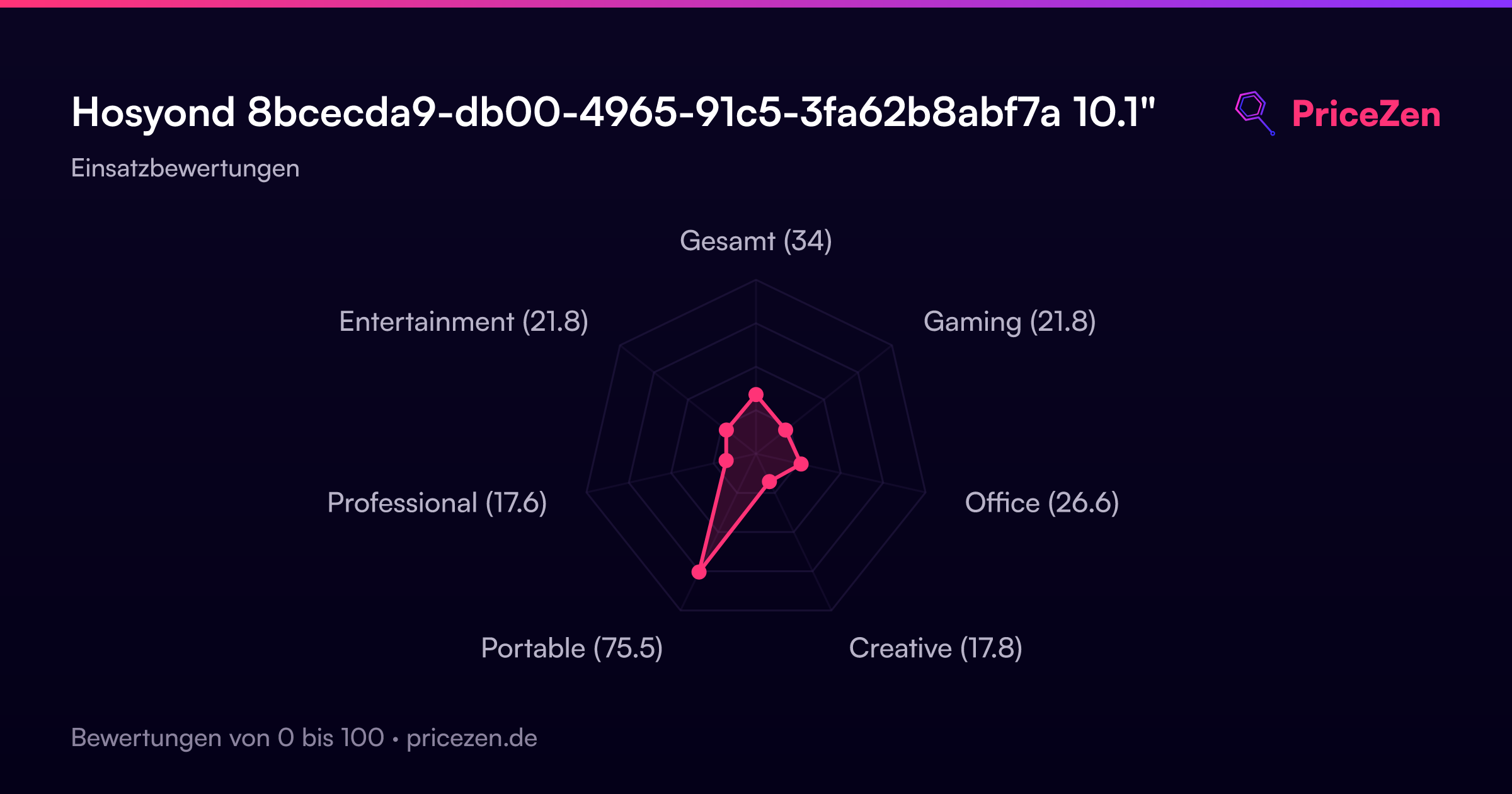
- Gesamt33.6
- Gaming21.7
- Office26.4
- Creative18.5
- Portable74.9
- Professional17.3
- Entertainment21.4