BenQ GW2283 21.5" Black
Das 21,5-Zoll-IPS-Panel mit 1920 x 1080 und 75 Hz liefert ein scharfes, flüssiges Bild, während die adaptive Helligkeitstechnologie die Augen bei wechselnden Lichtverhältnissen schont. Der rahmenlose Look und die versteckte Kabelführung im Standfuß sorgen für einen aufgeräumten Arbeitsplatz, und die integrierten Lautsprecher sparen zusätzlichen Platz. Dieser Monitor ist ideal für Büroangestellte und Studenten, die einen zuverlässigen Bildschirm für Arbeit und Freizeit ohne unnötigen Schnickschnack suchen.

Derzeit kein aktueller Händlerpreis
Überblick
The 30-Second Version
A $95 eye-comfort monitor that does the boring stuff well and nothing else. Great for spreadsheets, terrible for color work.
Pros & Cons
Vorteile
- Eye-care tech actually works for long sessions 89th
- Super light at 454g, easy to move around 84th
- Dual HDMI plus VGA covers old and new devices
- Hidden cable management keeps your desk clean
Nachteile
- Color accuracy is rough, 16th percentile
- Only tilt adjustment, no height or swivel
- Built-in speakers are weak, bring headphones
- 75Hz is fine but nothing exciting
Was Besitzer sagen
The Word on the Street
Die Fakten
Performance
The 75Hz refresh rate is a small but welcome bump over the standard 60Hz you get on most budget office panels. Scrolling feels smoother and it's easier on the eyes. But don't expect miracles. This thing sits in the 39th percentile for performance, which means it's fine for daily tasks but not built for fast-paced gaming or heavy media work. The IPS panel gives you decent viewing angles, though color performance lands in the 16th percentile, so don't plan on editing photos here. What surprised us most is how light this thing is at 454g. That's absurdly portable for a desktop monitor.
Specifications
Full Specifications
Display
| Size | 21.5" |
| Resolution | 1920x1080 (Full HD) |
| Panel Type | IPS |
| Aspect Ratio | 16:9 |
| Curved | No |
| Screen Finish | glossy |
Performance
| Refresh Rate | 75 Hz |
Connectivity
| HDMI Ports | 2 |
| Speakers | Yes |
Ergonomics
| Tilt | Yes |
Features
| Weight | 0.5 kg / 1.0 lbs |
vs Competition
Stacked against the ASUS TUF Gaming VG34VQL1B or HP OMEN 27qs G2, the GW2283 looks tiny and underpowered. Those are gaming monitors with high refresh rates and big panels. But they also cost way more. The KOORUI 34E6UC and SANSUI ES-G27D1U are ultrawide or 4K options that blow this BenQ away on specs, but again, totally different price brackets. If you're comparing within the budget office monitor space, the GW2283 holds its own. Against gaming or creative displays, it's not even the same conversation.
| Spec | BenQ GW2283 21.5" | LG UltraGear 45GX950A-B 45" | ASUS ROG Strix XG27UCDMG 27" | Dell UltraSharp U4025QW 39.7" | MSI MAG 271QPX QD-OLED E2 27" | Alienware AW-Series AW3425DW 34" |
|---|---|---|---|---|---|---|
| Screen Size | 21.5 | 45 | 27 | 39.70000076293945 | 27 | 34 |
| Resolution | 1920 x 1080 | 5120 x 2160 | 3840 x 2160 | 5120 x 2160 | 2560 x 1440 | 3440 x 1440 |
| Panel Type | IPS | OLED | OLED | IPS | QD-OLED | QD-OLED |
| Refresh Rate | 75 | 330 | 240 | 120 | 240 | 240 |
| Response Time Ms | - | 0.029999999329447746 | 0.029999999329447746 | 5 | 0.029999999329447746 | 0.029999999329447746 |
| Adaptive Sync | - | FreeSync Premium Pro | FreeSync Premium Pro | Adaptive-Sync | FreeSync Premium Pro | FreeSync Premium Pro |
| Hdr | - | DisplayHDR True Black 400 | DisplayHDR True Black 400 | DisplayHDR 600 | DisplayHDR True Black 400 | DisplayHDR 400 True Black |
| Compare | Compare | Compare | Compare | Compare |
| Produkt | Color | Mobilität | Display | Feature | Ergonomic | Performance | Connectivity | Nutzerresonanz |
|---|---|---|---|---|---|---|---|---|
| BenQ GW2283 21.5" | 15.8 | 88.8 | 21.4 | 19.3 | 22.1 | 39.8 | 39.2 | 84.1 |
| LG UltraGear 45GX950A-B 45" Compare | 99.4 | 76.5 | 99.7 | 95.7 | 90.8 | 99.4 | 97 | 92.1 |
| ASUS ROG Strix XG27UCDMG 27" Compare | 96.1 | 57.5 | 97.9 | 83.8 | 90.8 | 98 | 81.3 | 98.9 |
| Dell UltraSharp U4025QW 39.7" Compare | 98.2 | 76.5 | 98.7 | 95.7 | 90.8 | 56.1 | 99.3 | 96.9 |
| MSI MAG 271QPX QD-OLED E2 27" Compare | 99.1 | 57.5 | 77.3 | 83.8 | 90.8 | 98 | 81.3 | 98.9 |
| Alienware AW-Series AW3425DW 34" Compare | 99 | 73.9 | 85.7 | 89.8 | 90.8 | 98 | 95.4 | 96.9 |
Preis
Value & Pricing
At $95 USD, this is a solid deal if you need a basic, reliable monitor that won't fry your eyeballs. You're not paying for gaming features or color precision, you're paying for comfort and simplicity. For the price, it's hard to complain. Just don't expect it to punch above its weight class.
Mehr erfahren
Overview
The BenQ GW2283 is a no-nonsense 22-inch IPS monitor that nails the basics and skips the fluff. At 1080p with a 75Hz refresh rate, it's built for everyday work, casual browsing, and the occasional spreadsheet marathon. The one thing to know? This is an eye-comfort monitor first, everything else second. BenQ's Brightness Intelligence tech and low blue light modes are the real selling points here, not gaming chops or color accuracy.
Common Questions
Q: Is this monitor good for gaming?
Not really. 75Hz is smoother than 60Hz but it's no gaming panel. If you play fast shooters, get something with 144Hz or higher. For casual games, it's passable.
Q: Can I mount this on a monitor arm?
The GW2283 is super light at 454g, so most VESA arms will handle it easily. But check the mount pattern before you buy. The stand only tilts, so an arm is a good upgrade if you want height adjustment.
Q: Does the low blue light mode make the screen look yellow?
It can, especially at higher settings. BenQ's Brightness Intelligence tries to balance it automatically, but if you're picky about color temperature, you might notice a warm tint. For text and documents, it's fine.
Who Should Skip This
If you're looking for a gaming monitor, a color-accurate display for photo or video work, or anything with real ergonomic adjustments, this isn't it. Go grab something like the Acer Nitro XV272U W2bmiiprx for better color and a higher refresh rate, or the HP OMEN 27qs G2 if you want a bigger, faster panel. The GW2283 is for people who want a simple, comfortable screen and nothing more.
Verdict
Buy the BenQ GW2283 if you want a comfortable, lightweight monitor for work, school, or general use and you don't care about gaming or color-critical tasks. It's simple, it's cheap, and the eye-care features are genuinely useful. Skip it if you need anything beyond the basics.
Usage Scores
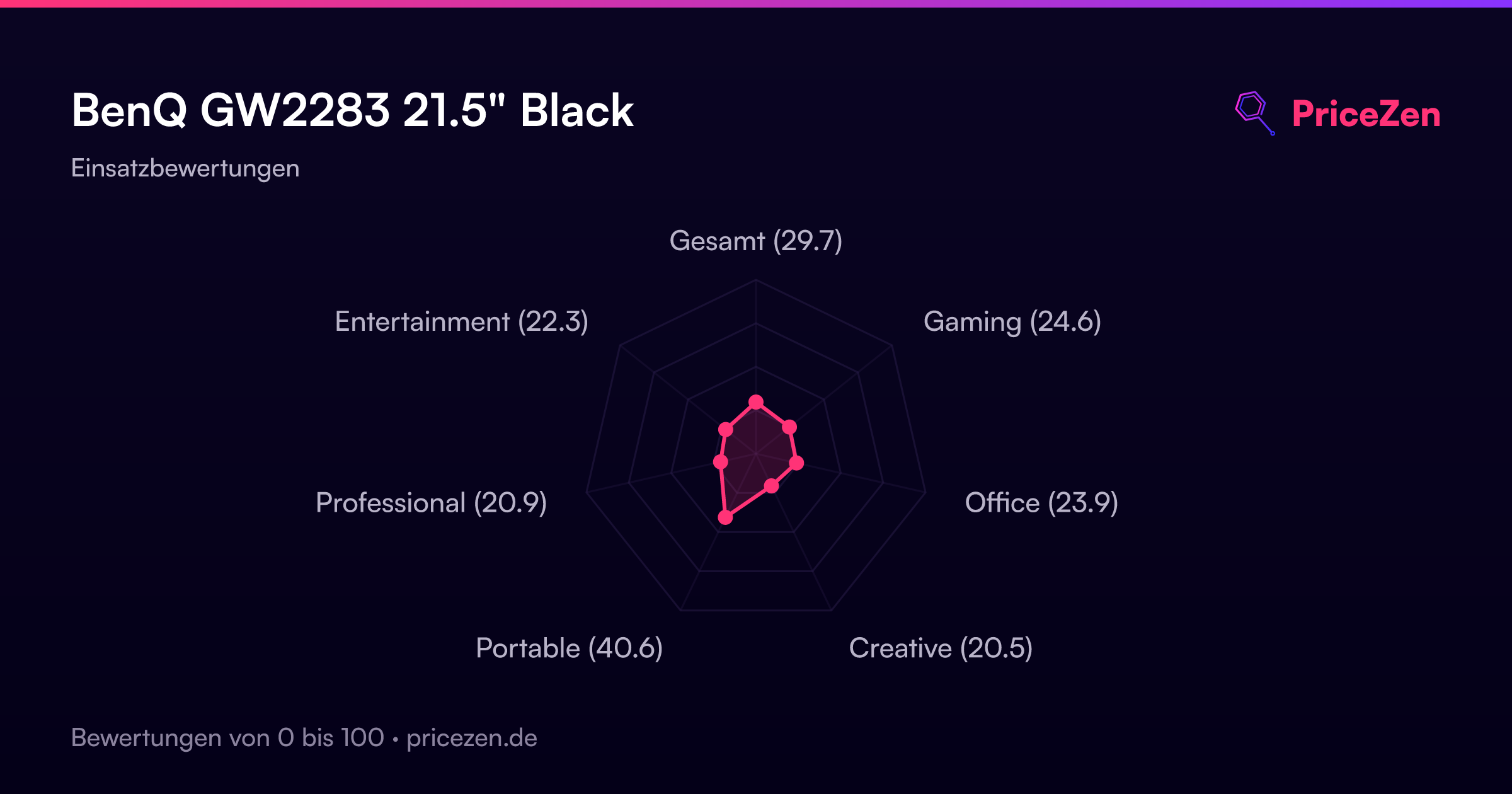
- Gesamt29.7
- Gaming24.6
- Office23.9
- Creative20.5
- Portable40.6
- Professional20.9
- Entertainment22.3