Acer Touch Series UT241Y bmiuzx 23.8" Black 2018
Das 23,8-Zoll-IPS-Panel mit 1920 x 1080 und 60 Hz liefert ein scharfes Bild, während der 10-Punkt-Touchscreen die Bedienung unter Windows 10 erleichtert. Mit 250 Nits Helligkeit und integrierten 2-Watt-Lautsprechern eignet er sich für Büroarbeiten, und die VESA-Aufnahme ermöglicht eine flexible Montage. Dieser Monitor ist am besten für Büroangestellte geeignet, die Wert auf Touch-Interaktion und Produktivität legen, weniger für Gamer.

Derzeit kein aktueller Händlerpreis











Überblick
The 30-Second Version
A touchscreen monitor for kiosks and kids, not for your desk. If you don't need 10 point touch, buy literally anything else.
Pros & Cons
Vorteile
- 10 point touch works well for kiosks and casual use 82nd
- IPS panel gives decent viewing angles
- VESA mount compatible for wall or arm setups
- USB-C connectivity is a nice modern touch
Nachteile
- 60Hz refresh rate is rough in 2024
- 250 nits brightness is dim for bright rooms
- Color performance lands in the 16th percentile
- 5.3kg weight makes it awkward for a 'portable' monitor
Was Besitzer sagen
Wie sich die Meinung der Besitzer im Lauf der Zeit verändert hat
ExklusivBasierend darauf, wann Kunden ihre Bewertungen tatsächlich geschrieben haben - so sehen Sie, ob das anfängliche Lob anhielt.
4 geschriebene Rezensionen, Jan. 2019 – Apr. 2026: 2 zufrieden, 2 gemischt
Über alle 2 Shop-Bewertungen: 4,0★. Das Diagramm zählt die 4 geschriebenen Rezensionen.
Jeder Punkt ist eine geschriebene Rezension, im Monat, in dem sie verfasst wurde. Zufrieden = 4-5★, gemischt = 3★, unzufrieden = 1-2★.
Die Fakten
Performance
The 4ms GTG response time is fine for office work and casual browsing, but our database puts this panel's performance in the 39th percentile. That's not a typo. It's a 60Hz screen in a world where even budget monitors are pushing 100Hz plus. The touch response itself is snappy enough for Windows 10 gestures, but don't expect this thing to feel like a giant tablet. It's a monitor with touch bolted on, not a touch first device.
Specifications
Full Specifications
Display
| Size | 23.8" |
| Resolution | 1920x1080 (Full HD) |
| Panel Type | IPS |
| Aspect Ratio | 16:9 |
| Curved | No |
| Screen Finish | matte |
Performance
| Refresh Rate | 60 Hz |
| Response Time | 4 |
Color & HDR
| Brightness | 250 nits |
| Color Gamut | 16.7 Million |
| Color Depth | 8-bit |
Connectivity
| HDMI Ports | 1 |
| DisplayPort | 0 |
| USB-C | 1 |
| Speakers | Yes |
Ergonomics
| Height Adjustable | No |
| Tilt | Yes |
| Swivel | No |
| Pivot | No |
| VESA Mount | 100x100 |
Features
| Touchscreen | Yes |
| PIP/PBP | No |
| Weight | 5.3 kg / 11.7 lbs |
vs Competition
Stacked against the ASUS ROG Strix XG27UCDMG or the LG UltraGear 27GX790A-B, this Acer looks like it's from a different decade. Those are high refresh OLED gaming panels with stunning color and speed. The UT241Y isn't even playing the same game. If you need touch, this is a niche pick. If you don't, literally any of those competitors will run circles around it for the same or less money.
| Spec | Acer Touch Series UT241Y bmiuzx 23.8" | LG UltraGear 45GX950A-B 45" | ASUS ROG Strix XG27UCDMG 27" | Dell UltraSharp U4025QW 39.7" | MSI MAG 271QPX QD-OLED E2 27" | Alienware AW-Series AW3425DW 34" |
|---|---|---|---|---|---|---|
| Screen Size | 23.799999237060547 | 45 | 27 | 39.70000076293945 | 27 | 34 |
| Resolution | 1920 x 1080 | 5120 x 2160 | 3840 x 2160 | 5120 x 2160 | 2560 x 1440 | 3440 x 1440 |
| Panel Type | IPS | OLED | OLED | IPS | QD-OLED | QD-OLED |
| Refresh Rate | 60 | 330 | 240 | 120 | 240 | 240 |
| Response Time Ms | 4 | 0.029999999329447746 | 0.029999999329447746 | 5 | 0.029999999329447746 | 0.029999999329447746 |
| Adaptive Sync | - | FreeSync Premium Pro | FreeSync Premium Pro | Adaptive-Sync | FreeSync Premium Pro | FreeSync Premium Pro |
| Hdr | - | DisplayHDR True Black 400 | DisplayHDR True Black 400 | DisplayHDR 600 | DisplayHDR True Black 400 | DisplayHDR 400 True Black |
| Compare | Compare | Compare | Compare | Compare |
| Produkt | Color | Mobilität | Display | Feature | Ergonomic | Performance | Connectivity | Nutzerresonanz |
|---|---|---|---|---|---|---|---|---|
| Acer Touch Series UT241Y bmiuzx 23.8" | 15.7 | 82.3 | 21.4 | 50.6 | 47.6 | 39.9 | 47.8 | 7.5 |
| LG UltraGear 45GX950A-B 45" Compare | 99.4 | 76.5 | 99.7 | 95.7 | 90.8 | 99.4 | 97 | 92.1 |
| ASUS ROG Strix XG27UCDMG 27" Compare | 96.1 | 57.5 | 97.9 | 83.7 | 90.8 | 98 | 81.2 | 98.9 |
| Dell UltraSharp U4025QW 39.7" Compare | 98.2 | 76.5 | 98.7 | 95.7 | 90.8 | 56.1 | 99.3 | 96.9 |
| MSI MAG 271QPX QD-OLED E2 27" Compare | 99.1 | 57.5 | 77.3 | 83.7 | 90.8 | 98 | 81.2 | 98.9 |
| Alienware AW-Series AW3425DW 34" Compare | 99 | 73.9 | 85.7 | 89.7 | 90.8 | 98 | 95.5 | 96.9 |
Preis
Value & Pricing
Pricing is all over the place. We see one listing at 460 CAD and another at 19,350 MXN, which tells us this is a niche product with limited availability. For that kind of money, you can get a much better non-touch monitor with higher refresh rates and better color. The touchscreen is the only reason to buy this, and that's a pretty expensive feature for what you get.
Mehr erfahren
Overview
The Acer UT241Y is a touchscreen monitor that feels like it was built for a very specific job, and that job is not gaming or serious color work. It's a 23.8 inch 1080p IPS panel with 10 point touch, which makes it a decent fit for kiosks, point of sale, or a kid's art station. But at 60Hz with a 4ms response time and 250 nits of brightness, it's not going to impress anyone looking for a main display.
Common Questions
Q: Is this monitor good for gaming?
No. 60Hz and 4ms response time put it in the 39th percentile for performance. You'll get screen tearing and motion blur in fast games. Get a 144Hz panel instead.
Q: Can I use this as a portable monitor?
Technically yes, but at 5.3kg it's heavy and bulky. There are much lighter portable monitors out there. This is better suited to a fixed spot like a counter or wall mount.
Q: Does the touchscreen work with Mac?
The touch features are designed for Windows 10. MacOS doesn't have native touchscreen support, so you'd be limited to basic mouse emulation at best. Stick with Windows for this one.
Who Should Skip This
If you're looking for a gaming monitor, a color accurate display for photo work, or a bright screen for a sunny room, this isn't it. Go get a 144Hz IPS panel from LG or ASUS instead. You'll get better color, better brightness, and a smoother experience for less money.
Verdict
Buy this only if you specifically need a touchscreen monitor for a kiosk, POS system, or interactive display. For everyone else, it's a pass. The 60Hz panel, dim screen, and mediocre color make it a poor choice as a daily driver. You're paying a premium for touch, and that's the only thing this monitor does that a better display can't.
Usage Scores
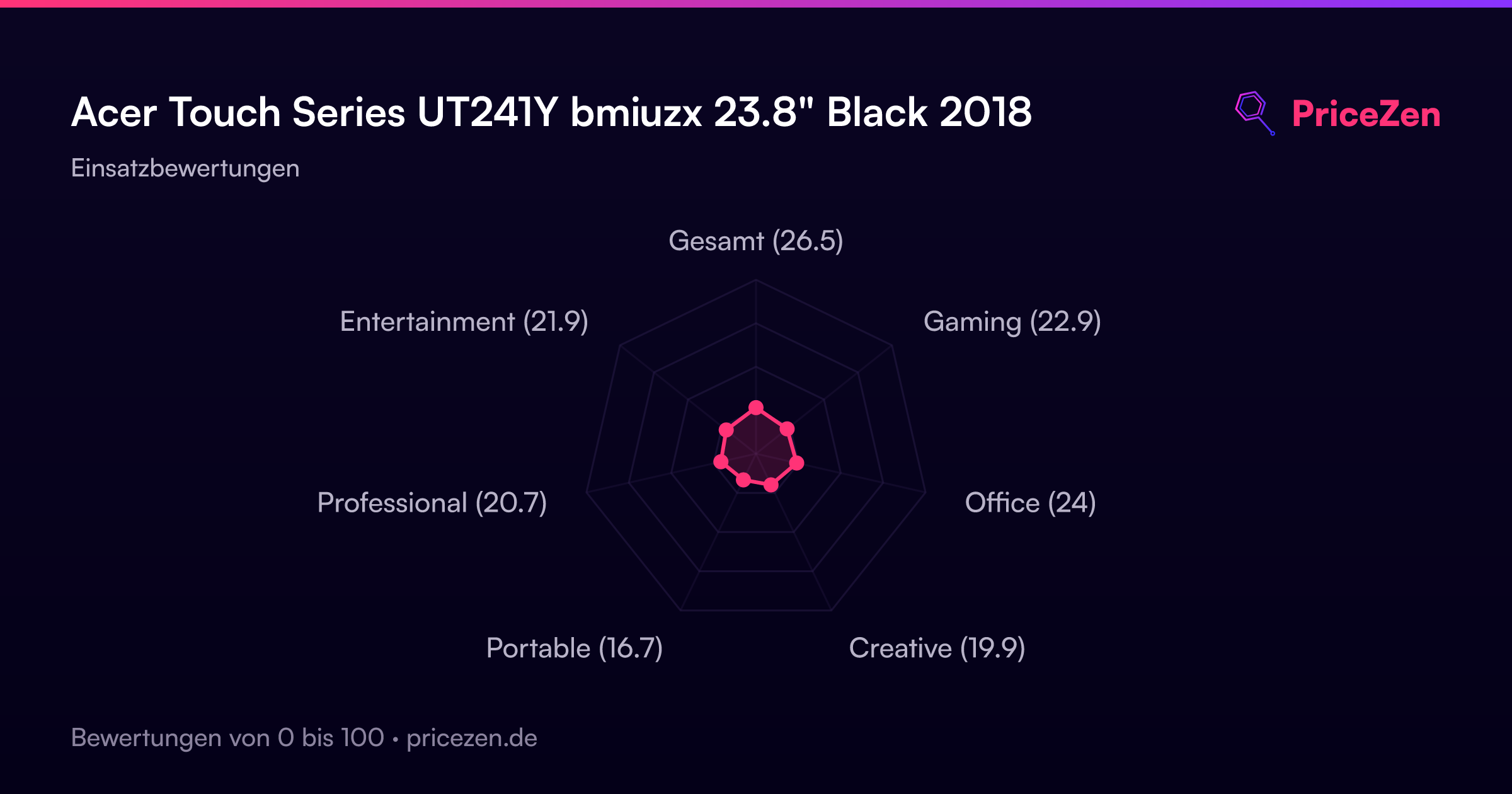
- Gesamt26.5
- Gaming22.9
- Office24
- Creative19.9
- Portable16.7
- Professional20.7
- Entertainment21.9