Team Group Elite 16GB (2x8GB) DDR3L-1600 CL11 SODIMM
Dieses 16-GB-Kit (2 x 8 GB) DDR3L SODIMM arbeitet mit 1600 MT/s, CL11-Latenz und 1,35 V Spannung, ideal für ältere Laptops. Es erfüllt die JEDEC- und RoHS-Normen und bietet eine lebenslange Garantie sowie kostenlosen technischen Support. Geeignet für Nutzer, die eine zuverlässige und preiswerte Speicheraufrüstung für ein DDR3L-kompatibles Notebook suchen.

Derzeit kein aktueller Händlerpreis











Überblick
The 30-Second Version
The Team Group Elite DDR3L 16GB kit is a solid capacity upgrade for older laptops still running DDR3. It scores 90.8 out of 100 for budget buyers and carries a lifetime warranty. Speed is near the bottom of our database at the 14th percentile, but that's expected for DDR3L. At $44 in the US, it's a great buy, though European prices swing wildly from EUR 66 to EUR 176.
Pros & Cons
Vorteile
- Excellent budget score at 90.8 out of 100 96th
- Lifetime warranty and free technical support 85th
- Low 1.35V draw helps battery life and thermals
- Strong social proof with a 4.8-star rating from 2,428 reviews
- Dual-channel 2 x 8GB config is ideal for older laptops
Nachteile
- Speed ranks at the 14th percentile, near the bottom overall
- Only works with DDR3L SODIMM slots, no desktop or DDR4 compatibility
- Server score is weak at 23.2 out of 100
- Feature set is barebones, just JEDEC compliance and RoHS
- No heat spreader, which some buyers prefer for peace of mind
Die Fakten
Performance
Let's be real about the numbers. 1600 MT/s with CL11 timings was respectable in the DDR3 era, but our database ranks this kit's speed near the bottom compared to all memory products today. That's not a knock on Team Group, it's just what DDR3L is. The latency sits at the 58th percentile, which is about average, so the CL11 rating isn't hurting you much within its class. The 11-11-11-28 timings are standard JEDEC fare for this speed.
The 1.35V operating voltage is the 'L' in DDR3L, and it matters. Standard DDR3 runs at 1.5V, and some older laptops won't boot with 1.5V sticks. The low voltage here means less heat and better battery life, which is exactly what you want in a laptop upgrade. Capacity-wise, 16GB lands at the 45th percentile overall, which is middle of the pack. For a DDR3L machine, though, 16GB is usually the practical ceiling, so this kit maxes out what most compatible laptops can handle.
Specifications
Full Specifications
Memory
| Type | DDR3L |
| Form Factor | SODIMM |
| Total Capacity | 16384 |
| Modules | 2 |
| Per Module | 8192 |
| Pins | 204 |
Performance
| Speed | 1600 |
| CAS Latency | 11 |
| Timings | 11-11-11-28 |
| Voltage | 1.35 |
Class
| ECC | No |
| Registered | No |
Features
| RGB | No |
vs Competition
The Corsair Vengeance LPX and G.Skill Ripjaws V kits that show up as top competitors are DDR4 desktop memory, so they're not direct alternatives. They're faster, sure, but they won't fit in a DDR3L SODIMM slot. If your laptop takes DDR4 SODIMM, you should absolutely buy DDR4 instead and ignore this kit entirely. The Timetec Pinnacle Konduit and Patriot Viper Steel are also desktop DDR4, so same story. The Kingston FURY Beast is DDR5, which is a completely different generation.
Where this Team Group kit actually competes is against other DDR3L SODIMM options, and there aren't many new ones left. Crucial and Kingston still sell some, but availability is spotty. The real comparison is against used or refurbished sticks from eBay, where you might save a few bucks but lose the warranty and the confidence that the modules haven't been abused. For a machine you're trying to keep alive, buying new with a lifetime warranty is usually the smarter move.
| Spec | Team Group Elite | Kingston FURY Beast | Corsair Vengeance | G.Skill Trident Z5 RGB | Crucial Pro Overclocking | KLEVV CRAS V |
|---|---|---|---|---|---|---|
| Capacity | 16GB | 32GB | 32GB | 48GB | 32GB | 32GB |
| Kit | 2 x 8GB | 2 x 16GB | 2 x 16GB | 2 x 24GB | 2 x 16GB | 2 x 16GB |
| Memory Type | DDR3L | DDR5 | DDR5 | DDR5 | DDR5 | DDR5 |
| Speed Mts | 1600 | 6000 | 6400 | 8400 | 6400 | 6000 |
| Cas Latency | CL11 | CL30 | CL36 | CL40 | CL32 | CL30 |
| Form Factor | SODIMM | UDIMM | UDIMM | UDIMM | UDIMM | UDIMM |
| Ecc | false | false | false | false | false | false |
| Compare | Compare | Compare | Compare | Compare |
| Produkt | Speed | Feature | Latency | Capacity | Nutzerresonanz | Affordability |
|---|---|---|---|---|---|---|
| Team Group Elite | 13.7 | 44.9 | 57.5 | 44.9 | 96.4 | 85.3 |
| Kingston FURY Beast Compare | 87.6 | 89.5 | 87.6 | 70.6 | 87.3 | 22.8 |
| Corsair Vengeance Compare | 94.8 | 74.7 | 78 | 70.6 | 96.4 | 29.1 |
| G.Skill Trident Z5 RGB Compare | 99.8 | 89.5 | 94.9 | 84.2 | 26.1 | 14.7 |
| Crucial Pro Overclocking Compare | 94.8 | 74.7 | 87.6 | 70.6 | 77 | 27.2 |
| KLEVV CRAS V Compare | 87.6 | 89.5 | 87.6 | 70.6 | 77 | 25.3 |
Preis
Value & Pricing
Pricing is all over the map depending on where you shop. In the US, you're looking at $44 for the kit, which is a solid deal for 16GB of new DDR3L. Canadian buyers see it around CAD 70. But the European listings are wild. We're seeing EUR 66 to EUR 176 across three listings in Germany, France, and Italy. That's a EUR 110 spread for the same kit, which is frankly ridiculous. If you're in Europe, shop around before you click buy. The lower end of that range is fair, the upper end is someone hoping you won't check.
For the money, this is one of the better values in DDR3L right now. The affordability ranking sits at the 85th percentile, meaning it's priced better than most memory products in our database. When you factor in the lifetime warranty and the fact that new DDR3L stock is getting harder to find, the value proposition holds up well. Just don't pay the top of that European price range.
Preisverlauf
Mehr erfahren
Overview
The Team Group Elite TED3L16G1600C11DC-S01 is a 16GB kit of DDR3L SODIMM memory aimed squarely at older laptops and small form factor machines that still run on DDR3. It's a two-stick setup, 8GB each, running at 1600 MT/s with CL11 timings and a low 1.35V draw. Nothing flashy here, just a straightforward capacity bump for notebooks that are starting to feel cramped with 4GB or 8GB.
Who's this for? Mostly people trying to squeeze a few more years out of a laptop that can't take DDR4 or DDR5. Think older ThinkPads, aging MacBook Pros from the DDR3 era, or mini PCs that use SODIMM slots. If your machine is from roughly 2012 to 2015, there's a good chance this is the kind of kit you'd be shopping for. And at this point, finding reliable new DDR3L can be trickier than you'd expect, so a kit with a lifetime warranty and a 4.8-star rating from over 2,400 buyers is worth a look.
What makes it interesting is the budget score. Our database puts this kit at 90.8 out of 100 for budget buyers, which lands it in the top tier for value among memory products. The affordability ranking is also strong, sitting well above average. But the speed ranking tells the other side of the story. At the 14th percentile, this is not fast memory by modern standards. It's a capacity play, not a performance play.
Common Questions
Q: Will this work in my laptop?
You need to confirm your laptop uses DDR3L SODIMM slots, not standard DDR3 or DDR4. The 204-pin form factor and 1.35V operating voltage are the key specs to check. Most laptops from roughly 2012 to 2015 with Intel 3rd, 4th, or 5th gen processors use DDR3L SODIMM. Check your manual or use a tool like CPU-Z to verify before buying.
Q: Can I mix this with my existing RAM?
Technically yes, but it's not ideal. Mixing different capacities, speeds, or voltages can cause stability issues or force everything to run at the slower stick's specs. For best results, replace all existing modules with this matched 2 x 8GB kit. The dual-channel config will also give you a slight performance boost over a single stick.
Q: Is 16GB worth it for an older laptop?
If you're running 4GB or 8GB and your laptop feels sluggish with multiple browser tabs or apps open, yes. 16GB gives you real headroom for multitasking and can extend the usable life of the machine by a couple of years. The capacity score of 45th percentile is middle of the pack overall, but for DDR3L machines, 16GB is typically the maximum supported.
Q: Does this work in a MacBook?
It depends on the model. MacBook Pros from 2012 through early 2015 that use DDR3L SODIMM should be compatible, but you need to verify your specific model. Some MacBook Air models have soldered RAM and can't be upgraded at all. Check your exact model number before purchasing.
Who Should Skip This
If your laptop takes DDR4 or DDR5 SODIMM, this kit is useless to you. The speed ranking near the bottom of our database isn't a defect, it's just an older standard, and you'd be better off buying memory that matches your machine's actual generation. Same goes for anyone building a desktop. This is 204-pin SODIMM, not standard DIMM, so it won't fit in a desktop motherboard.
Server and NAS builders should also look elsewhere. The server score of 23.2 out of 100 is one of the weakest in our database, and the lack of ECC support rules this out for any data-integrity-sensitive workload. If you need server memory, look for ECC UDIMMs or RDIMMs from Crucial or Kingston instead. And if you're in Europe and only seeing the EUR 176 listing, don't do it. That price is nearly triple the US cost and not worth it for DDR3L in 2025.
Verdict
If you have an older laptop with DDR3L SODIMM slots and you're running 4GB or 8GB, this 16GB kit is an easy recommendation. The jump to 16GB makes a real difference for multitasking, browser tabs, and even light photo editing. The low voltage keeps thermals in check, and the lifetime warranty means you're covered if a stick goes bad down the road. At $44 in the US, it's a no-brainer.
But if your machine supports DDR4 or newer, skip this entirely. The speed ranking near the bottom of our database isn't a flaw, it's just the reality of DDR3L. You'd be leaving performance on the table for no reason. And if you're building a server or a NAS that needs ECC memory, look elsewhere. The server score of 23.2 out of 100 tells you everything you need to know. This is a laptop upgrade kit, nothing more.
Usage Scores
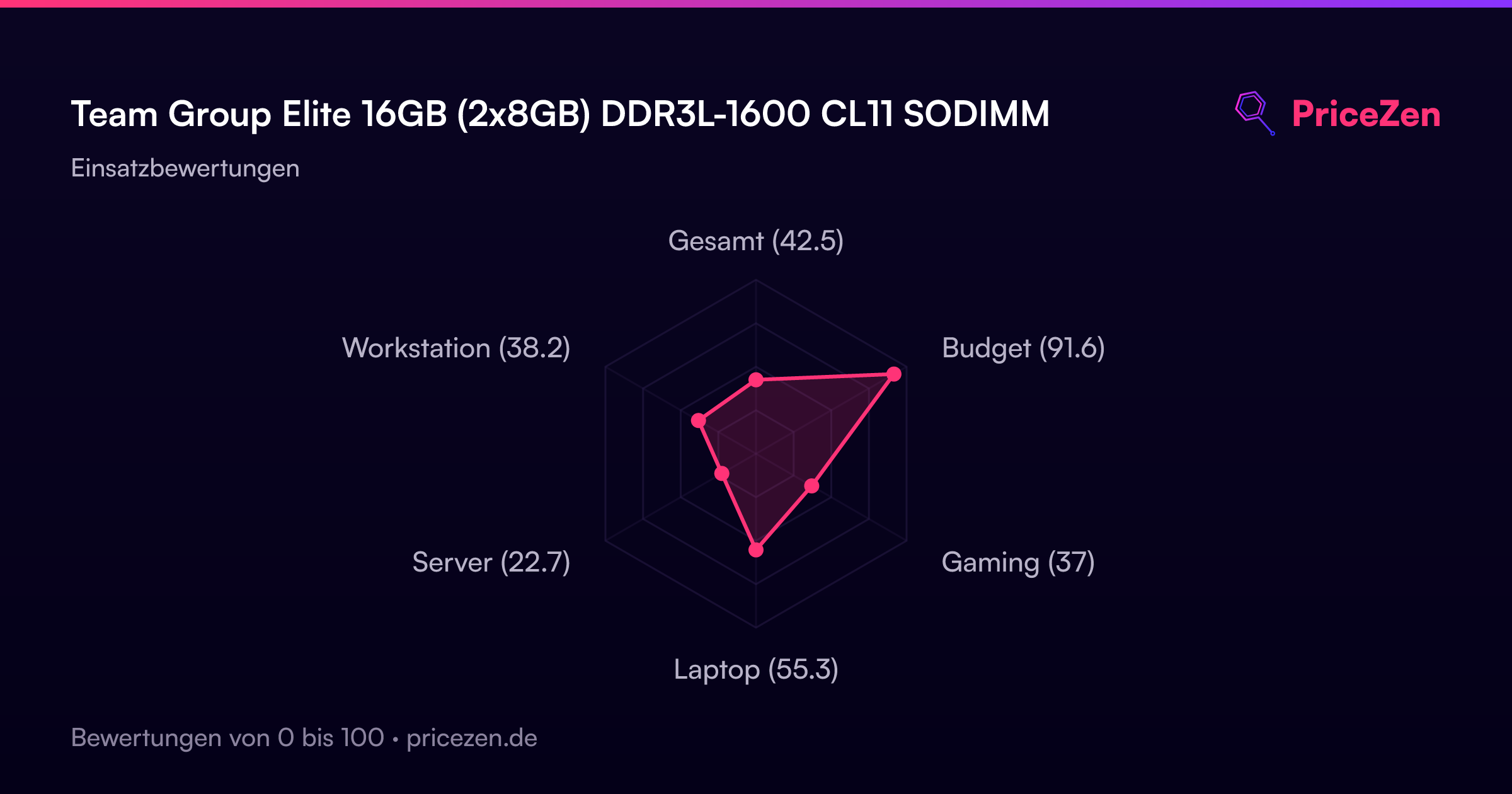
- Gesamt42.5
- Budget91.6
- Gaming37
- Laptop55.3
- Server22.7
- Workstation38.2