OWC 4GB DDR3L-1600 CL11 SODIMM (OWC1600DDR3S4GB)
Dieses 4-GB-DDR3L-Modul mit 1600 MT/s und CL11 arbeitet mit 1,35 V und senkt so den Stromverbrauch in kompatiblen iMacs und MacBook Pros. Es ist JEDEC- und ROHS-konform und bietet eine sichere, garantierte Aufrüstung für Modelle von 2011 bis 2015. Am besten geeignet für Mac-Besitzer, die den Arbeitsspeicher ihres Geräts kostengünstig erweitern möchten.

Derzeit kein aktueller Händlerpreis



Überblick
The 30-Second Version
The OWC 4GB DDR3L SODIMM ranks in the 9th percentile for capacity and 14th for speed, but hits the 92nd percentile for affordability at around $26. It's a repair part for 2011-2015 Macs that need DDR3L 204-pin SODIMMs, not an upgrade. Buy it to fix a broken machine, not to improve a working one.
Pros & Cons
Vorteile
- 92nd percentile affordability at around $26 92nd
- 1.35V low-voltage spec matches DDR3L Mac requirements
- JEDEC compliant and ROHS certified
- Compatible with 2011-2015 iMac, Mac mini, and MacBook Pro models
- Single 4GB stick leaves room for dual-channel pairing
Nachteile
- 9th percentile capacity, 4GB is barely enough for modern macOS
- 14th percentile speed, 1600 MT/s is the DDR3L baseline
- 18th percentile feature score, no heat spreader or extras
- 30.3/100 laptop score, weak even for its intended use case
- EUR 72 French listing is wildly overpriced compared to US pricing
Die Fakten
Performance
Let's be honest about what 1600 MT/s CL11 means in practice. This is the speed Apple shipped these machines with a decade ago. The 14th percentile speed ranking puts it near the bottom of our database, but that's expected for DDR3L. The latency sits at the 58th percentile, which is actually the most respectable number here. CL11 at 1600 MT/s works out to roughly 13.75 nanoseconds of first-word latency. Not going to win any races, but it's not a disaster either.
The 1.35V operating voltage is the one spec that matters for compatibility. Older Macs with DDR3L slots need that low voltage, and a standard 1.5V DDR3 stick can cause instability or simply not post. OWC gets this right. The 4GB single-stick configuration means you can pair it with an existing 4GB module for 8GB total in dual-channel, assuming your machine has two slots. That's the realistic ceiling for most of the compatible models anyway.
Specifications
Full Specifications
Memory
| Type | DDR3L |
| Form Factor | SODIMM |
| Total Capacity | 4096 |
| Modules | 1 |
| Per Module | 4096 |
| Pins | 204 |
Performance
| Speed | 1600 |
| CAS Latency | 11 |
| Voltage | 1.35 |
Class
| ECC | No |
| Registered | No |
Features
| RGB | No |
| Heat Spreader | No |
vs Competition
Stack this against the competition and the picture gets grim. The Kingston Fury Impact KF432S20IB/8 is an 8GB DDR4 SODIMM running at 3200 MT/s, double the capacity and double the speed for roughly the same money in many markets. The Crucial CT16G4DFRA32A is a 16GB DDR4 stick that makes this 4GB module look like a museum piece. Even the Team Group Elite TED48G3200C22-S01 offers 8GB at 3200 MT/s. The only reason to pick the OWC over any of those is compatibility. If your Mac requires DDR3L 204-pin SODIMMs, none of those faster, cheaper-per-gigabyte options will physically work. That's the whole ballgame. You're not buying performance, you're buying fitment.
| Spec | OWC 4GB DDR3L SODIMM | Kingston FURY Beast | Corsair VENGEANCE RGB | G.Skill Trident Z5 Royal | Team Group T-CREATE EXPERT | ADATA Lancer Blade RGB |
|---|---|---|---|---|---|---|
| Capacity | 4GB | 64GB | 64GB | 64GB | 32GB | 32GB |
| Kit | 1 x 4GB | 2 x 32GB | 2 x 32GB | 2 x 32GB | 2 x 16GB | 2 x 16GB |
| Memory Type | DDR3L | DDR5 | DDR5 | DDR5 | DDR5 | DDR5 |
| Speed Mts | 1600 | 6400 | 6400 | 6000 | 6400 | 6000 |
| Cas Latency | CL11 | CL32 | CL32 | CL26 | CL32 | CL30 |
| Form Factor | SODIMM | UDIMM | UDIMM | UDIMM | UDIMM | UDIMM |
| Ecc | false | false | false | false | false | false |
| Compare | Compare | Compare | Compare | Compare |
| Produkt | Speed | Feature | Latency | Capacity | Affordability |
|---|---|---|---|---|---|
| OWC 4GB DDR3L SODIMM | 13.7 | 18 | 57.5 | 8.9 | 92 |
| Kingston FURY Beast Compare | 94.8 | 89.5 | 87.6 | 89.6 | 8.2 |
| Corsair VENGEANCE RGB Compare | 94.8 | 89.5 | 87.6 | 89.6 | 7.1 |
| G.Skill Trident Z5 Royal Compare | 87.6 | 89.5 | 99 | 89.6 | 3.8 |
| Team Group T-CREATE EXPERT Compare | 94.8 | 74.7 | 87.6 | 70.6 | 24.4 |
| ADATA Lancer Blade RGB Compare | 87.6 | 89.5 | 87.6 | 70.6 | 15.9 |
Preis
Value & Pricing
At $26 to $27 in the US, this is a cheap fix for a dead or failing memory stick. The 92nd percentile affordability ranking backs that up. But value isn't just about the sticker price. You're getting 4GB of DDR3L in a world where 8GB DDR4 SODIMMs regularly sell for under $20. The French listing at EUR 72 is frankly absurd, that's more than triple the US price for the same stick. If you're in Europe, buy something else or import. For US buyers with a specific old Mac that needs this exact spec, $26 is a reasonable price to keep a machine running. Just don't expect it to feel like an upgrade.
Mehr erfahren
Overview
The OWC 4GB DDR3L SODIMM is a niche product in 2025, and the numbers tell that story fast. It sits in the 92nd percentile for affordability, which sounds great until you realize you're paying around $26 for 4GB of memory that ranks in the 9th percentile for capacity. This is a repair part, not an upgrade. If you've got a 2011-2015 iMac or an old MacBook Pro that needs a stick to boot, this gets the job done. If you're hoping to breathe new life into an aging machine, you're shopping in the wrong aisle.
The module runs at 1600 MT/s with CL11 timings at 1.35V, which puts it in the 14th percentile for speed and the 58th for latency. That's not a knock on OWC. It's just what DDR3L was. The 204-pin SODIMM form factor and JEDEC compliance mean it'll slot into the listed Mac models without drama, and OWC has a decent reputation for compatibility testing. But the feature score of 18th percentile reflects the reality: there's no heat spreader, no RGB, no overclocking headroom. Just a green stick doing exactly what it says on the tin.
Common Questions
Q: Will this work in my 2013 MacBook Pro?
If it's a non-Retina 2011-2012 MacBook Pro, yes. The 204-pin DDR3L SODIMM form factor and 1.35V spec match those machines. Retina models use soldered memory and can't be upgraded at all. Check your exact model year before buying.
Q: Can I mix this with my existing 4GB stick?
Generally yes, as long as the existing stick is also DDR3L 1600 MT/s. The OWC module runs at 1.35V with CL11 timings, which is the JEDEC standard for this class. Mixing with a 1.5V DDR3 stick is not recommended and may cause instability in Macs that expect low-voltage memory.
Q: Is 4GB enough for macOS today?
Barely. The 9th percentile capacity ranking reflects how small 4GB is by modern standards. It'll boot and handle basic tasks like web browsing and document editing, but expect slowdowns with multiple tabs or any modern application. 8GB total via dual-channel is the realistic minimum for tolerable performance.
Who Should Skip This
Skip this if you're trying to make an old Mac feel faster. The 14th percentile speed and 9th percentile capacity mean this stick won't move the needle on performance. If your machine already has working memory and you want more headroom, look for an 8GB DDR3L SODIMM instead. Also skip it if you're outside the US, the EUR 72 French price is nearly triple the US cost and makes no sense. And if you have a Retina MacBook or any Mac from 2013 or later, this won't fit at all. Those machines use soldered memory or different form factors entirely.
Verdict
The OWC 4GB DDR3L SODIMM is a compatibility part, not a performance product. The data is unambiguous: 9th percentile capacity, 14th percentile speed, 18th percentile features. But the 92nd percentile affordability and OWC's track record for Mac compatibility make it a sensible choice for exactly one scenario: you have a 2011-2015 iMac, Mac mini, or non-Retina MacBook Pro with a dead or missing memory stick and you just need it to boot again. For anything else, even a modest budget buys you dramatically better memory. If you're trying to make an old Mac faster, this won't do it. If you're trying to make an old Mac work, it will.
Usage Scores
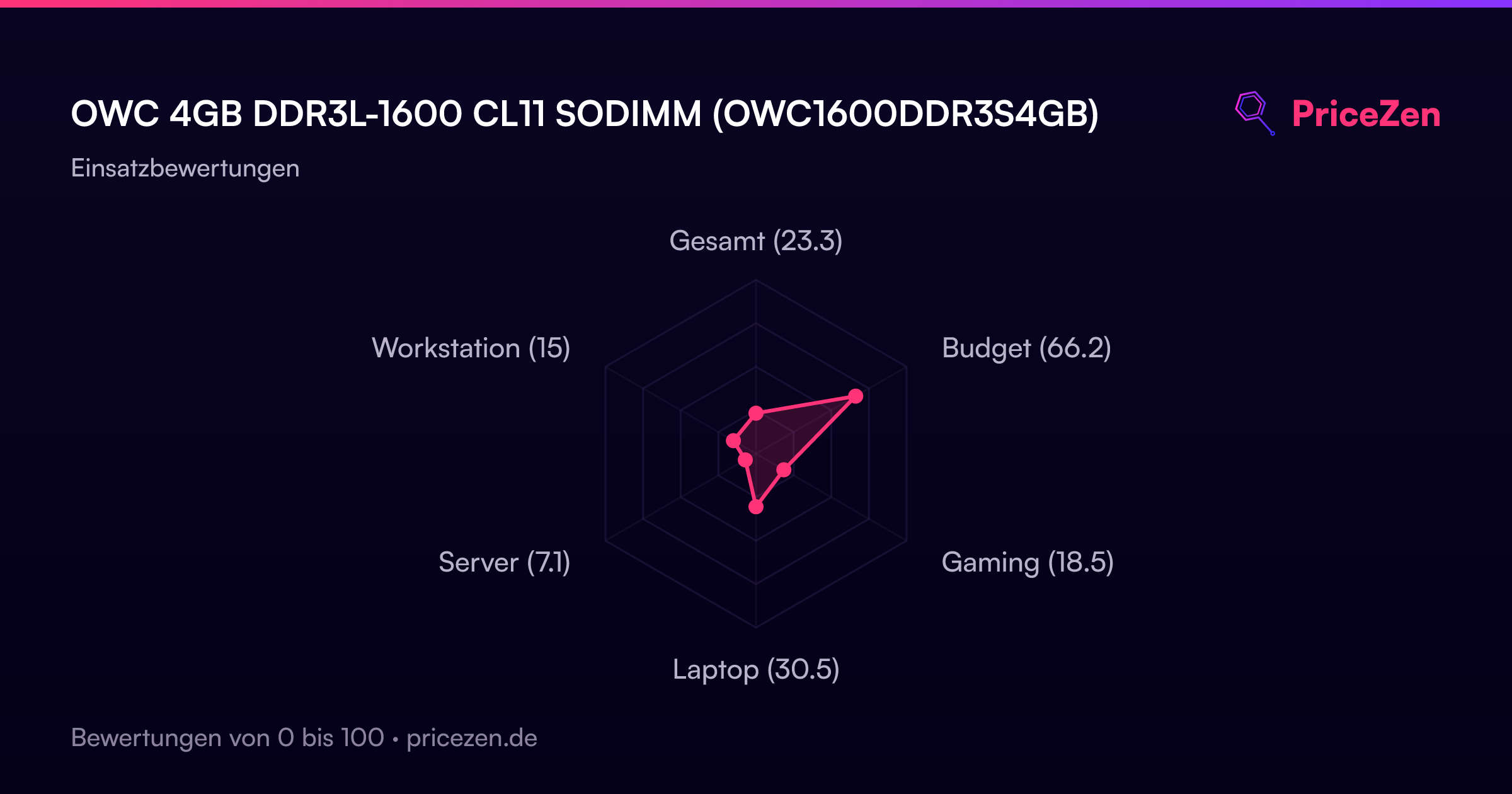
- Gesamt23.3
- Budget66.2
- Gaming18.5
- Laptop30.5
- Server7.1
- Workstation15