G.Skill NS 2GB DDR3-1333 CL9
Der DDR3-1333-Speicher mit CL9-Latenz (9-9-9-24) und 1,5 V Spannung bietet eine solide Basis für ältere Desktop-Systeme. Das 240-polige UDIMM-Modul mit 2 GB Kapazität ist einfach und zuverlässig, mit einer Kundenbewertung von 4,7/5. Es ist ideal für Nutzer älterer Desktop-PCs, die eine kostengünstige Speicheraufrüstung benötigen, ohne Wert auf Gaming-Leistung zu legen.

Derzeit kein aktueller Händlerpreis
Überblick
The 30-Second Version
The G.Skill NS F3-10600CL9S-2GBNS is a 2GB DDR3 1333 stick that's cheap, reliable, and perfect for breathing life into aging desktops. It ranks near the bottom for speed and capacity, but that's expected for DDR3. Users love the value and the out-of-box reliability, though one buyer reported a failure after 10 months. If you're nursing an old DDR3 system, grab a pair of these. If you're building new, look elsewhere.
Pros & Cons
Vorteile
- Dirt cheap way to upgrade older DDR3 systems 83rd
- Works right out of the box with no fuss 67th
- CL9 latency is decent for DDR3
- 1.5V standard voltage means broad motherboard compatibility
- Users report noticeable performance gains on old machines
Nachteile
- 2GB capacity is tiny by modern standards
- 1333 MT/s speed is near the bottom of our rankings
- One verified buyer reported stick failure after 10 months
- Single stick means no dual-channel benefit on its own
- Feature set is bare bones, 18th percentile
Was Besitzer sagen
The Word on the Street
Wie sich die Meinung der Besitzer im Lauf der Zeit verändert hat
ExklusivBasierend darauf, wann Kunden ihre Bewertungen tatsächlich geschrieben haben - so sehen Sie, ob das anfängliche Lob anhielt.
7 geschriebene Rezensionen, Jan. 2013 – Juni 2015: 7 zufrieden
Über alle 24 Shop-Bewertungen: 4,7★. Die meisten Besitzer bewerten, ohne eine Rezension zu schreiben. Das Diagramm zählt die 7 geschriebenen Rezensionen.
Jeder Punkt ist eine geschriebene Rezension, im Monat, in dem sie verfasst wurde. Zufrieden = 4-5★, gemischt = 3★, unzufrieden = 1-2★.
Die Fakten
Performance
Let's be real about the numbers here. 1333 MT/s with CL9 timings puts this stick near the bottom of our speed rankings, at the 7th percentile. That's not a typo. Compared to modern DDR4 and DDR5 kits running at 3200, 3600, or even 6000 MT/s, this thing is glacial. But that's not the point. The point is whether it's fast enough for the systems it's designed for, and for DDR3-era platforms, 1333 CL9 was a perfectly reasonable mid-range spec back in the day.
The latency story is a bit more forgiving. At the 67th percentile, the CL9 rating is actually decent for DDR3. The 9-9-9-24 timings are nothing special, but they're not embarrassing either. For an older system that's probably running a mechanical hard drive and integrated graphics, the memory speed is rarely the bottleneck. Users report a noticeable performance boost after installing this, which makes sense if they were running a single stick in single-channel mode before. Going from 2GB to 4GB or 8GB total with dual-channel support can make an old machine feel surprisingly snappy.
Specifications
Full Specifications
Memory
| Type | DDR3 |
| Form Factor | UDIMM |
| Total Capacity | 2048 |
| Modules | 1 |
| Per Module | 2048 |
| Pins | 240 |
Performance
| Speed | 1333 |
| CAS Latency | 9 |
| Timings | 9-9-9-24 |
| Voltage | 1.5 |
Class
| ECC | No |
| Registered | No |
Features
| RGB | No |
| Heat Spreader | No |
vs Competition
Stacking this against the competition is almost unfair, because most of the competitors in our database are modern DDR4 kits. The Corsair Vengeance LPX CMK32GX4M2D3600C18, for example, is a 32GB dual-channel DDR4 kit running at 3600 MT/s. It's in a completely different universe in terms of speed and capacity. Same goes for the Team Group T-FORCE VULCAN Z and the Kingston FURY Beast KF432C16BBK2/16. Those are all 16GB to 32GB kits designed for current platforms.
But here's the thing: none of those will physically fit in a DDR3 motherboard. The G.Skill NS isn't competing with them on specs, it's competing on compatibility. If you have a DDR3 system, your realistic alternatives are other DDR3 sticks from the same era, used modules from eBay, or replacing the whole platform. The Patriot Viper Elite 5 and Timetec Pinnacle Konduit are also DDR4 or DDR5 parts, so they're not direct swaps either. For DDR3 owners, this G.Skill stick is one of the few new-in-box options still floating around, and that scarcity gives it a niche value those fancy modern kits can't touch.
| Spec | G.Skill NS | Kingston FURY Beast | Corsair VENGEANCE RGB | Team Group T-CREATE EXPERT | ADATA Lancer Blade RGB | Crucial Pro OC Gaming |
|---|---|---|---|---|---|---|
| Capacity | 2GB | 64GB | 64GB | 32GB | 32GB | 64GB |
| Kit | 1 x 2GB | 2 x 32GB | 2 x 32GB | 2 x 16GB | 2 x 16GB | 2 x 32GB |
| Memory Type | DDR3 | DDR5 | DDR5 | DDR5 | DDR5 | DDR5 |
| Speed Mts | 1333 | 6400 | 6400 | 6400 | 6000 | 6000 |
| Cas Latency | CL9 | CL32 | CL32 | CL32 | CL30 | CL40 |
| Form Factor | UDIMM | UDIMM | UDIMM | UDIMM | UDIMM | UDIMM |
| Ecc | false | false | false | false | false | false |
| Compare | Compare | Compare | Compare | Compare |
| Produkt | Speed | Feature | Latency | Capacity | User Sentiment | Nutzerresonanz | Affordability |
|---|---|---|---|---|---|---|---|
| G.Skill NS | 7.4 | 18.1 | 66.8 | 4 | 37.9 | 46.8 | 83.3 |
| Kingston FURY Beast Compare | 94.8 | 89.6 | 87.6 | 89.6 | 90 | 96.4 | 8.1 |
| Corsair VENGEANCE RGB Compare | 94.8 | 89.6 | 87.6 | 89.6 | 97.4 | 96.4 | 7 |
| Team Group T-CREATE EXPERT Compare | 94.8 | 74.8 | 87.6 | 70.6 | 90 | 87.3 | 24.3 |
| ADATA Lancer Blade RGB Compare | 87.6 | 89.6 | 87.6 | 70.6 | 0 | 96.4 | 15.8 |
| Crucial Pro OC Gaming Compare | 87.6 | 74.8 | 68.8 | 89.6 | 0 | 77 | 15 |
Preis
Value & Pricing
Here's where this little stick earns its keep. At the 83rd percentile for affordability, it's one of the cheaper memory options in our database. The only price we're seeing right now is CAD 70 from a Canadian listing, which for a 2GB DDR3 stick feels a bit steep if you're comparing raw dollars-per-gigabyte to modern kits. But context matters. When you need DDR3 specifically, your options are limited, and new old stock or lightly used sticks can command weird prices.
Users consistently praise the value for money, and that's the real story. If this stick gets an old machine running smoothly again for another year or two, it's paid for itself. The sentiment score of 78/100 backs that up, with multiple buyers saying the performance boost was worth every penny. Just don't expect it to be an investment in future-proofing. This is a stopgap, not a foundation.
Mehr erfahren
Overview
The G.Skill NS F3-10600CL9S-2GBNS is a 2GB stick of DDR3 1333 memory, and honestly, it feels like a time capsule at this point. This is the kind of RAM you buy when you're nursing an old Core 2 Duo or first-gen Core i series machine back to life, not when you're building a new rig. It's a single 240-pin UDIMM running at 1333 MT/s with CL9 timings and 1.5V, which was pretty standard fare back in the DDR3 heyday.
Who's this actually for? People with older desktops that need a cheap memory bump, or folks trying to max out an aging motherboard that still uses DDR3. Maybe you've got an old office PC that's choking on 2GB total and you want to double it. Or you're fixing up a hand-me-down system for a kid to do homework on. This stick isn't exciting, but it's the kind of part that keeps old hardware useful.
What makes it interesting is the price-to-usefulness ratio. In our database, this thing sits at the 83rd percentile for affordability, which means it's cheaper than most memory we track. And users seem genuinely happy with what they got for their money. It's not going to win any speed contests, but for breathing life into a dusty tower, it does the job.
Common Questions
Q: Will this work in my motherboard?
This is a 240-pin DDR3 UDIMM running at 1.5V, which is the standard for most DDR3 desktop motherboards. If your board supports DDR3 1333 and has a free DIMM slot, it should work. Check your motherboard's memory compatibility list if you want to be extra sure, but the standard voltage and timings make this one of the more broadly compatible DDR3 sticks out there.
Q: Should I buy one stick or two?
If your motherboard supports dual-channel memory, buying two sticks will give you better performance than a single stick. Dual-channel effectively doubles the memory bandwidth, which can make a noticeable difference on older systems. That said, if you're just adding to an existing stick, make sure the new stick matches the speed and timings of what's already installed to avoid compatibility headaches.
Q: Is 2GB enough for modern use?
For modern operating systems and applications, 2GB is very tight. Windows 10 or 11 will technically run on 2GB, but you'll feel the pain with any multitasking. This stick makes more sense as an upgrade to get an older system to 4GB or 8GB total, or for lightweight Linux setups, media servers, or retro gaming machines where 2GB is workable.
Q: How does this compare to DDR4 or DDR5?
It doesn't, really. DDR4 and DDR5 are completely different technologies with different physical connectors, so you can't use this stick in a modern motherboard. In terms of raw speed, 1333 MT/s is far slower than even budget DDR4 kits running at 2666 or 3200 MT/s. This stick is only relevant if you're specifically working with a DDR3 platform.
Who Should Skip This
If you're building a new PC or upgrading a system from the last five or six years, skip this entirely. Modern platforms use DDR4 or DDR5, and this stick won't even fit in the slot. Even if you somehow had a DDR3 board, 2GB is too small for anything beyond basic web browsing and document editing. Gamers, content creators, and anyone running virtual machines or heavy multitasking should look at 16GB or 32GB DDR4 or DDR5 kits instead.
Also skip this if you need reliability for a mission-critical system. The user sentiment score of 37th percentile is a yellow flag, and while most buyers had a great experience, the reported stick failure after 10 months is worth taking seriously. If your old machine absolutely cannot go down, you might want to look for a kit with a longer warranty or a stronger track record, or just bite the bullet and upgrade the whole platform.
Verdict
If you've got an old DDR3 system that's still doing useful work, this G.Skill NS stick is a perfectly reasonable way to squeeze more life out of it. The 2GB capacity means you'll probably want to buy two for dual-channel operation, assuming your board has the slots. Users report it works right out of the box, and the performance bump on older machines is real. For a basic office PC, a media server, or a retro gaming box, this is a solid, low-risk purchase.
But if you're building anything new, or if your workload involves modern games, video editing, or heavy multitasking, this is not the RAM you're looking for. The 4th percentile capacity ranking and 7th percentile speed ranking tell the story. You'd be better off putting that money toward a platform upgrade. This stick is for keeping old soldiers marching, not for winning new battles.
Usage Scores
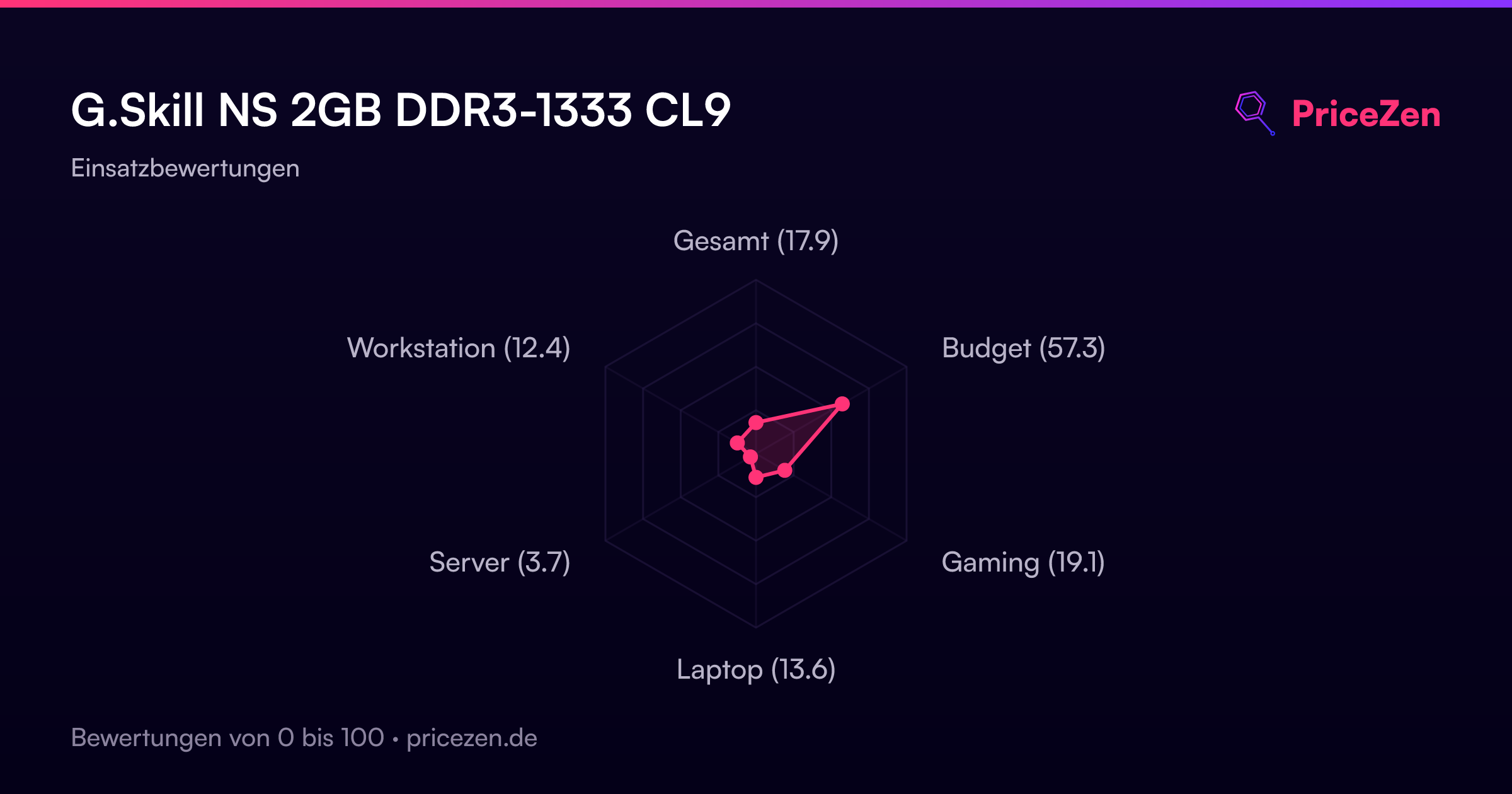
- Gesamt17.9
- Budget57.3
- Gaming19.1
- Laptop13.6
- Server3.7
- Workstation12.4