Kingston FURY Beast 16GB DDR5-5600 CL40 SODIMM Black

DDR5-SODIMM für Laptops und Mini-PCs geprüft am 29. Nov.
58/100 Gesamtwertung
Preise an 1 Tagen geprüft, bisher zu wenig, um zu sagen, was üblich ist.
- Capacity
- 16GB
- Kit
- 1 x 16GB
- Memory
- DDR5
- Speed
- 5600 MT/s
- CAS latency
- CL40
- Form factor
- SODIMM
Preise bei 1 Shop vergleichen
Günstigste zuerst. Neue, generalüberholte und gebündelte Angebote werden getrennt gehalten, damit du Gleiches mit Gleichem vergleichst.
| Shop | Verkauft von | Farbe und Zustand | Preis | ggü. Tiefstpreis | Zuletzt geprüft | Link |
|---|---|---|---|---|---|---|
| Neu1 AngebotEinzelstück | ||||||
| Amazon | Marktplatz-Händler | Nicht angegeben | 359,68 € | Niedrigster Preis | Vor 6 Tagen | Zum Shop |
 Quelle: PriceZen, geprüft am 23. Nov. 2026
Ein Preis gilt als aktuell, wenn wir ihn in den letzten 7 Tagen geprüft haben. „Marktplatz-Händler“ bedeutet einen Drittanbieter in diesem Shop, nicht den Shop selbst.











Überblick
The 30-Second Version
A single 16GB DDR5 stick at 5600 MT/s that's well above average on speed but soft on latency at CL40. Pricing is the sticking point, with CAD 316 to CAD 450 across listings and EUR 360 at Amazon, and affordability is on the pricey side. Verify the format first: our data lists a 262-pin SODIMM while the title says DIMM. Good single-slot upgrade if you shop the price, wrong pick for servers or dual-channel builds.
Pros & Cons
Vorteile
- 5600 MT/s is well above average for the category 78th
- Intel XMP 3.0 certified, so the 5600 CL40 profile is one selection away 67th
- On-die ECC helps hold data integrity at higher speeds
- 18 RGB effects plus infrared sync, controllable via FURY CTRL or board software
- Low 1.25V for this speed class, with a heat spreader included
Nachteile
- CL40 (40-40-40) latency falls behind most rivals
- Affordability is on the pricey side, so it's not a bargain pick
- Single 16GB module means one channel, no dual-channel bandwidth
- Listed as a 262-pin SODIMM but titled as a DIMM, format needs verifying
- Server suitability scores just 26.8/100, it's unbuffered memory
Die Fakten
Performance
Speed is where this thing earns its keep. At 5600 MT/s it ranks among the best in our tests, well above average for this category. In practical terms that's a healthy data rate for feeding a modern CPU, and it's the number you'll feel most in memory-hungry work like large project compiles or heavy multitasking. The trade-off is latency: CL40 with 40-40-40 timings lands near the bottom of the field, so it falls behind most rivals on how quickly it responds to a request. Fast throughput, less snappy access. For streaming through big datasets that's a fine trade. For latency-sensitive workloads, it's the opposite of what you want.
Capacity is the other thing to think hard about. 16GB puts it around the middle of the pack, and because this is a single module you're running one channel, not two. Two matched sticks generally give you more memory bandwidth than one, so if your system has a second slot free, a pair is usually the better play than this alone. Feature score is 67, solid rather than leading, driven by the RGB suite, heat spreader, XMP 3.0 and on-die ECC. And the 1.25V rating is modest for this speed class, which is good news for heat in a cramped chassis. Just remember none of the RGB matters if your laptop can't see the module's lighting controller.
Specifications
Full Specifications
Memory
| Type | DDR5 |
| Form Factor | SODIMM |
| Total Capacity | 16384 |
| Modules | 1 |
| Per Module | 16384 |
| Pins | 262 |
Performance
| Speed | 5600 |
| CAS Latency | 40 |
| Timings | 40-40-40 |
| Voltage | 1.25 |
Class
| ECC | No |
| Registered | No |
| OC Profile | Intel XMP 3.0 |
Features
| RGB | Yes |
| Heat Spreader | Yes |
vs Competition
Against the G.Skill Trident Z5 Royal Neo RGB and the XPG Lancer Blade RGB, this Kingston is playing in the same dressed-up memory space, and the fight comes down to timings and price rather than headline speed. Our data puts the FURY Beast's latency near the bottom of the field, which is its soft spot, so if you're choosing between RGB kits and you care about responsiveness, weigh that CL40 carefully. Where Kingston pushes back is the top-tier speed rating and the infrared sync trick for keeping multiple modules' lighting in step, which is a genuinely specific feature rather than a bullet point.
Corsair Vengeance, Team Group T-CREATE EXPERT and Crucial Pro Overclocking are the names to cross-shop if you'd rather skip the light show and put the money into capacity or tighter timings. The T-CREATE and Crucial Pro crowd tends to be the practical builder's shortlist, and with this module's affordability on the pricey side, that's a fair fight to have. Our overall score of 57.9/100 says this is a competent specialist, not a category leader. If you want one fast stick with lighting and XMP simplicity, it's in the running. If you want the best all-round module for the money, compare it against at least two of those names before committing.
| Spec | Kingston FURY Beast | G.Skill Trident Z5 Royal Neo RGB | Corsair Vengeance | Team Group T-CREATE EXPERT | Crucial Pro Overclocking | XPG Lancer Blade RGB |
|---|---|---|---|---|---|---|
| Capacity | 16GB | 32GB | 64GB | 32GB | 32GB | 32GB |
| Kit | 1 x 16GB | 2 x 16GB | 2 x 32GB | 2 x 16GB | 2 x 16GB | 2 x 16GB |
| Memory Type | DDR5 | DDR5 | DDR5 | DDR5 | DDR5 | DDR5 |
| Speed Mts | 5600 | 6000 | 6400 | 6400 | 6400 | 6000 |
| Cas Latency | CL40 | CL28 | CL32 | CL32 | CL32 | CL30 |
| Form Factor | SODIMM | UDIMM | UDIMM | UDIMM | UDIMM | UDIMM |
| Ecc | No | No | No | No | No | No |
| Compare | Compare | Compare | Compare | Compare |
| Produkt | Speed | Feature | Latency | Capacity | Affordability |
|---|---|---|---|---|---|
| Kingston FURY Beast | 77.6 | 66.8 | 31.2 | 44.8 | 39.2 |
| G.Skill Trident Z5 Royal Neo RGB Compare | 87.6 | 89.6 | 97.1 | 70.4 | 12.4 |
| Corsair Vengeance Compare | 94.8 | 74.8 | 87.6 | 89.4 | 8.1 |
| Team Group T-CREATE EXPERT Compare | 94.8 | 74.8 | 87.6 | 70.4 | 24 |
| Crucial Pro Overclocking Compare | 94.8 | 74.8 | 87.6 | 70.4 | 27 |
| XPG Lancer Blade RGB Compare | 87.6 | 89.6 | 87.6 | 70.4 | 16.5 |
Preis
Value & Pricing
Here's the uncomfortable part. Affordability is on the pricey side in our model, meaning it's not a bargain for what you get, and the raw listings back that up. In Canada we're seeing CAD 316 to CAD 450 across two listings, a spread of CAD 134 for the same module. That's a big gap for identical hardware, so shopping around genuinely pays here. Euro pricing runs EUR 360 to EUR 381 across four listings in DE, ES, FR and IT, with Amazon currently at EUR 360, the lowest euro price in our data. Brazil shows BRL 2,605 and Mexico MXN 6,251, each from a single listing.
We track prices over time, partly through our community browser extension, and a spread like the Canadian one is exactly why we bother. If you're buying in CAD, don't take the first price you see. The value case for this module rests on the 5600 MT/s speed and the RGB extras, not on it being cheap. If you don't care about lighting, you're paying for a feature you'll never look at, and there are plainer options in the comparison set worth a look.
Preisverlauf
Mehr erfahren
Overview
The Kingston FURY Beast KF556C40BBA-16 is a single 16GB DDR5 stick rated at 5600 MT/s with CL40 timings, and it's the kind of part that looks simple on paper but has one detail worth slowing down for. Our data lists it as a 262-pin SODIMM in the laptop memory category, while the product title calls it a DIMM and the marketing copy talks about RGB heat spreaders and motherboard software. Those two things don't normally live on the same module, so before you click buy, check the physical format against what your machine actually takes. We're flagging it because getting this wrong means a stick that won't seat, not a stick that runs a bit slow.
Assuming the format matches your system, this is aimed at people who want a fast single-module upgrade rather than a matched kit. One 16GB module at 5600 MT/s is a sensible move if you're going from a smaller or slower stick and you want headroom for browser tabs, IDEs, and a game or two in the background. The Intel XMP 3.0 certification means the 5600 CL40 profile is stored on the module, so on a board that supports XMP you pick the profile instead of typing timings by hand. On-die ECC is there too, which helps keep data intact at higher speeds, though it isn't the same thing as full server-grade ECC.
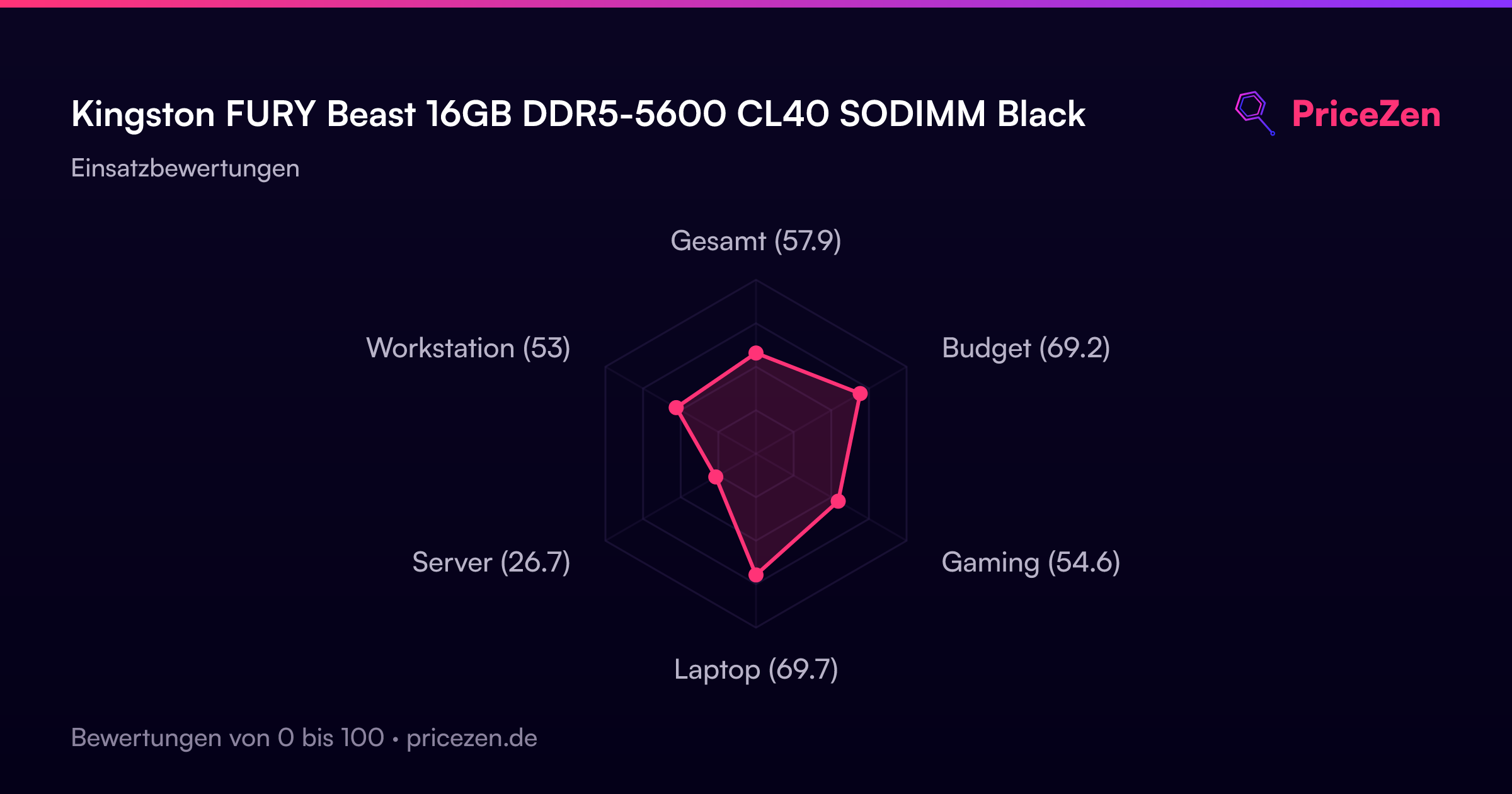
What makes it interesting is the mix: strong speed, RGB lighting with 18 effects and Kingston's infrared sync, and a heat spreader, all on a single module. That's an unusual combo for something filed under laptop memory. Our scoring model puts it at 69.8/100 for laptop use and 69.1/100 for budget builds, with an overall score of 57.9/100. The weakest fit by far is server work at 26.8/100, which tracks with it being unbuffered memory. So: a decent single-stick upgrade candidate, not a do-everything module.
Common Questions
Q: Is this a laptop SODIMM or a desktop DIMM?
Our data files it under laptop memory as a 262-pin SODIMM, but the product title says DIMM and the description references motherboard RGB software and heat spreaders. That's a genuine conflict, so confirm the physical format with the seller before ordering. A 262-pin SODIMM won't fit a full-size desktop DIMM slot, and vice versa.
Q: Will one 16GB stick be enough, or should I buy two?
16GB sits around the middle of the pack in our capacity rankings, which is workable for general use and gaming but tight for heavy creative or VM work. Because this is a single module, you're running one memory channel. If your system has a second slot, a matched pair will generally give you more bandwidth than this alone.
Q: Do I need XMP support to hit 5600 MT/s?
The module is Intel XMP 3.0 certified with pre-optimized speed, timings and voltage stored on it, so on a supporting board you select the profile and it runs at 5600 MT/s CL40. Without XMP support the system will fall back to whatever standard speed it negotiates, which may be lower. Check your platform's memory support list before assuming the rated speed.
Q: Can I use this in a server or workstation that needs ECC?
Not for proper ECC duty. It has on-die ECC, which corrects errors inside the memory chips themselves, but it's unbuffered memory and doesn't provide system-level ECC. Our model scores it just 26.8/100 for server use, its weakest category by a wide margin. Look at registered ECC modules for that job.
Who Should Skip This
Skip this if you're building a system with two free memory slots and you want maximum bandwidth. A single module runs one channel, and no amount of RGB fixes that. Same story if you're chasing tight timings for latency-sensitive work: CL40 near the bottom of the field is a weak spot, and the Crucial Pro Overclocking or Team Group T-CREATE EXPERT options in our comparison set are worth checking for that priority.
And anyone shopping for server or workstation memory should walk straight past. Unbuffered with on-die ECC isn't registered ECC, and the 26.8/100 server score reflects that honestly. Budget hunters should also pause, since affordability is on the pricey side and the Canadian listings swing by CAD 134. If lighting doesn't matter to you, Corsair Vengeance is a name worth putting on the shortlist instead.
Verdict
For a single-slot upgrade in a machine that takes this format, we'd call it a reasonable buy at the low end of its price range. You get 5600 MT/s, an XMP profile you don't have to fiddle with, and a low 1.25V rating. Pay CAD 316 rather than CAD 450, or EUR 360 rather than EUR 381, and the value story improves noticeably. The 4.7/5 customer rating across 20 reviews suggests buyers who got the right part were happy with it.
For a fresh build with two free slots, we'd steer you toward a matched pair instead of this single module, purely for the bandwidth. And for anything server-shaped, the 26.8/100 score is your answer: this is unbuffered memory with on-die ECC, not registered ECC, and it's the wrong tool. Buy it for what it is, a fast, well-lit single stick, and it does that job fine.
Usage Scores
- Gesamt57.9
- Budget69.3
- Gaming54.6
- Laptop69.7
- Server26.7
- Workstation53