OWC 8GB DDR3-1600 CL11 SODIMM
Dieses 8 GB DDR3L SODIMM mit 1600 MT/s und 1,35 V ist JEDEC- und ROHS-konform, werkseitig getestet und übertrifft die OEM-Spezifikationen, mit lebenslanger Garantie und kostenlosem Support. Es ist für Dell OptiPlex 3240/9020/9030 AIO und andere Modelle geeignet und lässt sich einfach installieren, um die Systemreaktion spürbar zu verbessern. Am besten geeignet für Besitzer dieser Desktop-PCs, die mehr Speicher für Multitasking und große Dateien benötigen, ohne die Garantie zu gefährden.

Derzeit kein aktueller Händlerpreis











Überblick
The 30-Second Version
OWC's 8GB DDR3L SODIMM is a cheap, no-frills upgrade for aging laptops and AIO desktops. It's not fast by modern standards, but at $38 with a lifetime warranty, it's a solid way to keep old hardware running. Only worth it if your machine actually uses DDR3L.
Pros & Cons
Vorteile
- Drops into a wide range of older Dell, Lenovo, and HP machines 88th
- 1.35V low-voltage design runs cooler and saves battery
- Lifetime warranty with OWC's advance replacement program
- JEDEC compliant and tested to meet OEM specs
Nachteile
- DDR3L means it only works in older systems
- 8GB single stick is a small capacity by today's standards
- Speed and feature scores land near the bottom of our database
- No heat spreader or any kind of visual flair
Die Fakten
Performance
At 1600 MT/s and CL11, this module sits in the bottom quarter of our database for speed and the bottom fifth for features. That sounds rough, but context matters. This is DDR3L for machines that shipped with DDR3L. It's not competing with DDR4 or DDR5 kits. For its intended job, it's fine. The 1.35V rating means it'll run cooler and sip less power than standard 1.5V DDR3, which is a real plus in laptops. Latency lands right around average, so responsiveness won't feel sluggish in everyday tasks. Just don't expect it to turn a 2014 laptop into a speed demon.
Specifications
Full Specifications
Memory
| Type | DDR3 |
| Form Factor | SODIMM |
| Total Capacity | 8192 |
| Modules | 1 |
| Per Module | 8192 |
| Pins | 204 |
| Rank | 2Rx8 |
Performance
| Speed | 1600 |
| CAS Latency | 11 |
| Voltage | 1.35 |
Class
| ECC | No |
| Registered | No |
Features
| RGB | No |
| Heat Spreader | No |
vs Competition
Stacked against the G.Skill Ripjaws V, Kingston FURY Beast, or Corsair Vengeance LPX kits in our database, this OWC module looks ancient. Those are DDR4 and DDR5 kits with double the capacity, higher clocks, and heat spreaders. But that's an unfair fight. This OWC stick isn't trying to compete with modern desktop memory. It's a replacement part for machines that can't use anything newer. The real comparison is against other DDR3L SODIMMs, and there OWC holds its own with solid compatibility and a lifetime warranty. The Timetec Pinnacle Konduit is probably the closest competitor in spirit, another budget-friendly upgrade option for older hardware.
| Spec | OWC 8GB DDR3 SODIMM | Kingston FURY Beast | Corsair VENGEANCE RGB | G.Skill Trident Z5 Royal | Team Group T-CREATE EXPERT | ADATA Lancer Blade RGB |
|---|---|---|---|---|---|---|
| Capacity | 8GB | 64GB | 64GB | 64GB | 32GB | 32GB |
| Kit | 1 x 8GB | 2 x 32GB | 2 x 32GB | 2 x 32GB | 2 x 16GB | 2 x 16GB |
| Memory Type | DDR3 | DDR5 | DDR5 | DDR5 | DDR5 | DDR5 |
| Speed Mts | 1600 | 6400 | 6400 | 6000 | 6400 | 6000 |
| Cas Latency | CL11 | CL32 | CL32 | CL26 | CL32 | CL30 |
| Form Factor | SODIMM | UDIMM | UDIMM | UDIMM | UDIMM | UDIMM |
| Ecc | false | false | false | false | false | false |
| Compare | Compare | Compare | Compare | Compare |
| Produkt | Speed | Feature | Latency | Capacity | Affordability |
|---|---|---|---|---|---|
| OWC 8GB DDR3 SODIMM | 13.7 | 18 | 57.5 | 22.5 | 88 |
| Kingston FURY Beast Compare | 94.8 | 89.5 | 87.6 | 89.6 | 8.2 |
| Corsair VENGEANCE RGB Compare | 94.8 | 89.5 | 87.6 | 89.6 | 7.1 |
| G.Skill Trident Z5 Royal Compare | 87.6 | 89.5 | 99 | 89.6 | 3.7 |
| Team Group T-CREATE EXPERT Compare | 94.8 | 74.7 | 87.6 | 70.6 | 24.4 |
| ADATA Lancer Blade RGB Compare | 87.6 | 89.5 | 87.6 | 70.6 | 15.9 |
Preis
Value & Pricing
At $38 USD, this is a cheap fix for a slow machine. Affordability lands in the top 12% of our database, which is the strongest thing this module has going for it. If you're trying to squeeze another year or two out of an old laptop, spending under forty bucks beats buying a new machine. The lifetime warranty sweetens the deal. But value depends entirely on your situation. If your system already has 8GB, adding another 8GB won't feel transformative. And if you're building anything modern, this isn't the RAM you're looking for.
Mehr erfahren
Overview
OWC's 8GB DDR3L SODIMM is a straightforward memory upgrade for older laptops and AIO desktops. It's a single 204-pin module running at 1600 MT/s with CL11 timings and 1.35V, which means it'll drop into a lot of aging Dell, Lenovo, and HP machines without drama. No RGB, no heat spreaders, no fuss. Just a stick of RAM that does what it says.
The pitch here is simple: breathe life into an old machine. If you've got a Dell OptiPlex 9020 AIO or a ThinkPad T450 that's choking on 4GB, this is a cheap way to make it usable again. But this is DDR3 territory, so we're talking about keeping old hardware alive, not building anything new.
Common Questions
Q: Will this work in my laptop?
Check if your machine uses DDR3L SODIMM modules with 204 pins. This stick is compatible with specific Dell OptiPlex AIO models, several ThinkPad T-series laptops, and select HP EliteBook and Pavilion systems. If your laptop shipped with DDR4, this won't fit.
Q: Can I mix this with my existing RAM?
Yes, but OWC recommends matching capacity, speed, and manufacturer across all DIMMs for the best stability. Mixing a 1.35V module with a 1.5V stick can cause issues, so check what's already installed before adding this.
Q: Is 8GB enough for everyday use?
For basic tasks like web browsing, email, and office apps, 8GB is workable. If you're running lots of browser tabs or heavier applications, you'll feel the limit. But as an upgrade from 4GB, it's a noticeable improvement.
Who Should Skip This
Skip this if your machine uses DDR4 or DDR5, because it physically won't fit. Also skip it if you already have 8GB and are hoping for a big performance jump. The gains from 8GB to 16GB on an old DDR3 system are real but modest, and you might be better off saving for a newer machine. If you're building a desktop or upgrading anything from the last five years, look at DDR4 or DDR5 kits instead.
Verdict
Buy this if you have an older laptop or AIO desktop that's struggling with 4GB or less. It's a cheap, low-risk upgrade that'll make multitasking smoother and extend the life of hardware that still works fine otherwise. The low-voltage design is a genuine benefit for battery life. Just make sure your machine actually takes DDR3L SODIMMs before you pull the trigger. If you're on anything newer than roughly 2016, this isn't for you.
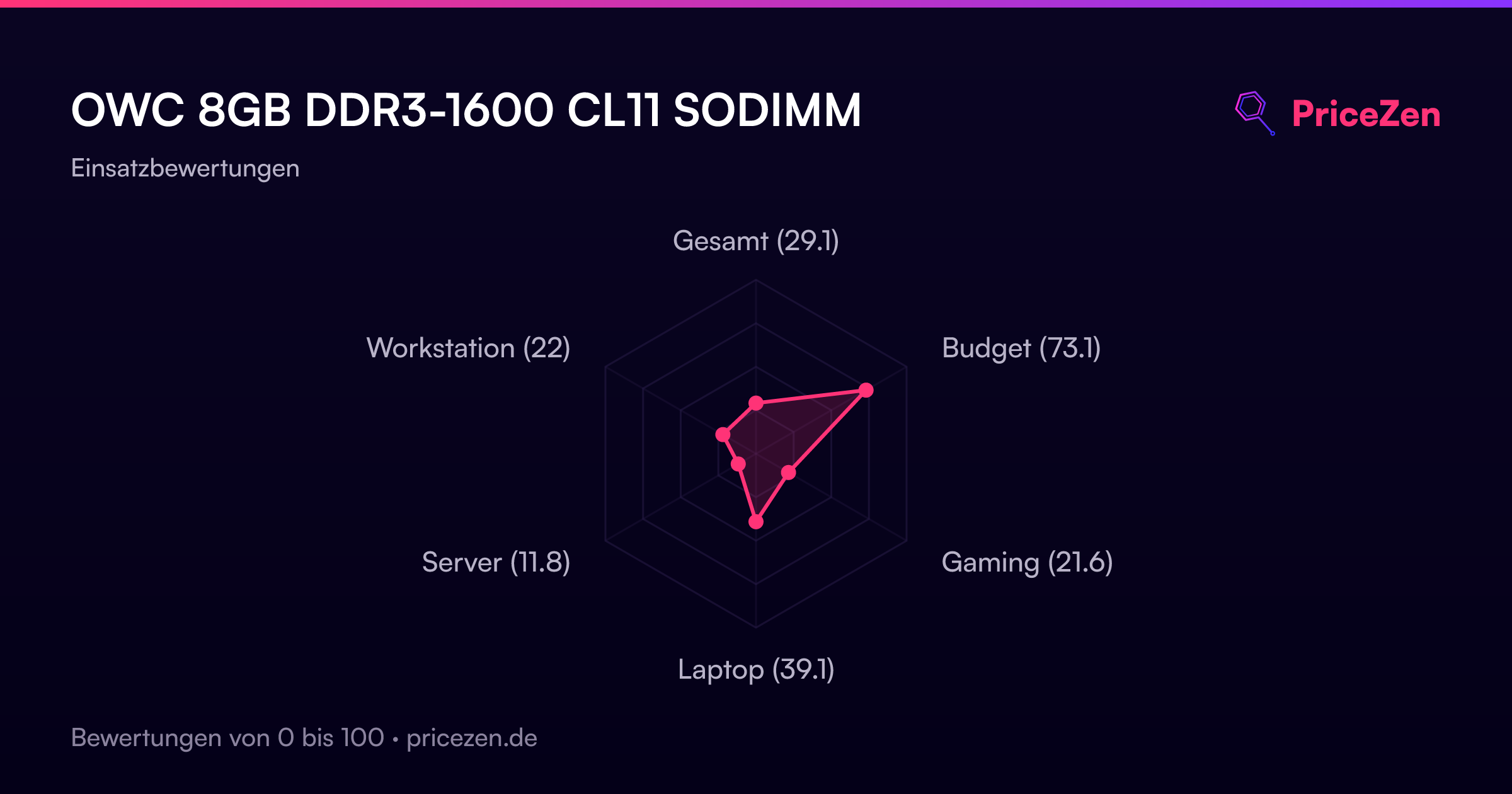
Usage Scores
- Gesamt29.1
- Budget73.1
- Gaming21.6
- Laptop39.1
- Server11.8
- Workstation22