Kingston ValueRAM 8GB DDR3-1600 CL11 Green
Das Kingston ValueRAM KVR16N11H/8 bietet 8 GB DDR3 mit 1600 MT/s, CL11-Latenz und 1,5 V Spannung, eine Standardkombination, die breite Kompatibilität mit älteren Plattformen gewährleistet. Der günstige Preis und die 100-prozentige Testung machen es zu einer wirtschaftlichen Wahl für Systemintegratoren und Käufer, die nach Spezifikation kaufen. Dieses Produkt eignet sich für Besitzer älterer Desktop-PCs, die ihren Arbeitsspeicher kostengünstig aufrüsten möchten, mit einem Budget-Score von 78,6/100.












Überblick
The 30-Second Version
The Kingston ValueRAM KVR16N11H/8 is a reliable 8GB DDR3 stick that's perfect for breathing life into older desktops. Affordability is its best trait at the 84th percentile, but speed and capacity lag way behind modern kits. Worth buying if you're stuck on DDR3 and want something that won't fail on you.
Pros & Cons
Vorteile
- Rock solid reliability, Kingston's track record here is excellent 84th
- Strong affordability score at the 84th percentile
- Plug and play, no XMP fiddling required
- Perfect drop-in replacement for aging DDR3 systems
Nachteile
- 8GB capacity is limiting for modern workloads
- DDR3 1600 is slow by today's standards
- Feature set is bare bones, nothing extra here
- Single stick means no dual channel unless you buy two
Was Besitzer sagen
The Word on the Street
Wie sich die Meinung der Besitzer im Lauf der Zeit verändert hat
ExklusivBasierend darauf, wann Kunden ihre Bewertungen tatsächlich geschrieben haben - so sehen Sie, ob das anfängliche Lob anhielt.
5 geschriebene Rezensionen, Apr. 2026: 5 zufrieden
Jeder Punkt ist eine geschriebene Rezension, im Monat, in dem sie verfasst wurde. Zufrieden = 4-5★, gemischt = 3★, unzufrieden = 1-2★.
Die Fakten
Performance
At 1600 MT/s and CL11, this is standard DDR3 fare. Nothing flashy, but it gets the job done in systems that still run on DDR3. The latency sits right around the middle of the pack, which is fine for everyday tasks and older games. Capacity is the real limitation here. 8GB on a single stick is okay for basic use, but our data shows it lands in the 23rd percentile for capacity, so heavy multitaskers or anyone running memory-hungry apps will feel the squeeze. Speed is also a weak spot at the 14th percentile, but again, that's the nature of DDR3 in a DDR5 world.
Specifications
Full Specifications
Memory
| Type | DDR3 |
| Form Factor | UDIMM |
| Total Capacity | 8192 |
| Modules | 1 |
| Per Module | 8192 |
| Pins | 240 |
Performance
| Speed | 1600 |
| CAS Latency | 11 |
| Voltage | 1.5 |
Class
| ECC | No |
| Registered | No |
Features
| RGB | No |
| Heat Spreader | No |
vs Competition
Against the Timetec 76, this Kingston stick holds its own on reliability but gives up ground on speed. The Netac Shadow III and Team Group Elite are DDR4 kits, so they're not really direct competitors unless you're building new. The Crucial CT16G4DFRA32A doubles the capacity at 16GB, which makes it a smarter buy if your board supports DDR4. For pure DDR3 replacement duty, the Kingston's brand reputation and 5-star customer rating give it an edge over no-name alternatives, even if the specs are identical on paper.
| Spec | Kingston ValueRAM | Timetec 76 | Netac Shadow III | XPG D35 | Team Group Elite | G.Skill Ripjaws |
|---|---|---|---|---|---|---|
| Capacity | 8GB | 16GB | 32GB | 8GB | 8GB | 16GB |
| Kit | 1 x 8GB | 2 x 8GB | 2 x 16GB | 1 x 8GB | 1 x 8GB | 2 x 8GB |
| Memory Type | DDR3 | DDR4 | DDR4 | DDR4 | DDR4 | DDR3L |
| Speed Mts | 1600 | 3200 | 3200 | 3200 | 3200 | 1600 |
| Cas Latency | CL11 | CL22 | CL16 | CL16 | CL22 | CL9 |
| Form Factor | UDIMM | SODIMM | UDIMM | UDIMM | SODIMM | SODIMM |
| Ecc | false | false | false | false | false | false |
| Compare | Compare | Compare | Compare | Compare |
| Produkt | Speed | Feature | Latency | Capacity | Affordability |
|---|---|---|---|---|---|
| Kingston ValueRAM | 13.6 | 18.1 | 57.5 | 22.5 | 84.3 |
| Timetec 76 Compare | 53.5 | 44.9 | 57.5 | 44.9 | 73.9 |
| Netac Shadow III Compare | 53.5 | 74.8 | 87.6 | 70.6 | 81.8 |
| XPG D35 Compare | 53.5 | 36.8 | 87.6 | 22.5 | 68.8 |
| Team Group Elite Compare | 53.5 | 56.5 | 57.5 | 22.5 | 84.6 |
| G.Skill Ripjaws Compare | 13.6 | 65.1 | 78.1 | 44.9 | 75 |
Preis
Value & Pricing
Pricing is all over the map depending on where you shop. In the US you're looking at USD 42 to USD 50, and Newegg has the best deal at the lower end of that range. European buyers see an even wider spread, from EUR 32 to EUR 51 across four countries. For an 8GB DDR3 stick, even the cheapest price feels a little steep when you consider what modern DDR4 costs. But if you're keeping an old system alive, this is often the cheapest reliable option that won't give you headaches.
Amazon 1 Angebot Ab 32 €
Wir verfolgen die Preise für dieses Produkt seit dem 8. Juni 2026. Das Diagramm erscheint, sobald mehr Daten vorliegen.
Mehr erfahren
Overview
The Kingston ValueRAM KVR16N11H/8 is an 8GB stick of DDR3 1600 with CL11 timings at 1.5V. It's the definition of a no-frills workhorse, built for people who just need their old desktop to boot and run without drama. Kingston has been doing this forever, and this module is aimed squarely at white box builders and anyone replacing a dead stick in an aging system.
Our database puts this one in a weird spot. Affordability is strong at the 84th percentile, but speed and capacity rankings are rough. That's not a knock on Kingston, it's just what happens when you benchmark a DDR3 module against modern DDR4 and DDR5 kits. For the right machine, this is exactly what you need.
Common Questions
Q: Is this memory dual channel?
A single stick can't run in dual channel by itself. You'd need two identical modules installed in the correct slots on your motherboard to get dual channel performance.
Q: Will this work in my older desktop?
If your motherboard uses DDR3 and has a standard 240-pin UDIMM slot, this should work fine. It runs at 1.5V, so make sure your board supports that voltage.
Q: Can I mix this with my existing RAM?
Technically yes, but mixing different speeds and timings can cause instability. For best results, match the speed and latency of your current stick or replace all modules with identical ones.
Who Should Skip This
Skip this if you're building a new system or your board supports DDR4 or DDR5. The 8GB capacity and DDR3 speed will bottleneck anything beyond basic productivity. If you need more than 8GB or plan to run modern games or creative apps, look at 16GB DDR4 kits instead. You'll spend a bit more but get dramatically better performance.
Verdict
Buy this if you have an older desktop that needs a memory refresh and you want something that will just work. It's not exciting, it's not fast, and it won't future-proof anything. But it's dependable, and sometimes that's all you need. System integrators and budget builders working with DDR3 platforms will get the most out of it.
Usage Scores
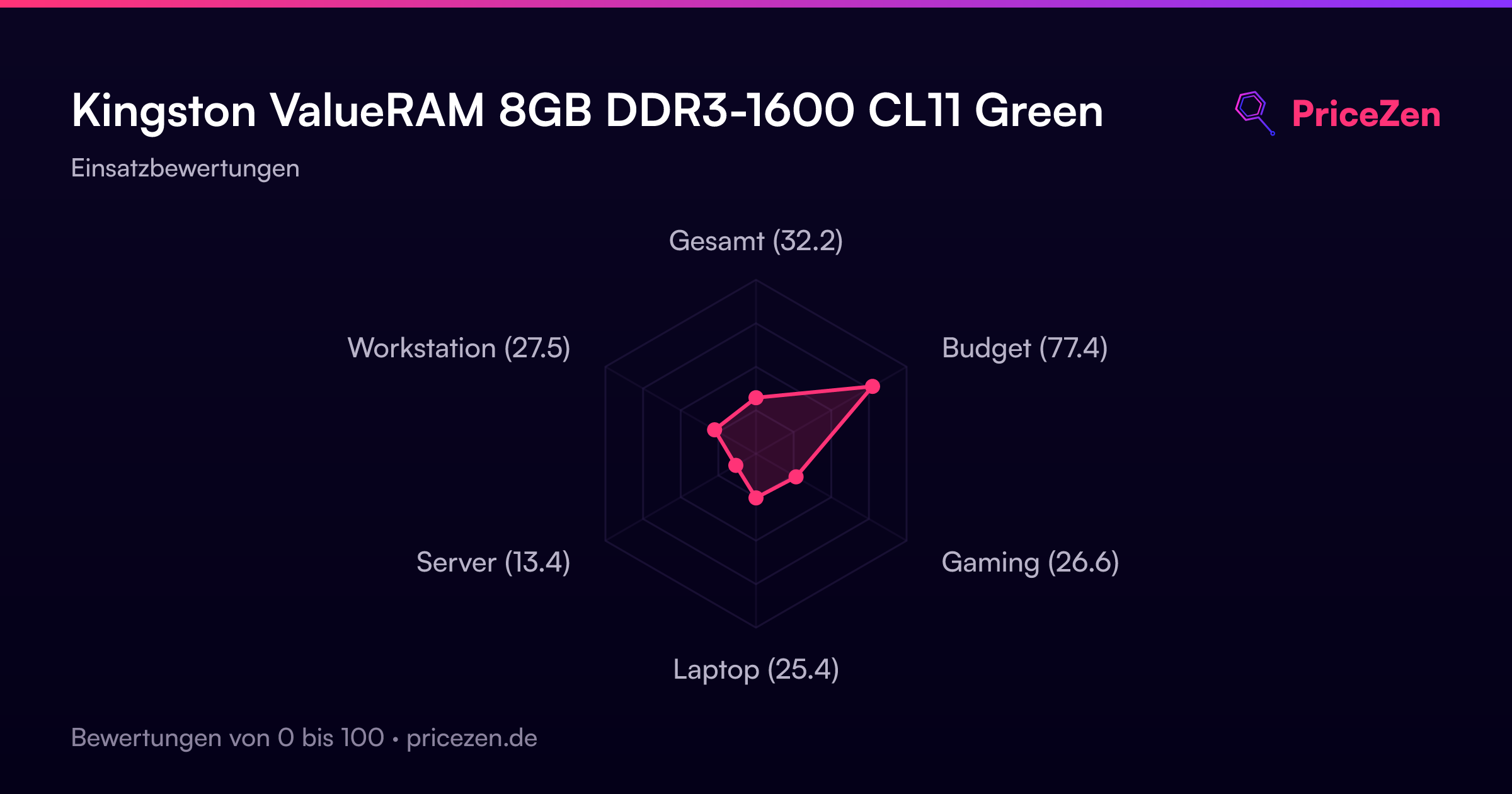
- Gesamt32.2
- Budget77.4
- Gaming26.6
- Laptop25.4
- Server13.4
- Workstation27.5