Kingston Technology 4GB DDR3-1600 CL11 SODIMM Green
Der DDR3L-Speicher mit 4 GB und 1600 MHz sowie CL11-Latenz sorgt für flüssiges Arbeiten mit anspruchsvollen Anwendungen und Spielen. Das SO-DIMM-Format mit 204 Pins und die niedrige Spannung von 1,35 V entlasten den Speicherbus und steigern die Effizienz. Dieses Modul ist ideal für Nutzer von Notebooks und kompakten NUCs, die eine kostengünstige und zuverlässige Aufrüstung für den Alltag suchen.












Überblick
The 30-Second Version
The Kingston KCP3L16SS8/4 is a 4GB DDR3L laptop memory module that's cheap, reliable, and perfect for reviving old notebooks. It runs at 1600 MT/s with CL11 latency and works at both 1.35V and 1.5V. If you need a small, affordable RAM boost for an aging DDR3 system, this is a solid pick, but don't expect it to work miracles.
Pros & Cons
Vorteile
- Dirt cheap way to upgrade an old laptop 96th
- Low-voltage 1.35V operation saves battery
- Runs at 1.5V too for wider compatibility
- Dual-rank configuration helps performance
- Kingston reliability and lifetime warranty
Nachteile
- Only 4GB, which is tight for modern workloads
- DDR3 is a dead platform, no future upgrade path
- Single stick means no dual-channel unless you buy two
- Retailer descriptions sometimes say 8GB, which is wrong
- Feature set is bare bones, no heat spreader or ECC
Was Besitzer sagen
The Word on the Street
Wie sich die Meinung der Besitzer im Lauf der Zeit verändert hat
ExklusivBasierend darauf, wann Kunden ihre Bewertungen tatsächlich geschrieben haben - so sehen Sie, ob das anfängliche Lob anhielt.
5 geschriebene Rezensionen, Dez. 2016 – Apr. 2026: 5 zufrieden
Über alle 3 Shop-Bewertungen: 5,0★. Das Diagramm zählt die 5 geschriebenen Rezensionen.
Jeder Punkt ist eine geschriebene Rezension, im Monat, in dem sie verfasst wurde. Zufrieden = 4-5★, gemischt = 3★, unzufrieden = 1-2★.
Die Fakten
Performance
Let's be honest about where this sits. In our database, this module lands in the 14th percentile for speed and the 9th percentile for capacity. That's not a knock on Kingston, it's just the reality of DDR3 in a world where DDR5 is the norm. The 1600 MT/s transfer rate and CL11 latency were perfectly respectable back in 2013, and for the kinds of tasks an old laptop handles, it still gets the job done. Web browsing, document editing, light media playback, all fine. You're not going to be editing 4K video or running modern games on a machine that takes this RAM anyway.
The latency sits at the 58th percentile, which is actually decent for DDR3. CL11 at 1600 MT/s is a standard JEDEC spec, nothing exotic, but it means the module responds quickly enough that you won't feel like the system is dragging its feet more than the CPU already makes it. The real bottleneck for most systems using this RAM is going to be the processor and storage, not the memory itself. If you're pairing this with an SSD, an old laptop can feel surprisingly snappy for basic tasks.
For the spec nerds: this is an unbuffered, non-ECC module with x8-based components and a dual-rank configuration. Dual-rank means slightly better performance in some memory-intensive workloads compared to single-rank sticks of the same capacity, though at 4GB the difference is marginal. The 1.35V low-voltage operation also means less heat and slightly better battery life in laptops that support it.
Specifications
Full Specifications
Memory
| Type | DDR3 |
| Form Factor | SODIMM |
| Total Capacity | 4096 |
| Modules | 1 |
| Per Module | 4096 |
| Pins | 204 |
Performance
| Speed | 1600 |
| CAS Latency | 11 |
| Voltage | 1.35 |
Class
| ECC | No |
| Registered | No |
Features
| RGB | No |
| Heat Spreader | No |
vs Competition
Compared to the competition, the Kingston KCP3L16SS8/4 holds its own on price but falls behind on specs. The Timetec 76, which tops our list for this category, offers better overall performance and more capacity options, though it'll cost you more. The Team Group Elite TED48G3200C22-S01 is a DDR4 module, so it's not even a direct comparison, but it shows what you could get if your system supported newer memory. The G.Skill Ripjaws Series F4-2400C16S-4GRS is another DDR4 option that runs at 2400 MT/s, significantly faster than this Kingston's 1600 MT/s, but again, only if your laptop can take it.
For people specifically stuck on DDR3, the KLEVV KD48GS880-32N220A and OWC OWC3S2D41R808GB are the more direct competitors. The OWC module is an 8GB stick, which gives you double the capacity for roughly double the price. If your laptop has only one RAM slot, that's a much better buy. The Kingston's real advantage is price and availability. It's everywhere, it's cheap, and it works. For a 4GB DDR3L SO-DIMM, there's not much to differentiate one brand from another beyond reliability and warranty, and Kingston has both covered.
| Spec | Kingston Technology | Timetec 76 | Team Group Elite | G.Skill Ripjaws | KLEVV 8GB DDR4 SODIMM | Micron 16GB DDR4 |
|---|---|---|---|---|---|---|
| Capacity | 4GB | 16GB | 8GB | 4GB | 8GB | 16GB |
| Kit | 1 x 4GB | 2 x 8GB | 1 x 8GB | 1 x 4GB | 1 x 8GB | 4 x 4GB |
| Memory Type | DDR3 | DDR4 | DDR4 | DDR4 | DDR4 | DDR4 |
| Speed Mts | 1600 | 3200 | 3200 | 2400 | 3200 | 3200 |
| Cas Latency | CL11 | CL22 | CL22 | CL16 | CL22 | CL22 |
| Form Factor | SODIMM | SODIMM | SODIMM | SODIMM | SODIMM | UDIMM |
| Ecc | false | false | false | false | false | false |
| Compare | Compare | Compare | Compare | Compare |
| Produkt | Speed | Feature | Latency | Capacity | Nutzerresonanz | Affordability |
|---|---|---|---|---|---|---|
| Kingston Technology | 13.7 | 18 | 57.5 | 8.9 | 35.2 | 95.8 |
| Timetec 76 Compare | 53.5 | 44.9 | 57.5 | 44.9 | 87.3 | 73.9 |
| Team Group Elite Compare | 53.5 | 56.5 | 57.5 | 22.5 | 87.3 | 84.7 |
| G.Skill Ripjaws Compare | 28.5 | 56.5 | 68.8 | 8.9 | 96.4 | 82.3 |
| KLEVV 8GB DDR4 SODIMM Compare | 53.5 | 56.5 | 57.5 | 22.5 | 77 | 77.9 |
| Micron 16GB DDR4 Compare | 53.5 | 44.9 | 57.5 | 44.9 | 50 | 84.8 |
Preis
Value & Pricing
At USD 19 in the US, this is about as cheap as a name-brand RAM upgrade gets. In Europe, prices range from EUR 19 to EUR 23 depending on the country and retailer, so it's worth shopping around a bit. The CAD market shows a wider spread, from CAD 23 to CAD 32, which is a bigger gap than you'd expect for a commodity part. If you're in Canada, check a couple of stores before pulling the trigger. For the price, you're getting a reliable module from a brand with a solid track record, and that's really all you can ask for at this tier. The affordability score in our database is a 96th percentile, which means it's one of the cheapest options in its category. Just remember that cheap RAM for an old laptop is only a good deal if it actually solves your problem. If you need 8GB or 16GB, buying two or four of these adds up fast, and you might be better off looking at a single higher-capacity stick.
Amazon 1 Angebot Ab 19 €
Preisverlauf
Mehr erfahren
Overview
The Kingston KCP3L16SS8/4 is a 4GB stick of DDR3L laptop memory, and it's about as straightforward as RAM gets. This is a 204-pin SO-DIMM module running at 1600 MT/s with CL11 latency, designed for older notebooks, NUCs, and other compact systems that still use DDR3. At around USD 19 in the US and EUR 19 to EUR 23 in Europe, it's a budget-friendly way to breathe a little life into an aging machine. We're talking about hardware from a decade ago, so expectations need to be realistic, but for what it is, Kingston's module does exactly what it says on the tin.
People searching for this kind of memory are usually trying to squeeze a bit more use out of an old laptop. Maybe it's a ThinkPad from 2013 that's struggling with too many browser tabs, or a mini PC that's been running as a home server. The question is usually 'is this RAM compatible with my system?' and the answer here is mostly yes, as long as your machine takes DDR3L SO-DIMMs. The 1.35V low-voltage spec is a nice touch since it'll also run at 1.5V if needed, which covers a wider range of older boards.
One thing to note right away: the product description on some retailer pages says 8GB, but this is a 4GB module. Don't get confused. It's a single stick, so if you want dual-channel performance, you'll need to buy two. For most people reviving an old laptop, one stick is often enough to make the system usable again, but it's worth knowing what you're actually getting.
Common Questions
Q: Is the Kingston KCP3L16SS8/4 compatible with my laptop?
This module works with any laptop that takes 204-pin DDR3L SO-DIMM memory. It runs at both 1.35V and 1.5V, so it's compatible with a wide range of older notebooks, including many ThinkPads, Dells, and HPs from the 2012-2015 era.
Q: Can I mix this 4GB Kingston RAM with my existing memory?
Yes, as long as your existing module is also DDR3L or DDR3 with the same or similar specs. The Kingston stick will run at the speed of the slower module, but in practice, mixing brands and capacities usually works fine in most laptops.
Q: Is 4GB of RAM enough for Windows 10?
4GB is the minimum for Windows 10, and it'll feel tight with multiple browser tabs open. Adding this stick to bring your total to 8GB will make a noticeable difference in everyday responsiveness.
Q: Does this Kingston RAM work in a MacBook?
It depends on the model. MacBooks from 2012 and earlier that use DDR3 SO-DIMMs should work with this module, but MacBooks from 2013 onward have soldered RAM and can't be upgraded at all.
Who Should Skip This
If your laptop has only one RAM slot, skip this and get an 8GB module instead. The OWC OWC3S2D41R808GB is a good alternative in that case. If you're running memory-hungry applications like photo editing, virtual machines, or modern games, 4GB won't cut it, and you should look at 8GB or 16GB options. And if you're building a new system or buying a new laptop, DDR3 is obsolete. You'd be much better off with DDR4 or DDR5, which offer dramatically better performance and capacity for not much more money. This Kingston stick is a repair part for old hardware, not a foundation for anything new.
Verdict
Should you buy this? If you have an old laptop with a free RAM slot and you're just trying to make it usable for basic tasks, yes. At around USD 19 or EUR 20, it's a low-risk upgrade that can genuinely improve the experience of an aging machine. Going from 4GB to 8GB total by adding this stick will make a noticeable difference in multitasking, especially if you're running Windows 10 or a lightweight Linux distro. The installation takes five minutes and requires no technical skill beyond a screwdriver and a bit of patience.
But if you're hoping to turn an old laptop into something it's not, this won't do it. 4GB is not enough for serious multitasking in 2024, and DDR3 systems are fundamentally limited by their age. If your laptop has a single RAM slot, skip this and get an 8GB module instead. If you're building or buying anything new, DDR3 shouldn't even be on your radar. This is a repair part, not an upgrade path.
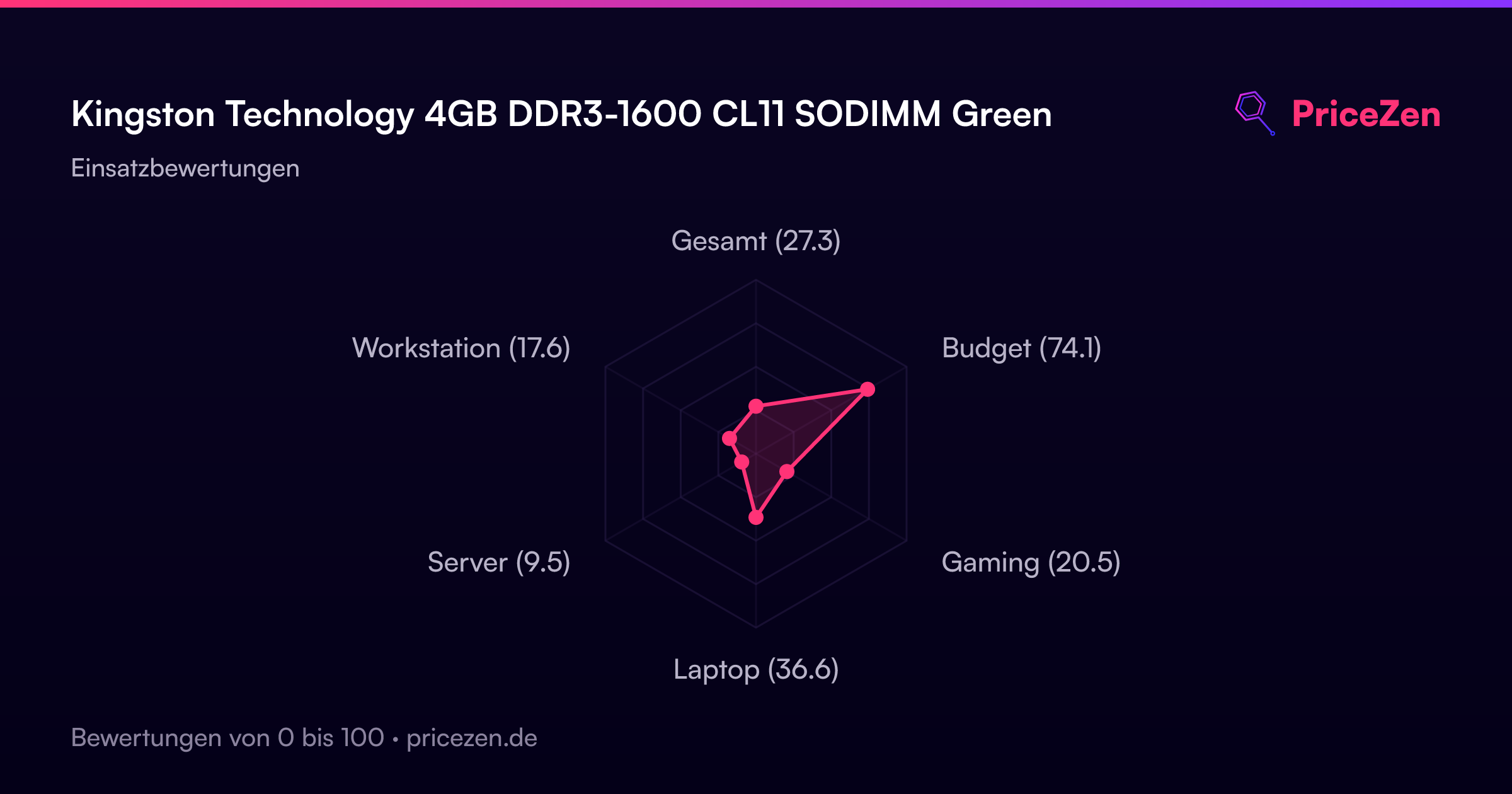
Usage Scores
- Gesamt27.3
- Budget74.1
- Gaming20.5
- Laptop36.6
- Server9.5
- Workstation17.6