OCZ Gold 1GB CL5
Der DDR2-1000-Riegel OCZ Gold OCZ2G10001G bietet 1000 MT/s bei Timings von 5-6-6-15 und einer Spannung von 2,10 V, ein solides Profil für ältere Desktop-Systeme. Der integrierte Kühlkörper und der 240-Pin-Formfaktor erleichtern den Einbau und die Wärmeableitung. Am besten geeignet für preisbewusste Nutzer, die einen älteren PC aufrüsten möchten, mit einem Budget-Score von 58,5/100, aber weniger für Gaming oder Server.

Derzeit kein aktueller Händlerpreis
Überblick
The 30-Second Version
The OCZ Gold OCZ2G10001G is a 1GB DDR2 1000 stick with solid CL5 latency and a rock-bottom price of CAD 15. It's great for reviving old systems or retro builds, but the tiny capacity and single-stick config limit real-world usefulness. If you need DDR2 on the cheap, this works. If you need actual performance, keep looking.
Pros & Cons
Vorteile
- Extremely affordable, 99th percentile for price 99th
- Strong latency for its class, 88th percentile overall 88th
- Gold heat spreader adds a bit of retro flair
- Runs at a solid 1000 MT/s for DDR2
- Decent customer rating of 4.7 out of 5
Nachteile
- Only 1GB capacity, bottom 3% of all memory
- Single stick means no dual-channel out of the box
- Speed is bottom 5% compared to modern memory
- Feature set is bare, 37th percentile
- Requires 2.10V, which some older boards may not support
Die Fakten
Performance
Let's talk about what these numbers actually mean. The 1000 MT/s speed rating puts this in the bottom 5% of all memory we track, which sounds harsh until you remember we're comparing against DDR4 and DDR5 modules running at 3200 MT/s and beyond. For DDR2, 1000 MT/s was near the top of the stack. The CL5 latency is actually the bright spot here, landing in the 88th percentile overall. That means the memory responds quickly when the CPU asks for data, even if the raw bandwidth is limited by the DDR2 standard.
In real-world terms, this stick will feel snappy in an old system running Windows XP or a lightweight Linux distro. The 5-6-6-15 timings are tight enough that basic tasks won't feel sluggish. But don't expect miracles. The 1GB capacity is the real bottleneck, sitting in the bottom 3% of our database. You'll hit swap or page file territory fast if you try to run a modern browser with more than a few tabs open. For retro gaming or basic office work on period-appropriate software, it's fine. For anything else, it's a struggle.
Specifications
Full Specifications
Memory
| Form Factor | UDIMM |
| Total Capacity | 1024 |
| Modules | 1 |
| Per Module | 1024 |
| Pins | 240 |
Performance
| Speed | 1000 |
| CAS Latency | 5 |
| Timings | 5-6-6-15 |
Class
| ECC | No |
| Registered | No |
Features
| RGB | No |
| Heat Spreader | Yes |
vs Competition
Stacked against the competition, the OCZ Gold is a mixed bag. The Micron MTA4ATF51264AZ-3G2J1 is another DDR2 option, but it's a 512MB stick, so you'd get half the capacity. The Samsung M471A5244CB0 is a 4GB module, which blows this out of the water on capacity but will cost more and may be harder to find in DDR2 form. The Timetec 78AP16NUSL2R8 and G.Skill Ripjaws are DDR4 parts, so they're not even in the same conversation for an old DDR2 board.
The Crucial CT2K102464BD160B is a 16GB kit of DDR3, which is a different generation entirely. If your board supports DDR3, that's a far better buy for actual usability. But if you're locked into DDR2, the OCZ Gold's main selling point is that it's cheap and available. The latency is better than most DDR2 sticks we've seen, but the capacity is a real limitation. You're trading modern convenience for period-correct compatibility.
| Spec | OCZ Gold | Kingston FURY Beast | Corsair VENGEANCE RGB | G.Skill Trident Z5 Royal | Team Group T-CREATE EXPERT | ADATA Lancer Blade RGB |
|---|---|---|---|---|---|---|
| Capacity | 1GB | 64GB | 64GB | 64GB | 32GB | 32GB |
| Kit | 1 x 1GB | 2 x 32GB | 2 x 32GB | 2 x 32GB | 2 x 16GB | 2 x 16GB |
| Memory Type | - | DDR5 | DDR5 | DDR5 | DDR5 | DDR5 |
| Speed Mts | 1000 | 6400 | 6400 | 6000 | 6400 | 6000 |
| Cas Latency | CL5 | CL32 | CL32 | CL26 | CL32 | CL30 |
| Form Factor | UDIMM | UDIMM | UDIMM | UDIMM | UDIMM | UDIMM |
| Ecc | false | false | false | false | false | false |
| Compare | Compare | Compare | Compare | Compare |
| Produkt | Speed | Feature | Latency | Capacity | Affordability |
|---|---|---|---|---|---|
| OCZ Gold | 4.5 | 36.8 | 87.6 | 2.7 | 99.2 |
| Kingston FURY Beast Compare | 94.8 | 89.5 | 87.6 | 89.6 | 8.2 |
| Corsair VENGEANCE RGB Compare | 94.8 | 89.5 | 87.6 | 89.6 | 7.1 |
| G.Skill Trident Z5 Royal Compare | 87.6 | 89.5 | 99 | 89.6 | 3.7 |
| Team Group T-CREATE EXPERT Compare | 94.8 | 74.7 | 87.6 | 70.6 | 24.4 |
| ADATA Lancer Blade RGB Compare | 87.6 | 89.5 | 87.6 | 70.6 | 15.9 |
Preis
Value & Pricing
At CAD 15 for a single listing, this is basically pocket change for a working stick of DDR2. The affordability ranking is 99th percentile, which means you'd be hard pressed to find cheaper memory anywhere in our database. For someone trying to revive an old machine, that's a no-brainer. You're not going to find new DDR2 at retail anymore, so the used and leftover stock market is where it's at, and this price is about as low as it gets.
That said, value isn't just about the sticker price. You're getting 1GB of capacity, which means you might need to buy multiple sticks to make a system usable. If you need 4GB, you're looking at four of these, and suddenly the cost adds up. Compare that to a single 4GB DDR2 stick if you can find one, and the math gets less appealing. But for filling a single empty slot or getting a dead system to POST, CAD 15 is hard to argue with.
Mehr erfahren
Overview
The OCZ Gold OCZ2G10001G is a single 1GB stick of DDR2 1000 memory, and honestly, it's a bit of a time capsule at this point. This is the kind of module you'd find in an old Core 2 Duo build or an early Phenom system, back when 1GB sticks were a reasonable way to fill out a motherboard. It runs at 1000 MT/s with CL5 timings (5-6-6-15) and needs 2.10V to get there, which was pretty standard for performance DDR2 back in the day. The gold heat spreader is a nice touch if you're into the vintage aesthetic.
Who is this for? Realistically, it's for someone trying to keep an older DDR2 system alive, or maybe a retro PC builder who wants period-correct hardware. At 1GB capacity, you're not doing modern gaming or heavy multitasking with this. But if you've got an old board with empty slots and you just need to get it booting or squeeze a bit more life out of it, this fits the bill. The affordability ranking is through the roof, which makes sense for hardware this old.
The interesting thing here is the mismatch between the speed rating and the capacity. DDR2 1000 was genuinely fast for its era, and the CL5 latency is respectable. But 1GB is tiny by today's standards, and that single stick means no dual-channel benefits unless you pair it with an identical module. It's a niche product for a niche audience, and we'll dig into what that means below.
Common Questions
Q: Will this work in my motherboard?
This is a 240-pin unbuffered DDR2 UDIMM, so it'll work in most desktop boards from the DDR2 era. Check your motherboard's memory compatibility list to be sure, and confirm it supports 1000 MT/s speeds. Some older boards may cap out at 800 MT/s, in which case this stick will downclock automatically. The 2.10V requirement is also worth checking, as some boards don't allow voltage adjustments.
Q: Can I mix this with other memory sticks?
Technically yes, but it's not ideal. Mixing different speeds and timings will force all sticks to run at the slowest common denominator. If you pair this 1000 MT/s stick with an 800 MT/s module, everything runs at 800 MT/s. For best results, use identical sticks in matching slots to enable dual-channel mode. Mismatched capacities can also cause stability issues on some older chipsets.
Q: Is 1GB enough for Windows 10 or 11?
No, not really. Windows 10 technically lists 1GB as the minimum for the 32-bit version, but you'll be miserable with constant disk swapping. Windows 11 won't even install with less than 4GB. This stick is best suited for Windows XP, lightweight Linux distributions, or retro gaming setups. If you need a modern OS, you'll want at least 4GB total, which means buying multiple sticks or looking for higher-capacity modules.
Q: Why is this so cheap compared to other memory?
DDR2 is a dead platform. It hasn't been used in new systems since around 2010, so demand is limited to people keeping old hardware alive. The 1GB capacity also makes it less desirable than larger sticks. Retailers are clearing out old stock, and the CAD 15 price reflects that. It's not a scam, just a product whose time has passed.
Who Should Skip This
Skip this if you're building or upgrading a system for any kind of modern workload. 1GB won't cut it for current operating systems, web browsing with multiple tabs, or anything beyond the most basic tasks. If you're on a DDR2 board and need real capacity, look for 2GB or 4GB sticks instead, even if they cost more per module. The total cost of buying four of these to reach 4GB will likely exceed a single larger stick.
Also skip it if your board doesn't support 2.10V memory or if you're not comfortable tweaking BIOS settings. Some OEM boards from Dell, HP, and others lock voltage options, which can cause instability with this stick. In that case, look for DDR2 800 modules that run at the standard 1.8V. And if you're just looking for cheap memory for a newer system, this won't even physically fit. DDR2 and DDR4/DDR5 slots are completely different.
Verdict
If you're nursing an old DDR2 system back to health and you just need a stick to get it running, the OCZ Gold is a perfectly fine choice. The price is right, the latency is solid, and it'll do the job for basic tasks. Pair it with another identical stick and you'll get dual-channel performance, which helps a bit. For retro builds or legacy hardware tinkering, this is a sensible pickup.
But if you're trying to build something you'll actually use daily, look elsewhere. 1GB is just not enough for modern operating systems and applications. You'd be better off hunting for higher-capacity DDR2 sticks or, if your board allows it, moving to a newer platform altogether. This is a stopgap solution, not a foundation for a daily driver.
Usage Scores
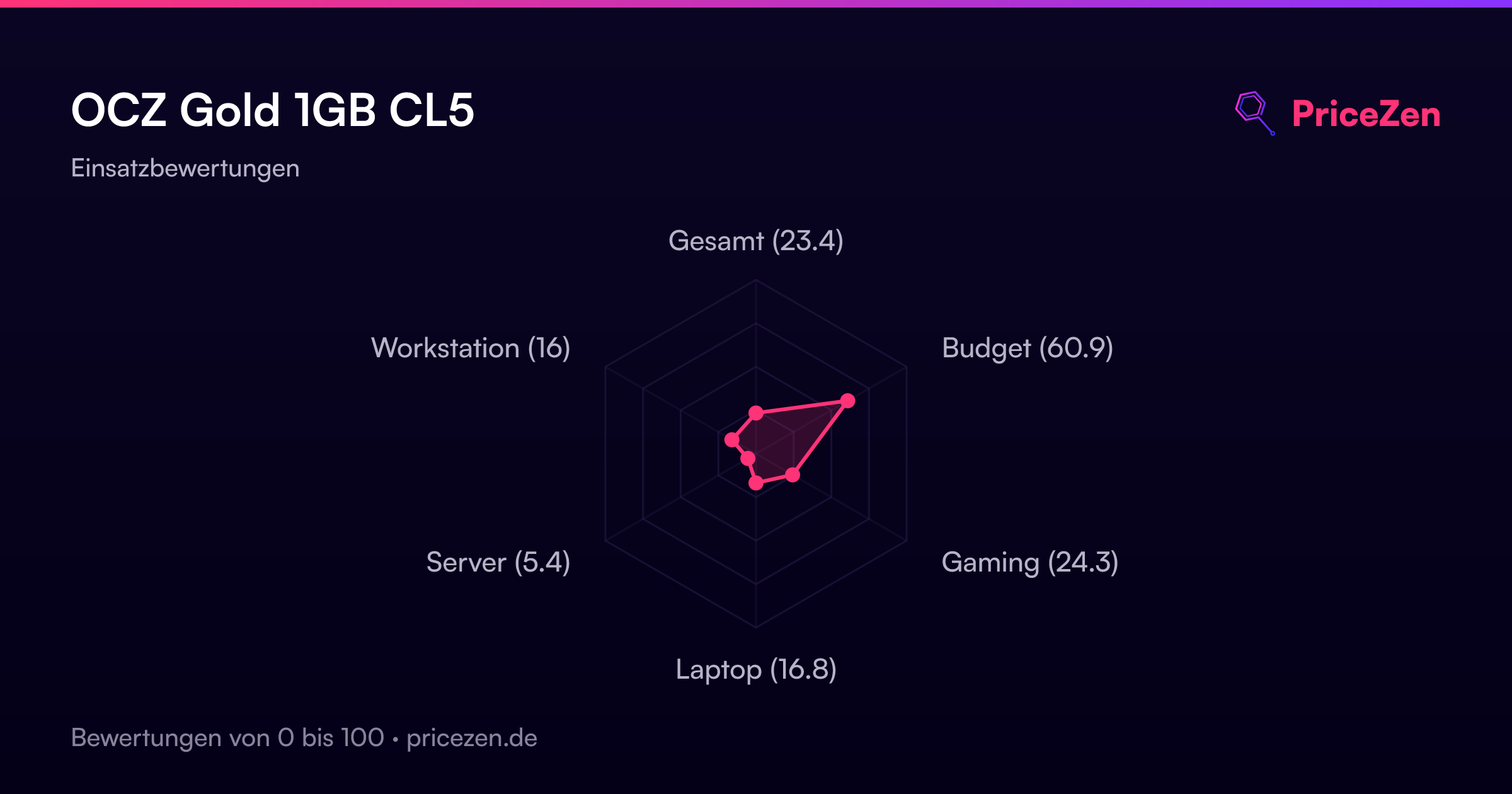
- Gesamt23.4
- Budget60.9
- Gaming24.3
- Laptop16.8
- Server5.4
- Workstation16