Western Digital Caviar Blue 250GB SATA III
Die 7200-U/min-Drehzahl und der 16-MB-Cache liefern zuverlässige Alltagsleistung für eine 250-GB-SATA-III-Festplatte, auch wenn die Kapazität nach heutigen Maßstäben bescheiden ist. Das 3,5-Zoll-Format und die budgetorientierte Ausrichtung machen sie zu einem unkomplizierten Upgrade für ältere Desktop-PCs. Am besten geeignet für Nutzer, die einen kostengünstigen Heim-PC aufbauen oder reparieren und ein einfaches Boot- oder Speicherlaufwerk ohne hohe Kapazitätsanforderungen benötigen.

Derzeit kein aktueller Händlerpreis











Überblick
The 30-Second Version
A 250GB spinning relic charging SSD-era money. Our data says walk away.
Pros & Cons
Vorteile
- Affordability ranks well above average, in the top quarter 71st
- 7200RPM is the faster tier of mechanical drives
- SATA 6Gbps means it'll plug into basically any desktop
- Dead simple, no-frills bulk storage
Nachteile
- Speed sits near the bottom, a real letdown
- 250GB capacity lags behind almost everything else in the category
- Endurance and feature scores both fall behind most rivals
- $99 for a quarter-terabyte HDD is rough value
Die Fakten
Performance
The spec sheet reads like a time capsule: 7200RPM, 16MB of cache, SATA III. The speed ranking tells the story, sitting near the bottom, one of the worst we've seen in this category. Random access is barely better, around the bottom quarter, so anything involving lots of small reads and writes (booting an OS, launching apps) will feel sluggish. And here's the kicker: some retailer listings file this under Internal Solid State Drives. It is not an SSD. It has spinning platters. If you buy this expecting flash speeds, you're in for a rude awakening.
Specifications
Full Specifications
Drive
| Capacity | 250 |
| Interface | SATA III |
| Protocol | SATA |
| External | No |
vs Competition
This isn't a close fight. The Samsung 9100 PRO and Crucial T500 are the drives our rankings put at the top of this category, and the WD2500AAKX trails them on every metric that matters: speed, capacity, endurance, features. Even the Kingston 1TB SSD and MSI 1TB SSD are worth cross-shopping instead, purely because this WD's 250GB lands near the bottom for capacity while those alternatives name their bigger sizes right on the box. If you want serious performance, look at the Corsair MP700 Elite. There's no scenario in our data where this Caviar Blue wins the comparison.
| Spec | Western Digital Caviar Blue | Samsung 9100 PRO | Kingston FURY Renegade | Crucial T500 | SanDisk WD_BLACK | Seagate FireCuda 530R |
|---|---|---|---|---|---|---|
| Capacity | 250GB | 8TB | 4TB | 2TB | 8TB | 4TB |
| Form Factor | - | M.2 2280 | M.2 2280 | M.2 2280 | M.2 2280 | M.2 2280 |
| Interface | SATA III | PCIe 5.0 x4 | PCIe 4.0 x4 | PCIe 4.0 x4 | PCIe 5.0 x4 | PCIe 4.0 x4 |
| Seq Read | - | 14,800 MB/s | 7,300 MB/s | 7,400 MB/s | 14,900 MB/s | 7,400 MB/s |
| Nand Type | - | TLC | TLC | TLC | TLC | TLC |
| Dram Cache | - | true | true | true | true | false |
| Endurance | - | 4800 TBW | 4000 TBW | 1200 TBW | 4800 TBW | 5050 TBW |
| Compare | Compare | Compare | Compare | Compare |
| Produkt | Speed | Random | Feature | Capacity | Endurance | Nutzerresonanz | Affordability |
|---|---|---|---|---|---|---|---|
| Western Digital Caviar Blue | 8.6 | 23.5 | 14.9 | 13.8 | 15 | 20 | 71.3 |
| Samsung 9100 PRO Compare | 99.2 | 99.8 | 99.8 | 98 | 85.7 | 94.9 | 2 |
| Kingston FURY Renegade Compare | 93.5 | 94.5 | 94.1 | 92.5 | 94 | 94.9 | 11.2 |
| Crucial T500 Compare | 94 | 97 | 99 | 78.7 | 82.6 | 94.9 | 17 |
| SanDisk WD_BLACK Compare | 99.1 | 99.3 | 97.7 | 98 | 80.5 | 39.8 | 3.3 |
| Seagate FireCuda 530R Compare | 93 | 96.8 | 53.4 | 92.5 | 95.6 | 85.7 | 7.8 |
Preis
Value & Pricing
Not worth it. We track its price and the only US listing sits at $99 on Amazon for 250GB of mechanical storage. Our budget score of 55.7 out of 100 says it all: even on the metric where it should shine, it's barely middling. Skip it.
Mehr erfahren
Overview
Let's not dance around this one: the WD Caviar Blue WD2500AAKX is a 250GB spinning hard drive asking $99 on Amazon, and our scoring model puts it at 16.1 out of 100 overall. That's not a typo. It's a 3.5-inch, 7200RPM mechanical drive with a 16MB cache and a SATA 6Gbps interface, sitting in a category where the competition is modern NVMe SSDs. The one thing to know? This is old-school hardware at a price that makes no sense right now.
To be fair, it does one thing acceptably: it's cheap-ish in absolute terms, landing in the top quarter for affordability. But cheap and good value aren't the same thing. A quarter-terabyte of storage on platters in a world of solid state is like bringing a flip phone to a video call. It technically works. You'll regret it.
Common Questions
Q: Is this actually an SSD? Some listings say so.
No. Despite the confusing retailer category, it's a 3.5-inch mechanical hard drive with 7200RPM platters and a 16MB cache. Don't expect solid state speeds.
Q: Can I use it as my main boot drive?
You can, but don't. With speed near the bottom and weak random access, booting and app launches will drag. Use it for secondary storage at most.
Q: Will it fit in a laptop?
Nope. It's a 3.5-inch desktop drive, and our laptop suitability score is a dismal 16.8 out of 100. Laptops need smaller drives.
Who Should Skip This
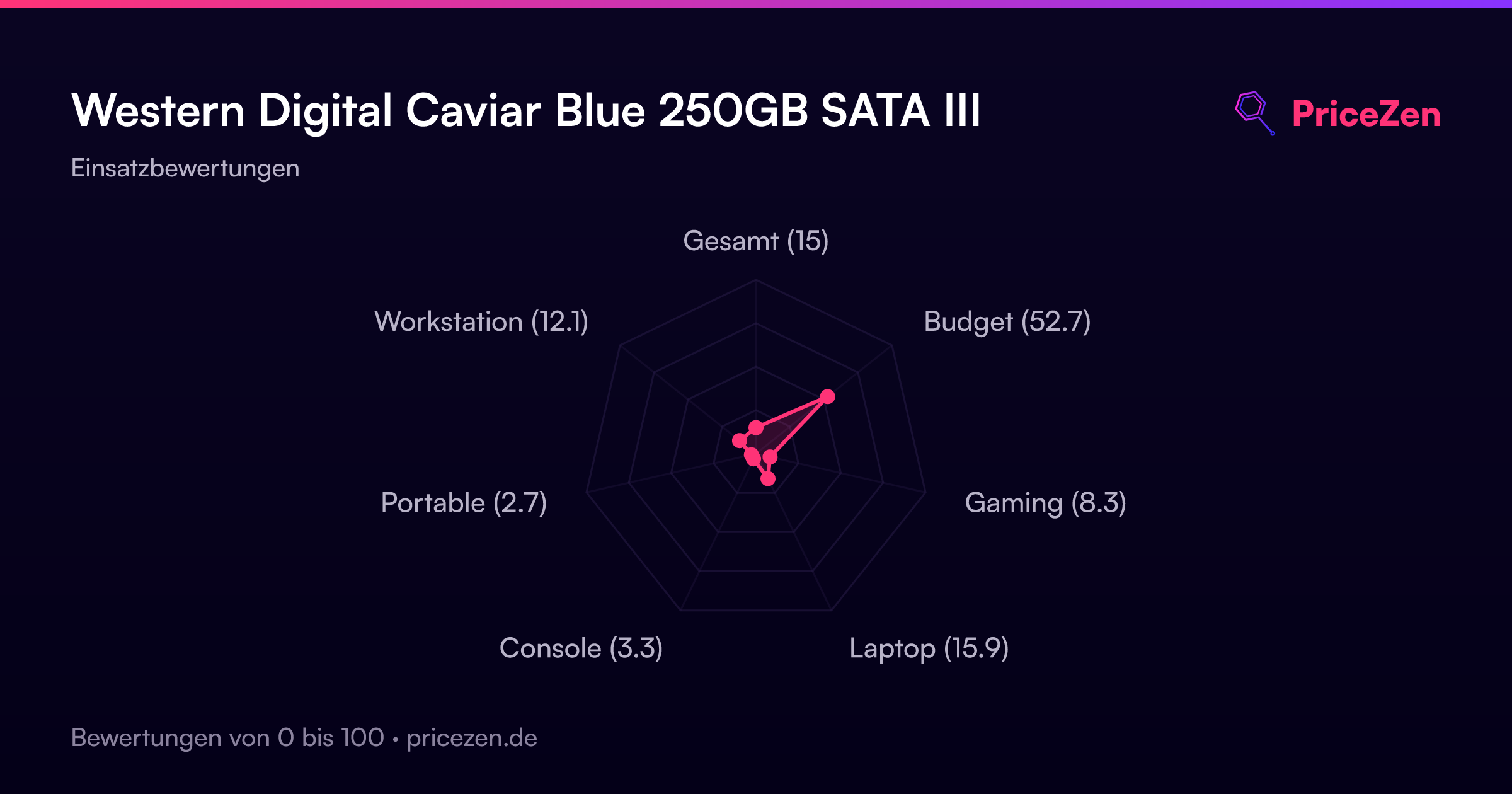
Honestly? Almost everyone. If you want a fast boot drive, this isn't it, go get the Crucial T500 or Samsung 9100 PRO. If you want capacity per dollar, this isn't it either, the Kingston 1TB SSD is the smarter cross-shop. And if you were hoping to toss it in a laptop or carry it around, forget it, the portable score of 3 out of 100 is dead last territory.
Verdict
Skip it. A 16.1 overall score with speed in the bottom decile and capacity near the floor means this drive loses to every competitor we track. The single 5-star review doesn't move the needle either, social proof sits around the bottom quarter. Unless you specifically need a small SATA spinner for a legacy machine and nothing else fits, put your $99 toward one of the SSDs above.
Usage Scores
- Gesamt15
- Budget52.7
- Gaming8.3
- Laptop15.9
- Console3.3
- Portable2.7
- Workstation12.1