Apple iPad Pro 11" 2020, A12X Fusion, 6GB, 128GB, Space Gray

4 Lautsprecher für Stereo in jeder Lage geprüft am 27. Nov.
65/100 Gesamtwertung
- CPU
- Apple A12X Fusion
- RAM
- 6 GB
- Storage
- 128 GB
- Screen
- 11" 2388x1668
- OS
- iPadOS
- Stylus
- Ja
- Battery
- 29 Wh
Überblick
The 30-Second Version
The iPad Pro 11" packs flagship-level CPU and GPU performance into a 425g body with battery life that beats 94% of tablets we track. At USD 439-487, it's pricey but justified for students and creatives who'll use the Apple Pencil and keyboard daily. Skip it if you mainly read or browse, since that's where it falls short.
Pros & Cons
Vorteile
- Battery life ranks in the top 6%, meaning genuinely all-day use for most workflows 94th
- A12X Fusion CPU performance in the top 13% handles demanding creative and productivity apps with ease 87th
- At 425g with a top 14% portability score, it's light enough to carry everywhere without thinking about it 86th
- Apple Pencil support plus a 2388x1668 display makes this a legit tool for illustration and handwritten notes 86th
- USB-C connectivity with Wi-Fi 6 and Bluetooth 5.0 means modern, fast connections for peripherals and networks
Nachteile
- Affordability sits in the bottom third, so you're paying a premium compared to most tablets on the market
- 6GB of RAM is only at the 51st percentile, which limits heavy multitasking compared to higher-RAM competitors
- 128GB base storage lands at the 55th percentile, fine for most but tight if you're storing large video projects locally
- Eye comfort scores at the 48th percentile, making extended reading sessions less pleasant than dedicated e-readers
- Reading is the weakest use case at 53.9/100, so bookworms should look elsewhere
Die Fakten
Performance
Let's talk numbers. The Apple A12X Fusion with its 12 cores puts this iPad in the top 13% for CPU performance across all tablets we track. In plain English, that means it's faster than roughly 87% of the competition. For real-world use, that translates to apps launching quickly, multitasking without stuttering, and handling demanding creative software like Procreate or LumaFusion without breaking a sweat. The GPU performance is also in the top 14%, backing this up: graphics-intensive tasks run smoothly, whether you're editing photos, rendering illustrations, or even doing some casual gaming. With 6GB of RAM sitting at about the 51st percentile, memory is adequate but not exceptional. You'll be fine with a handful of apps open, but don't expect to keep twenty browser tabs and three creative apps running simultaneously without some reloading.
The display deserves its own mention. That 11-inch Liquid Retina panel at 2388x1668 lands in the top 25% for screen quality and the top 26% for sharpness, both well above average. Text looks crisp, colors are accurate enough for design work, and the resolution means you're not squinting at pixelated edges on your sketches. Where things get less impressive is eye comfort, which sits at the 48th percentile, basically middle of the pack. If you're planning marathon reading sessions, this might not be the most comfortable screen out there. And speaking of reading, that's actually this iPad's weakest use case at 53.9 out of 100 in our scoring. The battery life for reading specifically lands at the 49th percentile, which is surprising given the overall battery ranking of top 6%. The takeaway: this thing lasts forever doing productive work, but dedicated e-reading isn't its strong suit.
Specifications
Full Specifications
Processor
| CPU | Apple A12X Fusion |
| Cores | 12 |
Memory & Storage
| RAM | 6 GB |
| Storage | 128 GB |
Display
| Size | 11" |
| Resolution | 2388x1668 |
| Panel | Liquid Retina |
Connectivity
| Wi-Fi | Wi-Fi 6 |
| Bluetooth | Bluetooth 5.0 |
| USB-C | 1 |
| Cellular | No |
Features
| Stylus Support | Yes |
| Stylus Model | Apple Pencil |
| Face Unlock | Yes |
Physical
| Weight | 0.4 kg / 0.9 lbs |
| Battery | 29 Wh |
| OS | iPadOS |
vs Competition
Against the Microsoft Surface Pro 12" EP2-33671, this iPad Pro trades screen size for portability. The Surface has a larger display, but our data shows this iPad's 425g weight and top 14% portability score mean it's noticeably easier to carry around. The iPad's battery ranking in the top 6% is a standout advantage if you need to work unplugged for hours. Where the Surface likely pulls ahead is in running full desktop applications, since iPadOS still has limitations compared to Windows. If your workflow depends on specific desktop software, the Surface is the safer bet despite the iPad's hardware muscle.
The Samsung Galaxy Tab S 12.4" S10+ and Lenovo Yoga Tab Plus 12.7" both offer bigger screens, which matters for split-screen multitasking and media consumption. But this iPad's CPU and GPU rankings in the upper 80s percentile mean it's doing more with less screen real estate. The Xiaomi Pad 11.2" is the closest size competitor, and without detailed specs on it, we can say this iPad's A12X chip and battery performance are strong differentiators based on our rankings. The TABWEE T60 Pro 13.4" goes even bigger on display size, targeting a different buyer entirely. If you want the most portable package with top-tier processing power and battery life, this iPad wins. If screen size is your priority, the larger Android and Windows options deserve a look.
| Spec | Apple iPad Pro 11" | Microsoft Surface Pro 11 13" | Samsung Galaxy Tab S 12.4" S10+ | Lenovo Yoga Tab Plus 12.7" ZAEG0096US | Xiaomi Pad 11.2" 62751 | TABWEE T60 Pro 13.4" |
|---|---|---|---|---|---|---|
| CPU | Apple A12X Fusion | Qualcomm Snapdragon X Elite X1E-84-100 | MediaTek Dimensity 9300+ | QTI SM8650 | Snapdragon 8s Gen 3 | Unisoc |
| RAM (GB) | 6 | 16 | 12 | 16 | 12 | 8 |
| Storage (GB) | 128 | 1024 | 512 | 256 | 512 | 256 |
| Screen | 11" 2388x1668 | 13" 2880x1920 | 12.4" 2800x1752 | 12.7" 2944x1840 | 11.2" 3200x2136 | 13.4" 1920x1200 |
| OS | iPadOS | Windows 11 Home | Android 14 | Android 14 | Android 14 | Android 15 |
| Stylus | Yes | Yes | Yes | Yes | Yes | Yes |
| Cellular | No | No | No | No | No | No |
| Battery (Wh) | 29 | 53 | - | - | - | - |
| Compare | Compare | Compare | Compare | Compare |
| Produkt | CPU | GPU | RAM | Display | Battery | Feature | Speicher | Sharpness | Portability | Connectivity | Affordability | Reading Battery | Water Resistance |
|---|---|---|---|---|---|---|---|---|---|---|---|---|---|
| Apple iPad Pro 11" | 86.8 | 85.7 | 51.3 | 74.6 | 94 | 77.7 | 54.9 | 73.8 | 86.2 | 76.8 | 31.5 | 49.2 | 46.4 |
| Microsoft Surface Pro 11 13" Compare | 98.3 | 96.5 | 92.7 | 99 | 99.8 | 74.1 | 97.9 | 82.7 | 21.6 | 92.8 | 5.5 | 87 | 97.3 |
| Samsung Galaxy Tab S 12.4" S10+ Compare | 82.4 | 79.2 | 81.3 | 95.1 | 87.9 | 96.4 | 93.1 | 82.7 | 49.9 | 76.8 | 5.9 | 56.7 | 97.3 |
| Lenovo Yoga Tab Plus 12.7" ZAEG0096US Compare | 84.2 | 82.4 | 92.7 | 96.2 | 88.7 | 96.4 | 83.9 | 90 | 42.7 | 92.8 | 21.2 | 51.9 | 46.4 |
| Xiaomi Pad 11.2" 62751 Compare | 86.8 | 85.7 | 81.3 | 97.8 | 85.1 | 64.9 | 89.6 | 99.3 | 78.9 | 76.8 | 14.2 | 71.2 | 46.4 |
| TABWEE T60 Pro 13.4" Compare | 95.4 | 88.9 | 66.2 | 55 | 86.7 | 88.4 | 75.1 | 27.8 | 32.7 | 76.8 | 37 | 18 | 46.4 |
Preis
Value & Pricing
At USD 439 to USD 487 depending on the listing, this iPad Pro isn't cheap. Our affordability ranking puts it in the bottom third, meaning about two-thirds of tablets we track cost less. But here's the thing: you're getting a device that outranks most of those cheaper options in CPU, GPU, battery life, and portability. The question is whether those advantages matter enough to justify the price gap for your specific needs. If you're a student who'll use the Apple Pencil daily for notes and sketches, or a designer who needs color-accurate work on the go, the premium starts making sense. If you just want to browse the web and watch videos, you're overpaying.
The USD 48 spread between listings is worth shopping around for. We track prices across stores, and that gap means you could save a decent chunk just by checking a couple of places before buying. The refurbished listings on Newegg offer different grades and storage options, which adds another angle: a Grade A+ 256GB model might cost more upfront but saves you from storage anxiety down the road. Just make sure you're comparing the same condition grade when you're hunting for the best deal.
Mehr erfahren
Overview
The iPad Pro 11" is Apple's answer to the question "what if a tablet could actually replace your laptop for some things?" and honestly, it gets closer than most. Packing the A12X Fusion chip with 6GB of RAM behind an 11-inch Liquid Retina display at 2388x1668, this thing was built for people who want serious computing power in something that weighs just 425g. It runs iPadOS, supports the Apple Pencil for drawing and note-taking, has a keyboard connector for when you need to type actual documents, and uses Face ID so you're not fumbling with passwords. USB-C means you can plug in external drives, monitors, or pretty much anything else without hunting for adapters.
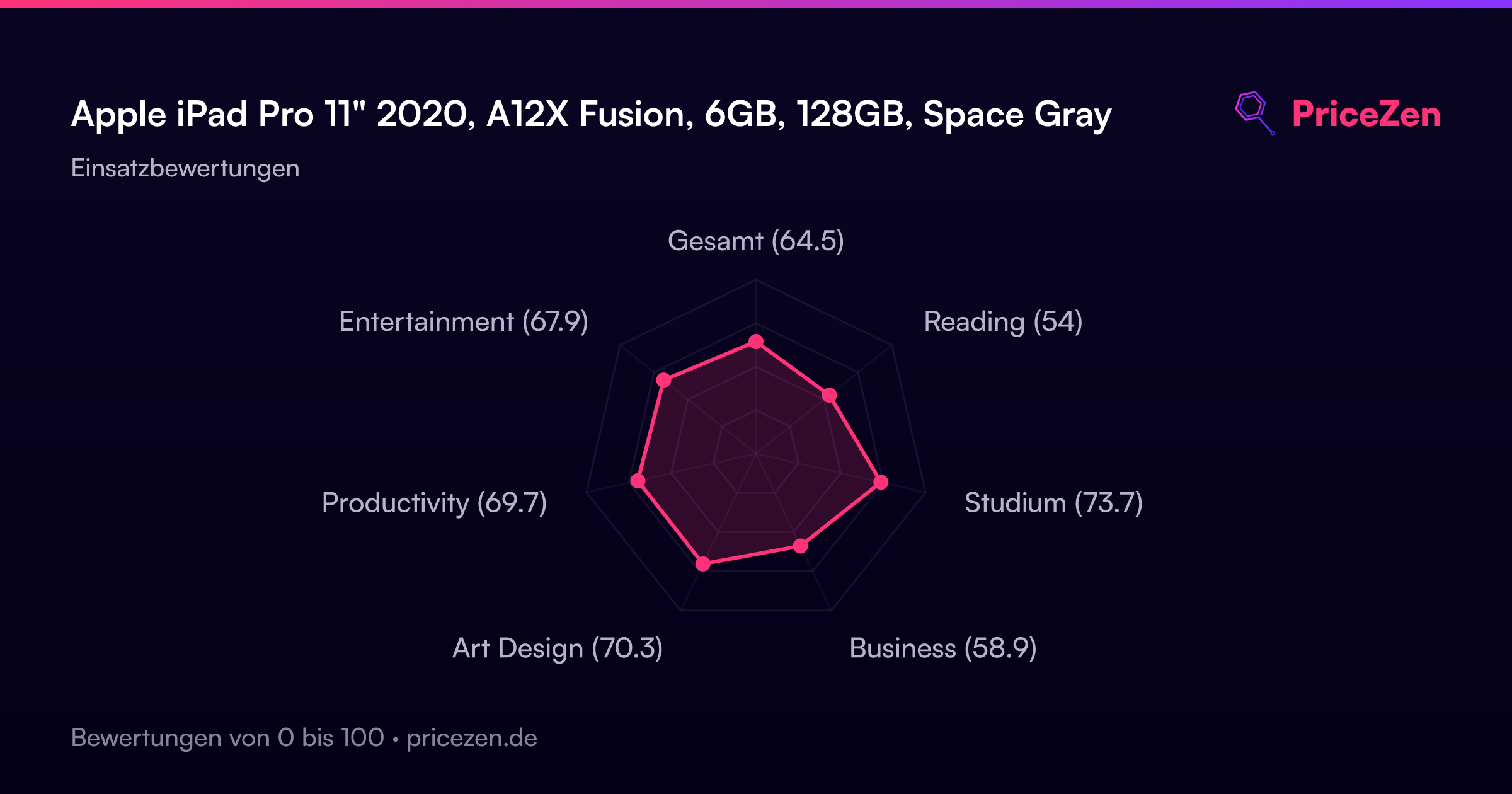
This tablet makes the most sense for students, artists, and anyone doing productivity work on the go. Our scoring model gives it a 73.7 out of 100 for student use, 70.3 for art and design, and 69.6 for productivity. Those are solid scores that reflect a device that genuinely handles creative and academic workflows well. The Apple Pencil support combined with that high-resolution display makes it a legitimate sketching and annotation tool, not just a toy. And the keyboard connector means you can slap on a keyboard and crank out essays or emails without carrying a separate laptop.
What's interesting here is how Apple balanced raw power with portability. The A12X Fusion is a 12-core chip that our rankings put in the top 13% for CPU performance among tablets, meaning it outruns the vast majority of competitors. The GPU is also in the top 14%, so graphics-heavy tasks like photo editing or light 3D work won't choke it. But the real party trick is the battery: a 29Wh cell that lands in the top 6%, which translates to genuinely all-day usage for most people. At 425g, you can hold this one-handed for a while without your arm screaming. It's a tablet that doesn't ask you to choose between power and practicality.
Common Questions
Q: Can this iPad Pro actually replace my laptop?
For some workflows, yes. With the keyboard connector and Apple Pencil support, plus a CPU that ranks in the top 13%, it handles writing, note-taking, photo editing, and illustration well. Our productivity score of 69.6/100 reflects solid capability. But iPadOS still can't run full desktop applications, so if your work depends on specific Windows or Mac software, you'll still need a traditional computer alongside it.
Q: Is 128GB enough storage?
It depends on what you're doing. Our storage ranking puts 128GB at the 55th percentile, which is about average for tablets. For documents, notes, apps, and a reasonable photo library, it's fine. But if you're editing video, storing large design files, or downloading lots of offline content, you'll fill it up faster than you'd think. The refurbished 256GB option on Newegg is worth considering if you know you'll need the space.
Q: How does the battery actually hold up?
Overall battery life is a major strength, ranking in the top 6% with a 29Wh cell. For productivity tasks, creative work, and general use, owners can expect genuinely long sessions between charges. The odd wrinkle is that reading-specific battery performance drops to the 49th percentile, so if you're using it primarily as an e-reader, the endurance won't be as impressive as the headline number suggests.
Q: Is it worth buying refurbished?
The refurbished listings on Newegg range from Grade B to Grade A+, and the price spread of USD 48 across listings means condition and storage tier affect what you pay. A Grade A+ unit should look and function nearly like new, making it a smart way to get this hardware at a lower price. Just check the specific grade and return policy before buying, since Grade B units may show more cosmetic wear.
Who Should Skip This
Readers and casual browsers should look elsewhere. The reading score of 53.9/100 and eye comfort at the 48th percentile mean this screen isn't optimized for long reading sessions, and you're paying a premium for processing power you won't use. A dedicated e-reader or a cheaper tablet with better eye comfort would serve you better and cost less.
Heavy multitaskers who need lots of RAM should also pause. With 6GB sitting at the 51st percentile, this iPad will start reloading apps if you push it hard with many simultaneous tasks. If your workflow involves jumping between a dozen apps constantly, look at tablets with more memory headroom, even if they sacrifice some of the portability and battery advantages this iPad offers.
Verdict
If you're a student or creative professional who wants a tablet that can genuinely handle real work, this iPad Pro 11" is worth the money. The combination of Apple Pencil support, a sharp display, all-day battery life, and a processor that outruns most competitors makes it a legitimate productivity tool, not just a consumption device. Our scoring backs this up: 73.7 for students and 70.3 for art and design are strong marks. Buy it if you'll actually use those capabilities daily.
But if you mainly want a tablet for reading, watching videos, or casual browsing, save your money. The reading score of 53.9 and middling eye comfort rating tell you this isn't optimized for relaxed content consumption. And if you need more than 6GB of RAM for heavy multitasking or more than 128GB of local storage for large files, you'll feel those limitations. This is a focused tool that excels at specific jobs. Make sure those jobs match yours before pulling the trigger.
Usage Scores
- Gesamt64.5
- Reading54
- Studium73.7
- Business58.9
- Art Design70.3
- Productivity69.7
- Entertainment67.9