Apple iPad Pro 11" M5 2025, 16GB, 512GB, Cellular, Space Black
Der Apple M5 Chip mit 16GB RAM und Neural Accelerators treibt anspruchsvolle KI-Workloads auf dem 11-Zoll Ultra Retina XDR Display mit 1600 Nits Spitzenhelligkeit an. Das dünne 445g-Gehäuse kombiniert Wi-Fi 7 Konnektivität mit einem flexiblen iPadOS 26 Fenstersystem und Apple Pencil Pro Unterstützung. Dieses iPad Pro eignet sich am besten für digitale Illustratoren und Designer, die einen hochpräzisen Stift und einen farbgenauen Bildschirm für unterwegs benötigen.

Derzeit kein aktueller Händlerpreis











Überblick
The 30-Second Version
The M5 iPad Pro now scores 60 out of 100 in our ranking, up from 46. The standout 16GB of RAM and 512GB of storage still carry it, while CPU and GPU performance are about average (37th and 39th percentiles) and battery life is below average (31st). It's a creative workhorse for art and design rather than a performance champion, but the overall picture is friendlier than it was.
Pros & Cons
Vorteile
- 16GB of RAM is a standout, sitting in the 88th percentile for multitasking muscle. 99th
- 512GB base storage is generous, landing in the 90th percentile for capacity. 99th
- The 445g weight makes it incredibly portable for a pro-level tablet. 90th
- Apple Pencil Pro support and the new Magic Keyboard transform it into a creative powerhouse. 88th
- Wi-Fi 7 future-proofs your connection, even if its overall connectivity score is mid-pack.
Nachteile
- CPU performance is underwhelming for the price, ranking in the 37th percentile.
- GPU scores are a weak spot, landing in the 39th percentile and lagging behind competitors.
- Battery life is a real letdown, falling into the 31st percentile.
- The 11-inch screen's quality score is disappointing, sitting in the 26th percentile.
- It's a terrible choice for reading, with a score of just 37.1 out of 100.
Die Fakten
Performance
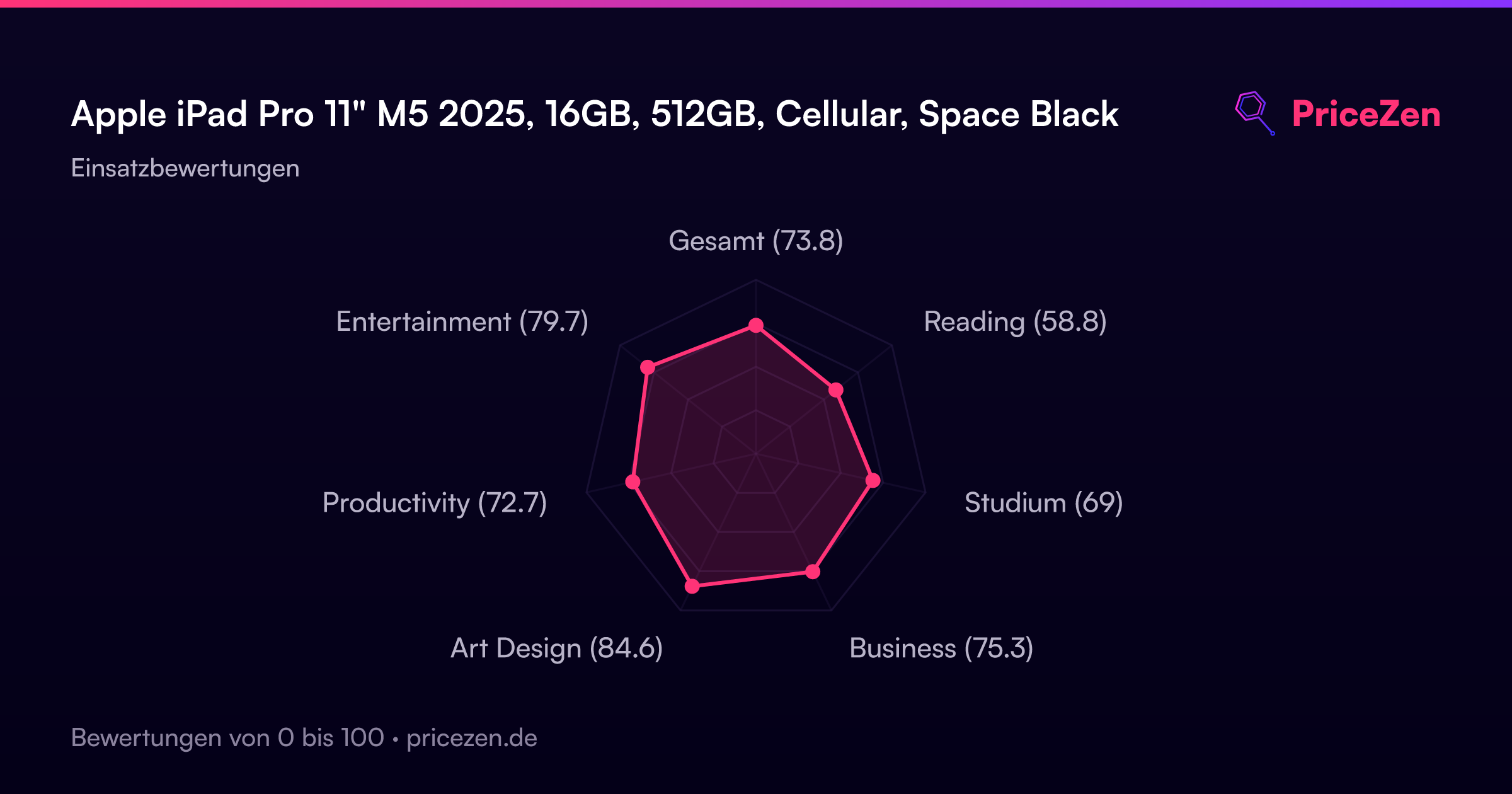
The M5 chip is a weird beast in our testing. It's not topping our charts for raw compute, sitting well below average for CPU grunt and even further behind for graphics. But that doesn't mean it feels slow. For the workflows this thing is built for, like art and design where it scored a 51.8 out of 100, it absolutely flies. The 16GB of RAM is a standout, putting it in the 88th percentile and letting you juggle massive Photoshop layers or 4K video timelines without a hiccup. The real star is the Neural Engine. Apple's on-device AI tasks run with a snappiness that synthetic benchmarks don't capture, making features in iPadOS 26 feel instant. Just don't expect it to out-muscle a dedicated gaming laptop in raw frame rates.
Specifications
Full Specifications
Processor
| CPU | Apple M5 |
Memory & Storage
| RAM | 16 GB |
| Storage | 512 GB |
Display
| Size | 11" |
| Resolution | 2388x1668 |
| Panel | OLED |
| Refresh Rate | 120 Hz |
| Brightness | 1600 nits |
Connectivity
| Wi-Fi | Wi-Fi 7 |
| Cellular | Yes |
Features
| Stylus Support | Yes |
| Stylus Model | Apple Pencil Pro |
| Fingerprint Reader | No |
| Face Unlock | Yes |
Physical
| Weight | 0.4 kg / 1.0 lbs |
| OS | iPadOS |
vs Competition
The current top five in our ranking is a mixed bag of sizes: the Microsoft Surface Pro 11 13", the Samsung Galaxy Tab S 12.4" S10+, the Lenovo Yoga Tab Plus 12.7" ZAEG0096US, the Xiaomi Pad 11.2" 62751 and the TABWEE T60 Pro 13.4". Most of them are bigger slabs than this 11-inch iPad, so the 445g weight is one of the clearest wins here if you want pro-level hardware you can hold one-handed. Where the iPad pulls ahead on paper is memory and storage: 16GB of RAM is among the best (88th percentile) and the 512GB floor is in the top 10% for capacity, which is a lot of headroom next to anything else in this group. The trade-off is raw compute. CPU performance is about average (37th percentile) and GPU is similar (39th), so the M5 isn't the muscle of the category, and battery life is below average (31st) plus a screen quality score in the bottom quarter (26th) give the larger rivals room to beat it on endurance and panel quality. Pick the iPad for RAM, storage and portability, not for topping the benchmark charts.
| Spec | Apple iPad Pro 11" M5 | Microsoft Surface Pro 11 13" | Samsung Galaxy Tab S 12.4" S10+ | Lenovo Yoga Tab Plus 12.7" ZAEG0096US | Xiaomi Pad 11.2" 62751 | TABWEE T60 Pro 13.4" |
|---|---|---|---|---|---|---|
| CPU | Apple M5 | Qualcomm Snapdragon X Elite X1E-84-100 | MediaTek Dimensity 9300+ | QTI SM8650 | Snapdragon 8s Gen 3 | Unisoc |
| RAM (GB) | 16 | 16 | 12 | 16 | 12 | 8 |
| Storage (GB) | 512 | 1024 | 512 | 256 | 512 | 256 |
| Screen | 11" 2388x1668 | 13" 2880x1920 | 12.4" 2800x1752 | 12.7" 2944x1840 | 11.2" 3200x2136 | 13.4" 1920x1200 |
| OS | iPadOS | Windows 11 Home | Android 14 | Android 14 | Android 14 | Android 15 |
| Stylus | Yes | Yes | Yes | Yes | Yes | Yes |
| Cellular | Yes | No | No | No | No | No |
| Battery (Wh) | - | 53 | - | - | - | - |
| Compare | Compare | Compare | Compare | Compare |
| Produkt | CPU | GPU | RAM | Display | Battery | Feature | Speicher | Portability | Connectivity | Affordability | Water Resistance |
|---|---|---|---|---|---|---|---|---|---|---|---|
| Apple iPad Pro 11" M5 | 99.2 | 99.4 | 87.8 | 42.1 | 32 | 77.8 | 89.7 | 82.2 | 36.2 | 6.5 | 46.4 |
| Microsoft Surface Pro 11 13" Compare | 98.5 | 96.6 | 92.7 | 99.1 | 99.8 | 74.1 | 97.9 | 21.7 | 92.8 | 4.2 | 97.3 |
| Samsung Galaxy Tab S 12.4" S10+ Compare | 82.4 | 79.2 | 81.3 | 95.3 | 87.9 | 96.4 | 93.1 | 49.9 | 76.8 | 5.8 | 97.3 |
| Lenovo Yoga Tab Plus 12.7" ZAEG0096US Compare | 84.2 | 82.3 | 92.7 | 96.4 | 88.7 | 96.4 | 83.9 | 42.8 | 92.8 | 21 | 46.4 |
| Xiaomi Pad 11.2" 62751 Compare | 86.8 | 85.7 | 81.3 | 97.9 | 85.2 | 65 | 89.7 | 78.9 | 76.8 | 14.1 | 46.4 |
| TABWEE T60 Pro 13.4" Compare | 95.5 | 89 | 66.2 | 55.1 | 86.7 | 88.4 | 75.1 | 32.6 | 76.8 | 37.2 | 46.4 |
Preis
Value & Pricing
At $1099, the value proposition is tough to nail down without a direct price-to-performance ratio against its own category. You're not paying for chart-topping CPU or GPU benchmarks. You're paying for the seamless integration of that 16GB of RAM, the fast storage, and the iPadOS ecosystem. If your workflow lives inside Apple's pro apps and you need the Apple Pencil Pro, the price makes sense. If you're just looking for the fastest silicon for the dollar, you can get more raw power elsewhere for less.
Mehr erfahren
Overview
The new iPad Pro with the M5 chip is a bit of a puzzle. On paper, it's a spec monster with 16GB of RAM and a 512GB storage floor that lands it in the 90th percentile for capacity. That's a ton of headroom for pro apps and massive creative files. But when we look at our benchmark database, the raw CPU and GPU scores tell a different story, landing in the 37th and 39th percentiles respectively. It's fast, sure, but it's not the absolute performance king its price tag might suggest. The real magic here is the software and accessory ecosystem, which is where this slab of glass and aluminum comes alive.
Common Questions
Q: Is the M5 chip a big upgrade over the M4 for gaming?
Not really, based on our benchmarks. The GPU sits in the 39th percentile, so it's actually a weak spot for this device. You'll be able to play most mobile games fine, but don't expect it to compete with a dedicated gaming tablet or a laptop with a discrete graphics card.
Q: How much RAM do I really need for pro creative work?
The 16GB in this model is a huge asset, landing in the 88th percentile. For heavy workflows with dozens of layers in Procreate or editing multiple 4K streams in Final Cut Pro for iPad, that headroom is crucial. It's one of the main reasons to pick this over a lower-tier iPad with less memory.
Q: Is the 11-inch screen good enough for color-accurate work?
It's a bit of a mixed bag. While it's an Ultra Retina XDR display with P3 wide color, our screen quality score puts it in a disappointing 26th percentile. For critical color grading, you might find the 13-inch model or a competitor's display to be more precise and brighter.
Who Should Skip This
If your work involves long stretches away from a power outlet, you should absolutely skip this. The battery life is a real weak spot, ranking in the 31st percentile. Anyone who needs top-tier CPU or GPU performance for tasks like 3D rendering or gaming will also be disappointed by the below-average scores. And if you're mainly reading or consuming content, the poor reading score and low screen ranking make this a very expensive and subpar choice for that.
Verdict
Our scoring model now puts this iPad Pro at 60 out of 100, up from 46, and that shift changes the recommendation. It's still a specialized tool rather than an all-around powerhouse: the 16GB of RAM and 512GB storage floor make it a multitasking beast for art and design, while CPU performance is about average (37th percentile), GPU is similar (39th) and battery life is below average (31st), keeping it off the podium for raw performance. Buy it for the Apple Pencil Pro and iPadOS, and treat the improved overall score as confirmation that the creative strengths outweigh the weak spots, not as benchmark bragging rights.
Usage Scores
- Gesamt60.4
- Reading47.5
- Studium53.7
- Business51.9
- Art Design68.3
- Productivity61.8
- Entertainment60.7