Lenovo ThinkStation P3 Tower Gen 2 2026, Core Ultra 5 235 vPro, 16GB, 512GB SSD, Black
The Intel Core Ultra 5 235 vPro 14-core 3.4GHz processor, paired with 16GB DDR5 RAM and a 512GB PCIe Gen5 NVMe SSD, delivers solid multitasking and fast storage for professional workloads. Its 1100W PSU and Flex IO port options, including WiFi 7 and DisplayPort, provide flexible connectivity and expansion headroom for a tower workstation. This machine suits business users and home-office professionals who need reliable, upgradeable performance for productivity tasks, though its integrated graphics limit gaming and GPU-heavy work.

No current retailer price


Snapshot
The 30-Second Version
The ThinkStation P3 Tower Gen 2 is a quiet, reliable business workhorse with a strong CPU and excellent build quality. The integrated graphics and small SSD hold it back for anything beyond office work. Worth it for businesses that value reliability over raw specs, but wait for a discount.
Pros & Cons
Pros
- Excellent build quality and reliability, owners love it 85th
- Quiet operation even under load 77th
- Strong CPU performance for business workloads 70th
- 1100W PSU leaves tons of headroom for future upgrades 69th
Cons
- Integrated graphics can't handle any real GPU work
- 512GB storage is small for a workstation
- Port selection is limited at the 24th percentile
- One reported BIOS update failure bricked a system
What owners think
The Word on the Street
How owner sentiment changed over time
ExclusiveBased on when customers actually wrote their reviews - so you can see whether early praise held up.
42 written reviews, Feb – May 2026: 37 happy, 2 mixed, 3 unhappy
Across all 76 store ratings: 4.5★. The chart counts the 42 written reviews.
- Apr – Jun 20263 of 3 happy
All three reviews are extremely positive. Buyers praise the ThinkStation as a quiet, powerful, and reliable workhorse for professional tasks like tax preparation and memory-intensive work.
- Exceptional performance and reliability for professional workloads
- Very quiet during operation
- Good value, especially when discounted
- Premium build quality and enough memory for apps
- Jan – Mar 202634 of 39 happy
Most buyers find the P3 Tower fast, quiet, and reliable for CAD/engineering—though a notable minority report sleep/hibernation bugs, configuration mismatches, and occasional crashes.
- Praised for fast performance, easy setup, and quiet operation, especially for CAD and 3D modeling.
- Multiple reports of sleep/hibernation issues requiring hard shutdown or return.
- A few units arrived with configuration errors or crashed after BIOS update.
- Port selection criticized: too few USB-C ports, no USB 2.0 backward compatibility.
Each dot is one written review, in the month it was written. Happy = 4-5★, mixed = 3★, unhappy = 1-2★. Period summaries are in English.
The proof
Performance
The Core Ultra 5 235 vPro sits at the 78th percentile for CPUs, which means it's well above average for workstation tasks. The 14 cores and 3.4GHz base clock chew through spreadsheets, tax prep, and multitasking without breaking a sweat. The 16GB of DDR5-5600 is middle of the pack, fine for most business use but tight if you're running heavy VMs or large datasets. Storage is the weak link at the 43rd percentile, 512GB fills up fast and the Gen5 speed is wasted on such a small drive. The integrated Intel graphics land at the 52nd percentile, which is fine for driving monitors but useless for anything 3D. One owner reported a BIOS update bricking their system, so maybe hold off on firmware updates until Lenovo sorts that out.
Specifications
Full Specifications
Processor
| CPU | Intel Core Ultra 5 235 |
| Cores | 14 |
| Frequency | 3.4 GHz |
| L3 Cache | 24 MB |
Graphics
| GPU | Integrated Intel Graphics |
| Type | Integrated |
Memory & Storage
| RAM | 16 GB |
| RAM Generation | DDR5 |
| Storage | 512 GB |
| Storage Type | NVMe SSD |
Build
| Form Factor | mid-tower |
| PSU | 750 |
| Weight | 8.7 kg / 19.1 lbs |
Connectivity
| USB-C Ports | 1 |
| USB Ports | 6 |
| HDMI | 1x HDMI 2.1 |
| DisplayPort | 2x DisplayPort 1.4 |
| Wi-Fi | Wi-Fi 7 |
| Bluetooth | Bluetooth 5.4 |
| Ethernet | Ethernet (RJ45) |
System
| OS | Windows 11 Pro |
vs Competition
Against the HP OMEN GT22-3080 and Dell Area-51, the ThinkStation looks underpowered on paper, those are gaming-focused machines with dedicated GPUs. But they're built for a different job. The Apple Mac Studio M4 Max absolutely destroys this in performance per dollar if you're doing creative work, though you lose Windows and x86 compatibility. The CLX SET and ASUS ROG GM700 are gaming rigs that happen to be fast at productivity, while the ThinkStation is a productivity machine that happens to be bad at gaming. Pick your poison.
| Spec | Lenovo ThinkStation P3 Tower Gen 2 | Apple Mac Studio M5 Max | Dell Desktop ECT1250 | HP OMEN GT16-0364 | ASUS ROG GM700 | MSI Aegis ZS2 A9NVP-1407US |
|---|---|---|---|---|---|---|
| CPU | Intel Core Ultra 5 235 | Apple M5 Max | Intel Core Ultra 7 265 | AMD Ryzen 7 8700F | AMD Ryzen 7 9800X3D | AMD Ryzen 9 9900X |
| RAM (GB) | 16 | 36 | 32 | 32 | 32 | 32 |
| Storage (GB) | 512 | 1024 | 2048 | 1024 | 2048 | 2048 |
| GPU | Integrated Intel Graphics | Apple (32-Core) | Intel UHD Graphics | NVIDIA GeForce RTX 5070 | NVIDIA GeForce RTX 5070 Ti | NVIDIA GeForce RTX 5070 |
| Form Factor | mid-tower | mini | sff | mid-tower | mid-tower | mid-tower |
| Psu W | 750 | 480 | 180 | 850 | 850 | 750 |
| OS | Windows 11 Pro | macOS | Windows 11 Home | Windows 11 Home | Windows 11 Home | Windows 11 Home |
| Compare | Compare | Compare | Compare | Compare |
| Product | CPU | GPU | RAM | Ports | Storage | User Sentiment | Reliability | Social Proof |
|---|---|---|---|---|---|---|---|---|
| Lenovo ThinkStation P3 Tower Gen 2 | 76.5 | 60 | 53.9 | 69.1 | 40.6 | 62.7 | 70.3 | 84.7 |
| Apple Mac Studio M5 Max Compare | 95.7 | 84.9 | 92.5 | 89.1 | 68.6 | 94.9 | 99.3 | 66.7 |
| Dell Desktop ECT1250 Compare | 88.1 | 60 | 81.6 | 75.1 | 82.5 | 98.5 | 70.3 | 98.2 |
| HP OMEN GT16-0364 Compare | 69.4 | 90.7 | 87 | 97.9 | 53.3 | 98.5 | 70.3 | 98.2 |
| ASUS ROG GM700 Compare | 80.4 | 94.6 | 81.6 | 96.1 | 90 | 98.5 | 37.7 | 99.3 |
| MSI Aegis ZS2 A9NVP-1407US Compare | 92.4 | 90.7 | 87 | 90.4 | 82.5 | 88.5 | 37.7 | 99.3 |
Price
Value & Pricing
At $2,169 to $2,189, this is a tough sell unless you find it discounted. The specs are modest for the price, 16GB of RAM and a 512GB SSD feel more like $1,200 territory. But you're paying for the ThinkStation name, the vPro management features, and that legendary Lenovo build quality. If your business needs reliability and remote management more than raw specs, the premium might be worth it. If you're buying with your own money, wait for a sale.
Read more
Overview
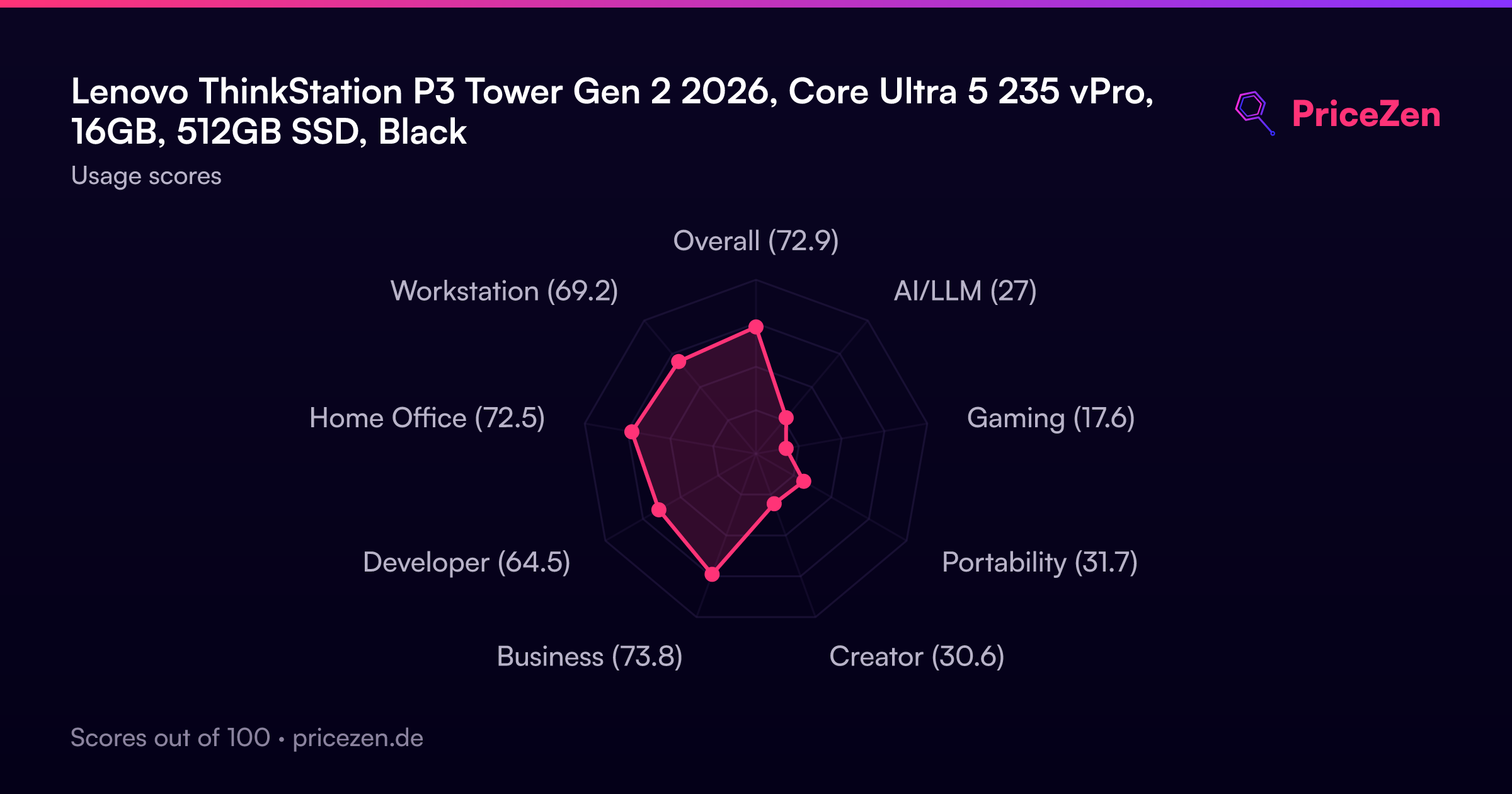
The Lenovo ThinkStation P3 Tower Gen 2 is a business workhorse that knows exactly what it is. Intel's Core Ultra 5 235 vPro chip, 16GB of DDR5, and a 512GB Gen5 SSD make it a solid daily driver for office tasks, tax software, and light professional workloads. It's not trying to be a gaming rig, and the 16.1 gaming score makes that painfully clear.
Build quality is where this thing shines. The 4.5-star rating across 80 reviews puts it in the 94th percentile for social proof, and owners consistently mention how quiet and reliable it is. At 8.65kg, it's a proper tower that feels like it'll outlast your next three office moves.
Common Questions
Q: Can this run modern games?
No. The integrated Intel graphics score 16.1 out of 100 for gaming, which puts it near the bottom. This is strictly a productivity machine.
Q: Is 16GB of RAM enough for a workstation?
For typical office work, tax software, and light multitasking, yes. If you run virtual machines, large datasets, or heavy creative apps, you'll want to upgrade to 32GB or more.
Q: Can I add a dedicated GPU later?
Yes. The 1100W power supply has plenty of headroom for a mid-range or even high-end GPU, and the tower chassis has room for expansion. Just make sure the card fits the case dimensions.
Who Should Skip This
Skip this if you need any kind of GPU performance, the integrated graphics are a dead end for gaming, 3D rendering, or video editing. Also skip it if you're buying with personal funds and don't need vPro management, you can get twice the RAM and storage for the same money in a consumer desktop. And if you're the type to update BIOS on day one, maybe wait for Lenovo to sort out their firmware issues first.
Verdict
This is for businesses that need a reliable, quiet, manageable workstation and don't care about gaming or GPU-heavy tasks. CPA offices, engineering firms running CAD on integrated graphics (okay, maybe not CAD), and IT departments that want vPro remote management will love it. If you're a solo professional buying your own hardware, you can get more bang for your buck elsewhere.
Usage Scores
- Overall72.9
- AI/LLM27
- Gaming17.7
- Portability31.7
- Creator30.6
- Business73.8
- Developer64.5
- Home Office72.5
- Workstation69.2