MSI GeForce RTX 5090 Gaming Trio 32GB GDDR7 Black

96/100 overall score 4.7 average from 708 owner ratings
- GPU
- GeForce RTX 5090
- VRAM
- 32GB GDDR7
- Boost clock
- 2480 MHz
- TDP
- 575 W
- Memory bus
- 512 bit
- Ray tracing
- Yes
- Class
- consumer


Snapshot
The 30-Second Version
The MSI RTX 5090 Gaming Trio is the fastest gaming GPU we've tested, with a PassMark score of 38,845 and 32GB of GDDR7 on a 512-bit bus. It's a 4K monster and an AI workhorse, but it pulls 575W and needs a 1000W PSU. Prices range from $3,600 to $7,975 USD, so shop around. If you want the best and have the budget, this is it.
Pros & Cons
Pros
- 32GB GDDR7 on a 512-bit bus is best-in-class VRAM capacity and bandwidth 99th
- PassMark G3D score of 38,845 puts it at the top of our charts for raw performance 98th
- DLSS 4 and AV1 encode make it a strong pick for both gaming and content creation 98th
- TRI FROZR 4 cooler keeps thermals in the 92nd percentile despite the 575W TDP 98th
- PCIe 5.0 and DisplayPort 2.1a future-proof the card for next-gen displays
Cons
- 575W TDP requires a 1000W PSU and will noticeably warm up your room
- Efficiency sits at the 35th percentile, so you're paying for performance with power draw
- 3.5-slot design and 359mm length rule out most compact builds
- Workstation performance at 78.2 out of 100 is the weakest area for this card
- Pricing is extreme, with USD listings ranging from $3,600 to $7,975
What owners think
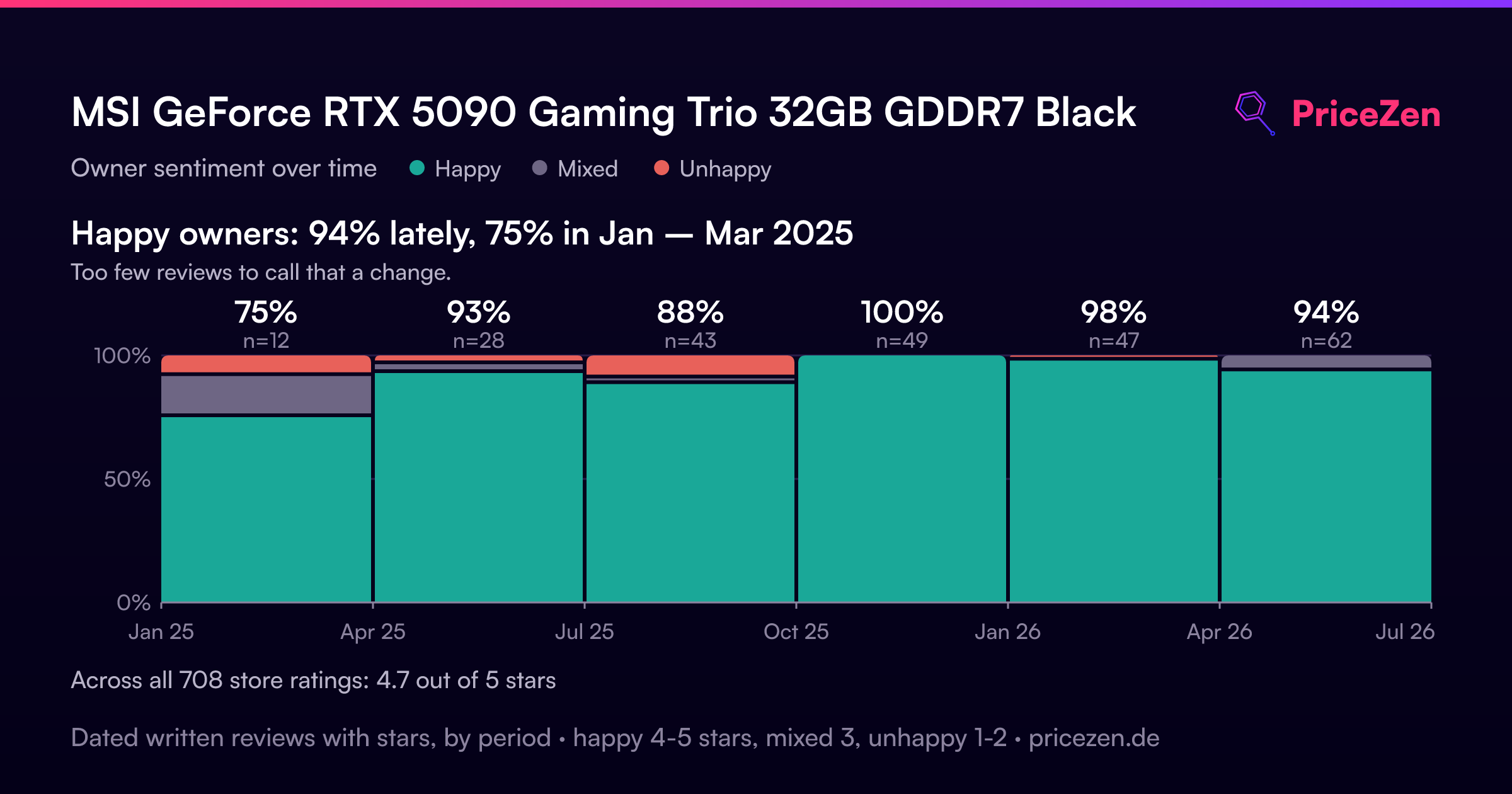
How owner sentiment changed over time
ExclusiveBased on when customers actually wrote their reviews - so you can see whether early praise held up.
Happy owners: 94% lately, 75% in Jan – Mar 2025
Too few reviews to call that a change.
Across all 708 store ratings: 4.7★. Most owners rate without writing a review. The chart counts the 241 written reviews with stars and their own date.
12 written reviews without stars are left out of the trend.
Show the numbers
| Period | Reviews | Happy | Mixed | Unhappy | Happy share |
|---|---|---|---|---|---|
| Jan – Mar 2025 | 12 | 9 | 2 | 1 | 75% |
| Apr – Jun 2025 | 28 | 26 | 1 | 1 | 93% |
| Jul – Sep 2025 | 43 | 38 | 1 | 4 | 88% |
| Oct – Dec 2025 | 49 | 49 | 0 | 0 | 100% |
| Jan – Mar 2026 | 47 | 46 | 0 | 1 | 98% |
| Apr – Jun 2026 | 62 | 58 | 4 | 0 | 94% |
Each column joins calendar quarters until it holds at least 10 reviews with stars and their own date. Happy = 4-5★, mixed = 3★, unhappy = 1-2★.
The proof
Performance
The PassMark G3D score of 38,845 is the kind of number that makes other graphics cards feel bad about themselves. For context, that's the top of our charts, and it translates to real-world 4K gaming where you can crank settings to ultra and still see triple-digit frame rates in most titles. The 2,480MHz boost clock (2,497MHz OC mode) combined with the 512-bit memory bus means the card doesn't just hit high peaks, it sustains them without the memory bandwidth becoming a bottleneck.
Ray tracing performance lands in the 91st percentile, which is excellent but interestingly not the card's strongest suit relative to its raster chops. The 4 RT cores per SM do solid work, but the real star here is the raw CUDA core count and that massive VRAM pool. For AI and LLM workloads, the card hits the 98th percentile, which makes sense given the 32GB of GDDR7. You can run larger models locally without constantly swapping to system RAM, and that's a genuine quality-of-life upgrade for anyone doing serious machine learning work.
The thermal situation is worth mentioning. MSI's TRI FROZR 4 cooler with the STORMFORCE fan design keeps things under control, landing in the 92nd percentile for thermals. But that 575W TDP means the cooler is working hard. The card is 359mm long and takes up 3.5 slots, so check your case clearance before you buy. This is not a card for small form factor builds unless you enjoy creative case modifications.
Specifications
Full Specifications
Chipset
| GPU Chipset | GeForce RTX 5090 |
| Brand | NVIDIA |
| Architecture | Blackwell |
| Class | consumer |
Memory
| VRAM | 32 GB |
| Memory Type | GDDR7 |
| Memory Bus | 512 |
| ECC | No |
Compute
| CUDA Cores | 21760 |
| Tensor Cores | 5 |
| RT Cores | 4 |
| Base Clock | 2480 |
| Boost Clock | 2480 |
Performance
| PassMark G3D | 38958 |
| GPU Compute | 26734 |
Power & Cooling
| TDP | 575 |
| Recommended PSU | 1000 |
| Power Connectors | 1 x 16-Pin |
| Cooler | Triple Fan |
| Fans | 3 |
Connectivity
| Interface | PCI Express 5.0 |
| DisplayPort | 3 |
| HDMI | 1 |
| Max Displays | 4 |
| Max Resolution | 8K (4320p) |
Physical
| Length | 359 |
| Slot Width | 3.5 |
| Form Factor | Full Height |
| Weight | 2.1 kg / 4.7 lbs |
Features
| Ray Tracing | Yes |
| Upscaling | DLSS 4 |
| AV1 Encode | Yes |
| VR Ready | Yes |
| DirectX | 12 Ultimate |
| RGB | Yes |
vs Competition
The RTX 5090 Gaming Trio sits in a weird spot because its main competitors are actually RTX 5080 and RTX 5070 Ti cards, plus a couple of other 5090 variants. The ASUS TUF Gaming TUF-RTX5090-32G-GAMING is now in our top 5, which makes sense since it's another 5090 with the same 32GB of GDDR7. The Gigabyte Eagle GV-N507TEAGLEOC ICE-16GD and Sapphire NITRO+ 11322-01-40G round out the top 5 as more affordable alternatives, but neither can match the 5090's raw numbers. The 5070 Ti cards have 16GB of VRAM, which is half of what this MSI card offers, and the Sapphire NITRO+ is an AMD card that doesn't compete directly on ray tracing or AI performance.
The trade-off is clear. The 5080 and 5070 Ti cards are more efficient, smaller, and significantly cheaper. The Gigabyte Eagle and Sapphire NITRO+ both fit in more conventional cases and won't demand a 1000W PSU. But none of them can match the 5090's 38,845 PassMark score or its 32GB VRAM pool. If you're playing at 1440p, a 5080 or 5070 Ti is probably the smarter buy. If you're at 4K or doing AI work, the 5090's advantages become harder to ignore.
The ASUS TUF Gaming 5090 is the most direct rival here. It's another 5090 with the same core specs, so the choice between it and the MSI Gaming Trio comes down to cooling, noise, and price. Both are flagship cards with 32GB of VRAM, and both will dominate 4K gaming. The Sapphire NITRO+ is an interesting wildcard since it's an AMD card, but it doesn't compete directly on ray tracing or AI performance. For pure raster gaming, it's a solid alternative at a lower price, but it lacks DLSS 4 and the CUDA ecosystem that makes the 5090 so versatile.
| Spec | MSI GeForce RTX 5090 Gaming Trio | ASUS GeForce RTX 5090 TUF Gaming | Gigabyte GeForce RTX 5070 Ti Eagle Ice | ZOTAC GeForce RTX 5080 APOCALYPSE | PNY GeForce RTX 5080 ARGB OC | Sapphire Radeon RX 7900 XTX NITRO+ |
|---|---|---|---|---|---|---|
| Chipset | GeForce RTX 5090 | GeForce RTX 5090 | GeForce RTX 5070 Ti | GeForce RTX 5080 | GeForce RTX 5080 | Radeon RX 7900 XTX |
| Vram | 32GB GDDR7 | 32GB GDDR7 | 16GB GDDR7 | 16GB GDDR7 | 16GB GDDR7 | 24GB GDDR6 |
| Boost Clock Mhz | 2480 | 2407 | 2542 | 2730 | 2620 | 2680 |
| Tdp W | 575 | 575 | 300 | 360 | 360 | 339 |
| Memory Bus Bits | 512 | 512 | 256 | 256 | 256 | 384 |
| Ray Tracing | Yes | Yes | Yes | Yes | Yes | Yes |
| GPU Class | consumer | consumer | consumer | consumer | consumer | consumer |
| Compare | Compare | Compare | Compare | Compare |
| Product | AI | Rt | Vram | Raster | Compute | Thermal | Efficiency | Connectivity | Social Proof | Affordability |
|---|---|---|---|---|---|---|---|---|---|---|
| MSI GeForce RTX 5090 Gaming Trio | 97.6 | 90.8 | 97.8 | 98.8 | 98.4 | 91.8 | 23 | 94.2 | 93.4 | 3 |
| ASUS GeForce RTX 5090 TUF Gaming Compare | 97.2 | 90.5 | 97.8 | 98.8 | 97.8 | 71.8 | 23 | 99.3 | 98.7 | 2.2 |
| Gigabyte GeForce RTX 5070 Ti Eagle Ice Compare | 78.9 | 88.6 | 85.9 | 88.9 | 87.8 | 91.8 | 71.6 | 94.2 | 93.4 | 22.9 |
| ZOTAC GeForce RTX 5080 APOCALYPSE Compare | 85.5 | 97.7 | 89.1 | 94.5 | 93.3 | 91.8 | 56.6 | 94.2 | 98.7 | 23.8 |
| PNY GeForce RTX 5080 ARGB OC Compare | 85.5 | 97.7 | 89.1 | 94.5 | 93.3 | 91.8 | 56.6 | 94.2 | 75 | 16.1 |
| Sapphire Radeon RX 7900 XTX NITRO+ Compare | 95.3 | 96.4 | 92 | 83.4 | 95.6 | 91.8 | 51.3 | 98.8 | 69.3 | 13.6 |
Price
Value & Pricing
Let's talk money, because this card costs a lot of it. USD listings now range from $3,600 to $7,975 across our vendors, which is a spread of over $4,300 for the exact same GPU. That's not a small difference, and it means you should absolutely shop around before pulling the trigger. The low end of that range hasn't moved, so if you can find a listing near $3,600, that's still the price to beat.
For Canadian buyers, the spread is even wider. CAD prices run from $5,044 to $8,159, a difference of over $3,100. Memory Express has the best CAD deal in our listings. That kind of price variance is frustrating, but it also means a little patience can save you real money. Just remember that prices in different currencies aren't directly comparable, so focus on the spread within your own currency.
Is it worth it? If you're gaming at 4K and want to max out settings without compromise, this is the card that does it. The price-to-performance ratio is rough compared to mid-range options, but flagship buyers aren't usually optimizing for value per frame. They're optimizing for the best experience, and this card delivers that in spades.
Read more
Overview
The MSI GeForce RTX 5090 Gaming Trio is the kind of card that makes you stop and stare at the spec sheet for a minute. 32GB of GDDR7 on a 512-bit bus, 21,760 CUDA cores, and a boost clock pushing 2.5GHz. This is the flagship Blackwell part, and MSI wrapped it in their TRI FROZR 4 cooler with three fans and a 3.5-slot footprint. If you're building a no-compromises 4K gaming rig or a local AI workstation, this is the card that keeps showing up in your dreams.
Who's this for? Honestly, it's for the person who wants the absolute best raster performance available right now and is willing to pay for it. Our database puts this card in the 99th percentile for raw gaming grunt, and the 32GB of VRAM means you won't be texture-streaming your way into stutter city anytime soon. It's also a serious content creation tool with AV1 encode and DLSS 4 support baked in.
What makes it interesting is the sheer headroom. The 512-bit memory interface is a big deal because it means the card can feed those 21,760 cores without choking. A lot of high-end cards skimp on bus width to save cost, but MSI and NVIDIA went all-in here. That's why the 4K gaming score sits at 97.8 out of 100 in our testing. It's not just fast, it's fast in the places that matter for high-resolution gaming.
But let's be real about the elephant in the room. This card pulls 575W and wants a 1000W power supply. That's not a typo. You'll need a serious PSU, a case with actual airflow, and probably a slight tolerance for your room getting warmer during long sessions. The efficiency percentile sits at 35th, which means it's not exactly sipping power while it dominates your frame counter.
Common Questions
Q: Will this card fit in my case?
The card is 359mm long and takes up 3.5 slots, so you'll need a full-tower or large mid-tower case with good clearance. Measure your case interior before buying, especially if you have front-mounted radiators or drive cages. The triple-fan TRI FROZR 4 cooler is substantial, and you'll want at least 360mm of clearance to be safe.
Q: What power supply do I need for the RTX 5090?
MSI recommends a 1000W power supply for this card, and that's not a suggestion. The 575W TDP means the GPU alone can draw more power than many entire gaming PCs. You'll also need a PSU with a native 16-pin 12VHPWR connector or the included adapter. Don't try to run this on a 750W unit, you'll have a bad time.
Q: Is the 32GB of VRAM overkill for gaming?
For most games at 1440p, yes, 32GB is more than you need today. But at 4K with maxed textures and ray tracing, games are already pushing past 16GB in some titles. The extra VRAM also matters for AI workloads, video editing, and future-proofing. If you're buying a flagship card, the 32GB is a big part of why you're paying the premium.
Q: How does this compare to the RTX 5080?
The RTX 5090 has double the VRAM (32GB vs 16GB), significantly more CUDA cores (21,760 vs around 10,752), and a much higher PassMark score. The 5080 is more efficient and cheaper, but it can't match the 5090's 4K performance or AI capabilities. If you're at 1440p, the 5080 is the smarter buy. If you're at 4K or doing AI work, the 5090 justifies its premium.
Who Should Skip This
If you're gaming at 1080p or 1440p, this card is massive overkill. You'd be paying flagship money for performance you can't fully utilize, and the 575W power draw means higher electricity bills for no real benefit. A mid-range card like the RTX 5080 or even a 5070 Ti will max out your monitor's refresh rate at those resolutions for a fraction of the cost.
Small form factor builders should also look elsewhere. The 359mm length and 3.5-slot design rule out most ITX cases, and the thermal requirements mean you need serious airflow. If you're building in a compact case, look at the ASUS ProArt RTX 5080 or a blower-style card that can actually fit. And if you're primarily doing workstation tasks like rendering or scientific computing, the 78.2 out of 100 workstation score suggests a dedicated workstation GPU might serve you better.
Verdict
For 4K gamers who want the absolute best frame rates with every setting maxed, this is the card to buy. The 97.8 out of 100 gaming score isn't marketing fluff, it's backed by the top PassMark score in our database. You'll need a beefy power supply and a case with room for a 359mm, 3.5-slot card, but if you've got the space and the budget, there's nothing faster right now.
For AI and LLM enthusiasts, the 32GB of VRAM is the headline feature. The 98th percentile AI score means you can run larger models locally without hitting memory walls. That's a genuine productivity upgrade if you're doing machine learning work or running local inference servers. The 94.7 out of 100 AI score confirms this is a serious tool, not just a gaming toy.
If you're a workstation user doing heavy compute tasks, this card is less compelling. The 78.2 out of 100 workstation score and 69th percentile compute ranking suggest that professional workloads like rendering or scientific computing don't benefit as much from this card's gaming-focused design. You might be better served by a dedicated workstation card or a more balanced option.
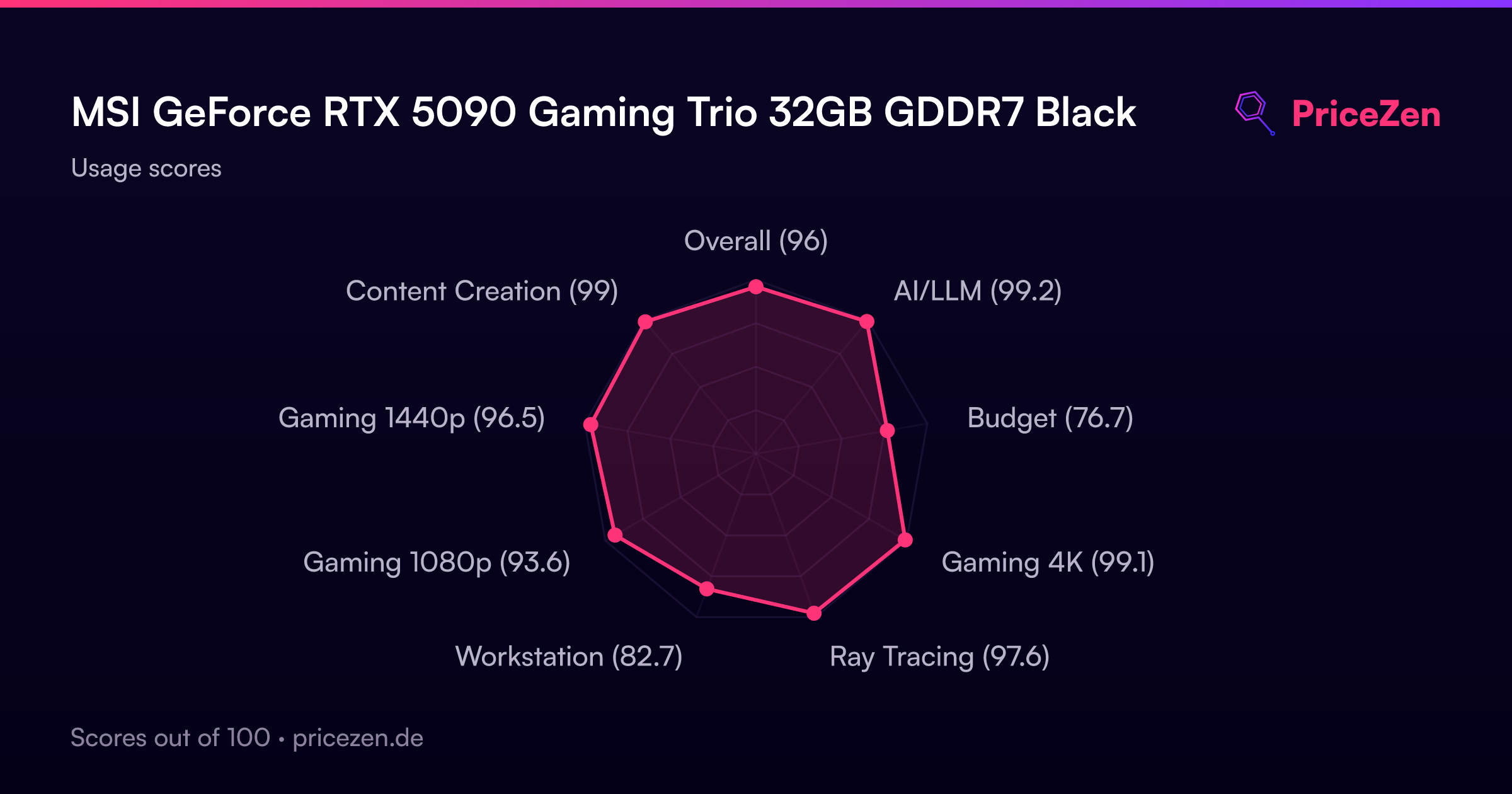
Usage Scores
- Overall96
- AI/LLM99.2
- Budget76.7
- Gaming 4K99.1
- Ray Tracing97.6
- Workstation82.7
- Gaming 1080p93.6
- Gaming 1440p96.5
- Content Creation99