ZOTAC GeForce RTX 3060 Twin Edge 12GB GDDR6 Black
The 12GB GDDR6 memory on a 192-bit bus delivers 240 GB/s bandwidth, making this RTX 3060 a solid choice for 1080p gaming with ray tracing and DLSS. Its IceStorm 2.0 cooling with FREEZE fan stop and metal backplate keeps the card quiet and durable at 224mm length. Best for budget-conscious gamers building a compact 1080p rig who want VR readiness and AV1 encoding without overspending.

No current retailer price


Snapshot
The 30-Second Version
The ZOTAC RTX 3060 Twin Edge scores 16,890 on PassMark, which is 38th percentile for raster but comes with 12GB of VRAM that's rare at this price. The 90th percentile feature set includes DLSS, ray tracing, and AV1 encode. At $440 to $480 USD, it's a budget AI card disguised as a gaming GPU.
Pros & Cons
Pros
- 12GB GDDR6 on a 192-bit bus is rare at this price point 89th
- 90th percentile feature set with DLSS, ray tracing, and AV1 encode 70th
- Compact 224mm dual-slot design fits in small cases 67th
- 170W TDP runs on a single 8-pin connector
- Budget score of 76.2/100 makes it a value standout
Cons
- 38th percentile raster performance won't wow at higher resolutions
- Ray tracing sits at the 45th percentile, needs DLSS to stay smooth
- Thermal performance is only 56th percentile, middle of the pack
- AI compute at 40.8/100 is the weakest area despite the VRAM
- Social proof is thin at the 48th percentile with limited reviews
What owners think
The Word on the Street
How owner sentiment changed over time
ExclusiveBased on when customers actually wrote their reviews - so you can see whether early praise held up.
1 written review, Aug 2026: 1 happy
Across all 1 store ratings: 5.0★. The chart counts the 1 written review.
Each dot is one written review, in the month it was written. Happy = 4-5★, mixed = 3★, unhappy = 1-2★.
The proof
Performance
Let's talk numbers. The 16,890 PassMark score puts this card in the 38th percentile for rasterization, which means it's not going to impress anyone running Cyberpunk at 4K. But the 12GB of VRAM is the quiet hero here. That's the same memory capacity as cards costing twice as much, and it's the reason this GPU has developed a cult following among local AI enthusiasts. The 12.74 TFLOPS of FP32 compute is solid for the price bracket, though it sits at the 35th percentile overall.
The 1,777MHz boost clock and 3584 CUDA cores do the heavy lifting for 1080p gaming, where this card scores 56.7 out of 100. That's playable, not spectacular. Ray tracing performance is a weak spot at the 45th percentile, so you'll want DLSS enabled for anything with heavy RT effects. The 360 GB/s memory bandwidth keeps textures flowing, but don't expect this to be a 1440p powerhouse. For 1080p gaming and AI workloads that need memory capacity over raw speed, this card makes a lot of sense.
Specifications
Full Specifications
Chipset
| GPU Chipset | GeForce RTX 3060 |
| Brand | NVIDIA |
| Architecture | Ampere |
| Class | consumer |
| Process | 8 |
Memory
| VRAM | 12 GB |
| Memory Type | GDDR6 |
| Memory Bus | 192 |
| Bandwidth | 360 |
Compute
| CUDA Cores | 3584 |
| Tensor Cores | 112 |
| RT Cores | 28 |
| Base Clock | 1320 |
| Boost Clock | 1777 |
| FP16 TFLOPS | 12.74 |
| FP32 TFLOPS | 12.74 |
Performance
| PassMark G3D | 16890 |
| GPU Compute | 8039 |
Power & Cooling
| TDP | 170 |
| Recommended PSU | 600 |
| Power Connectors | 1 x 8-pin |
| Cooler | Dual Fan |
| Fans | 2 |
Connectivity
| Interface | PCI Express 4.0 |
| DisplayPort | 3 |
| HDMI | 1 |
| Max Displays | 4 |
| Max Resolution | 7680 x 4320 |
Physical
| Length | 224 |
| Slot Width | 2 |
| Form Factor | Full Height |
| Weight | 0.6 kg / 1.3 lbs |
Features
| Ray Tracing | Yes |
| Upscaling | DLSS |
| AV1 Encode | Yes |
| VR Ready | Yes |
| DirectX | 12 Ultimate |
| RGB | No |
vs Competition
Stacked against the current crop of RTX 5070 Ti cards like the Gigabyte AERO, ASUS TUF Gaming, and MSI Shadow, this ZOTAC gets absolutely demolished in raw performance. Those cards are in a completely different league for raster and ray tracing. But here's the thing: they also cost dramatically more and carry 16GB of VRAM, which means the 3060's 12GB isn't as far behind as the core counts suggest. The Sapphire NITRO+ and PNY OC models similarly outclass this card in compute. The real comparison is about use case. If you want high refresh rate gaming at 1440p or 4K, look elsewhere. If you want a budget AI card with enough VRAM to actually load models, this ZOTAC holds its own against cards that cost twice as much.
| Spec | ZOTAC GeForce RTX 3060 Twin Edge | ASUS GeForce RTX 5090 TUF Gaming | Gigabyte GeForce RTX 5070 Ti Eagle Ice | MSI GeForce RTX 5070 Ti Ventus 3X OC | PNY GeForce RTX 5080 ARGB OC | Sapphire Radeon RX 9070 XT PULSE |
|---|---|---|---|---|---|---|
| Chipset | GeForce RTX 3060 | GeForce RTX 5090 | GeForce RTX 5070 Ti | GeForce RTX 5070 Ti | GeForce RTX 5080 | Radeon RX 9070 XT |
| Vram | 12GB GDDR6 | 32GB GDDR7 | 16GB GDDR7 | 16GB GDDR7 | 16GB GDDR7 | 16GB GDDR6 |
| Boost Clock Mhz | 1777 | 2407 | 2542 | 2482 | 2620 | 2970 |
| Tdp W | 170 | 575 | 300 | 300 | 360 | 304 |
| Memory Bus Bits | 192 | 512 | 256 | 256 | 256 | 256 |
| Ray Tracing | true | true | true | true | true | true |
| GPU Class | consumer | consumer | consumer | consumer | consumer | consumer |
| Compare | Compare | Compare | Compare | Compare |
| Product | AI | Rt | Vram | Raster | Compute | Feature | Thermal | Efficiency | Connectivity | Social Proof | Affordability |
|---|---|---|---|---|---|---|---|---|---|---|---|
| ZOTAC GeForce RTX 3060 Twin Edge | 53.5 | 43.9 | 52.4 | 37 | 34.6 | 88.8 | 55.3 | 59 | 69.7 | 32.7 | 67 |
| ASUS GeForce RTX 5090 TUF Gaming Compare | 97.1 | 90.5 | 97.7 | 98.8 | 97.7 | 95.9 | 72.3 | 24 | 99.3 | 98.7 | 2.3 |
| Gigabyte GeForce RTX 5070 Ti Eagle Ice Compare | 79.5 | 88.7 | 86 | 89 | 88.2 | 95.9 | 91.7 | 72.1 | 94.1 | 93.3 | 26.7 |
| MSI GeForce RTX 5070 Ti Ventus 3X OC Compare | 79.5 | 92.5 | 86 | 89 | 88.2 | 95.9 | 91.7 | 72.1 | 94.1 | 83.8 | 23.1 |
| PNY GeForce RTX 5080 ARGB OC Compare | 85.7 | 97.6 | 89 | 94.5 | 93.5 | 95.9 | 91.7 | 57 | 94.1 | 74.7 | 14.5 |
| Sapphire Radeon RX 9070 XT PULSE Compare | 89.3 | 84.7 | 73.8 | 75.2 | 90.2 | 95.9 | 72.3 | 45.5 | 88.9 | 93.3 | 43.3 |
Price
Value & Pricing
The value story here is interesting. With a budget score of 76.2 out of 100, this card earns its keep for a specific type of buyer. US listings run $440 to $480, while Canadian buyers are looking at CAD 673 to CAD 710. That's not cheap for a 3060 in 2025, but the 12GB of VRAM changes the math. Cards with this much memory typically cost significantly more, and if you're running local AI models or modded games that eat VRAM, this is one of the cheapest ways to get there. The affordability percentile sits at 65, which is decent but not a screaming deal. You're paying a premium for the memory capacity, not the raw speed.
Read more
Overview
The ZOTAC RTX 3060 Twin Edge posts a PassMark G3D score of 16,890, which lands it in the 38th percentile for raster performance in our database. That's not a chart-topper by any stretch, but the story changes when you look at the 12GB of GDDR6 on a 192-bit bus. That's a lot of VRAM for a card in this class, and it's the main reason this thing still gets recommended for budget AI tinkering. The feature set sits at the 90th percentile, which means you get DLSS, ray tracing, AV1 encode, and VR Ready support without paying a flagship tax.
At 224mm long and pulling 170W through a single 8-pin, this is a card that fits in most mid-tower cases without a fuss. The dual-fan IceStorm 2.0 cooler keeps things reasonable, though thermal performance is only middle of the pack at the 56th percentile. The real headline here is value. With a budget score of 76.2 out of 100, this card punches above its weight for people who care more about memory capacity and feature access than raw frame rates.
Common Questions
Q: Is the RTX 3060 still good for gaming in 2025?
For 1080p gaming, yes. The card scores 56.7 out of 100 in our 1080p gaming tests, which is playable for most titles at medium to high settings. The 16,890 PassMark score puts it at the 38th percentile for raster performance, so don't expect high refresh rates at 1440p or 4K. DLSS helps, but this is fundamentally a 1080p card.
Q: Why do people buy this card for AI instead of gaming?
It comes down to the 12GB of VRAM. Most cards in this price range ship with 8GB, which limits the size of AI models you can load. The 3060's 12GB on a 192-bit bus with 360 GB/s bandwidth lets you run larger local models without spending twice as much. The AI score of 40.8 out of 100 isn't impressive, but memory capacity matters more than speed for many local AI workloads.
Q: Will this card fit in a small form factor case?
At 224mm long and dual-slot, this is one of the more compact RTX 3060 options. It needs a 600W power supply and a single 8-pin connector, which most SFF builds can handle. The 170W TDP is reasonable, though the thermal performance at the 56th percentile means you'll want decent case airflow.
Who Should Skip This
Skip this card if you're building a gaming rig for 1440p or 4K. The 38th percentile raster performance and 45th percentile ray tracing scores mean you'll be turning settings down more than you'd like. The AI compute score of 40.8 out of 100 is the weakest area, so if you need fast model inference rather than just model capacity, look for something with more CUDA cores. And at $440 to $480 USD, you're paying a premium for the 12GB of VRAM. If you don't need that memory capacity, there are faster cards available for similar money.
Verdict
The ZOTAC RTX 3060 Twin Edge is a weird card in 2025. Its 16,890 PassMark score won't impress anyone, and the 38th percentile raster performance means it's not a gaming powerhouse. But the 12GB of VRAM and 90th percentile feature set make it a legitimate budget option for AI tinkering and memory-hungry workloads. The 76.2 budget score backs that up. If you need VRAM capacity without selling a kidney, this is one of the cheapest ways to get it. Just don't expect it to be a 1440p gaming monster, because it isn't.
Usage Scores
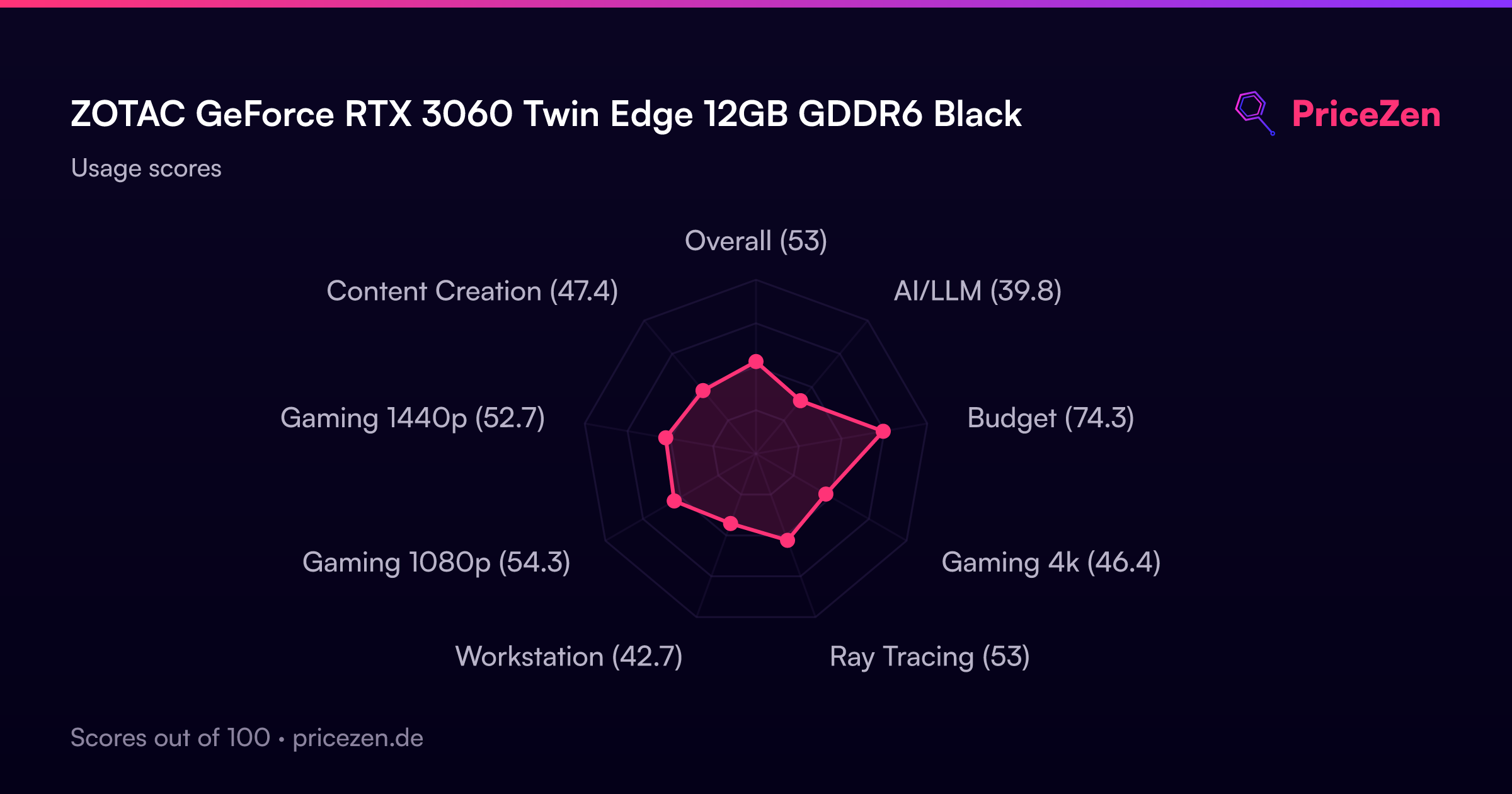
- Overall53
- AI/LLM39.8
- Budget74.3
- Gaming 4k46.4
- Ray Tracing53
- Workstation42.7
- Gaming 1080p54.3
- Gaming 1440p52.7
- Content Creation47.4