Lenovo ThinkPad P16s Gen 4 2024, Core Ultra 7 255H, 96GB, 2TB SSD, RTX PRO 500 Blackwell, Black
The Intel Core Ultra 7 255H processor and NVIDIA RTX PRO 500 Blackwell GPU with 6GB GDDR7 deliver workstation-class performance for compute-heavy tasks. Its 96GB DDR5 RAM and 2TB NVMe SSD support large datasets and fast file access, while the 1.82kg chassis keeps it portable for mobile work. This laptop is best for developers and creators who need a certified mobile workstation for AI model training, 3D rendering, or multi-VM development environments.

No current retailer price


Snapshot
The 30-Second Version
The ThinkPad P16s Gen 4 is a developer's dream with 96GB of RAM, a 16-core Core Ultra 7 255H, and a 2TB SSD. It scores 91.7 for developer workloads and 90.3 for creators, with port selection that's among the best we've seen. The weak spots are AI/LLM performance and a mediocre 45% NTSC display. The price has fallen from $5,239 to $3,439 USD, which turns an expensive workstation into a genuinely tempting one.
Pros & Cons
Pros
- 96GB of DDR5 RAM is the highest we've seen in this category, period 100th
- Excellent port selection with Thunderbolt, dual USB-C, dual USB-A, HDMI 2.1, Ethernet, and Wi-Fi 7 95th
- Core Ultra 7 255H delivers strong single and multi-threaded performance for development work 94th
- 2TB NVMe SSD gives you serious storage headroom out of the box 87th
- Upgradeable RAM and storage, which is increasingly rare in modern laptops
Cons
- AI/LLM performance is weak at 48.9 out of 100, a real limitation for machine learning work
- The 45% NTSC display is mediocre for color-critical creative work
- Battery life is inconsistent, with some owners reporting poor endurance under load
- No SD card reader, which is an odd omission for a creator-focused workstation
- At 1.82kg it's lighter than expected, but still not something you'll forget is in your bag
What owners think
The Word on the Street
How owner sentiment changed over time
ExclusiveBased on when customers actually wrote their reviews - so you can see whether early praise held up.
44 written reviews, Mar – Nov 2026: 41 happy, 2 mixed, 1 unhappy
Across all 70 store ratings: 4.8★. The chart counts the 44 written reviews.
- Oct – Dec 20263 of 4 happy
Buyers in this period praised the laptop's performance, keyboard, and screen, calling it reliable and capable for work. One noted it gets a bit loud under heavy load.
- Strong performance and speed for work and multitasking, with fast responsiveness.
- Excellent keyboard quality, comfortable for typing and long-term use.
- Good build quality and practical, professional design suitable for business.
- A bit loud under heavy duty, but not a major complaint.
- Jan – Mar 202637 of 39 happy
Buyers in this period praised the ThinkPad P16/P16s for speed, display quality, and build, with many calling it a powerful workstation. A few noted issues with battery life, weight, and one defective unit, but overall sentiment was very positive.
- Performance is fast and handles heavy workloads, CAD, and multi-monitor setups without lag.
- Display quality is praised for being bright, sharp, and vibrant, especially the 4K OLED option.
- Battery life varies: some find it sufficient, others report short life or needing to stay plugged in.
- A few buyers report defects or issues, including a defective graphics subsystem and slower-than-expected graphics performance.
Each dot is one written review, in the month it was written. Happy = 4-5★, mixed = 3★, unhappy = 1-2★. Period summaries are in English.
The proof
Performance
The Core Ultra 7 255H is the star here. It sits at the 85th percentile for CPU performance in our database, which puts it in the 'one of the best on the market' tier. The hybrid architecture with P-cores boosting to 5.10 GHz and E-cores at 4.40 GHz means it can chew through single-threaded tasks like code compilation while still handling background workloads without breaking a sweat. Paired with 96GB of RAM, you're looking at a machine that can run multiple VMs, Docker containers, and a full IDE without ever touching a swap file. That RAM figure is the highest we've seen in this category, and it's the kind of spec that makes this laptop relevant for years.
The RTX PRO 500 Blackwell GPU is a bit more of a mixed story. It lands at the 76th percentile, which is solid but not spectacular. The 6GB of GDDR7 is the new hotness in memory tech, but the GPU itself is aimed at professional workloads like CAD rendering and AI inference rather than gaming. Our AI/LLM score of 48.9 out of 100 is the weakest area by far, so if you're planning to run large language models locally, this isn't the machine for that. For CUDA-accelerated professional apps, it'll do fine. Just don't expect it to push high frame rates in modern games at native resolution.
Specifications
Full Specifications
Processor
| CPU | Intel Core Ultra 7 255H |
| Cores | 16 |
| Frequency | 2.0 GHz |
| L3 Cache | 24 MB |
Graphics
| GPU | NVIDIA RTX PRO 500 Blackwell Laptop GPU 6GB GDDR7 |
| Type | Discrete |
| VRAM | 6 GB |
| VRAM Type | GDDR7 |
Memory & Storage
| RAM | 96 GB |
| RAM Generation | DDR5 |
| Storage | 2 TB |
| Storage Type | NVMe SSD |
Display
| Size | 16" |
| Resolution | 1920x1200 (Full HD) |
| Panel | IPS |
| Refresh Rate | 60 Hz |
| Brightness | 400 nits |
| Color Gamut | 45%NTSC |
Connectivity
| USB-C Ports | 2 |
| USB Ports | 2 |
| Thunderbolt | Thunderbolt 4 |
| HDMI | HDMI® 2.1 (supports resolution up to 8K@60Hz or 4K@120Hz) |
| Wi-Fi | Wi-Fi 7 |
| Bluetooth | Bluetooth 5.4 |
| Ethernet | Ethernet (RJ45) |
Physical
| Weight | 1.8 kg / 4.0 lbs |
| Battery | 75 Wh |
| OS | Windows 11 Pro |
vs Competition
The current field around it is mostly smaller machines, which tells you something about how unusual this configuration is. The Apple MacBook Pro 14.2" M4 Pro is the closest rival in spirit, a compact pro-grade laptop aimed at developers and creators. Where the ThinkPad pulls ahead is memory and expandability: 96GB of RAM sits at the 100th percentile in our database, and both the RAM and the SSD are user-upgradeable, so the machine you buy isn't the ceiling. The port selection helps too, at the 95th percentile, with Thunderbolt, dual USB-C, dual USB-A, HDMI 2.1 and Ethernet all built in. The trade-off is graphics-heavy work: our AI/LLM score of 48.9 is the weakest number on the sheet, so if local model work is your day job, weigh that carefully before choosing the ThinkPad.
The Samsung Galaxy Book5 Pro 14" NP944XHA-KG3US and the Dell Premium 14.5" LDA14250-7667SLV-PUS are thinner, lighter everyday machines rather than workstations. If your work is browsing, documents, meetings and travel, they're the more sensible carry. But nothing in this group matches the ThinkPad's spec sheet for sustained professional load: a 16-core CPU at the 85th percentile for CPU performance, 96GB of RAM, 2TB of storage, and a 16-inch 1920x1200 panel that gives you extra vertical room for code or timelines. Our scoring puts it at 91.7 for developer workloads and 90.3 for creators, and among these competitors it's the only one built to run several virtual machines and a full IDE at once without complaint.
| Spec | Lenovo ThinkPad P16s Gen 4 | Apple MacBook Pro 14.2" M4 Pro | ASUS ROG Zephyrus 14" GA403WW-G14.R95080 | HP OMEN Transcend | Samsung Galaxy Book5 Pro 14" NP944XHA-KG3US | Dell Premium 14.5" LDA14250-7667SLV-PUS |
|---|---|---|---|---|---|---|
| CPU | Intel Core Ultra 7 255H | Apple M4 Pro | AMD Ryzen AI 9 HX 370 | Intel Core Ultra 9 285H | Intel Core Ultra 7 258V | Intel Core Ultra 7 255H |
| RAM (GB) | 96 | 48 | 32 | 32 | 32 | 32 |
| Storage (GB) | 2048 | 4096 | 2048 | 1024 | 1024 | 1024 |
| Screen | 16" 1920x1200 | 14.2" 3024x1964 | 14" 2880x1800 | 14" 2880x1800 | 14" 2880x1800 | 14.5" 3200x2000 |
| GPU | NVIDIA RTX PRO 500 Blackwell Laptop GPU 6GB GDDR7 | Apple (16-Core) | NVIDIA GeForce RTX 5080 | NVIDIA GeForce RTX 5070 | Intel Arc Graphics 140V | Intel Arc Graphics |
| OS | Windows 11 Pro | macOS | Windows 11 Home | Windows 11 Home | Windows 11 Pro | Windows 11 Home |
| Weight (kg) | 1.8 | 1.6 | 1.6 | 1.6 | 1.2 | 1.7 |
| Battery (Wh) | 75 | 72 | - | 71 | 63 | 62 |
| Compare | Compare | Compare | Compare | Compare |
| Product | CPU | GPU | RAM | Ports | Screen | Portability | Storage | User Sentiment | Reliability | Social Proof | Affordability |
|---|---|---|---|---|---|---|---|---|---|---|---|
| Lenovo ThinkPad P16s Gen 4 | 87 | 80.3 | 99.6 | 94.6 | 71.7 | 25.7 | 93.9 | 81.5 | 81.9 | 79.6 | 3.9 |
| Apple MacBook Pro 14.2" M4 Pro Compare | 92.4 | 78.9 | 90.6 | 73.8 | 99.1 | 68.9 | 98.4 | 90.8 | 98.2 | 99.7 | 4.7 |
| ASUS ROG Zephyrus 14" GA403WW-G14.R95080 Compare | 91.2 | 98.3 | 90.8 | 89.4 | 96 | 73.6 | 89.7 | 99.1 | 60.6 | 95.6 | 6.1 |
| HP OMEN Transcend Compare | 90.1 | 93.5 | 89.7 | 89.4 | 96 | 72.2 | 65.4 | 81.5 | 33.7 | 93.2 | 9 |
| Samsung Galaxy Book5 Pro 14" NP944XHA-KG3US Compare | 65.8 | 69.7 | 79.5 | 83.5 | 90.3 | 89.4 | 79.3 | 0 | 81.9 | 95.6 | 21.4 |
| Dell Premium 14.5" LDA14250-7667SLV-PUS Compare | 87 | 69.7 | 89 | 66.7 | 96.8 | 61.3 | 65.4 | 90.8 | 33.7 | 95.6 | 14.9 |
Price
Value & Pricing
Here's where things get a lot more interesting. We track this machine's price over time, partly through our community browser extension, and the US listing has come down from $5,239 to $3,439. That's roughly a third off what it was asking before, and it changes the conversation completely. This was always a serious amount of money for a laptop, but at $3,439 you're getting 96GB of DDR5, a 2TB NVMe drive, and a 16-core Core Ultra 7 in a chassis that weighs 1.82kg. Memory and storage like that are genuinely hard to find in any laptop, and the ThinkPad still gives you the one thing most rivals won't: you can upgrade both later.
Is it a great value now? The owner sentiment says yes even at the old price, with multiple buyers calling it a great value for the money and social proof landing at the 88th percentile in our data. At the current price that argument gets easier to make. The caveat hasn't changed, though: if you don't actually need 96GB of RAM or the ISV certifications that come with the P series, you're paying for headroom you'll never touch. The value here is about longevity. This is a machine built to still be useful years from now, and at $3,439 that's a much simpler sell than it was.
Read more
Overview
The ThinkPad P16s Gen 4 is one of those machines that makes you do a double take at the spec sheet. 96GB of DDR5 RAM. A 2TB NVMe drive. Intel's new Core Ultra 7 255H with 16 cores. And an RTX PRO 500 Blackwell GPU with 6GB of GDDR7. That's a serious mobile workstation, and it lands in our database at the 100th percentile for RAM, which is about as maxed out as a laptop gets right now. Lenovo clearly built this for people who live in CAD software, compile massive codebases, or run multiple virtual machines without flinching.
Who's this for? Developers, mostly. Our scoring puts it at 91.7 out of 100 for developer workloads, and 90.3 for creators. The 16-inch 1920x1200 IPS panel gives you a bit more vertical room than a standard 1080p screen, which is nice for reading code or timelines. It's not a gaming laptop despite the RTX branding, and the 82.7 gaming score reflects that. This is a tool first, entertainment device second.
The interesting thing here is the balance Lenovo struck. You get workstation-class internals in a 1.82kg chassis, which is lighter than most 16-inch machines with this much horsepower. The port selection is genuinely excellent, hitting the 95th percentile in our database. Thunderbolt, dual USB-C, dual USB-A, HDMI 2.1, Ethernet, and Wi-Fi 7. You won't need a dongle for anything. And the 75Wh battery is a reasonable size for the class, though real-world battery life seems to be a bit of a coin flip depending on what you're running.
Common Questions
Q: Can I upgrade the RAM and storage later?
Yes, and that's one of the best things about this machine. The RAM and storage are both user-upgradeable, which is increasingly rare in modern laptops. The 96GB of DDR5 and 2TB NVMe SSD it ships with are already excellent, but you can push both further down the line if needed.
Q: Is this laptop good for gaming?
It's okay but not great. The RTX PRO 500 Blackwell GPU is designed for professional workloads like CAD and rendering, not gaming. Our gaming score of 82.7 out of 100 reflects that. The 60Hz display also caps your frame rate experience. If gaming is your main priority, buy a machine built around a gaming GPU and a high-refresh panel rather than a workstation.
Q: How is the display for photo or video editing?
The 1920x1200 IPS panel with 400 nits brightness is decent for general use, but the 45% NTSC color gamut is a real limitation for color-critical work. If you're doing professional photo or video editing, you'll want to pair this with an external monitor that has better color coverage.
Q: Does it have an SD card reader?
No, and that's a notable omission for a creator-focused workstation. Several owners have mentioned this as a frustration. You'll need a USB-C or USB-A card reader if you regularly transfer photos or video from cameras.
Who Should Skip This
If your work involves AI, machine learning, or running large language models locally, this is not the machine for you. The 48.9 AI/LLM score is the weakest area by a wide margin, and the 6GB of VRAM on the RTX PRO 500 will bottleneck any serious model training or inference. The Apple MacBook Pro 14.2" M4 Pro is worth comparing before you commit, or a desktop workstation with a high-VRAM GPU if raw model capacity matters more than portability.
Color-critical creators should also think twice. The 45% NTSC display is fine for coding and general productivity, but it won't cut it for professional photo or video work where color accuracy matters. You'd be better served by a machine with a higher-gamut panel, or at minimum budgeting for a quality external monitor. And if you're just looking for a general-purpose laptop for web browsing, email, and office work, this is massive overkill even at $3,439. Something like the Samsung Galaxy Book5 Pro 14" or the Dell Premium 14.5" makes far more sense for that kind of day, and you'd be paying for performance you'll actually use.
Verdict
For developers and CAD professionals, this is one of the best machines you can buy right now, and the price drop to $3,439 makes it a much easier recommendation than it was. The 91.7 developer score isn't just a number, it's a reflection of how well this thing handles real workloads. 96GB of RAM means you can run every service, container, and IDE you need simultaneously without ever thinking about memory pressure. Owners consistently praise the classic ThinkPad keyboard, and the port selection means you can dock it to multiple monitors and peripherals without a single adapter.
For creators, it's a bit more complicated. The 90.3 creator score is strong, but the 45% NTSC display is a real limitation if you're doing color-critical work. You'll want an external monitor for anything involving print or video color grading. And if your creative work leans toward AI or machine learning, the 48.9 AI/LLM score is a dealbreaker. The Apple MacBook Pro 14.2" M4 Pro is worth a look instead, or a desktop workstation with a beefier GPU. For everyone else, this is a machine that'll serve you well for years, and at the current price the headroom you're buying costs a lot less than it did.
Usage Scores
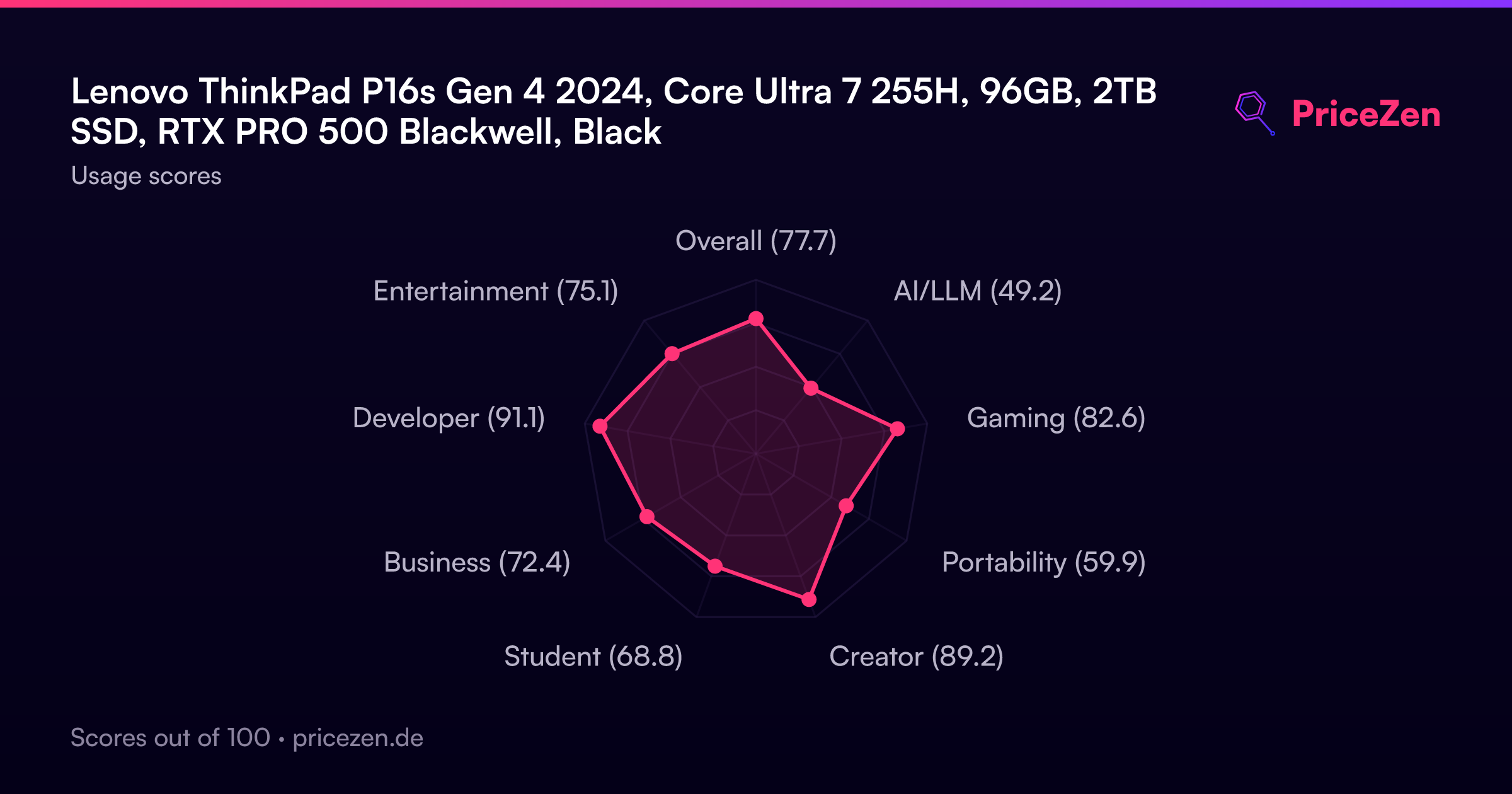
- Overall77.7
- AI/LLM49.2
- Gaming82.6
- Portability59.9
- Creator89.2
- Student68.8
- Business72.4
- Developer91.1
- Entertainment75.1