HP ZBook 8 G1i 14" 2024, Core Ultra 7 255H, 16GB, 512GB SSD, RTX 500 Ada, Meteor Silver

3 USB-C ports for modern gear verified Nov 28
64/100 overall score 4.7 average from 22 owner ratings
- CPU
- Intel Core Ultra 7 255H
- RAM
- 16 GB
- Storage
- 512 GB
- Screen
- 14" 1920x1200
- GPU
- NVIDIA RTX 500 Ada
- OS
- Windows 11 Pro
- Weight
- 1.4 kg
- Battery
- 77 Wh
Compare prices at 1 store
Cheapest first. New, refurbished and bundled offers are kept apart, so you compare like with like.
| Store | Sold by | Colour and condition | Price | vs lowest | Last checked | Link |
|---|---|---|---|---|---|---|
| New1 offerSingle unit | ||||||
| Out of stock when last checked | ||||||
| Amazon | Not known | Not listed | No price | Out of stock | Not known | Go to store |
 Source: PriceZen
A price counts as current when we checked it in the last 7 days. “Marketplace seller” means a third-party seller on that store, not the store itself.











Snapshot
The 30-Second Version
The HP ZBook 8 G1i is a 14-inch mobile workstation with a 16-core Core Ultra 7 255H, RTX 500 Ada graphics and a standout port selection, all in a 1.43kg body. It's a strong pick for Windows-based CAD and engineering work, but 4GB of VRAM and a 62.5% sRGB display limit its appeal. Prices range from USD 1,576 to USD 2,229, so where you buy matters a lot.
Pros & Cons
Pros
- 16-core Core Ultra 7 255H is one of the stronger CPUs in the category 92nd
- Best-in-class port selection, including real Ethernet and Thunderbolt 4 87th
- 1.43kg with a 77Wh battery, genuinely portable for a workstation 79th
- RTX 500 Ada pro GPU with certified drivers for CAD apps 79th
- Windows 11 Pro and a 5MP IR webcam for business use
Cons
- Only 4GB VRAM, which caps 3D scene size and local AI work
- 62.5% sRGB and 300 nits is weak for any color-sensitive work
- 16GB RAM and 512GB SSD are just average at this price
- Poor value ranking, affordability sits in the bottom fifth
- 60Hz panel with no high-refresh option in this config
The proof
Performance
The CPU is the star here. In our ranking model, built from specs and external benchmark data, the Core Ultra 7 255H sits in the 87th percentile against everything else in this category, which puts it among the stronger chips you can buy in a laptop right now. Sixteen cores means compiling, batch exports, and running a dozen browser tabs alongside SolidWorks won't choke it. The port selection ranks even higher, at the 92nd percentile: Thunderbolt 4, three USB-C, one USB-A, HDMI 2.1, gigabit Ethernet and Wi-Fi 7. An actual Ethernet jack on a 1.43kg laptop is close to endangered-species territory, and if you've ever tried to do a site survey with a dongle dangling off your machine, you know why it matters.
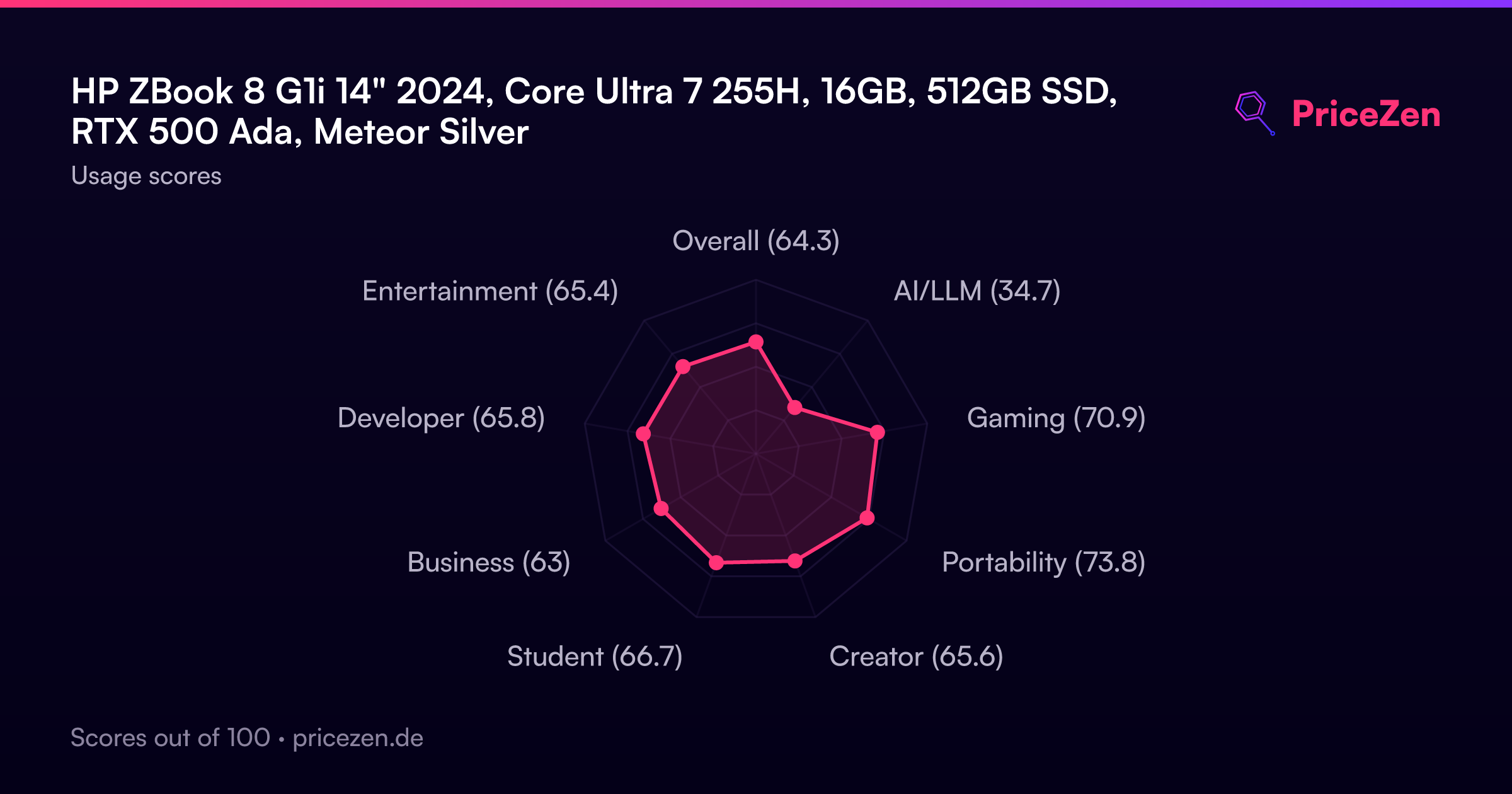
Graphics are more modest. The RTX 500 Ada lands around the 79th percentile, well above average for laptops overall but nowhere near gaming-laptop territory, and our scoring gives it 70.9/100 for gaming. It'll run games, just not the ones you'd brag about. The bigger limit is AI work: our model scores this config 34.7/100 for local LLM use, its weakest area by a wide margin. With 4GB of VRAM and 16GB of system RAM, you're limited to small models, and anything larger crawls. The 13 TOPS NPU handles lightweight on-device AI features fine, but don't buy this expecting to run a serious local assistant. Storage and memory are both middling, roughly average for the category, and the display is the other soft spot: 1920x1200 IPS at 60Hz, 300 nits, and only 62.5% sRGB coverage. That's a spreadsheet screen, not a color-critical one.
Specifications
Full Specifications
Processor
| CPU | Intel Core Ultra 7 255H |
| Cores | 16 |
| Frequency | 2.0 GHz |
| L3 Cache | 24 MB |
Graphics
| GPU | NVIDIA RTX 500 Ada |
| Type | Discrete |
| VRAM | 4 GB |
Memory & Storage
| RAM | 16 GB |
| RAM Generation | DDR5 |
| Storage | 512 GB |
| Storage Type | NVMe SSD |
Display
| Size | 14" |
| Resolution | 1920x1200 (Full HD) |
| Panel | IPS |
| Refresh Rate | 60 Hz |
| Brightness | 300 nits |
| Color Gamut | 62.5% sRGB |
Connectivity
| USB-C Ports | 3 |
| USB Ports | 1 |
| Thunderbolt | Thunderbolt 4 |
| HDMI | HDMI 2.1 |
| Wi-Fi | Wi-Fi 7 |
| Bluetooth | Bluetooth 5.4 |
| Ethernet | Gigabit Ethernet |
Physical
| Weight | 1.4 kg / 3.2 lbs |
| Battery | 77 Wh |
| OS | Windows 11 Pro |
vs Competition
Cross-shopping this against the Apple MacBook Pro 14.2" M4 Pro is the obvious move, and it's a genuine fork in the road. The ZBook's case rests on its own strengths: certified pro GPU drivers, Windows 11 Pro, and that top-tier port lineup with Ethernet and HDMI 2.1 built in. If your workflow lives in Windows-only CAD or engineering software, that settles it. If it doesn't, the MacBook Pro is worth a hard look before you commit.
Against the ASUS ROG Zephyrus 14" GA403WW-G14.R95080, the ZBook wins on portability and connectivity but our gaming score of 70.9/100 tells you it isn't trying to compete on frame rates. The Lenovo Legion Pro 7i Gen 10 16" is a different animal entirely, a much bigger machine, so pick the ZBook only if 1.43kg and a 14" footprint are non-negotiable. The Samsung Galaxy Book5 Pro 14" NP944XHA-KG3US and Dell Premium 14.5" LDA14250-7667SLV-PUS are the closer rivals for someone who wants a premium 14-ish-inch Windows laptop; the ZBook's discrete pro GPU and Ethernet port are what separate it from those two. Given the display's 62.5% sRGB coverage, though, don't assume the ZBook is the best screen of the bunch.
| Spec | HP ZBook 8 G1i 14" | Apple MacBook Pro 14.2" M4 Pro | ASUS ROG Zephyrus 14" GA403WW-G14.R95080 | Lenovo Legion Pro 7i Gen 10 16" | Samsung Galaxy Book5 Pro 14" NP944XHA-KG3US | Dell Premium 14.5" LDA14250-7667SLV-PUS |
|---|---|---|---|---|---|---|
| CPU | Intel Core Ultra 7 255H | Apple M4 Pro | AMD Ryzen AI 9 HX 370 | Intel Core Ultra 9 275HX | Intel Core Ultra 7 258V | Intel Core Ultra 7 255H |
| RAM (GB) | 16 | 48 | 32 | 32 | 32 | 32 |
| Storage (GB) | 512 | 4096 | 2048 | 1024 | 1024 | 1024 |
| Screen | 14" 1920x1200 | 14.2" 3024x1964 | 14" 2880x1800 | 16" 2560x1600 | 14" 2880x1800 | 14.5" 3200x2000 |
| GPU | NVIDIA RTX 500 Ada | Apple (16-Core) | NVIDIA GeForce RTX 5080 | NVIDIA GeForce RTX 5070 Ti | Intel Arc Graphics 140V | Intel Arc Graphics |
| OS | Windows 11 Pro | macOS | Windows 11 Home | Windows 11 Home | Windows 11 Pro | Windows 11 Home |
| Weight (kg) | 1.4 | 1.6 | 1.6 | 2.7 | 1.2 | 1.7 |
| Battery (Wh) | 77 | 72 | - | 99 | 63 | 62 |
| Compare | Compare | Compare | Compare | Compare |
| Product | CPU | GPU | RAM | Ports | Screen | Portability | Storage | Reliability | Social Proof | Affordability |
|---|---|---|---|---|---|---|---|---|---|---|
| HP ZBook 8 G1i 14" | 87 | 78.7 | 59.9 | 92.2 | 63.8 | 78.5 | 51.1 | 33.7 | 66 | 18.5 |
| Apple MacBook Pro 14.2" M4 Pro Compare | 92.4 | 78.9 | 90.6 | 73.8 | 99.1 | 68.9 | 98.4 | 98.2 | 99.7 | 4.7 |
| ASUS ROG Zephyrus 14" GA403WW-G14.R95080 Compare | 91.2 | 98.3 | 90.8 | 89.4 | 96 | 73.6 | 89.7 | 60.6 | 95.6 | 6.1 |
| Lenovo Legion Pro 7i Gen 10 16" Compare | 97.2 | 96.7 | 89 | 97.3 | 95 | 9.5 | 79.3 | 82 | 99.7 | 5.8 |
| Samsung Galaxy Book5 Pro 14" NP944XHA-KG3US Compare | 65.8 | 69.6 | 79.5 | 83.5 | 90.3 | 89.4 | 79.3 | 82 | 95.6 | 21.4 |
| Dell Premium 14.5" LDA14250-7667SLV-PUS Compare | 87 | 69.6 | 89 | 66.7 | 96.8 | 61.3 | 65.4 | 33.7 | 95.6 | 14.9 |
Price
Value & Pricing
Here's the honest part: our scoring puts affordability in the 19th percentile, meaning this is expensive for what's on the spec sheet. And the pricing is all over the place. We track listings over time, partly through our community browser extension, and USD prices currently span USD 653, from USD 1,576 up to USD 2,229 across five listings. Of the stores we have per-store prices for, Staples is cheapest at USD 1,850, then B&H Photo at USD 2,031, then Amazon at USD 2,199. Buying from the wrong retailer costs you hundreds for an identical machine. Canadian shoppers see an even wider spread: CAD 2,255 to CAD 3,190, a CAD 935 gap across three listings. If you need pro GPU drivers and Windows 11 Pro in a 1.43kg chassis, there's a real argument here. If you just want a fast 14-inch laptop, you're paying a workstation tax you don't need.
Read more
Overview
The HP ZBook 8 G1i is a 14-inch mobile workstation, and it sits in the awkward-but-interesting middle of the laptop market: too serious to be a thin-and-light ultrabook, too small to be a desktop replacement. Our automated system pulls specs, prices and owner ratings from multiple stores, and right now this configuration lands between USD 1,576 and USD 2,229 depending on where you shop. That's real money for a 14" machine, so let's talk about what you actually get.
Under the hood: an Intel Core Ultra 7 255H with 16 cores at 2.0GHz, 16GB of DDR5 running at 5600MHz, a 512GB PCIe 4.0 SSD, and a discrete NVIDIA RTX 500 Ada with 4GB of GDDR6. Windows 11 Pro comes standard, which matters if you're buying this for a business that needs domain joins and BitLocker management rather than Home edition headaches. The whole thing weighs 1.43kg with a 77Wh battery inside, which is a genuinely good weight-to-battery ratio for a workstation.
Is the HP ZBook 8 G1i good for CAD and 3D work? For reviewing models and light-to-moderate design work, yes. The RTX 500 Ada is a professional GPU with certified drivers, and that's the whole reason this product exists. But 4GB of VRAM is a hard ceiling, and we'll get into where that bites.
Common Questions
Q: Is the HP ZBook 8 G1i good for gaming?
Not really. Our scoring gives it 70.9/100 for gaming, and the RTX 500 Ada with 4GB of GDDR6 plus a 60Hz 1920x1200 panel means it's built for pro apps, not high frame rates.
Q: Can the HP ZBook 8 G1i run local AI models or LLMs?
Only small ones. Local LLM performance is its weakest area in our ranking at 34.7/100, since 4GB of VRAM and 16GB of DDR5 leave very little room for larger models.
Q: Is the ZBook 8 G1i display good enough for photo or video editing?
We'd skip it for color-critical work. The 14" IPS panel covers just 62.5% of sRGB at 300 nits, which is fine for documents and CAD viewports but not for accurate color.
Q: How much does the HP ZBook 8 G1i cost?
In our data, US listings run USD 1,576 to USD 2,229, with Staples cheapest at USD 1,850 among the stores we track individually. Canadian listings span CAD 2,255 to CAD 3,190.
Who Should Skip This
Skip this if you're a gamer, a photographer, a video colorist, or anyone hoping to run decent-sized AI models locally. The 4GB RTX 500 Ada and 62.5% sRGB screen rule out all three, and our gaming and AI scores back that up. Gamers should look at the ASUS ROG Zephyrus 14" GA403WW-G14.R95080 or the Lenovo Legion Pro 7i Gen 10 16" instead. Students and general productivity buyers are also overpaying here, our student score is 66.7/100 and affordability sits near the bottom, so the Samsung Galaxy Book5 Pro 14" NP944XHA-KG3US or Dell Premium 14.5" LDA14250-7667SLV-PUS deserve a look. And if your work isn't tied to Windows, the Apple MacBook Pro 14.2" M4 Pro belongs on your shortlist.
Verdict
Should you buy the HP ZBook 8 G1i? If you're an engineer, architect or technical professional who needs certified GPU drivers, Windows 11 Pro, and a laptop you can carry all day without a dongle bag, yes. The 16-core CPU is strong, the port selection is top of the charts, and 1.43kg with a 77Wh battery is a combination most workstations can't touch. Just buy it from the cheapest listing, not the first one you find.
For everyone else, we'd hesitate. The 4GB VRAM ceiling, the mediocre 62.5% sRGB panel, and average RAM and storage make this a narrow tool rather than a great all-rounder, and the price reflects the badge more than the parts. Owners rate it 4.7/5 across 22 reviews, which suggests the people who bought it for the right reasons are happy. Make sure you're one of them.
Usage Scores
- Overall64.3
- AI/LLM34.7
- Gaming70.9
- Portability73.8
- Creator65.6
- Student66.7
- Business63
- Developer65.8
- Entertainment65.4