HP OmniBook X 2025, Ryzen AI 7 350, 32GB, 1TB SSD, Meteor silver aluminum

Inky OLED blacks at 120 Hz verified Nov 29
59/100 overall score
- CPU
- AMD Ryzen AI 7 350
- RAM
- 32 GB
- Storage
- 1 TB
- Screen
- 16" 2880x1800
- GPU
- AMD Radeon 860M Graphics
- OS
- Windows 11 Home
- Weight
- 1.9 kg
- Battery
- 68 Wh
Snapshot
The 30-Second Version
The HP OmniBook X 16 is all about that 96th percentile OLED display. You get 32GB of RAM, 1TB of storage, and a flexible 2-in-1 design for $1,650. Just don't expect the integrated Radeon 860M to handle anything beyond light gaming.
Pros & Cons
Pros
- Gorgeous 16-inch 3K OLED touchscreen with 120Hz and 500 nits 96th
- 32GB of fast LPDDR5X memory gives you tons of multitasking headroom 90th
- 1TB Gen4 SSD is quick and spacious 80th
- Wi-Fi 7 and HDMI 2.1 keep you future-proofed 79th
Cons
- Integrated Radeon 860M graphics can't handle serious gaming
- 1.9kg is heavy for a 2-in-1 you're supposed to flip around
- Reliability sits in the 33rd percentile, which is concerning
- AI performance is weak despite all the Copilot+ marketing
The proof
Performance
The Ryzen AI 7 350 is a solid mid-pack performer, landing in the 74th percentile for CPUs. Eight cores and sixteen threads chew through browser tabs, office apps, and light photo editing without complaint. The 32GB of LPDDR5X-7500 is a standout, sitting in the 91st percentile and giving you serious headroom for multitasking. The Radeon 860M integrated graphics are fine for casual use but only manage the 63rd percentile, so don't expect much beyond older titles at modest settings. The 1TB Gen4 SSD is quick and roomy at the 80th percentile. The weakest link is AI and LLM performance, which scored just 16.9 out of 100, ironic given all the AI branding on the box.
Specifications
Full Specifications
Processor
| CPU | AMD Ryzen AI 7 350 |
| Cores | 8 |
| Frequency | 2.0 GHz |
Graphics
| GPU | AMD Radeon 860M Graphics |
| Type | Integrated |
Memory & Storage
| RAM | 32 GB |
| RAM Generation | LPDDR5X |
| Storage | 1 TB |
| Storage Type | NVMe SSD |
Display
| Size | 16" |
| Resolution | 2880x1800 |
| Panel | OLED |
| Refresh Rate | 120 Hz |
| Brightness | 500 nits |
| Color Gamut | 100% DCI-P3 |
Connectivity
| USB-C Ports | 2 |
| USB Ports | 2 |
| HDMI | HDMI 2.1 |
| Wi-Fi | Wi-Fi 7 |
| Bluetooth | Bluetooth 5.4 |
Physical
| Weight | 1.9 kg / 4.2 lbs |
| Battery | 68 Wh |
| OS | Windows 11 Home |
vs Competition
Stacked against the Apple MacBook Pro M4 Max, the OmniBook X gets absolutely smoked on raw performance, but it also costs a fraction of the price. The ASUS ROG Zephyrus G14 and Lenovo Legion Pro 7i both offer dedicated GPUs that crush the Radeon 860M for gaming, though their displays, while excellent, don't quite match this OLED's color and contrast. The Microsoft Surface Laptop 7th Edition is the closest philosophical rival, with similar AI ambitions and a premium build, but the OmniBook's larger OLED screen and 2-in-1 hinge give it a distinct edge for media lovers. The MSI Raider is a different beast entirely, built for raw gaming power and not much else.
| Spec | HP OmniBook X | Apple MacBook Pro 14.2" M4 Pro | ASUS ROG Zephyrus 14" GA403WW-G14.R95080 | Lenovo Legion Pro 7i Gen 10 16" | Samsung Galaxy Book5 Pro 14" NP944XHA-KG3US | MSI Raider 16 Max HX |
|---|---|---|---|---|---|---|
| CPU | AMD Ryzen AI 7 350 | Apple M4 Pro | AMD Ryzen AI 9 HX 370 | Intel Core Ultra 9 275HX | Intel Core Ultra 7 258V | Intel Core Ultra 9 290HX |
| RAM (GB) | 32 | 48 | 32 | 32 | 32 | 32 |
| Storage (GB) | 1024 | 4096 | 2048 | 1024 | 1024 | 1024 |
| Screen | 16" 2880x1800 | 14.2" 3024x1964 | 14" 2880x1800 | 16" 2560x1600 | 14" 2880x1800 | 16" 2560x1600 |
| GPU | AMD Radeon 860M Graphics | Apple (16-Core) | NVIDIA GeForce RTX 5080 | NVIDIA GeForce RTX 5070 Ti | Intel Arc Graphics 140V | NVIDIA GeForce RTX 5080 |
| OS | Windows 11 Home | macOS | Windows 11 Home | Windows 11 Home | Windows 11 Pro | Windows 11 Home |
| Weight (kg) | 1.9 | 1.6 | 1.6 | 2.7 | 1.2 | 2.6 |
| Battery (Wh) | 68 | 72 | - | 99 | 63 | 100 |
| Compare | Compare | Compare | Compare | Compare |
| Product | CPU | GPU | RAM | Ports | Screen | Portability | Storage | Reliability | Affordability |
|---|---|---|---|---|---|---|---|---|---|
| HP OmniBook X | 80 | 64.6 | 90.2 | 58.3 | 96 | 23 | 79.3 | 33.7 | 24.1 |
| Apple MacBook Pro 14.2" M4 Pro Compare | 92.4 | 78.9 | 90.6 | 73.8 | 99.1 | 68.9 | 98.4 | 98.2 | 4.7 |
| ASUS ROG Zephyrus 14" GA403WW-G14.R95080 Compare | 91.2 | 98.3 | 90.8 | 89.4 | 96 | 73.6 | 89.7 | 60.6 | 6.1 |
| Lenovo Legion Pro 7i Gen 10 16" Compare | 97.2 | 96.7 | 89 | 97.3 | 95 | 9.5 | 79.3 | 82 | 5.9 |
| Samsung Galaxy Book5 Pro 14" NP944XHA-KG3US Compare | 65.8 | 69.6 | 79.5 | 83.5 | 90.3 | 89.4 | 79.3 | 82 | 21.4 |
| MSI Raider 16 Max HX Compare | 99.6 | 98.3 | 86.3 | 98.6 | 91.4 | 10.9 | 79.3 | 60.6 | 7.9 |
Price
Value & Pricing
At $1,650 USD, you're paying a premium for that OLED panel and the 2-in-1 flexibility. The screen is genuinely top-tier, and 32GB of RAM plus 1TB of storage means you won't feel cramped. But the integrated graphics and middling CPU put a ceiling on what this machine can do. If you need a big, beautiful display for productivity and media consumption, the price is defensible. If you want any real GPU muscle, you'll need to spend more elsewhere or accept a lesser screen.
Read more
Overview
The HP OmniBook X 16 is a big, beautiful 2-in-1 that puts the screen front and center. You get a 16-inch 3K OLED touch panel with a 120Hz refresh rate, 500 nits of HDR brightness, and full DCI-P3 color. That display sits in the 96th percentile of our database, and it's the main reason to consider this machine. The Ryzen AI 7 350 and 32GB of RAM handle everyday work without breaking a sweat, but this isn't a gaming rig or a workstation replacement.
HP leans hard into the AI angle here, with Copilot+ features and a dedicated AI Companion app. Some of that is genuinely useful for video calls and quick tasks. Some of it feels like checkbox marketing. The 2-in-1 hinge and touchscreen add real flexibility, but at 1.9kg, this is not a tablet you'll want to hold for long stretches.
Common Questions
Q: Can this laptop handle gaming?
Not really. The integrated AMD Radeon 860M sits in the 63rd percentile for GPUs, so it's fine for older or less demanding titles at low settings, but modern AAA games will struggle. If gaming matters, look for something with a dedicated GPU.
Q: Is the touchscreen any good for drawing or note-taking?
The 16-inch 3K OLED touch panel is excellent for touch input, with a 120Hz refresh rate and 0.2ms response time. It supports multitouch and works well with a stylus, though at 1.9kg it's not the most comfortable tablet to hold for long drawing sessions.
Q: How is the battery life?
The 68Wh battery is decent but not class-leading. With a 3K OLED display at 120Hz, you'll likely get a full workday of mixed use, but heavy brightness and demanding tasks will drain it faster. The display's variable refresh rate helps conserve power when you're not scrolling.
Who Should Skip This
Skip this if you need real GPU power for gaming, 3D rendering, or heavy video editing. The integrated Radeon 860M just can't keep up with dedicated graphics, and the weak AI performance makes all the Copilot+ branding feel hollow. Also skip it if portability matters, at 1.9kg this is a chunky 2-in-1 that's awkward to use as a tablet for long periods.
Verdict
Buy this if you want a stunning 16-inch OLED touchscreen in a flexible 2-in-1 chassis and you don't need serious graphics performance. It's a productivity and media machine first, with enough RAM and storage to stay relevant for years. Creators who work with color-critical content will appreciate the DCI-P3 coverage, but video editors and 3D artists will hit the GPU ceiling fast. Casual users who just want a big, gorgeous screen for work and streaming will be very happy.
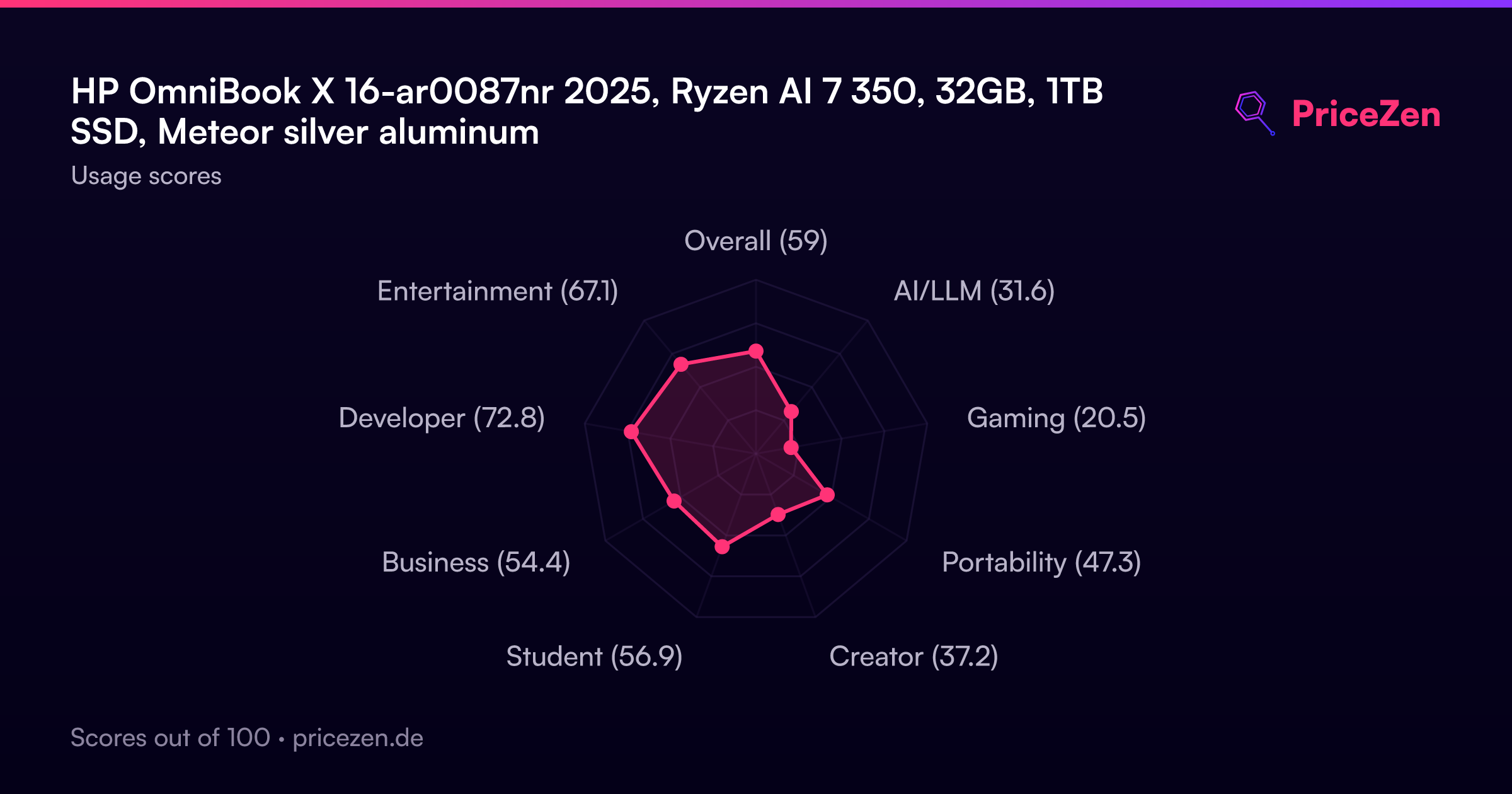
Usage Scores
- Overall59
- AI/LLM31.6
- Gaming20.5
- Portability47.3
- Creator37.2
- Student56.9
- Business54.4
- Developer72.8
- Entertainment67.1