HP OmniBook 7 Flip 16" CK0R2UAR#ABA, Core Ultra 5 226V, 16GB, 512GB SSD, Glacier Silver
The Intel Core Ultra 5 226V chip and integrated Arc 130V GPU handle everyday tasks and light creative work, while the 16-inch 1920x1200 IPS touchscreen at 400 nits stays readable in bright rooms. The 68Wh battery and Wi-Fi 6E support long study sessions, and the 2-in-1 flip design adds flexibility for note-taking or presentations. This refurbished model suits students who need a dependable, portable laptop for coursework, browsing, and streaming, though gaming performance is limited.

No current retailer price
Snapshot
The 30-Second Version
A refurbished 16-inch 2-in-1 with mid-pack specs and a genuinely useful touchscreen, priced at USD 719. Its best showing is RAM at the 67th percentile, which is... fine, not flashy. Worth buying only if the big flip screen is exactly what you're after.
Pros & Cons
Pros
- Big 16-inch touchscreen with a flip hinge for tablet mode. 67th
- 16GB of LPDDR5 handles everyday multitasking fine.
- 400-nit IPS panel is brighter than most budget screens.
- Refurbished price of USD 719 keeps costs down.
Cons
- Gaming is basically off the table at 16.2/100.
- Port selection lags behind most rivals.
- Reliability ranks below average in our data.
- A 16-inch convertible is bulky to carry around.
The proof
Performance
The 8-core Core Ultra 5 226V at 2.1GHz and 16GB of LPDDR5 are solid for everyday multitasking, sitting mid-pack against other 2-in-1s in our data. The integrated Arc 130V graphics rank about average too, but that's not saying much: our gaming score of 16.2/100 tells you everything. Storage is dead average at 512GB, and the 68Wh battery backs a big 16-inch panel. The 400-nit touchscreen is decently bright, though 1920x1200 on a screen this size won't wow anyone.
Specifications
Full Specifications
Processor
| CPU | Intel Core Ultra 5 226V |
| Cores | 8 |
| Frequency | 2.1 GHz |
| L3 Cache | 8 MB |
Graphics
| GPU | Intel Arc 130V |
| Type | Integrated |
| VRAM Type | Shared |
Memory & Storage
| RAM | 16 GB |
| RAM Generation | LPDDR5 |
| Storage | 512 GB |
| Storage Type | NVMe SSD |
Display
| Size | 16" |
| Resolution | 1920x1200 (Full HD) |
| Panel | IPS |
| Brightness | 400 nits |
Connectivity
| Wi-Fi | Wi-Fi 6E |
| Bluetooth | Bluetooth 5.3 |
Physical
| Battery | 68 Wh |
| OS | Windows 11 Home |
vs Competition
Cross-shop the Apple MacBook Air 13.6" M4 if you'd rather have a smaller, lighter machine and don't need the flip touchscreen. The Samsung Galaxy Book5 Pro 14" and ASUS Zenbook 14" are worth a look if portability matters, since this HP's compactness score sits near the bottom of the category. And the Lenovo Legion 5i 15.1" is the one to check if gaming is on your list, because a 16.2/100 gaming score here isn't going to cut it. The Dell Premium 14.5" rounds out the alternatives if you want a more traditional clamshell.
| Spec | HP OmniBook 7 Flip 16" CK0R2UAR#ABA | Apple MacBook Pro 14.2" M4 Max | ASUS ROG Zephyrus 14" GA403WW-G14.R95080 | Lenovo Legion Pro 7i Gen 10 16" | Samsung Galaxy Book5 Pro 14" NP944XHA-KG3US | Dell Premium 14.5" LDA14250-7667SLV-PUS |
|---|---|---|---|---|---|---|
| CPU | Intel Core Ultra 5 226V | Apple M4 Max | AMD Ryzen AI 9 HX 370 | Intel Core Ultra 9 275HX | Intel Core Ultra 7 258V | Intel Core Ultra 7 255H |
| RAM (GB) | 16 | 64 | 32 | 32 | 32 | 32 |
| Storage (GB) | 512 | 4096 | 2048 | 1024 | 1024 | 1024 |
| Screen | 16" 1920x1200 | 14.2" 3024x1964 | 14" 2880x1800 | 16" 2560x1600 | 14" 2880x1800 | 14.5" 3200x2000 |
| GPU | Intel Arc 130V | Apple (40-Core) | NVIDIA GeForce RTX 5080 | NVIDIA GeForce RTX 5070 Ti | Intel Arc Graphics 140V | Intel Arc Graphics |
| OS | Windows 11 Home | macOS | Windows 11 Home | Windows 11 Home | Windows 11 Pro | Windows 11 Home |
| Weight (kg) | - | 1.6 | 1.6 | 2.7 | 1.2 | 1.7 |
| Battery (Wh) | 68 | 72 | - | 99 | 63 | 62 |
| Compare | Compare | Compare | Compare | Compare |
| Product | CPU | GPU | RAM | Ports | Screen | Portability | Storage | Reliability | Affordability |
|---|---|---|---|---|---|---|---|---|---|
| HP OmniBook 7 Flip 16" CK0R2UAR#ABA | 62.6 | 62.6 | 66.5 | 18.6 | 60.7 | 19.5 | 50.9 | 33.7 | 60.8 |
| Apple MacBook Pro 14.2" M4 Max Compare | 93.7 | 91.5 | 95.6 | 73.8 | 99.1 | 68.9 | 98.4 | 98.3 | 1.7 |
| ASUS ROG Zephyrus 14" GA403WW-G14.R95080 Compare | 91.2 | 98.3 | 90.8 | 89.4 | 96 | 73.7 | 89.7 | 60.7 | 5.9 |
| Lenovo Legion Pro 7i Gen 10 16" Compare | 97.2 | 96.7 | 89 | 97.3 | 95 | 9.5 | 79.2 | 82.1 | 5.7 |
| Samsung Galaxy Book5 Pro 14" NP944XHA-KG3US Compare | 65.7 | 69.6 | 79.4 | 83.4 | 90.3 | 89.5 | 79.2 | 82.1 | 20.9 |
| Dell Premium 14.5" LDA14250-7667SLV-PUS Compare | 87 | 69.6 | 89 | 66.7 | 96.8 | 61.2 | 65.2 | 33.7 | 14.4 |
Price
Value & Pricing
At USD 719, affordability lands slightly above average in our rankings, which feels right for a refurb with these specs. You're paying for the big touchscreen and the flip design, not raw power. If those two things matter to you, it's a fair deal. If you just want speed per dollar, the middling CPU ranking means your money works harder elsewhere.
Read more
Overview
The HP OmniBook 7 Flip CK0R2UAR#ABA is a refurbished 16-inch 2-in-1 at USD 719. You get an Intel Core Ultra 5 226V, 16GB of LPDDR5, a 512GB NVMe SSD and a 1920x1200 IPS touchscreen rated at 400 nits. Windows 11 Home comes preloaded.
Our scoring model puts it in the middle of the pack for most things: CPU, GPU, screen and RAM all land around average for this category. The weak spots are reliability (34th percentile), portability (20th) and ports (19th). And gaming? A rough 16.2/100.
Common Questions
Q: Will it throttle during long, heavy workloads?
The Core Ultra 5 226V is built for efficiency, and its mid-pack CPU ranking suggests it's tuned for everyday multitasking rather than sustained heavy loads. For marathon rendering sessions, we'd point you at something with stronger performance scores.
Q: Is 16GB of RAM enough for daily use and coding?
For browsing, office work and light coding, 16GB of LPDDR5 is solid and ranks above the middle of this category. Just know our developer score of 49.6/100 means heavier dev workloads will push it.
Q: Can I game on the Arc 130V graphics?
Casual stuff, sure, but don't expect more. Our gaming score of 16.2/100 is the weakest area of this whole machine, so serious gamers should look elsewhere.
Who Should Skip This
Gamers, obviously, because 16.2/100 is brutal. Skip it too if you commute daily or crave ports: the compactness and port rankings both sit near the bottom of the category. And if reliability is your top priority, the below-average reliability score should give you pause on a refurb.
Verdict
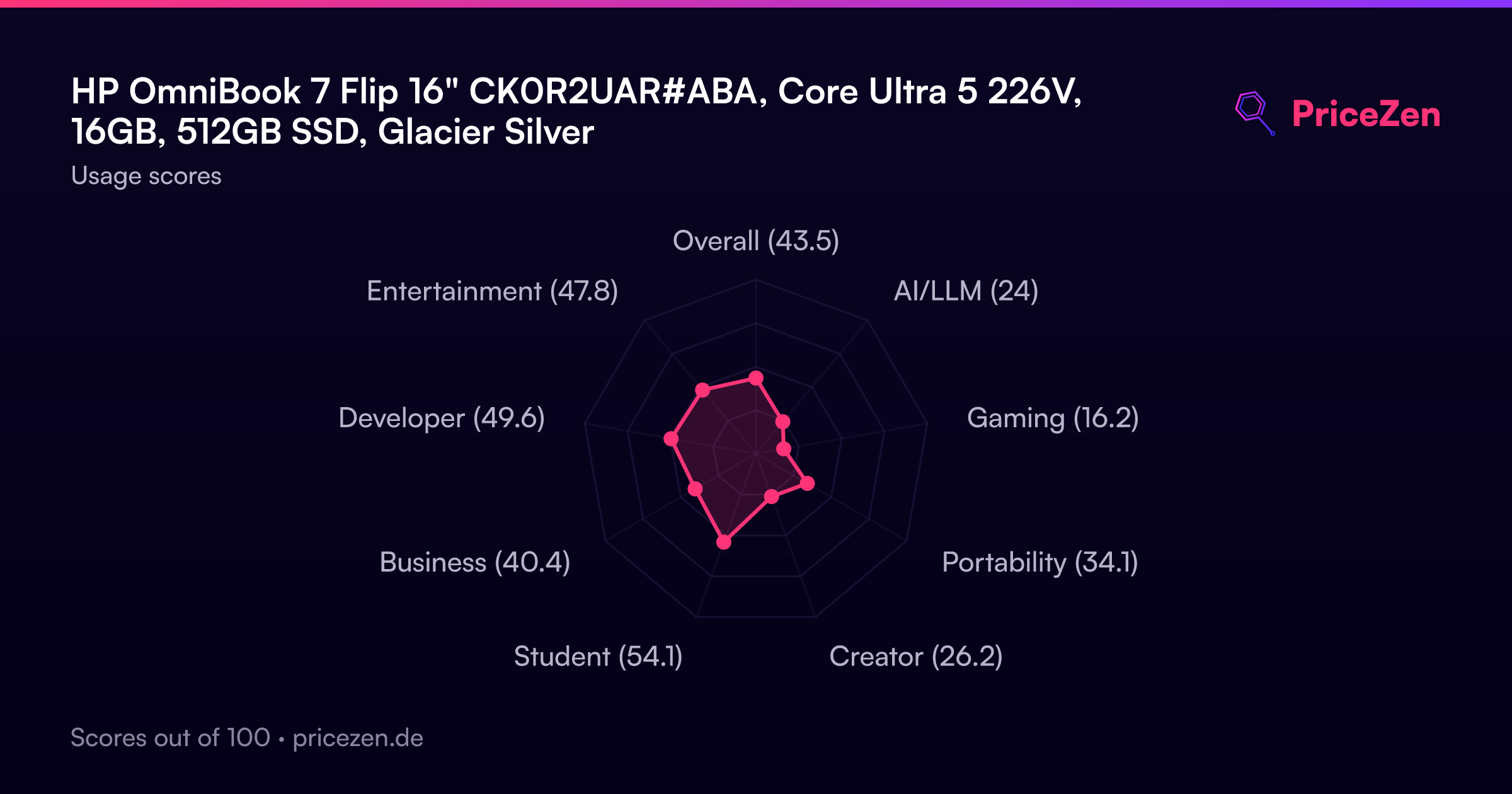
Buy this if you want a big touchscreen for notes, streaming and light work, and you like flipping between laptop and tablet modes. Our student score of 54.1/100 says it's a passable study machine, nothing special. Developers (49.6/100) and entertainment users (47.8/100) can make it work, but nobody's getting excited. It's a practical pick, not a thrilling one.
Usage Scores
- Overall43.5
- AI/LLM24
- Gaming16.2
- Portability34.1
- Creator26.2
- Student54.1
- Business40.4
- Developer49.6
- Entertainment47.8